Manuale utente della macchina per incisione laser ATOMSTACK S30 Pro
Modello: S30 Pro
1. Introduzione
The ATOMSTACK S30 Pro is a professional-grade laser engraving and cutting machine designed for high precision and efficiency. Featuring a powerful 33000mW laser output and advanced control methods, it is suitable for a wide range of materials and applications. This manual provides essential information for safe operation, setup, maintenance, and troubleshooting to ensure optimal performance and longevity of your device.
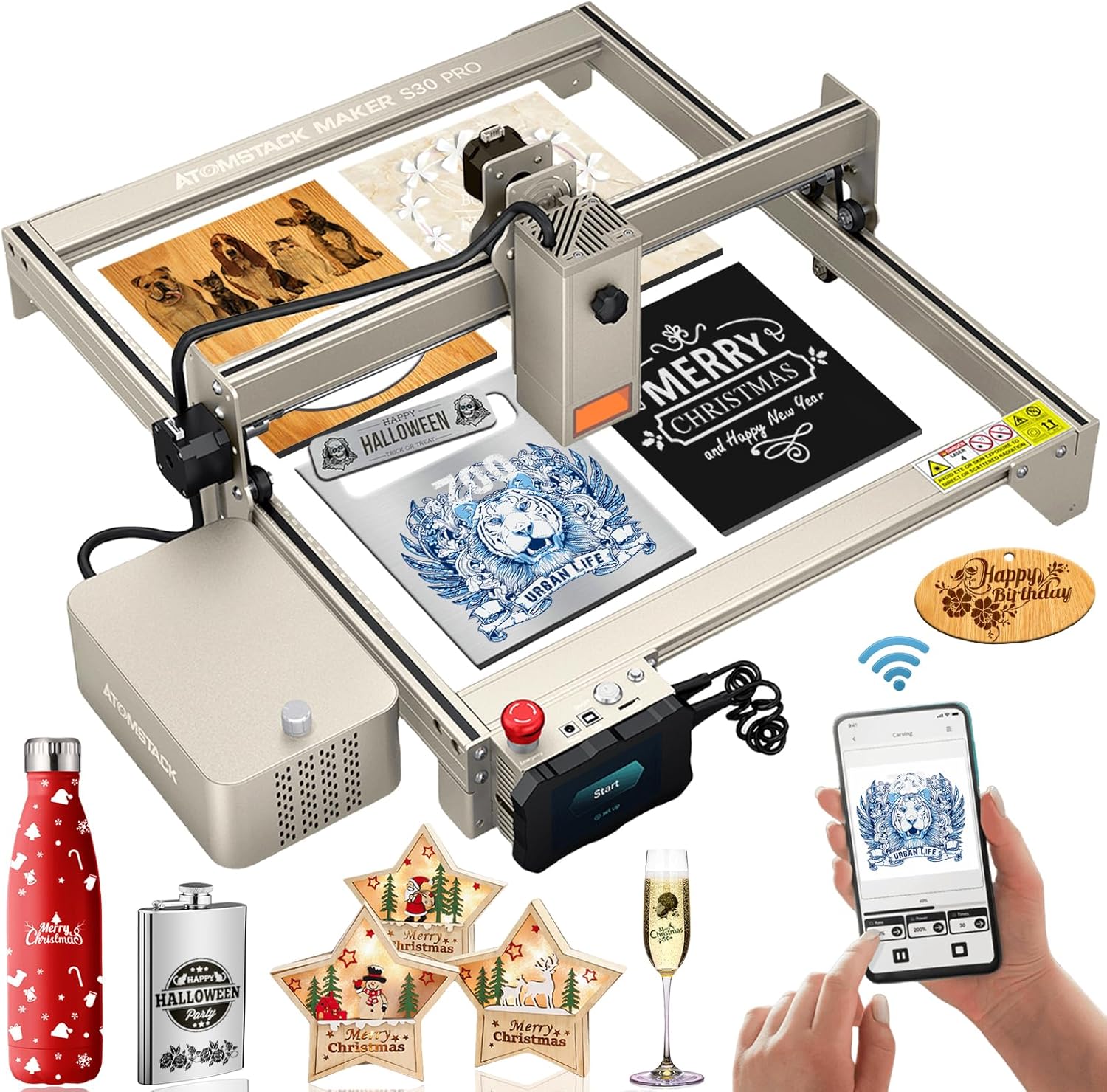
Figure 1: The ATOMSTACK S30 Pro Laser Engraving Machine, showcasing il suo design ed exampdi materiali incisi e tagliati.
2. Informazioni sulla sicurezza
Operating a laser engraving machine requires strict adherence to safety protocols to prevent injury and damage. The ATOMSTACK S30 Pro is a Laser Class 4 device, indicating a high-power laser that can cause severe eye and skin damage from direct or scattered exposure. Always prioritize safety.
- Protezione degli occhi: Always wear the provided eye protection glasses during operation. The panoramic lens eye protection cover filters out 97% of harmful UV rays, but additional safety glasses are recommended.
- Ventilazione: Utilizzare la macchina in un'area ben ventilata per dissipare i fumi e il fumo prodotti durante l'incisione e il taglio.
- Sicurezza antincendio: Tenere un estintore a portata di mano. Non lasciare la macchina incustodita durante il funzionamento, soprattutto quando si tagliano materiali infiammabili.
- Arresto di emergenza: Familiarize yourself with the emergency stop switch and its location. In case of any malfunction or emergency, immediately press this switch to halt operation.
- Bambini e animali domestici: Keep children and pets away from the operating area to prevent accidental exposure to the laser.
- Compatibilità dei materiali: Only engrave or cut materials specified as safe. Avoid reflective or unknown materials that could cause unexpected laser reflections.

Figure 2: Key safety features of the ATOMSTACK S30 Pro, highlighting the eye protection cover and the prominent emergency stop button for immediate shutdown.
3. Contenuto della confezione
Prima di iniziare il montaggio, verificare che tutti i componenti siano presenti e integri:
- ATOMSTACK S30 Pro Laser Engraving Machine Frame
- Modulo laser da 33000 mW
- Air Assist Pump Kit
- Control Box with Touchscreen
- Adattatore di alimentazione e cavi
- Cavo di collegamento USB
- Occhiali di sicurezza
- Materiale Samples per i test
- Manuale dell'utente (questo documento)
- Assembly Tools (screws, wrenches, etc.)
4. Impostazione
Follow these steps to assemble and prepare your ATOMSTACK S30 Pro for first use:
- Disimballaggio: Carefully remove all components from the packaging. Keep the original packaging for future storage or transport.
- Assemblaggio del telaio: Montare il pro in alluminiofile frame according to the included quick start guide. Ensure all screws are tightened securely for stability.
- Installazione del modulo laser: Mount the 33000mW laser module onto the gantry. The S30 Pro features a tool-free focus and height adjustment knob for easy installation.
- Collegamento della scatola di controllo: Collegare la scatola di controllo al telaio principale e al modulo laser utilizzando i cavi forniti.
- Collegamento della pompa di assistenza pneumatica: Connect the air assist pump to the designated port on the laser module and the control box. Ensure the air hose is securely attached.
- Collegamento elettrico: Connect the power adapter to the control box and then to a suitable power outlet (AC100-240V, 50/60Hz).
- Installazione del software: Install the recommended software (LaserGRBL or LightBurn) on your computer. These operating systems support Win XP, Win 7, Win 8, XP, Win 10 system.
- Test iniziale: Perform a small test engraving on a scrap piece of material to verify proper setup and laser alignment.

Figura 3: Oltreview of the ATOMSTACK S30 Pro's core components and features, essential for understanding its capabilities during setup.
5. Operativo
The ATOMSTACK S30 Pro offers versatile control methods and powerful engraving/cutting capabilities. Always ensure proper material placement and laser focus before starting any operation.
5.1. Metodi di controllo
The S30 Pro supports three primary control methods:
- Controllo del computer: Connect via USB and use LaserGRBL or LightBurn software for comprehensive control.
- Controllo touchscreen: Insert a TF/SD card with your design files and operate directly via the integrated touchscreen.
- Controllo da smartphone: After a firmware update, download the ATOMSTACK app and connect via Wi-Fi for mobile operation.

Figure 4: Illustration of the diverse control options available for the ATOMSTACK S30 Pro, including touchscreen, smartphone, and computer interfaces.
5.2. Material Preparation and Focusing
Ensure your material is flat and securely placed on the working area. The S30 Pro features a fixed-focus laser, eliminating the need for manual focusing. Simply ensure the material thickness is within the optimal range for the laser's focal point.

Figure 5: Demonstrating the ultra-fine laser spot of the S30 Pro, crucial for achieving high-precision engraving results.
5.3. Incisione e taglio
The S30 Pro excels in both engraving and cutting tasks. Its 33000mW output allows for deep cuts and intricate engravings.
- Incisione: Achieve precise and high-contrast engravings on various materials, including wood, bamboo, cardboard, plastic, leather, PCB, aluminum oxide, non-reflective coated metals, 304 mirror stainless steel, glass, ceramic, cotton fabric, and slate. The 32-bit motherboard provides 256-bit color gradient mapping for enhanced detail.
- Taglio: Capable of cutting 20mm wood, 10mm black acrylic in a single pass, and 0.1mm stainless steel. With multiple passes, it can cut 25mm thick wood and 30mm black acrylic. The integrated air assist pump significantly improves cutting capabilities and prevents laser head clogging.

Figure 6: A visual guide to the wide array of materials compatible with the ATOMSTACK S30 Pro for both engraving and cutting.

Figure 7: Detailed illustration of the ATOMSTACK S30 Pro's impressive single-pass cutting thickness on various materials.

Figure 8: Visual representation of the S30 Pro's enhanced working speeds for both cutting and engraving, demonstrating its efficiency.
Video 1: Demonstrates the ATOMSTACK S30 Pro 130W Laser Engraver in action, showcasing its cutting and engraving capabilities on various materials, including wood and acrylic. It highlights the precision and speed of the machine, as well as the effectiveness of the air assist system in producing clean cuts.
6. Manutenzione
Regular maintenance ensures the longevity and consistent performance of your ATOMSTACK S30 Pro.
- Pulizia delle lenti laser: Periodically clean the laser lens with a soft, lint-free cloth and lens cleaning solution to maintain optimal laser output.
- Rail and Belt Cleaning: Keep the guide rails and belts free from dust and debris to ensure smooth movement of the laser module. Use a dry cloth or compressed air.
- Ugello di assistenza all'aria: Regularly check the air assist nozzle for any blockages or buildup, especially after cutting materials that produce significant residue. The new poly wind cover design helps prevent clogging.
- Aggiornamenti del firmware: Controlla l'ATOMSTACK ufficiale websito per eventuali aggiornamenti firmware disponibili per garantire che il tuo computer abbia le funzionalità più recenti e miglioramenti delle prestazioni.
- Pulizia generale: Pulisci l'esterno della macchina con un pannoamp panno per rimuovere polvere e residui.

Figure 9: Highlighting the benefits of the standard air assist kits in maintaining a clean laser path and preventing material residue buildup.
7. Risoluzione Dei Problemi
Ecco alcuni problemi comuni e le loro possibili soluzioni:
- Il laser non funziona:
- Check power connections.
- Ensure the emergency stop button is disengaged.
- Verify software settings and laser power output. - Scarsa qualità di incisione/taglio:
- Ensure the material is flat and properly positioned.
- Pulire la lente laser.
- Adjust laser power and speed settings in your software.
- Check for any obstructions in the laser path or air assist nozzle. - La macchina non risponde:
- Restart the machine and your controlling device (computer/smartphone).
- Check USB or Wi-Fi connection.
- Ensure firmware is up to date. - Rumori insoliti:
- Inspect the belts and rails for debris or misalignment.
- Lubricate moving parts if necessary (refer to detailed maintenance guide).
8. Specifiche
| Caratteristica | Specificazione |
|---|---|
| Modello dell'articolo | ATOMSTACK S30 PRO |
| Area di incisione | 400*410 mm |
| Potenza laser in uscita | 33000 mW |
| Classe laser | 4 |
| Energia elettrica | 160W |
| Lunghezza d'onda | 445 ± 5 nm |
| Precisione dell'incisione | 0.01mm |
| Metodo di messa a fuoco | Fixed-Focus Laser |
| Metodi di controllo | Smartphone (App), Computer (USB), Touchscreen (TF/SD card) |
| Supporto del sistema operativo | LaserGRBL, LightBurn (Win XP, Win 7, Win 8, Win 10) |
| Formato di input | NC, BMP, JPG, PNG, DXF, etc. |
| Metodo di trasferimento dati | Connessione USB |
| Ingresso volumetage | CA 100-240 V, 50/60 Hz |
| Volume di uscitatage | CC24V, 6A |
9. Garanzia e supporto
Per informazioni sulla garanzia e supporto tecnico, fare riferimento al sito ufficiale ATOMSTACK website or contact the seller directly. Keep your purchase receipt as proof of purchase for warranty claims. Regular updates and support resources may be available online.


