1. Introduzione
This manual provides detailed instructions for the setup, operation, and maintenance of your boAt Aavante Bar 490 Bluetooth Soundbar. Please read this manual thoroughly before using the product to ensure proper functionality and to maximize your audio experience.

Image 1.1: The boAt Aavante Bar 490 Bluetooth Soundbar in Classic Black.
2. Contenuto della confezione
Verifica che tutti gli articoli elencati di seguito siano inclusi nel tuo pacchetto:
- barcaAt Aavante Bar 490 Soundbar
- Cavo di ricarica
- Manuale dell'utente (questo documento)
- Scheda di garanzia
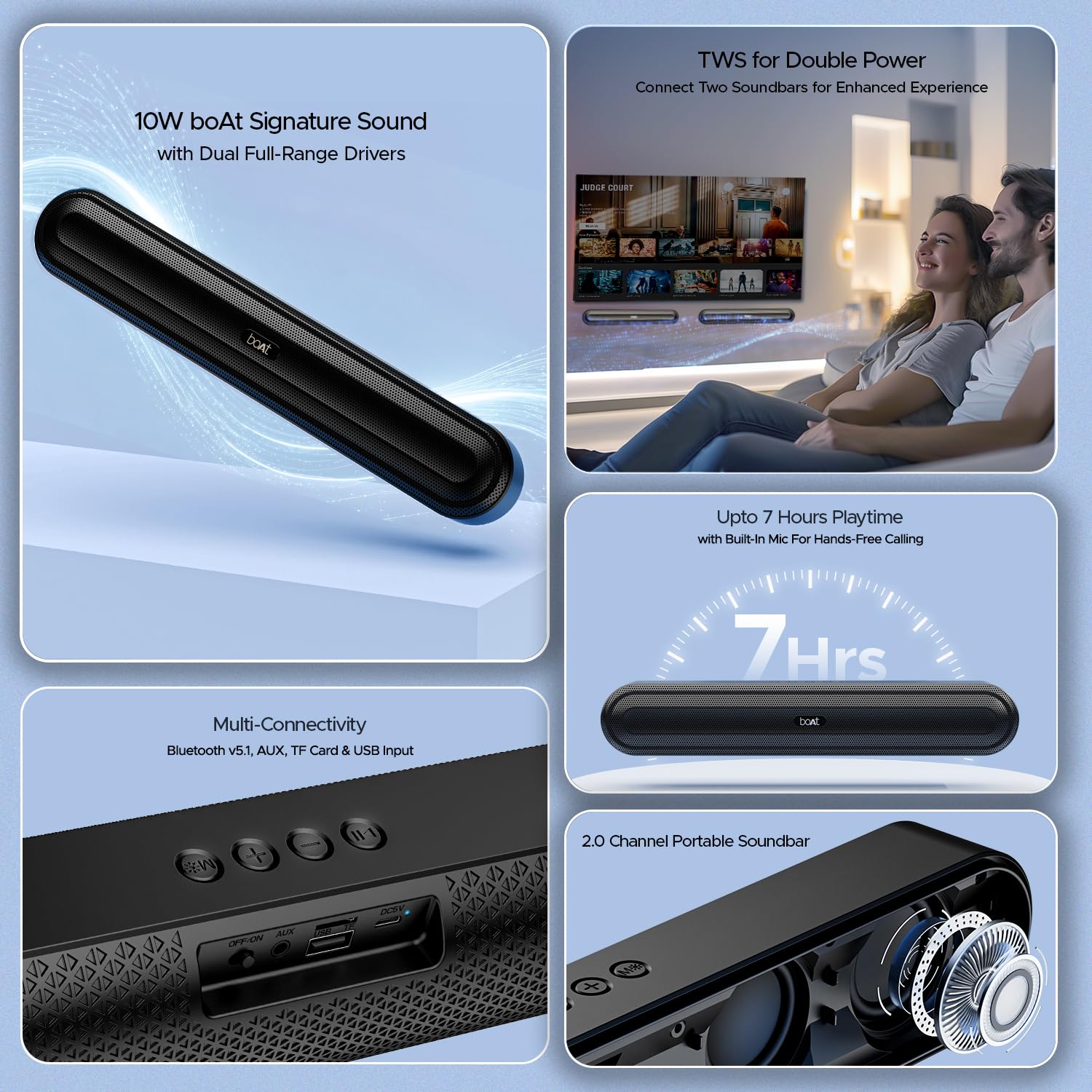
Immagine 2.1: Passoview of the boAt Aavante Bar 490 and its key features, including package contents.
3. Prodotto finitoview
3.1. Controlli e porte
Familiarize yourself with the control buttons and connectivity ports on your Aavante Bar 490.

Immagine 3.1: Primo piano view of the control buttons and multi-connectivity ports (Bluetooth v5.1, AUX, TF Card, USB Input) on the soundbar.
- Pulsante di accensione: Tenere premuto per accendere/spegnere. Premere brevemente per cambiare modalità.
- Volume basso (-): Diminuire il volume.
- Volume su (+): Aumentare il volume.
- Pulsante Play/Pausa: Riproduci o metti in pausa la musica. Rispondi/termina le chiamate.
- Pulsante Modalità (M): Switch between input modes (Bluetooth, AUX, USB, TF Card).
- Interruttore OFF/ON: Interruttore di alimentazione principale.
- Porta AUX: Per la connessione audio cablata.
- Porta USB: Per la riproduzione da unità USB.
- Slot per schede TF: Per la riproduzione di schede TF.
- Porta DC5V: Per caricare il dispositivo.
4. Impostazione
4.1. Ricarica della soundbar
Before first use, fully charge the soundbar. Connect the provided charging cable to the DC5V port on the soundbar and the other end to a compatible USB power adapter (not included). The LED indicator will show charging status and turn off when fully charged. A full charge provides up to 7 hours of playback.

Image 4.1: The boAt Aavante Bar 490 highlighting its up to 7 hours of playtime on a single charge.
4.2. Accensione/spegnimento
- Ensure the OFF/ON switch at the back is in the "ON" position.
- Press and hold the Power button on the top panel for 3 seconds to power on the soundbar.
- Per spegnere, tenere premuto nuovamente il pulsante di accensione per 3 secondi.
4.3. Accoppiamento Bluetooth
- Power on the soundbar. It will automatically enter Bluetooth pairing mode (indicated by a flashing LED).
- Sul tuo dispositivo (smartphone, tablet, ecc.), attiva il Bluetooth e cerca i dispositivi disponibili.
- Select "Aavante Bar 490" from the list.
- Una volta effettuato l'accoppiamento, l'indicatore LED diventerà blu fisso e verrà emesso un tono di conferma.
The soundbar supports Bluetooth v5.1 for stable and efficient wireless connection up to 10 meters.
4.4. Accoppiamento TWS (True Wireless Stereo)
For an enhanced stereo experience, you can pair two Aavante Bar 490 soundbars together.
- Ensure both Aavante Bar 490 units are powered on and in Bluetooth pairing mode (not yet connected to any device).
- On one of the soundbars, double-press the Mode button (M). It will search for the other unit.
- Once successfully paired, you will hear a confirmation tone, and the LED indicators on both units will synchronize.
- Now, connect your device to one of the paired soundbars via Bluetooth as described in Section 4.3. Both soundbars will play audio in stereo.

Image 4.2: Illustration of two boAt Aavante Bar 490 soundbars connected via TWS for an enhanced audio experience.
4.5. Other Connectivity Modes
Press the Mode button (M) to cycle through the following input options:
- Modalità AUX: Connect an audio device using a 3.5mm AUX cable to the AUX port.
- Modalità USB: Insert a USB flash drive into the USB port. The soundbar will automatically play audio files.
- Modalità scheda TF: Insert a TF (microSD) card into the TF card slot. The soundbar will automatically play audio files.
5. Istruzioni per l'uso
5.1. Riproduzione di musica
- Riproduci/Pausa: Premi brevemente il pulsante Riproduci/Pausa.
- Regolazione del volume: Premere brevemente i pulsanti Volume su (+) o Volume giù (-).
- Traccia successiva: Premere a lungo il pulsante Volume su (+).
- Traccia precedente: Premere a lungo il pulsante Volume giù (-).
5.2. Chiamate in vivavoce
Se connesso tramite Bluetooth, il microfono integrato consente di effettuare chiamate in vivavoce.
- Rispondi alla chiamata: Premi brevemente il pulsante Riproduci/Pausa.
- Termina chiamata: Premere brevemente il pulsante Riproduci/Pausa durante una chiamata.
- Rifiuta chiamata: Premi a lungo il pulsante Riproduci/Pausa.
6. Manutenzione
- Keep the soundbar away from water, moisture, and extreme temperatures.
- Pulire il dispositivo con un panno morbido e asciutto. Non utilizzare detergenti abrasivi o solventi.
- Evitare di far cadere o di sottoporre la soundbar a forti urti.
- Conservare in luogo fresco e asciutto quando non si utilizza per lunghi periodi.
7. Risoluzione Dei Problemi
| Problema | Possibile causa | Soluzione |
|---|---|---|
| La soundbar non si accende. | Low battery; OFF/ON switch is off. | Charge the soundbar; ensure OFF/ON switch is in the "ON" position. |
| Impossibile effettuare l'associazione tramite Bluetooth. | Soundbar not in pairing mode; device Bluetooth is off; too far from device. | Ensure soundbar is in pairing mode; enable Bluetooth on your device; move closer to the soundbar (within 10m). |
| Nessun suono. | Volume troppo basso; modalità di input errata; cavo non collegato correttamente. | Increase volume; switch to correct input mode (Bluetooth, AUX, USB, TF); check cable connections. |
| L'associazione TWS non riesce. | One or both units already connected to a device; units too far apart. | Disconnect both units from any Bluetooth devices; ensure they are close to each other during TWS pairing. |
8. Specifiche
- Nome modello: Avante Bar 490
- Tipo di altoparlante: Barra audio
- Uscita audio: 2.0 canali
- Potenza di uscita: Potenza nominale 10 W
- Autisti: Dual Full-Range Drivers
- Versione Bluetooth: versione 5.1
- Gamma Bluetooth: Fino a 10 metri
- Connettività: Bluetooth, AUX, USB, scheda TF
- Durata della batteria: Fino a 7 ore
- Tipo di batteria: Polimeri di litio (1 x 12 V incluso)
- Microfono incorporato: Sì (per chiamate in vivavoce)
- Metodo di controllo: Pulsanti touch
- Dimensioni del prodotto: 38.7D x 6.5W x 5.5H centimetri
- Peso dell'articolo: 650 grammi

Image 8.1: Dimensions of the boAt Aavante Bar 490 soundbar.
9. Garanzia e supporto
The boAt Aavante Bar 490 comes with a standard Garanzia limitata di 1 anno dalla data di acquisto. Per i termini e le condizioni dettagliate, consultare la scheda di garanzia inclusa.
Per supporto tecnico, assistenza o reclami in garanzia, contattare il servizio clienti boAt:
- E-mail: info@imaginemarketingindia.com
- Produttore: Immagina Marketing Limited
- Indirizzo: Unità n. 204 e 205, 2° piano, ala D ed ala E, Corporate Avenue, Andheri Ghatkopar Link Road, Mumbai, Maharashtra-400093, India
You can also download the boAt Hearables App for additional features and user guides. Scan the QR code below:

Image 9.1: QR code to download the boAt Hearables App for additional features and support.
10. Video di prodotto
Video 10.1: Una breve pre-produzioneview mostrareasing the boAt Aavante Bar 490 Bluetooth Soundbar's features, including 10W RMS sound, dual full-range drivers, 7 hours playback, multi-connectivity, and hands-free calling. This video is provided by the seller.
Video 10.2: Un breve riassuntoview of the boAt Aavante Bar 490, highlighting its 10W RMS Signature Sound, dual drivers, and Bluetooth 5.1 connectivity. This video is provided by the seller.


