
Introduzione
This manual provides comprehensive instructions for the operation and maintenance of your ATTOP X-PACK 18 Drone with Camera. Please read this manual thoroughly before operating the drone to ensure safe and optimal performance. The ATTOP X-PACK 18 is a foldable drone equipped with a 1080P 120° wide-angle FPV Wi-Fi camera, offering features like one-key take-off/landing, headless mode, 3-speed modes, 360° flip, emergency stop, one-key return, and various APP-controlled functions including gesture, voice, and gravity control, as well as flight path mode.

Image: ATTOP Drone with remote control, batteries, and carrying case.
Cosa c'è nella scatola
Verificare che tutti i componenti siano presenti nella confezione:
- ATTOP X-PACK 18 Drone
- Telecomando
- 2 x 3.7V / 1100mAh Rechargeable Batteries
- Custodia per il trasporto
- Lame di ricambio
- Cavo di ricarica USB
- Cacciavite
- Supporto per telefono

Image: Visual representation of the drone, remote, batteries, and accessories included in the package.
Guida all'installazione
Spiegazione del drone
Carefully unfold the drone arms until they are fully extended. Ensure all arms click into place securely.

Image: Illustration of the drone's foldable design and dimensions.
Installazione della batteria
Insert the fully charged battery into the designated compartment on the drone. Ensure it is securely latched.
Telefono Clamp Installation (for Remote Control)
Attacca il telefono clamp to the remote control. Secure your smartphone into the clamp for FPV viewing and APP control.
Image: Close-up of the remote control with a smartphone mounted in the clamp.
Accendere
Press and hold the power button on the drone until the indicator lights illuminate. Power on the remote control.
Abbinamento
After powering on both the drone and remote, push the left control stick on the remote fully up and then fully down to pair the devices. The drone lights will stop flashing once paired.
Calibrazione
If playing for the first time, press the calibration button on the remote control. This ensures stable flight.
Download e connessione APP
Download the "ATTOP CLUB" APP from your device's app store. Connect your phone to the drone's Wi-Fi network (e.g., "X-PACK 18-XXXXXX"). Open the APP and select "X-PACK 18" to connect and access advanced features and FPV view.
Video: Demonstrates the ATTOP CLUB APP download, Wi-Fi connection, and interface display for the X-PACK 18 drone.
Istruzioni per l'uso
Familiarize yourself with the drone's controls and features for an optimal flight experience.
Video: Comprehensive guide demonstrating drone setup, basic flight controls, and advanced features like 360° stunts and headless mode.
Controlli di volo di base:
- Decollo/atterraggio con un solo tasto: Press the dedicated button on the remote or APP for automatic take-off or landing.
- Ascend & Descend: Use the left control stick to adjust the drone's altitude.
- Altitude Holding: The drone maintains a stable hover at a set altitude, ideal for capturing steady photos and videos.
- Rifinitura: Adjust the drone's flight path to correct any drifting.
- Flying Forward/Backward: Use the right control stick to move the drone in the desired direction.
- Girare a sinistra/destra: Rotate the drone left or right using the left control stick.
- Volo laterale sinistro/destro: Move the drone sideways using the right control stick.
Funzionalità avanzate:
- 360° Stunt (Flip): Esegui spettacolari salti mortali aerei premendo un solo pulsante.
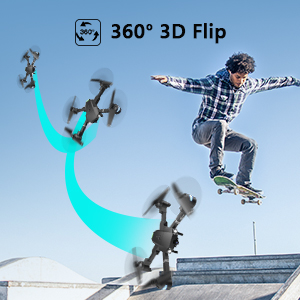
Image: Sequence showing the drone executing a 360-degree flip.
- Modalità di velocità: Switch between 3 different speeds (30%, 60%, 100%) to match your skill level and environment.
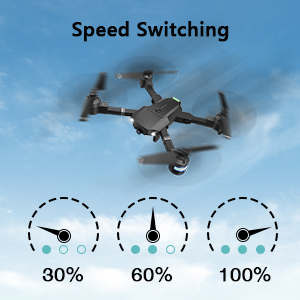
Image: Visual representation of the three-speed modes (30%, 60%, 100%).
- Modalità senza testa: Simplifies flight by orienting the drone relative to the pilot, regardless of the drone's actual front direction.
- Volo in cerchio: The drone can perform circular flight patterns.
- Taking Pictures & Videos: Use the dedicated buttons on the remote or APP to capture 1080P HD photos and videos.
Image: Close-up of the drone's 1080P HD camera.
- Arresto di emergenza: Instantly stop the drone in case of an emergency to prevent damage or injury.
- Ritorno con una sola chiave: The drone will automatically return to its take-off point.
APP-Controlled Functions:
- Controllo gestuale: Esegui specifici gesti delle mani per attivare l'acquisizione di foto o video.
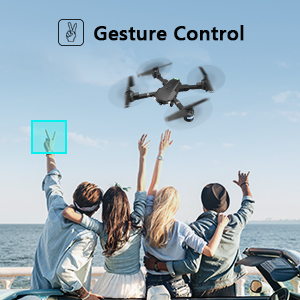
Image: People making a "V" gesture to activate the drone camera.
- Controllo vocale: Command the drone using voice commands for various flight actions (e.g., "Take off", "Landing", "Forward").

Immagine: Examples of voice commands like "Take off" and "Right side" for drone control.
- Controllo della gravità: Control the drone's movement by tilting your smartphone, utilizing its built-in G-sensor.
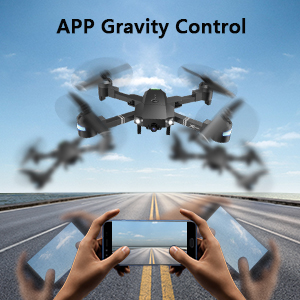
Image: Hands holding a smartphone, demonstrating how tilting controls the drone's direction.
- Flight Path Mode: Traccia sullo schermo del tuo smartphone il percorso di volo desiderato e il drone lo seguirà automaticamente.
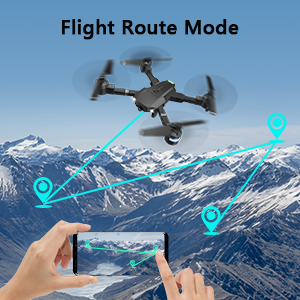
Image: A smartphone screen displaying a drawn flight path for the drone to follow.
- Modalità VR: Compatible with VR glasses for an immersive first-person view flight experience.
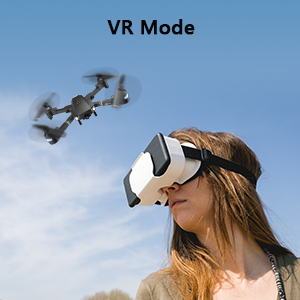
Image: A person wearing VR glasses, experiencing the drone's first-person view.
Manutenzione
Una manutenzione regolare garantisce la longevità e le prestazioni ottimali del tuo drone.
- Pulizia: Utilizzare un panno morbido e asciutto per pulire il corpo del drone e l'obiettivo della fotocamera. Evitare l'uso di prodotti chimici aggressivi.
- Ispezione dell'elica: Controllare regolarmente le eliche per verificare la presenza di eventuali danni (crepe, piegature). Sostituire immediatamente le eliche danneggiate utilizzando le lame di ricambio e il cacciavite forniti.
- Cura della batteria: Conservare le batterie in un luogo fresco e asciutto. Non sovraccaricarle o scaricarle eccessivamente. Se si conservano per periodi prolungati, caricarle fino a circa il 50% della capacità.
- Cura del motore: Mantenere i motori liberi da polvere e detriti. Evitare di utilizzarli in ambienti sabbiosi o polverosi.
- Magazzinaggio: Quando non lo si utilizza, ripiegare il drone e riporlo nella sua custodia per proteggerlo dalla polvere e dai danni fisici.
Risoluzione dei problemi
| Problema | Possibile causa | Soluzione |
|---|---|---|
| Il drone non risponde al telecomando. | Non associato, batteria scarica, interferenza. | Ensure drone and remote are powered on and paired correctly. Recharge batteries. Move away from sources of interference. |
| Il drone va alla deriva durante il volo. | Not calibrated, uneven surface for take-off, wind. | Perform calibration on a flat surface. Use trimming functions to correct drift. Avoid flying in strong winds. |
| Camera not working or FPV feed is unstable. | Wi-Fi not connected, APP issue, low drone battery. | Ensure phone is connected to drone's Wi-Fi. Restart APP and drone. Charge drone battery. |
| Breve tempo di volo. | Batteria non completamente carica, batteria vecchia. | Caricare completamente le batterie prima di ogni volo. Valutare la possibilità di sostituire le batterie vecchie. |
| I droni si schiantano frequentemente. | Lack of experience, environmental factors, damaged propellers. | Practice in open areas. Avoid obstacles. Check and replace damaged propellers. |
Specifiche
| Caratteristica | Dettaglio |
|---|---|
| Marca | IN ALTO |
| Nome del modello | PACCHETTO X 18 |
| Caratteristiche speciali | 360 Degree Flip, Speed Adjustment, Foldable, First Person View (FPV), Long Battery Life |
| Fascia d'età (descrizione) | 96 mesi e oltre |
| Colore | Nero pece |
| Risoluzione di acquisizione video | Formato: 1080p |
| Tecnologia di connettività | Wifi |
| Livello di abilità | Tutto |
| Capacità della batteria | 1100 mAh (per batteria) |
| Tempo di volo | Fino a 20 minuti (con 2 batterie)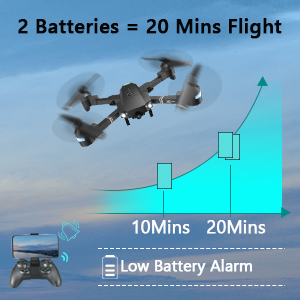 Image: Graph showing flight time with two batteries. |
| Formato di acquisizione video | MP4 |
| Tecnologia di controllo remoto | Wifi |
| Tipo di controllo | Telecomando |
| Portata massima | 80 metri |
| Materiale | Plastic or Reinforced Plastic |
| Dimensioni del prodotto | 13.8 cm L x 12.6 cm P x 2.76 cm A |
| Peso dell'articolo | 1.76 libbre |
| Data di rilascio | 12 novembre 2023 |
Garanzia e supporto
ATTOP provides customer support and assistance for your drone. For any questions or to inquire about extended warranty, please refer to the following:
- Supporto via e-mail: support@attoptoys.com
- Supporto online: Scansiona il codice QR qui sotto o visita intop.afterservice.vip per assistenza e informazioni sulla garanzia.

Image: QR code for quick access to ATTOP customer service and extended warranty information.