1. Introduzione
Grazie per l'acquistoasing the ATTOP X-PACK 18 Drone. This manual provides essential information for the safe operation and maintenance of your drone. Please read it thoroughly before use and retain it for future reference.
2. Cosa c'è nella scatola
The ATTOP X-PACK 18 package includes the following components:
- ATTOP X-PACK 18 Drone
- Telecomando
- 2 x 3.7V/1100mAh Rechargeable Batteries
- Cavo di ricarica USB
- Eliche di ricambio
- Cacciavite
- Custodia per il trasporto
- Manuale dell'utente (questo documento)
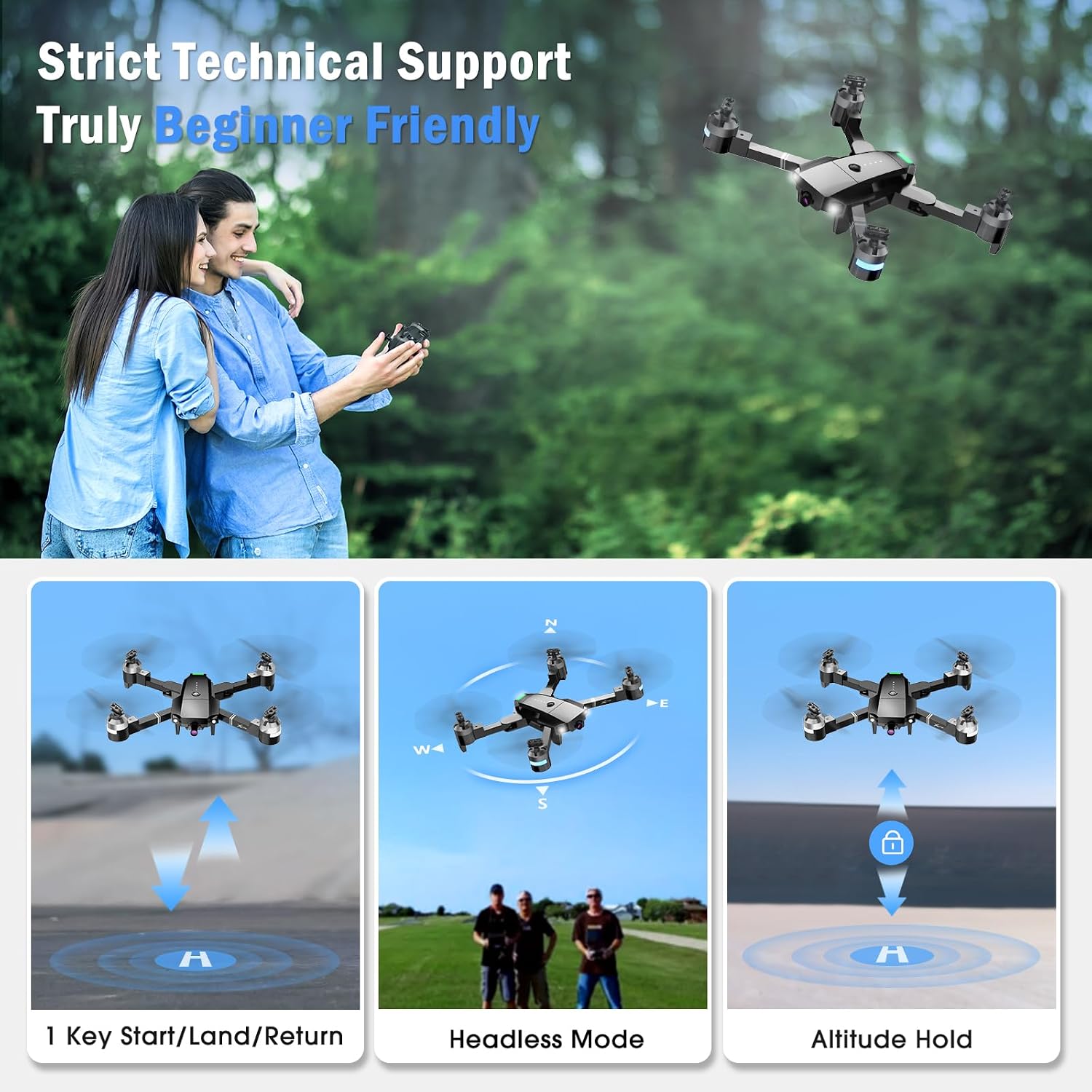
Image: The ATTOP X-PACK 18 drone, remote control, and various accessories neatly packed in its dedicated carrying case.
3. Guida all'installazione
3.1 Apertura del drone
- Estrarre con cautela il drone dalla custodia.
- Unfold the drone arms one by one until they are fully extended. Ensure they click into place.
Video: This video demonstrates the unboxing, unfolding, battery installation, and phone clamp setup for the ATTOP X-PACK 18 drone and its controller.
3.2 Installazione e ricarica della batteria
- Insert the fully charged 3.7V/1100mAh battery into the drone's battery compartment. Ensure it is securely latched.
- Per caricare la batteria, collegala al cavo di ricarica USB e collega quest'ultimo a una fonte di alimentazione USB adatta (ad esempio, un computer, un adattatore da parete USB). L'indicatore di carica mostrerà lo stato di carica.
3.3 Configurazione del telecomando
- Installa il telefono clamp onto the remote control.
- Place your smartphone securely into the phone clamp.
- Ensure the remote control has sufficient power.
3.4 Download e connessione dell'app
- Download the "ATTOP CLUB" app from your device's app store (available on App Store and Google Play). You can scan the QR code provided in the app operation guide video or search for "ATTOP CLUB".
- Accendi il drone e il telecomando.
- On your smartphone, go to Wi-Fi settings and connect to the drone's Wi-Fi network (e.g., "X-PACK 18-XXXXXX").
- Open the "ATTOP CLUB" app and select the drone model "X-PACK 18".
- Tap "Go To Connect" or "Go To Fly" to enter the control interface.
Video: This video provides a detailed guide on how to download the ATTOP CLUB app, connect to the drone's Wi-Fi, and navigate the app's interface for flight control.
4. Istruzioni per l'uso
4.1 Controlli di volo di base
- Accensione: Press the power button on the drone. Wait for 2 seconds until the lights stop flashing.
- Abbinamento: Turn on the remote control. Push the left joystick up and then down to pair with the drone.
- Calibrazione: If flying for the first time, press the calibration button on the app interface or remote.
- Sbloccare: Push both joysticks on the remote control diagonally outwards to unlock the motors.
- Un punto chiave da prendere: Press the one-key take-off button on the remote or app, or push the left control stick up slowly.
- Salire/scendere: Use the left joystick to control altitude.
- Avanti indietro: Utilizzare il joystick destro per spostare il drone avanti o indietro.
- Svoltare a sinistra a destra: Utilizzare il joystick sinistro per ruotare il drone a sinistra o a destra.
- Volo laterale sinistro/destro: Utilizzare il joystick destro per spostare il drone lateralmente.
- Un atterraggio chiave: Press the one-key landing button on the remote or app, or push the left control stick down directly.

Image: The drone performing 1-key start/land/return, flying in headless mode, and maintaining altitude hold, illustrating beginner-friendly features.
Video: This video demonstrates the simple one-button take-off and landing, pairing, calibration, and basic flight maneuvers of the ATTOP X-PACK 18 drone.
4.2 Funzioni di volo avanzate
- Rotazione a 360°: Press the 360° flip button on the remote or app to perform aerial stunts.
- Modalità senza testa: Activate headless mode for easier control, where the drone's orientation is relative to the pilot.
- Regolazione della velocità: Switch between 3 speed settings (30%, 60%, 100%) for different flying experiences.
- Mantenimento dell'altitudine: The drone maintains a stable hover at a set altitude, ideal for photography and stable flight.
- Ritorno con una sola chiave: Press the one-key return button to automatically bring the drone back to its take-off point.
- Arresto di emergenza: In case of an emergency, press the emergency stop button to immediately halt the drone's motors and land it.

Image: The drone illustrating advanced flight functions including drawing a custom flight path, switching between three speed modes, and performing a 360-degree flip.
4.3 Funzionalità di controllo intelligente delle app
- Controllo gestuale: Make specific hand gestures to trigger automatic picture-taking or video recording.
- Controllo vocale: Control the drone's direction using voice commands (e.g., "Take off", "Forward").
- Controllo della gravità: Wave your phone to control the drone's movement, utilizing the phone's gravity sensor.
- Modalità VR: Compatible with VR glasses for an immersive 3D flight experience, syncing with your phone or iPad.
- Flight Path Mode: Draw a custom flight path on the app, and the drone will follow it automatically.

Image: This image highlights the various control methods for the drone, including traditional remote control, voice commands, gesture recognition, and gravity-sensing phone control.
4.4 Funzionamento della fotocamera
The ATTOP X-PACK 18 features a 120° wide-angle 1080P FPV camera for real-time video transmission and high-definition photos.
- In tempo reale View: Connect your phone or iPad to the drone's Wi-Fi to view live aerial footage through the "ATTOP CLUB" app.
- Fare foto: Press the photo button on the remote control or within the app interface.
- Registra video: Press the video button on the remote control or within the app interface to start/stop recording.
- Review Media: Photos and videos can be reviewed directly from the media folder within the "ATTOP CLUB" app.

Immagine: un primo piano view of the drone's 120-degree wide-angle 1080P FPV camera, emphasizing its capability for real-time transmission and high-definition capture.
5. Manutenzione
5.1 Cura della batteria
- Always use the provided charging cable and follow charging instructions.
- Non sovraccaricare o scaricare eccessivamente le batterie.
- Conservare le batterie in un luogo fresco e asciutto, lontano dalla luce solare diretta e da temperature estreme.
- If the drone indicates a low battery warning, land it immediately to prevent damage.
5.2 Cura dell'elica
- Controllare regolarmente le eliche per verificare la presenza di eventuali danni (crepe, piegature).
- Replace damaged propellers with spare ones using the provided screwdriver. Ensure correct orientation when replacing.
5.3 Pulizia
- Utilizzare un panno morbido e asciutto per pulire il corpo del drone e l'obiettivo della telecamera.
- Evitare l'uso di prodotti chimici o solventi aggressivi.
6. Risoluzione Dei Problemi
| Problema | Possibile causa | Soluzione |
|---|---|---|
| Il drone non si accende | Batteria non carica o installata in modo errato. | Assicurarsi che la batteria sia completamente carica e inserita correttamente. |
| Drone not pairing with remote/app | Incorrect pairing sequence; Wi-Fi not connected. | Follow pairing steps (Section 4.1); ensure phone is connected to drone's Wi-Fi. |
| Volo instabile/deriva | Drone not calibrated; damaged propellers; strong wind. | Perform calibration (Section 4.1); replace damaged propellers; fly in calm conditions. |
| Poor camera feed/No image | Weak Wi-Fi signal; app not connected to drone. | Ensure strong Wi-Fi connection; restart app and reconnect to drone. |
| Breve tempo di volo | Batteria non completamente carica; batteria vecchia. | Fully charge batteries before each flight; consider replacing old batteries. |
7. Specifiche
| Caratteristica | Dettaglio |
|---|---|
| Marca | IN ALTO |
| Nome del modello | PACCHETTO X 18 |
| Caratteristiche speciali | 360 Degree Flip, Auto-Landing, First Person View (FPV), Foldable, Speed Adjustment, Headless Mode, One Key Return, Emergency Stop, Gesture Control, Voice Control, Gravity Control, VR Mode, Flight Path Mode, Altitude Hold |
| Fascia di età | 8 years and up (96 months) |
| Colore | Nero |
| Risoluzione di acquisizione video | Formato: 1080p |
| Risoluzione fissa efficace | 2.07 Megapixels (2073600 Pixels) |
| Tecnologia di connettività | Wifi |
| Componenti inclusi | Drone, Remote Control, 2 Batteries, Camera, Carrying Case, Propellers, USB Charging Cable, Screwdriver |
| Livello di abilità | Tutto |
| Capacità della batteria | 1100 milioneamp Ore (3.7 V) |
| Formato di acquisizione video | MP4 |
| Tecnologia di controllo remoto | Wifi |
| Tipo di controllo | Controllo remoto, controllo app |
| Materiale | Plastica |
| Tecnologia di comunicazione wireless | Wifi |
| Composizione delle celle della batteria | Lithium-Cobalt |
| Le batterie sono incluse? | Sì (2 batterie ai polimeri di litio) |
| Formato immagine supportato | Formato JPEG |
| Risoluzione dell'uscita video | 1920x1080 pixel |
| Il telecomando è incluso? | SÌ |
| Tecnologia dei sensori ottici | CMOS o CCD |
| Batteria ricaricabile inclusa | SÌ |
| Dimensioni del prodotto | 13.8 cm L x 12.6 cm P x 2.76 cm A |
| Produttore | Guangdong Attop Technology Co Ltd |
| Peso dell'articolo | 1.83 libbre |
| Data di rilascio | 9 novembre 2023 |
8. Garanzia e supporto
For technical support, customer service, or to inquire about an extended warranty, please contact ATTOP directly:
- E-mail: support@attoptoys.com
- You can also scan the QR code within the "ATTOP CLUB" app's Help section for customer service and warranty information.

Image: The ATTOP X-PACK 18 drone showcasing its main features including 1080P camera, 360° flip, gesture control, voice control, gravity control, VR mode, 3 speed mode, flight path mode, altitude hold, and emergency stop.


