1. Introduzione
Welcome to the user manual for your new HP Victus 16.1" Gaming Notebook. This document provides essential information to help you set up, operate, maintain, and troubleshoot your device. Please read this manual thoroughly to ensure optimal performance and longevity of your notebook.
The HP Victus 16.1" Gaming Notebook is designed for high-performance computing and gaming, featuring an AMD Ryzen 5 7640HS processor, NVIDIA GeForce RTX 3050 graphics, 16GB of RAM, and a 512GB SSD, all complemented by a 144Hz Full HD display.
2. Informazioni sulla sicurezza
Observe the following safety guidelines to prevent damage to your device or personal injury:
- Use only the power adapter supplied with your notebook.
- Do not expose the notebook to extreme temperatures, humidity, or direct sunlight.
- Avoid placing heavy objects on the notebook.
- Keep liquids away from the device. In case of accidental spills, disconnect power immediately and contact support.
- Do not attempt to disassemble or repair the notebook yourself. Refer to qualified service personnel.
- Assicurare una ventilazione adeguata per evitare il surriscaldamento. Non bloccare le aperture di ventilazione.
3. Contenuto della confezione
Verifica che tutti gli articoli siano presenti nella confezione del prodotto:
- HP Victus 16.1" Gaming Notebook
- Adattatore di alimentazione e cavo di alimentazione
- Guida rapida (se inclusa)
- Informazioni sulla garanzia (se incluse)
If any items are missing or damaged, contact your retailer or HP support.
4. Prodotto finitoview
Familiarize yourself with the components and features of your HP Victus Gaming Notebook.

Figura 4.1: Davanti view of the HP Victus 16.1" Gaming Notebook with the lid open, showcasing the display running Windows 11.

Figura 4.2: Angolato view of the HP Victus 16.1" Gaming Notebook, illustrating the keyboard, touchpad, and the vibrant display.
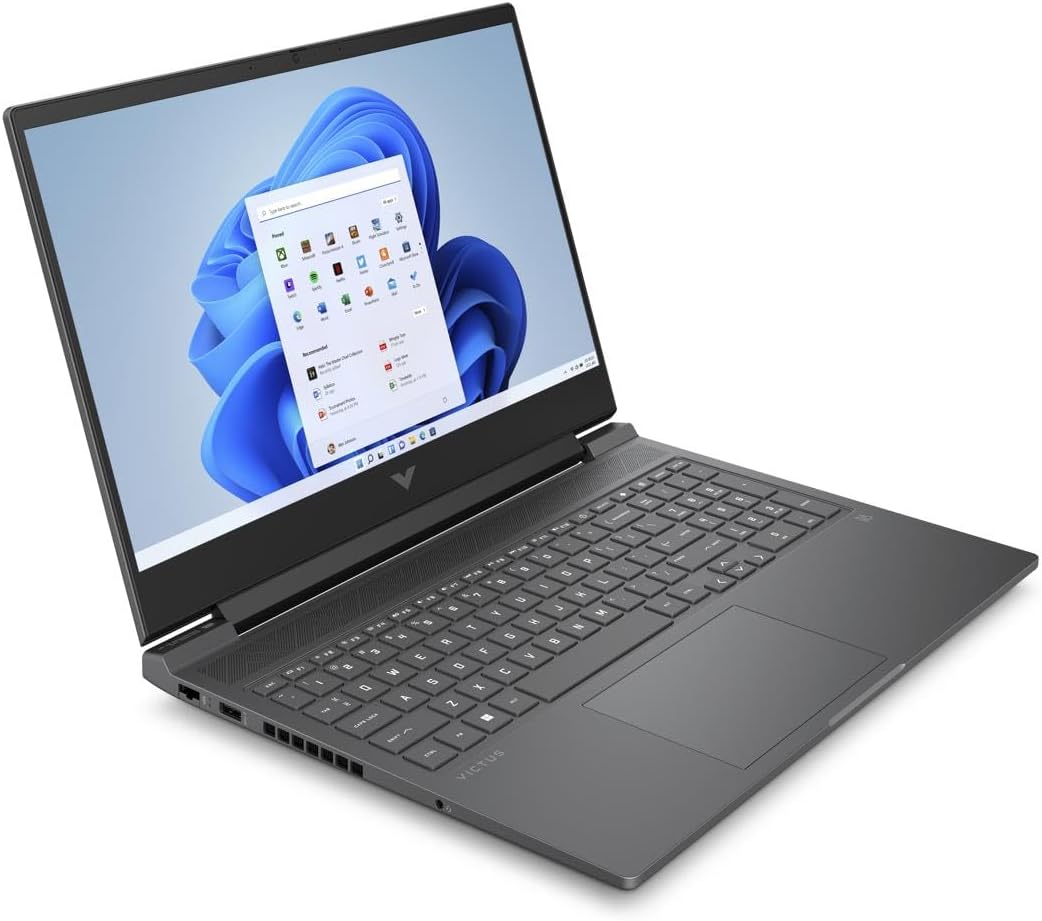
Figura 4.3: Another angled perspective of the HP Victus 16.1" Gaming Notebook, highlighting its sleek design and screen clarity.
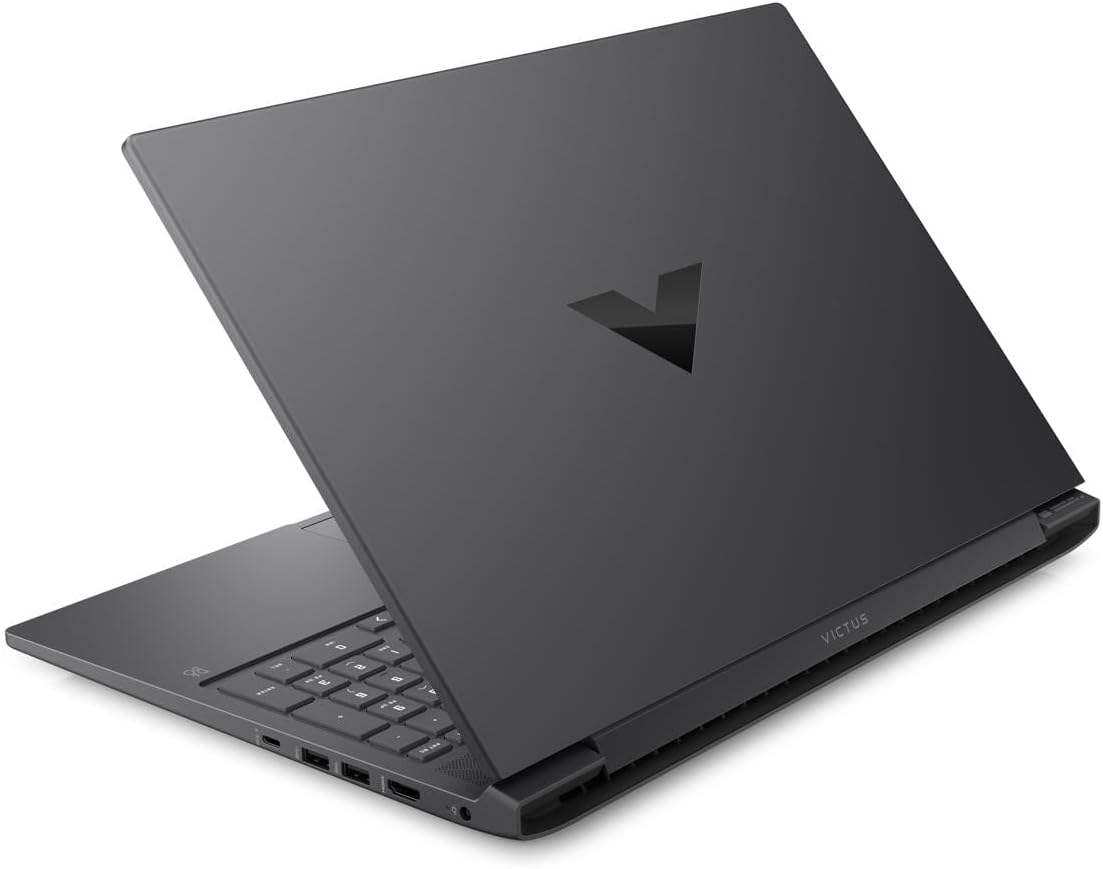
Figura 4.4: Posteriore view of the HP Victus 16.1" Gaming Notebook with the lid closed, featuring the distinct Victus logo on the cover.

Figura 4.5: Lato profiles of the HP Victus 16.1" Gaming Notebook, detailing the placement of various input/output ports and ventilation grilles.
Componenti chiave:
- Display: 16.1-inch Full HD (1920 x 1080) 144Hz Anti-glare panel.
- Tastiera: Full-size keyboard with numeric keypad.
- Touchpad: Multi-touch gesture enabled touchpad.
- Porte: USB Type-A, USB Type-C, HDMI, Ethernet, Audio Jack, Power connector.
- WebCamera: Integrato webcam for video communication.
- Relatori: Altoparlanti stereo integrati.
5. Impostazione
Follow these steps for the initial setup of your HP Victus Gaming Notebook:
- Disimballare il notebook: Carefully remove the notebook and all accessories from the packaging.
- Connetti alimentazione: Plug the power adapter into the notebook's power port and then into a wall outlet. Ensure the power indicator light illuminates.
- Accensione iniziale: Open the lid and press the power button, typically located on the keyboard deck.
- Installazione di Windows: Follow the on-screen instructions to complete the Windows 11 setup process. This includes selecting your region, connecting to a Wi-Fi network, creating a user account, and accepting terms and conditions.
- Aggiornamenti: After initial setup, it is recommended to check for and install all available Windows updates and HP driver updates to ensure optimal performance and security.
6. Istruzioni per l'uso
Gestione energetica:
- Accensione: Premere il pulsante di accensione.
- Fermare: Fare clic sul pulsante Start, quindi su Arresta > Arresta il sistema.
- Modalità risparmio: Chiudere il coperchio o fare clic sul pulsante Start, quindi su Alimentazione > Sospensione.
- Ricomincia: Fare clic sul pulsante Start, quindi su Arresta > Riavvia.
Utilizzo della tastiera e del touchpad:
- The keyboard functions like a standard PC keyboard. Use the Fn key in combination with function keys (F1-F12) for special features like volume control, brightness adjustment, and Wi-Fi toggle.
- The touchpad supports multi-touch gestures for scrolling, zooming, and switching applications. Refer to Windows settings for customization.
Collegamento di periferiche:
Your notebook features various ports for connecting external devices:
- Porte USB: Collegare dispositivi USB come dischi rigidi esterni, mouse o tastiere.
- Porta HDMI: Collegare un monitor esterno o una TV per una visualizzazione estesa.
- Jack audio: Collega cuffie o altoparlanti esterni.
- Porta Ethernet: Collegati a una rete cablata per un accesso Internet stabile.
Impostazioni di visualizzazione:
To utilize the 144Hz refresh rate for smoother visuals, especially in gaming:
- Fare clic con il tasto destro del mouse sul desktop e selezionare "Impostazioni schermo".
- Scroll down and click 'Advanced display settings'.
- Under 'Choose a refresh rate', select '144 Hz'.
7. Manutenzione
Proper maintenance ensures the longevity and performance of your notebook:
- Pulizia: Utilizzare un panno morbido e privo di lanugine per pulire lo schermo e il telaio. Per i segni ostinati, dampInumidire leggermente il panno con acqua o un detergente per schermi. Evitare prodotti chimici aggressivi.
- Aggiornamenti software: Regularly check for and install operating system updates (Windows Update) and driver updates (HP Support Assistant or HP website) to ensure security and optimal performance.
- Cura della batteria: To maximize battery lifespan, avoid fully discharging the battery frequently. If storing the notebook for an extended period, charge it to about 50-70%.
- Ventilazione: Ensure the ventilation grilles are clear of dust and debris. Use the notebook on a hard, flat surface to allow for proper airflow.
- Backup dei dati: Esegui regolarmente il backup dei dati importanti su un'unità esterna o su un archivio cloud per evitare la perdita di dati.
8. Risoluzione Dei Problemi
This section addresses common issues you might encounter with your HP Victus Gaming Notebook.
No Power / Not Turning On:
- Ensure the power adapter is securely connected to both the notebook and a working wall outlet.
- Verificare che la presa di corrente funzioni collegandovi un altro dispositivo.
- Se la batteria è completamente scarica, lasciarla in carica per almeno 15-30 minuti prima di provare ad accenderla.
Problemi di visualizzazione:
- Schermo nero: Try connecting an external monitor to see if there is output. If so, the internal display might have an issue.
- Immagine tremolante/distorta: Aggiorna i driver della scheda grafica. Controlla i collegamenti dei cavi dello schermo se utilizzi un monitor esterno.
- Risoluzione/frequenza di aggiornamento non corretta: Adjust settings in Windows Display settings as described in Section 6.
Problemi di prestazioni:
- Prestazioni lente: Chiudere le applicazioni non necessarie. Controllare Task Manager per individuare eventuali processi che consumano molta CPU o RAM. Assicurarsi di avere sufficiente spazio libero sull'SSD.
- Surriscaldamento: Ensure ventilation vents are clear. Use the notebook on a hard, flat surface. Consider using a cooling pad if issues persist.
- Prestazioni di gioco: Ensure graphics drivers are up to date. Adjust in-game graphics settings to match your system's capabilities.
Problemi di connettività:
- Problemi Wi-Fi: Restart your router and modem. Check if Wi-Fi is enabled on the notebook (Fn + F12 or similar key combination). Update wireless drivers.
- Problemi Bluetooth: Ensure Bluetooth is enabled in Windows settings. Try re-pairing the device.
If you cannot resolve an issue using these steps, please refer to the HP support websito o contattare il servizio clienti.
9. Specifiche
Detailed technical specifications for the HP Victus 16.1" Gaming Notebook (Model 16-s0001nr).
| Caratteristica | Specificazione |
|---|---|
| Nome del modello | 16-s0001nr (823F0UA#ABA) |
| Processore | AMD Ryzen 5 7640HS (Hexa-core) |
| Grafica | NVIDIA GeForce RTX 3050 (6 GB GDDR6 dedicati) |
| Display | 16.1-inch FHD (1920 x 1080) 144Hz, Anti-glare |
| Memoria RAM | 16 GB di memoria DDR5 SDRAM |
| Magazzinaggio | SSD da 512 GB |
| Sistema operativo | Windows 11 Casa |
| Connettività wireless | 802.11ax (Wi-Fi 6), Bluetooth |
| Porti | USB Type-A, USB Type-C, HDMI, Ethernet, Audio Jack |
| Dimensioni (LxWxH) | 23.5 x 13.7 x 2.8 pollici |
| Peso | 10 libbre |
| Colore | Mica Silver |
| Anno di rilascio | 2024 |
10. Garanzia e supporto
Your HP Victus Gaming Notebook comes with a standard manufacturer's warranty. Please refer to the warranty documentation included with your product for specific terms and conditions, including coverage period and service options.
Per supporto tecnico, download di driver e risorse aggiuntive, visitare il sito ufficiale del supporto HP websito:
When contacting support, please have your product model number (16-s0001nr or 823F0UA#ABA) and serial number ready.