Introduzione
This manual provides detailed instructions for the operation and maintenance of your Sharp Alarm Clock. Please read this manual thoroughly before using the product to ensure proper function and longevity. This alarm clock is designed for ease of use and features convenient charging options for your devices.
Caratteristiche principali
- Super Fast USB-C Charging: Equipped with a USB Type-C port for rapid charging of compatible smartphones, including the latest models.
- Veloce 2 Amp Ricarica USB-A: Includes a standard USB Type-A port delivering 2 Amps for efficient charging of various devices.
- Doppi allarmi: Imposta due sveglie indipendenti per orari di sveglia diversi.
- Ripetizione di 9 minuti: Provides a convenient snooze function for extra rest.
- Dimmer a 3 livelli: Adjustable display brightness with three levels to suit your preference.
- Easy-to-Read Green LED Display: Clear 0.7-inch green LED numbers for visibility day or night.
- Backup della batteria opzionale: Mantiene le impostazioni di ora e sveglia durante lo spegnimentotages (requires 2 x AAA batteries, not included).
Prodotto finitoview
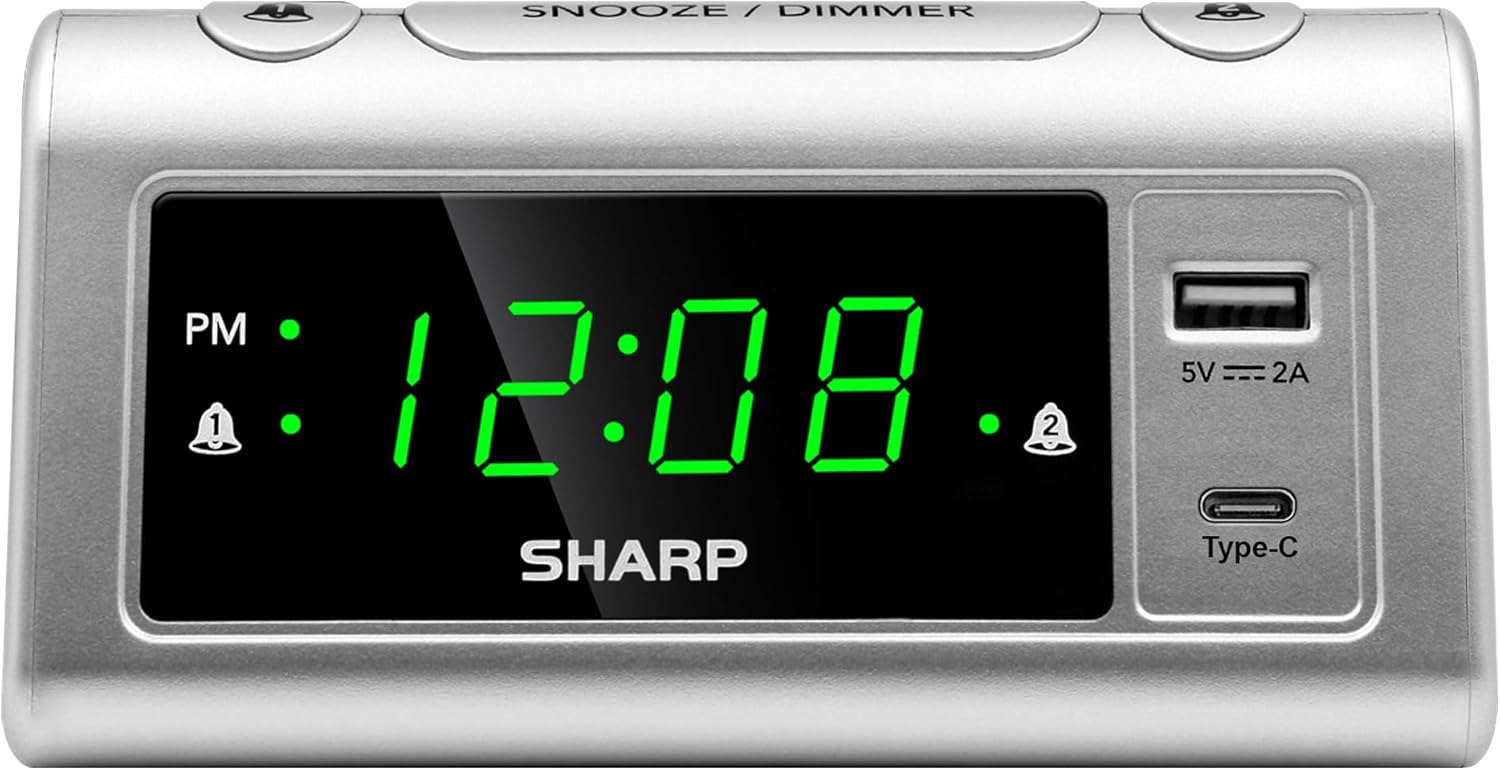
Davanti view of the Sharp Alarm Clock, showcasing the large green LED time display, PM indicator, alarm indicators, and the integrated USB-A and USB-C charging ports on the right side.

Top-down view of the alarm clock with labels indicating the 'Time Set', 'Time Advancing', 'Time Receding', 'Alarm 1 Set ON/OFF', 'Alarm 2 Set ON/OFF', 'Snooze/Dimmer Control (3-Levels of Brightness)', 'Super Fast Charging USB-C', and 'Fast Charging 2 Amp USB'. Dimensions are also shown as 5.65 inches wide and 2.95 inches high.
Impostare
1. Collegamento elettrico
Plug the AC power cord into a standard 120V AC wall outlet. The clock display will illuminate, and the time will default to 12:00 AM.
2. Installazione della batteria di backup
For optional battery backup, insert 2 x AAA batteries (not included) into the battery compartment located on the bottom of the unit. This feature ensures that time and alarm settings are retained during a power interruption. The display will not be lit during battery backup, but the alarm will still sound.

The bottom of the alarm clock, revealing the battery compartment for 2 AAA batteries (not included) to provide backup power for settings.
Istruzioni per l'uso
1. Impostazione dell'ora
- Premere e tenere premuto il tasto IMPOSTAZIONE DELL'ORA pulsante. Le cifre delle ore inizieranno a lampeggiare.
- Mentre si tiene IMPOSTAZIONE DELL'ORA, premere il tasto ORA ripetutamente il pulsante per regolare l'ora. Osservare l'indicatore PM per la corretta impostazione AM/PM.
- Mentre si tiene IMPOSTAZIONE DELL'ORA, premere il tasto MINUTO ripetutamente il pulsante per regolare i minuti.
- Rilasciare il IMPOSTAZIONE DELL'ORA pulsante per confermare l'ora.
2. Impostazione degli allarmi (doppi allarmi)
This clock features two independent alarms (Alarm 1 and Alarm 2).
- Premere e tenere premuto il tasto ALLARME 1 INSERITO pulsante. Le cifre dell'ora per la Sveglia 1 lampeggeranno.
- Mentre si tiene ALLARME 1 INSERITO, premere il tasto ORA pulsante per impostare l'ora desiderata per la sveglia.
- Mentre si tiene ALLARME 1 INSERITO, premere il tasto MINUTO pulsante per impostare i minuti desiderati per la sveglia.
- Rilasciare il ALLARME 1 INSERITO pulsante per confermare.
- To activate Alarm 1, press the ALLARME 1 ON/OFF button until the alarm indicator (bell icon) appears next to 'AL1' on the display.
- Ripetere i passaggi da 1 a 5 per ALLARME 2 INSERITO E ALLARME 2 ON/OFF to set and activate the second alarm.
3. Funzione snooze
Quando suona un allarme, premere il tasto grande SNOOZE / DIMMER button on top of the clock. The alarm will pause for 9 minutes and then sound again.
4. Dimmer del display
To adjust the brightness of the LED display, repeatedly press the SNOOZE / DIMMER button when the alarm is not sounding. Cycle through the three brightness levels (High, Medium, Low) and an Off setting.

The Sharp Alarm Clock displaying the time, with a hand adjusting the dimmer function on the top of the unit. This allows for comfortable viewin varie condizioni di illuminazione.
5. Porte di ricarica USB
The alarm clock features both a USB Type-C port and a standard USB Type-A port for charging your electronic devices. Simply connect your device's charging cable to the appropriate port on the right side of the clock.
- USB Tipo-C: Provides super-fast charging for compatible devices like the iPhone 15 or Galaxy smartphones.
- USB di tipo A: Consegna 2 Amps of fast charging power for other USB-powered devices.

The Sharp Alarm Clock with a smartphone connected to its USB-C port, indicating active charging. The clock also features a USB-A port for additional device charging.
Manutenzione
- Pulizia: Pulire l'orologio con un panno morbido e asciutto. Non utilizzare detergenti abrasivi o solventi.
- Cavo di alimentazione: Ispezionare regolarmente il cavo di alimentazione per verificare la presenza di eventuali danni. In caso di danni, interrompere l'uso e contattare l'assistenza clienti.
- Sostituzione della batteria: Replace AAA backup batteries annually or when the clock's settings are no longer retained during power outages.
Risoluzione dei problemi
| Problema | Soluzione |
|---|---|
| Il display dell'orologio è vuoto. | Ensure the AC power cord is securely plugged into a working outlet. Check if the dimmer is set to 'Off'. |
| L'allarme non suona. | Verify that the alarm is set and activated (bell icon visible). Check the alarm time is correct (AM/PM). |
| USB ports are not charging. | Ensure the clock is powered via AC. Check the charging cable and device compatibility. |
| Ora/impostazioni perse dopo lo spegnimentotage. | Install fresh AAA batteries for the backup function. |
Specifiche
- Marca: Affilato
- Modello: B0CHXR25FJ
- Colore: Argento
- Tipo di visualizzazione: LED (verde)
- Dimensioni del prodotto: 5.56"L x 2.67"A
- Fonte di energia: Elettrico con cavo
- Batteria di backup: 2 batterie AAA (non incluse)
- Uscita USB-C: Ricarica super veloce
- Uscita USB-A: 2 Amps Fast Charging
- Caratteristiche speciali: Charging Port, Corded, Dual Alarms, 3-Step Dimmer, Snooze
Video ufficiale del prodotto
An official video from Sharp, titled 'Sharp Clocks - Keeps the Rhythm of Your Day', showcasing the features and design of Sharp alarm clocks, including this model.
Garanzia e supporto
For warranty information or technical support, please refer to the documentation included with your product or visit the official Sharp websito. Conservare la ricevuta d'acquisto come prova d'acquisto per eventuali reclami in garanzia.


