1. Introduzione
Welcome to the user manual for your Beafon SL270 Basic Mobile Phone. This guide provides essential information to help you set up, operate, maintain, and troubleshoot your device. Please read this manual carefully to ensure proper use and to maximize the phone's features.

Figure 1: Beafon SL270 Basic Mobile Phone in its charging cradle.
The Beafon SL270 is designed for ease of use, featuring a large display and essential functions for reliable communication.
2. Impostazione
2.1 Contenuto della confezione
Prima di iniziare, assicurati che tutti gli articoli siano presenti nel pacco:
- Beafon SL270 Mobile Phone
- Batteria (1 agli ioni di litio)
- Cavo di ricarica
- Charging Cradle (if included)
- Manuale d'uso
2.2 Installazione della batteria
- Rimuovere la cover posteriore del telefono sollevandola delicatamente dalla tacca.
- Insert the Lithium-ion battery, ensuring the gold contacts align with the phone's terminals.
- Riposizionare il coperchio posteriore, premendo con decisione finché non scatta in posizione.
2.3 Installazione della scheda SIM
The Beafon SL270 uses a standard SIM card. Ensure your SIM card is activated by your network provider.
- Dopo aver rimosso la batteria, individuare lo slot della scheda SIM.
- Carefully insert the SIM card into the slot with the gold contacts facing down and the cut corner aligned correctly.
- Reinstallare la batteria e il coperchio posteriore.
2.4 Carica iniziale
Prima del primo utilizzo, caricare completamente la batteria del telefono.
- Connect the charging cable to the phone or place the phone in the charging cradle.
- Collega l'altra estremità del cavo di ricarica a una presa di corrente.
- The battery indicator on the screen will show charging progress. A full charge may take several hours.
2.5 Accensione/Spegnimento
- Per accendere: Tenere premuto il pulsante di accensione/fine chiamata (pulsante rosso) finché lo schermo non si illumina.
- Per spegnere: Tenere premuto il pulsante di accensione/fine chiamata finché non vengono visualizzate le opzioni di spegnimento, quindi selezionare "Spegni".
3. Istruzioni per l'uso
3.1 Navigazione nel menu
Use the navigation keys (up, down, left, right) and the central OK/Select button to move through the phone's menu. The left and right soft keys (below the screen) perform functions indicated on the display.

Figure 2: The Beafon SL270 features a large display for enhanced readability and comfort.
3.2 Effettuare e ricevere chiamate
- Per effettuare una chiamata: Inserire il numero di telefono tramite la tastiera e premere il pulsante Chiama (pulsante verde).
- Per ricevere una chiamata: Premere il pulsante Chiama (pulsante verde) quando il telefono squilla.
- Per terminare una chiamata: Premere il pulsante Termina chiamata (pulsante rosso).
3.3 Contacts and Photo Contacts
You can save frequently used numbers in your phone's contact list. The Beafon SL270 supports Photo Contacts, allowing you to assign a picture to up to 8 contacts for easy identification.
- Go to the 'Contacts' menu.
- Select 'Add New Contact' or 'Edit Contact'.
- Enter the name and number. For Photo Contacts, select the option to add a photo from your gallery or take a new one.
Figure 3: The Beafon SL270 allows for up to 8 photo contacts, making it easier to identify callers.
3.4 Pulsante di emergenza SOS
The Beafon SL270 features a dedicated SOS emergency button on the back of the device. This function allows you to quickly contact pre-set emergency numbers in critical situations.
- Impostazione dei numeri SOS: Navigate to the 'SOS Settings' in the menu. You can set up to 5 emergency contacts.
- Attivazione SOS: In an emergency, press and hold the SOS button on the back of the phone. The phone will automatically call and send an SMS to the pre-set numbers in sequence until a connection is made.

Figure 4: The SOS emergency button on the back of the Beafon SL270 allows for quick dialing of pre-selected emergency contacts.
3.5 Messaggistica (SMS)
Per inviare e ricevere messaggi di testo:
- Vai al menu "Messaggi".
- Seleziona "Scrivi messaggio" per comporre un nuovo SMS.
- Inserisci il numero del destinatario o selezionalo dai contatti, quindi digita il messaggio.
- Premere 'Invia'.
3.6 Camera and Light Signal
The phone is equipped with a camera for basic photo capture and a light signal feature.
- Telecamera: Access the camera from the main menu. Point and shoot to capture images.
- Segnale luminoso: The phone can provide a visual light signal for incoming calls or messages, useful in noisy environments or for users with hearing impairments. This feature can usually be enabled or disabled in the phone's settings under 'Call Settings' or 'Notification Settings'.

Figure 5: The Beafon SL270 provides a light signal for incoming calls or messages.
3.7 Altre caratteristiche
- Bluetooth: Per la connessione ad auricolari wireless o altri dispositivi Bluetooth.
- FM Radio: Ascolta le tue stazioni radio preferite.
- Sveglia: Imposta degli allarmi per i promemoria.
4. Manutenzione
4.1 Pulizia del telefono
Per mantenere il telefono in condizioni ottimali:
- Utilizzare un panno morbido e asciutto per pulire la superficie del telefono.
- Evitare l'uso di prodotti chimici aggressivi, solventi per la pulizia o detergenti aggressivi.
- Do not expose the phone to excessive dust, moisture, or extreme temperatures.
4.2 Cura della batteria
- Evitare di scaricare completamente la batteria frequentemente.
- Non lasciare il telefono collegato al caricabatterie per periodi prolungati dopo averlo caricato completamente.
- If the phone will not be used for a long time, charge the battery to about 50% before storing it.
4.3 Aggiornamenti software
While specific software update information is not available, it is generally recommended to keep your device's software updated to ensure optimal performance and security. Check the manufacturer's website or contact support for any available updates.
5. Risoluzione Dei Problemi
If you encounter issues with your Beafon SL270, try the following solutions:
| Problema | Possibile causa | Soluzione |
|---|---|---|
| Il telefono non si accende | La batteria è scarica o non è installata correttamente. | Caricare la batteria. Assicurarsi che la batteria sia inserita correttamente. |
| Nessun segnale di rete | SIM card issue, out of network coverage. | Controlla l'installazione della scheda SIM. Spostati in una zona con una migliore copertura di rete. Contatta il tuo operatore telefonico. |
| Non è possibile effettuare/ricevere chiamate | No network, incorrect number, call barring. | Check signal strength. Verify the number. Check call barring settings. |
| Problemi audio (nessun suono/volume basso) | Volume too low, speaker/earpiece blocked. | Adjust volume. Clean speaker/earpiece openings. |
| Phone freezes/unresponsive | Problema temporaneo del software. | Remove and reinsert the battery to restart the phone. |
If the problem persists after trying these solutions, please contact Beafon customer support.
6. Specifiche
Detailed technical specifications for the Beafon SL270:
| Caratteristica | Dettaglio |
|---|---|
| Marca | Faro |
| Numero di modello | B0CJ6KX594 |
| Dimensioni dello schermo | 3.5 pollici |
| Tipo di visualizzazione | LCD |
| Risoluzione | 480x320 |
| Tecnologia di connettività | Bluetooth, Wi-Fi, USB |
| Tecnologia di rete wireless | Wifi |
| Operatore di telefonia mobile | Tutti gli operatori (sbloccati) |
| Risoluzione della telecamera posteriore | 3 Megapixel |
| Caratteristiche speciali | Wi-Fi, USB, Touchscreen, Camera, Flash, Radio |
| Batteria | 1 agli ioni di litio (inclusa) |
| Anno del modello | 2023 |
| Memoria | 1 (unit not specified, typically GB or MB for basic phones) |
| Disponibilità dei pezzi di ricambio | Informazioni non disponibili |
| Aggiornamenti software garantiti fino al | Informazioni non disponibili |
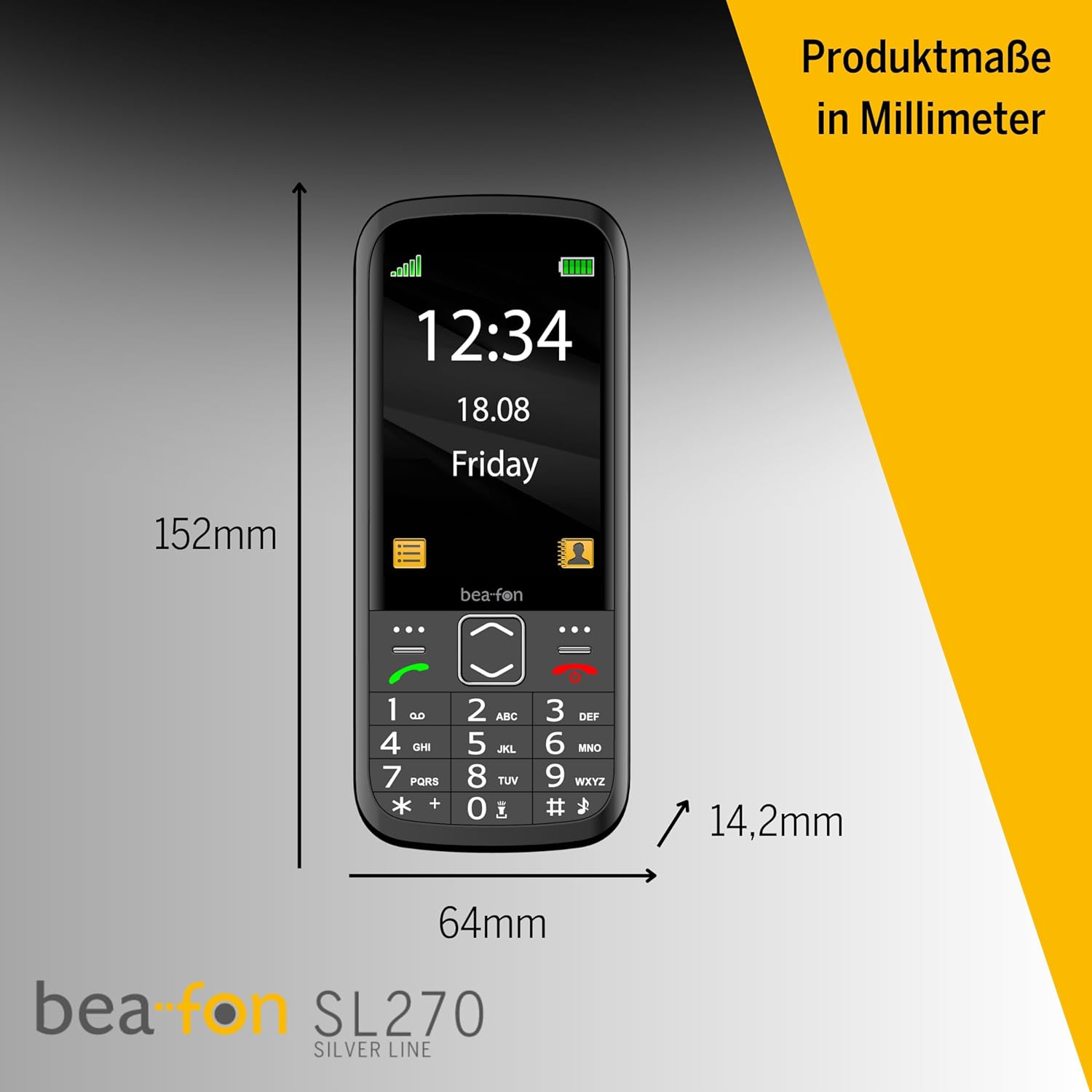
Figure 6: Product dimensions of the Beafon SL270 in millimeters.
7. Garanzia e supporto
7.1 Informazioni sulla garanzia
For detailed warranty information, please refer to the warranty card included with your product or visit the official Beafon websito. La garanzia copre in genere i difetti di fabbricazione per un periodo di tempo specificato a partire dalla data di acquisto.
7.2 Assistenza clienti
If you require further assistance, have questions not covered in this manual, or need technical support, please contact Beafon customer service. Contact details can usually be found on the official Beafon websito o sulla confezione del prodotto.
- Supporto online: Visita il sito ufficiale Beafon websito per FAQ, articoli di supporto e moduli di contatto.
- Supporto telefonico: Check the Beafon websito per i numeri di telefono del servizio clienti regionale.