1. Introduzione
This manual provides detailed instructions for the setup, operation, and maintenance of your McbeAn Multifunction Digital Weather Station, model TS-3310-BK. This device is designed to provide accurate indoor and outdoor temperature, humidity, and air pressure readings, along with weather forecasts and timekeeping functions.
Please read this manual thoroughly before using the product to ensure correct operation and to maximize its lifespan.
2. Contenuto della confezione
Dopo aver disimballato, verificare che tutti gli articoli elencati di seguito siano presenti e in buone condizioni:
- 1 x Digital Weather Station (Main Unit)
- 1 cavo USB
- 1 sensore esterno wireless
- 1 x Manuale utente (questo documento)
Note: 2 x AAA batteries for the main unit and 2 x AA batteries for the remote sensor are not included and must be purchased separately.
3. Caratteristiche del prodotto
The McbeAn Multifunction Digital Weather Station offers a range of features for comprehensive environmental monitoring:
- Monitoraggio interno ed esterno: Real-time display of temperature and humidity for both indoor and outdoor environments.
- Registrazioni di temperatura e umidità: Tracks highest and lowest temperature and humidity readings.
- Pressione barometrica: Displays current barometric pressure and trend changes.
- Previsioni del tempo: Predicts weather conditions for the next 12 hours based on air pressure data.
- Ora e data: Visualizza l'ora corrente, la data e il giorno della settimana.
- Sveglia e funzione snooze: Integrated alarm function with a snooze option.
- Visualizzazione delle fasi lunari: Mostra la fase lunare attuale.
- Luminosità regolabile: Large LCD screen with 4 levels of brightness adjustment for optimal viewing.
- Modalità doppia alimentazione: Can be powered by an AC adapter (USB cable included) or AAA batteries.
- Sensore wireless: Outdoor sensor transmits data wirelessly up to 60 meters in an open area, supporting up to 3 channels.
4. Guida all'installazione
4.1 Alimentazione dell'unità principale
- Installazione della batteria: Open the battery compartment on the back of the main unit. Insert 2 x AAA batteries (not included) according to the polarity markings (+/-).
- Alimentazione USB: Alternatively, connect the provided USB cable to the main unit's power port and plug the other end into a USB power adapter (not included) or a compatible USB port.
Note: Using the USB cable provides continuous power and allows for brightness adjustment. Batteries serve as a backup or for portable use.
4.2 Alimentazione del sensore esterno wireless
- Aprire il vano batteria sul retro del sensore esterno wireless.
- Inserire 2 batterie AA (non incluse) rispettando la polarità indicata (+/-).
- Chiudere bene il vano batterie.
Ensure the sensor is placed in a shaded, dry location outdoors, protected from direct sunlight and rain, for accurate readings. The maximum transmission range is 60 meters in an open area.
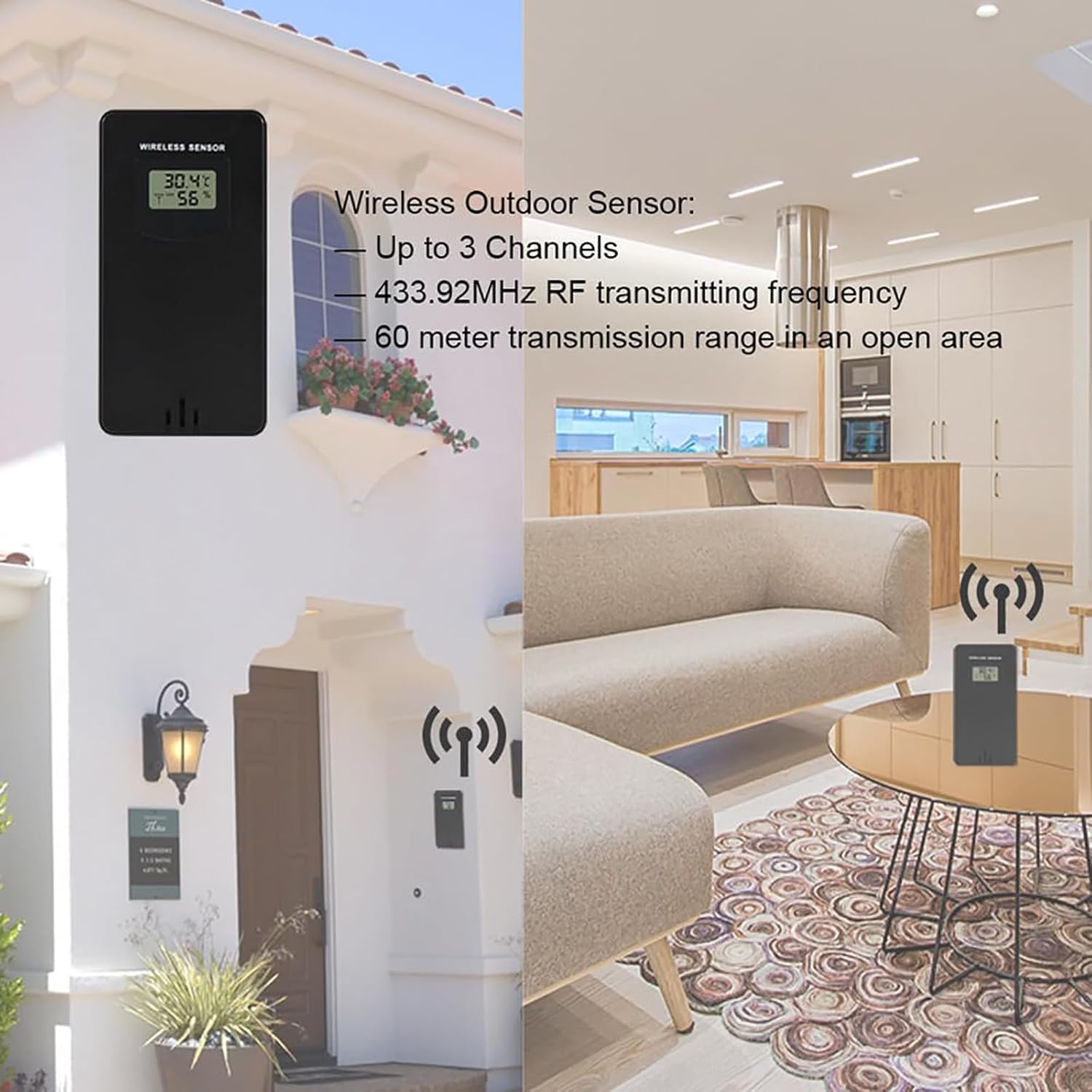
Descrizione dell'immagine: This image shows the wireless outdoor sensor mounted on the exterior wall of a house, displaying temperature and humidity. On the right, the main weather station unit is placed on a table indoors, illustrating the wireless connection between the two devices. The image highlights the sensor's wireless capability and optimal placement.
4.3 Associazione del sensore all'unità principale
Once both units are powered, the main unit will automatically search for the outdoor sensor. The outdoor temperature and humidity should appear on the main unit's display within a few minutes. If not, follow these steps:
- Press and hold the "CHAN" button on the main unit to initiate a manual search for the sensor.
- Ensure the sensor is within range and not obstructed by thick walls or large metal objects.
- If pairing fails, remove and reinsert batteries from both units, then try again.
5. Istruzioni per l'uso
5.1 Fine displayview
The large LCD screen displays various information simultaneously. Refer to the diagram below for key display areas:

Descrizione dell'immagine: This image displays the main unit's LCD screen, clearly showing the current time (13:26), date (30-12 SUN), indoor temperature (39.8°C) and humidity (42%), outdoor temperature (33.9°C) and humidity (60%), and a weather forecast icon (partly cloudy). The moon phase is also visible in the upper right corner.
5.2 Impostazione di data e ora
- Press and hold the "TIME" button to enter time setting mode.
- Use the "UP" or "DOWN" buttons to adjust the flashing value (e.g., hour, minute, year, month, day).
- Press "TIME" again to confirm the setting and move to the next parameter.
- Ripetere l'operazione fino al completamento delle impostazioni di data e ora.
5.3 Impostazione dell'allarme
- Press the "ALARM" button once to display the alarm time.
- Tenere premuto il pulsante "ALARM" per accedere alla modalità di impostazione della sveglia.
- Utilizzare "SU" o "GIÙ" per regolare l'ora e i minuti.
- Premere "ALARM" per confermare.
- To activate/deactivate the alarm, press the "ALARM" button briefly when the alarm time is displayed. An alarm icon will appear/disappear.
5.4 Funzione posticipa
When the alarm sounds, press the "SNZ" button to activate the snooze function. The alarm will temporarily stop and sound again after approximately 5 minutes.
5.5 Selezione dell'unità di temperatura (°C/°F)
Briefly press the "UP" button to switch between Celsius (°C) and Fahrenheit (°F) temperature display.
5.6 Regolazione della luminosità
When powered by the USB cable, briefly press the "DOWN" button to cycle through 4 levels of screen brightness.
5.7 Previsioni del tempo
The weather station calculates a weather forecast for the next 12 hours based on changes in barometric pressure. The forecast is represented by intuitive icons:

Descrizione dell'immagine: This image illustrates the five weather forecast icons used by the station: Sunny, Slightly Cloudy, Cloudy, Rainy, and Snowy. Below the icons, text explains that the weather station forecasts the next 12 hours based on barometric pressure trends.
- Soleggiato
- Leggermente nuvoloso
- Nuvoloso
- Piovoso
- Nevoso
Note: The weather forecast is an estimation and may not always be 100% accurate. It is based on local barometric pressure changes, not satellite data.
5.8 Indicatore del livello di comfort
The main unit features a comfort level indicator based on indoor humidity, helping you maintain a comfortable indoor environment.

Descrizione dell'immagine: This image shows a 5-level comfort indicator bar with labels for "Dry", "Comfortable", and "Moist" zones. It indicates the indoor comfort level based on humidity, helping users understand their environment at a glance.
6. Manutenzione
- Pulizia: Pulire l'unità principale e il sensore con un panno morbido e asciutto.amp panno. Non usare detergenti abrasivi o solventi.
- Sostituzione della batteria: Sostituire le batterie in entrambe le unità quando sul display compare l'indicatore di batteria scarica. Assicurarsi che la polarità sia corretta.
- Posizionamento: Ensure the outdoor sensor remains in a protected, shaded location for optimal performance and longevity.
7. Risoluzione Dei Problemi
| Problema | Possibile causa | Soluzione |
|---|---|---|
| Nessun display sull'unità principale | Low or no batteries; USB cable not connected/faulty. | Install fresh AAA batteries or connect the USB cable to a working power source. |
| Letture esterne non visualizzate o imprecise | Outdoor sensor batteries low/dead; sensor out of range; interference; sensor exposed to direct elements. | Replace AA batteries in the sensor. Move sensor closer to the main unit. Relocate sensor to a shaded, protected area. Press "CHAN" on main unit to re-sync. |
| Ora/data errate | Ora/data non impostate correttamente. | Follow instructions in Section 5.2 to set time and date. |
| Weather forecast seems wrong | Forecast is an estimation based on local barometric pressure. | Understand that the forecast is a general trend and not a precise prediction. Allow time for the station to gather sufficient pressure data. |
8. Specifiche
- Intervallo di temperatura interna: da -9.9°C (14.2°F) a 50°C (122°F)
- Intervallo di temperatura esterna: Da -40°C (-40°F) a 70°C (158°F)
- Gamma di umidità: Da 20% RH a 95% RH
- Unità di temperatura: Celsius (°C) / Fahrenheit (°F) switchable
- Trasmissione senza fili: 433.92MHz RF, up to 60 meters (open area)
- Alimentazione (unità principale): 2 batterie AAA (non incluse) o cavo USB (incluso)
- Power Supply (Sensor): 2 batterie AA (non incluse)
- Materiale: addominali
- Colore: Black + Clear glass
- Waterproof Rating (Sensor): Grado di protezione IPX4
- Tipo di visualizzazione: LCD with 4 brightness levels
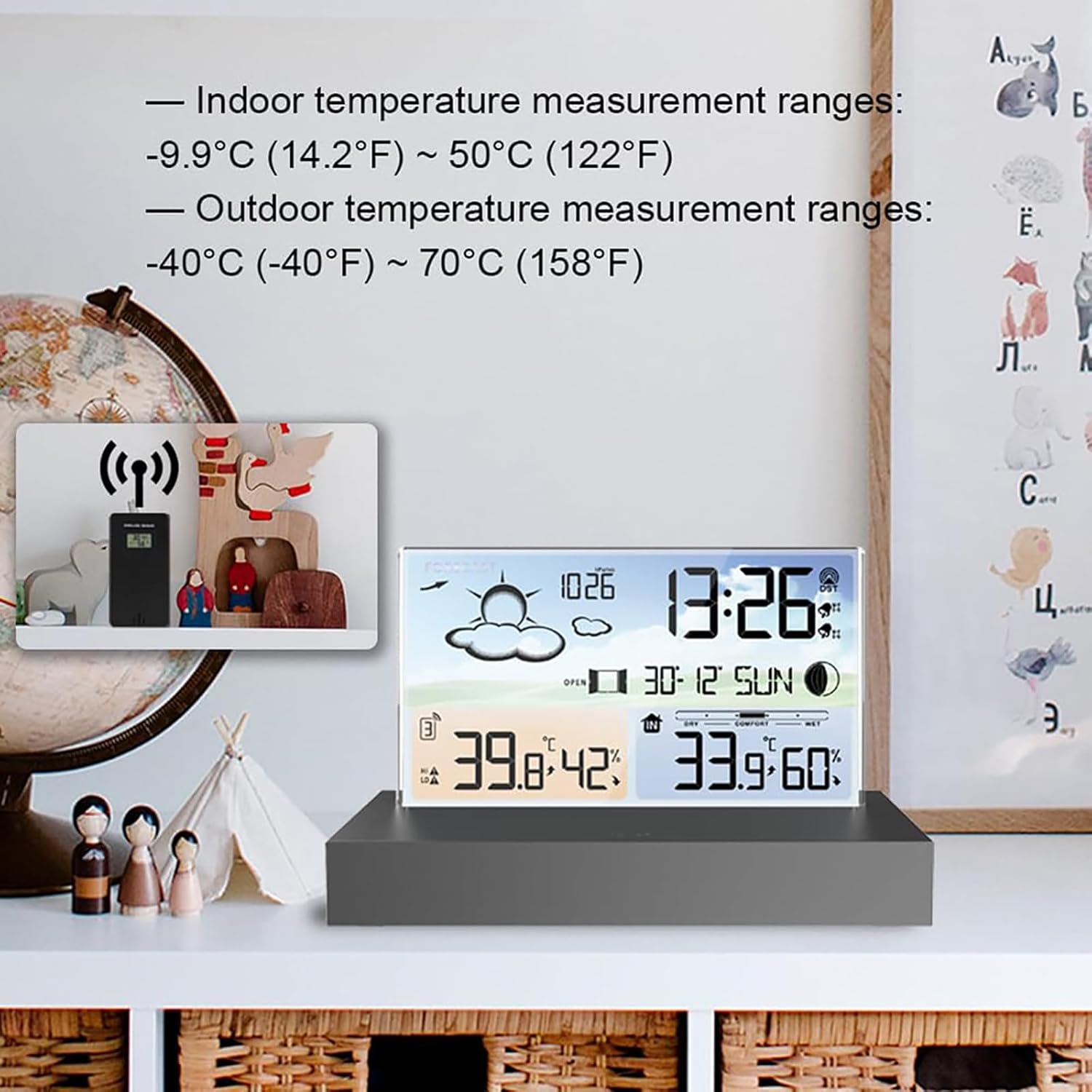
Descrizione dell'immagine: This image highlights the temperature measurement ranges for both indoor and outdoor environments. It shows the main unit displaying indoor temperature from -9.9°C (14.2°F) to 50°C (122°F) and outdoor temperature from -40°C ((-40°F) to 70°C (158°F).
9. Video del prodotto finitoview
Descrizione del video: Questo video fornisce una breve panoramicaview of a similar weather station, showcasing its multi-language display support, power port (USB interface), and the wireless connection between the main unit and the outdoor sensor. It demonstrates the device's design and basic functionality.
10. Garanzia e supporto
McbeAn products are designed for reliability and performance. This product comes with a standard manufacturer's warranty against defects in materials and workmanship. Please refer to the packaging or contact customer support for specific warranty terms and conditions.
For technical support, troubleshooting assistance, or warranty claims, please contact McbeAn customer service through your retailer or the official McbeAn websito.