Introduzione
Thank you for choosing the SUNOL GM20 True Wireless Earbuds. This manual provides detailed instructions on how to set up, operate, and maintain your earbuds to ensure optimal performance and longevity. Please read this manual thoroughly before using the product.
Prodotto finitoview

Image: The GM20 True Wireless Earbuds in orange, shown with their matching charging case. The charging case features an LED display indicating battery percentage.
The GM20 True Wireless Earbuds are designed for a superior audio experience with advanced features:
- Tecnologia Bluetooth 5.3: Ensures faster pairing, more stable connection, and lower power consumption with an effective range of up to 10 meters.
- Microfono integrato: High-quality microphone with environmental noise reduction for clear hands-free calls.
- Riproduzione estesa: Up to 48 hours of total playback time with the 600mAh charging case, which can recharge the earbuds four times.
- Display a LED: The charging case features an LED display to show the power levels of both the earbuds and the charging case.
- Design impermeabile: IPX8 waterproof nano-coating makes the earbuds suitable for various activities, including sports.
- Vestibilità comoda: Ergonomic in-ear design with multiple ear tip sizes for prolonged comfortable wear.
Cosa c'è nella scatola
Upon opening your GM20 True Wireless Earbuds package, you should find the following items:
- GM20 True Wireless Earbuds (Left and Right)
- Custodia di ricarica
- Cavo di ricarica
- Multiple sizes of Ear Tips
- Manuale dell'utente (questo documento)
Impostare
1. Ricarica degli auricolari e della custodia
Prima del primo utilizzo, assicurarsi che sia gli auricolari sia la custodia di ricarica siano completamente carichi.
- Place the earbuds into the charging case. Ensure they are correctly seated; the LED display on the case will show charging status.
- Connect the charging cable to the charging port on the case and to a USB power source. The LED display will indicate the charging progress of the case.
- A full charge for the case typically takes a few hours. The earbuds will charge automatically when placed inside the powered case.

Image: The GM20 charging case displaying "100" on its LED screen, indicating a full charge. An earbud is shown next to it, ready for use.
2. Associazione con il dispositivo (associazione in un unico passaggio)
Per maggiore praticità, gli auricolari GM20 sono dotati di associazione automatica.
- Abbinamento iniziale:
- Apri la custodia di ricarica ed estrai entrambi gli auricolari. Si accenderanno automaticamente ed entreranno in modalità di associazione.
- Sul tuo dispositivo (smartphone, tablet, ecc.), attiva il Bluetooth.
- Cercare Bluetooth devices and select "GM20 TWS" from the list.
- Una volta effettuata la connessione, sentirai un tono di conferma e gli auricolari saranno pronti per l'uso.
- Riassociazione: The earbuds will automatically connect to the last paired device when taken out of the charging case.
- If the earbuds do not connect automatically, ensure Bluetooth is enabled on your device and select "GM20 TWS" from your Bluetooth settings.
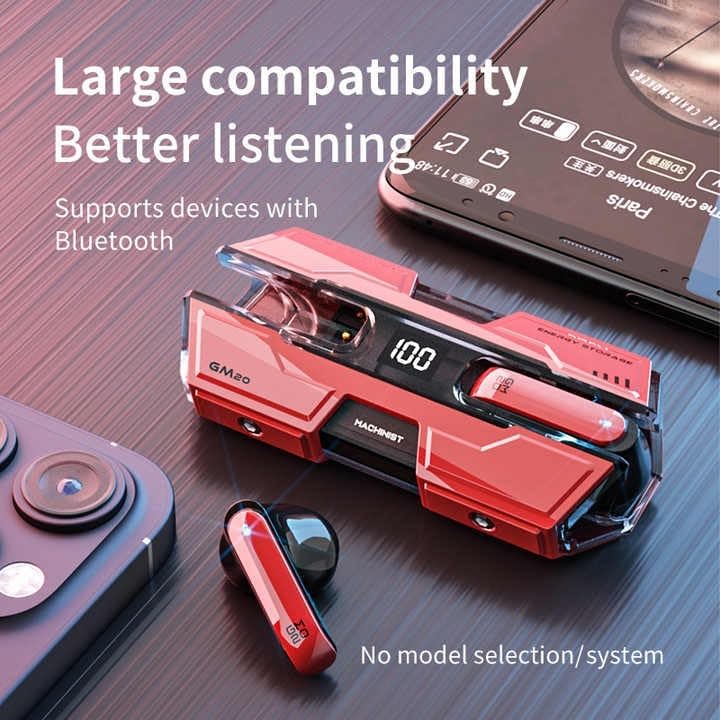
Image: The GM20 earbuds and charging case positioned near a smartphone, emphasizing their broad compatibility with Bluetooth-enabled devices.
Istruzioni per l'uso
Controlli auricolari
The GM20 earbuds feature a multifunction button on each earbud for easy control of audio playback and calls.
| Azione | Funzione |
|---|---|
| Pressione singola (auricolare sinistro/destro) | Riproduci/Metti in pausa la musica, Rispondi/Termina chiamata |
| Doppia pressione (auricolare sinistro) | Canzone precedente |
| Doppia pressione (auricolare destro) | Prossima canzone |
| Pressione lunga (2 secondi) | Rifiuta chiamata, attiva assistente vocale |
| Pressione lunga (5 secondi) | Accensione/spegnimento |
Indossare gli auricolari
For optimal sound quality and comfort, ensure the earbuds are properly seated in your ears. Experiment with the different sizes of ear tips provided to find the best fit for your ears.

Immagine: Un esploso view diagram of an earbud, illustrating its internal components such as the 13mm moving coil and composite diaphragm, which contribute to high-resolution sound.
Manutenzione
Proper maintenance will extend the life of your GM20 earbuds.
- Pulizia: Pulisci regolarmente gli auricolari e la custodia di ricarica con un panno morbido, asciutto e privo di lanugine. Non utilizzare detergenti abrasivi o solventi.
- Resistenza all'acqua: The earbuds are IPX8 waterproof, meaning they are protected against prolonged immersion in water. However, the charging case is not waterproof. Avoid exposing the charging case to liquids. Always ensure earbuds are dry before placing them back in the charging case.
- Magazzinaggio: Quando non li usi, riponi gli auricolari nella loro custodia di ricarica per proteggerli e mantenerli carichi. Conservali in un luogo fresco e asciutto, lontano da temperature estreme.
- Cura della batteria: Per preservare la durata della batteria, evitare di scaricare completamente gli auricolari e la custodia di ricarica frequentemente. Ricaricarli regolarmente, anche se non vengono utilizzati costantemente.
Risoluzione dei problemi
If you encounter issues with your GM20 earbuds, try the following solutions:
- Gli auricolari non si associano:
- Assicurarsi che entrambi gli auricolari siano completamente carichi.
- Disattiva il Bluetooth sul tuo dispositivo, quindi riattivalo.
- Forget "GM20 TWS" from your device's Bluetooth settings and attempt to re-pair.
- Riporre gli auricolari nella custodia, chiudere il coperchio, attendere qualche secondo, quindi riaprirlo e riprovare.
- Nessun suono o volume basso:
- Controlla il livello del volume sia sul dispositivo che sugli auricolari.
- Assicurati che gli auricolari siano collegati correttamente al tuo dispositivo.
- Pulisci eventuali detriti dalla rete dell'altoparlante dell'auricolare.
- Sound distortion or crackling:
- Assicurati che gli auricolari si trovino entro un raggio di 10 metri dal tuo dispositivo Bluetooth.
- Ridurre le interferenze allontanandosi da altri dispositivi wireless o da forti campi elettromagnetici.
- Prova ad associare nuovamente gli auricolari.
- Gli auricolari non si caricano:
- Assicurarsi che il cavo di ricarica sia collegato saldamente sia alla custodia sia alla fonte di alimentazione.
- Controllare che la porta di ricarica sulla custodia sia pulita e priva di detriti.
- Prova un cavo di ricarica o un adattatore di alimentazione diverso.
Specifiche
| Caratteristica | Dettaglio |
|---|---|
| Nome del modello | K8 |
| Versione Bluetooth | 5.3 |
| Portata Bluetooth | 10 metri |
| Durata della batteria (auricolari) | Circa 8-10 ore (carica singola) |
| Durata della batteria (con custodia di ricarica) | Fino a 48 ore |
| Capacità della batteria della custodia di ricarica | 600mAh |
| Livello di resistenza all'acqua | IPX8 (solo auricolari) |
| Risposta in frequenza | 20 Hz - 20 KHz |
| Impedenza | 32 Ohm |
| Metodo di controllo | Tocco/Pulsante |
| Materiale | Acrilonitrile Butadiene Stirene (ABS) |
| Peso dell'articolo | 14.4 once (confezione totale) |
Garanzia e supporto
For warranty information and customer support, please refer to the documentation included with your purchase or visit the official SUNOL website. If you experience any issues not covered in this manual, please contact SUNOL customer service for assistance.
Conservare la prova d'acquisto per eventuali richieste di garanzia.


