Introduzione
This manual provides detailed instructions for the SUNOL GM20 True Wireless Earbuds. Please read this manual carefully before using the product to ensure proper operation and to maximize your listening experience. These earbuds feature Bluetooth 5.3 connectivity, a waterproof design, and a charging case with an LED display.
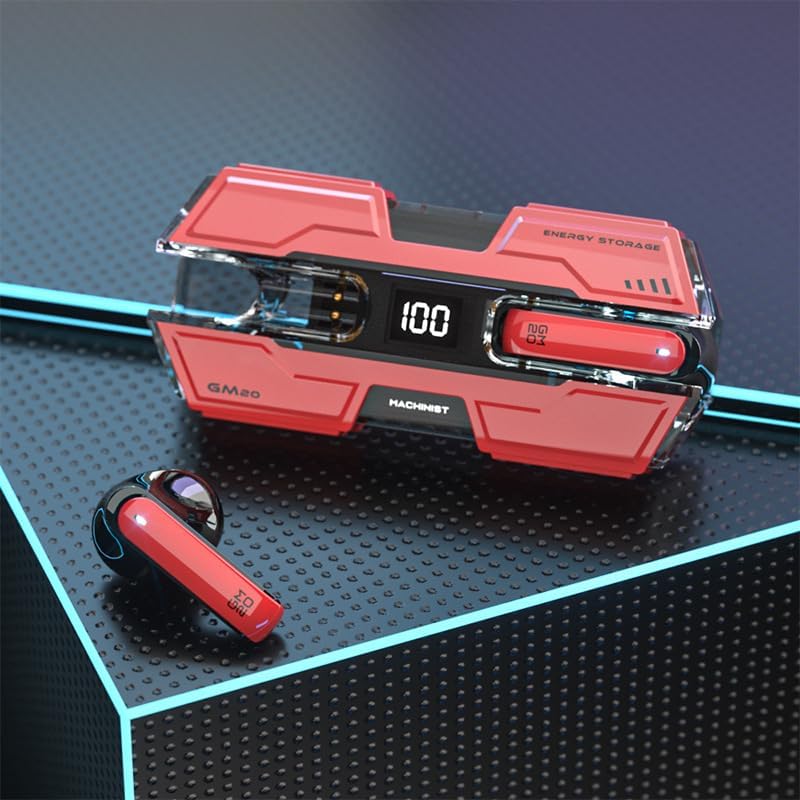
Image: The SUNOL GM20 True Wireless Earbuds with their charging case, showcasing the design and LED display.
Contenuto della confezione
Assicurarsi che tutti gli articoli siano presenti nel pacco:
- GM20 True Wireless Earbuds (Left and Right)
- Custodia di ricarica
- Cavo di ricarica
- Manuale d'uso
- Diverse misure di gommini auricolari
Caratteristiche del prodotto
- Tecnologia Bluetooth 5.3: Offers faster pairing, stable connection, and lower power consumption with an effective range of up to 10 meters.
- Riproduzione di 48 ore: The charging case provides multiple charges, extending total listening time.
- IPX8 impermeabile: Designed to withstand water exposure, suitable for sports and outdoor activities.
- Display a LED: The charging case features an LED display to show battery life.
- Audio con bassi profondi: Equipped with a 14mm dynamic bass unit for enhanced sound quality.
- Microfono incorporato: Supports hands-free calls with environmental noise reduction.
- Design ergonomico: Leggero e comodo da indossare a lungo.

Image: The GM20 earbuds and charging case, emphasizing Bluetooth 5.3 and high-definition sound quality.

Immagine: Un esploso view diagram illustrating the internal components of the earbud, highlighting the 13mm moving coil and composite diaphragm for high-fidelity sound.
Impostare
1. Ricarica degli auricolari e della custodia di ricarica
Before first use, fully charge the earbuds and the charging case. Connect the provided charging cable to the charging case and a USB power source. The LED display on the charging case will indicate the charging status and battery level. When charging the earbuds inside the case, the display will show their individual battery life.
2. Accensione/Spegnimento
- Accensione: Gli auricolari si accendono automaticamente quando vengono rimossi dalla custodia di ricarica.
- Spegni: Riposiziona gli auricolari nella custodia di ricarica per spegnerli automaticamente e iniziare la ricarica.
3. Associazione con un dispositivo
Per maggiore praticità, gli auricolari supportano l'associazione in un solo passaggio.
- Assicurati che gli auricolari siano carichi.
- Apri la custodia di ricarica e rimuovi entrambi gli auricolari. Si accenderanno automaticamente e tenteranno di connettersi tra loro.
- After approximately 10 seconds, the earbuds will enter pairing mode.
- Sul tuo dispositivo (smartphone, tablet, ecc.), attiva il Bluetooth e cerca i dispositivi disponibili.
- Select "GM20 TWS" from the list of found devices to complete the pairing process.
- Una volta associati, gli auricolari si connetteranno automaticamente all'ultimo dispositivo associato quando vengono rimossi dalla custodia di ricarica.

Image: The GM20 earbuds and charging case, illustrating the quick connect and pairing process with a smartphone.
Istruzioni per l'uso
1. Indossare gli auricolari
Select the ear tips that provide the most comfortable and secure fit. Insert the earbuds gently into your ear canal and rotate slightly until they feel snug. A proper fit ensures optimal sound quality and noise isolation.
2. Controlli di base
Gli auricolari sono dotati di un pulsante multifunzione per vari controlli:
- Riproduci/Pausa musica: Single press the multifunction button on either earbud.
- Prossima canzone: Double press the multifunction button on the right earbud.
- Canzone precedente: Double press the multifunction button on the left earbud.
- Rispondi/Termina chiamata: Single press the multifunction button on either earbud during an incoming call or active call.
- Rifiuta chiamata: Press and hold the multifunction button on either earbud during an incoming call.
- Controllo del volume: (Note: Specific volume control via earbuds is not detailed in product information. Adjust volume via your connected device.)
3. Funzionalità impermeabile
The GM20 earbuds are designed with an IPX8 waterproof nano-coating, making them resistant to water. This feature makes them suitable for activities such as running, cycling, and other sports where exposure to sweat or light rain may occur. Avoid prolonged submersion in water.

Image: The GM20 earbuds and charging case in a gaming context, highlighting fast transmission and no delay for an enhanced experience.
Manutenzione
1. Pulizia
Regularly clean your earbuds and charging case to maintain optimal performance and hygiene. Use a soft, dry, lint-free cloth. For stubborn dirt, a slightly damp È possibile utilizzare un panno, ma assicurarsi che non penetri umidità nelle aperture degli auricolari o nelle porte di ricarica. Non utilizzare prodotti chimici aggressivi o materiali abrasivi.
2. Conservazione
Quando non li usi, conserva gli auricolari nella loro custodia di ricarica per proteggerli da polvere e danni e mantenerli carichi. Conserva la custodia in un luogo fresco e asciutto, lontano dalla luce solare diretta e da temperature estreme.
3. Cura della batteria
To prolong battery life, avoid fully discharging the earbuds and charging case frequently. Charge them regularly, even if not in constant use. Do not expose batteries to excessive heat.
Risoluzione dei problemi
- Gli auricolari non si associano tra loro: Place both earbuds back into the charging case, close the lid, wait a few seconds, then remove them again. They should automatically connect.
- Gli auricolari non si connettono al dispositivo: Ensure Bluetooth is enabled on your device and the earbuds are in pairing mode. Forget "GM20 TWS" from your device's Bluetooth list and try pairing again.
- Nessun suono da un auricolare: Check if both earbuds are charged. Try resetting them by placing them in the case and then removing them.
- Problemi di ricarica: Assicurarsi che il cavo di ricarica sia collegato saldamente e che la fonte di alimentazione sia funzionante. Pulire i contatti di ricarica sia sugli auricolari che sulla custodia.
- Scarsa qualità del suono: Ensure the earbuds are properly seated in your ears. Try different sized ear tips for a better seal. Check the audio source device for any issues.
Specifiche tecniche
| Nome del modello | GM20 (K8) |
| Versione Bluetooth | 5.3 |
| Portata Bluetooth | Fino a 10 metri |
| Durata della batteria (auricolari) | Approximately 48 hours with charging case |
| Custodia di ricarica Batteria | 600mAh |
| Livello di resistenza all'acqua | Grado di protezione IPX8 |
| Tipo di driver audio | Driver dinamico da 14 mm |
| Gamma di frequenza | 20 Hz - 20 KHz |
| Metodo di controllo | Tocco/Pulsante |
| Materiale | Acrilonitrile Butadiene Stirene (ABS) |
Informazioni sulla garanzia
The SUNOL GM20 True Wireless Earbuds come with a standard manufacturer's warranty. Please refer to the warranty card included in your package or contact customer support for specific details regarding warranty coverage and duration. Keep your proof of purchase for warranty claims.
Assistenza clienti
If you encounter any issues not covered in this manual or require further assistance, please contact SUNOL customer support. Contact information can typically be found on the product packaging or the official SUNOL websito.