Introduzione
This manual provides detailed instructions for the installation, operation, and maintenance of your GLEDOPTO WLED Digital Strip Controller (Model GL-C-008WL). This controller is designed to manage various LED strip types, offering extensive dynamic lighting modes and app control capabilities without the need for a separate hub.

Immagine: Oltreview of the GLEDOPTO WLED Digital Strip Controller, showing its compact design and connectivity options.
Caratteristiche del prodotto
- Ampio volumetage Compatibilità: Supports DC 5-24V power input.
- Chipset avanzato: Equipped with a 4MB ESP8266 Chip, allowing for official WLED firmware upgrades.
- Extensive Dynamic Modes: Over 100 dynamic lighting modes available via the WLED app.
- Broad LED Strip Compatibility: Compatible with RGB, RGBW, WS2812B, WS2811, SK6812, TM1814, WS2813, and WS2815 LED strip types.
- Funzionamento senza hub: Direct WiFi APP control without the need for an additional hub.
- High IC Quantity Support: Supports up to 800 ICs (Integrated Circuits) for complex lighting setups.
Contenuto della confezione
- 1 x GLEDOPTO WLED Digital Strip Controller (Model GL-C-008WL)
Note: LED strips and power supply are sold separately and are required for operation.
Specifiche
| Nome del prodotto | WLED Strip Light Controller |
| Modello n. | Codice articolo: GL-C-008WL |
| Voltage | DC 5-24V |
| Quantità IC | 800 Massimo |
| Corrente totale | 10A massimo |
| Dimensioni | 89 x 48 x 23.5 mm |
| Temperatura di esercizio | -20 a 45°C |
| Tipi di strisce supportati | WS2811, SK6812, SM16703P, WS2812B, TM1814, WS2813, WS2815 |
| Metodo di controllo | Controllo app (app WLED) |
| Connettività | Wifi |

Image: Illustration indicating the maximum 800 ICs supported by the controller. It is important to ensure the power supply is adequate if the number of ICs is large.
Informazioni sulla sicurezza
- Garantire l'alimentazione voltage matches the controller's specifications (DC 5-24V).
- Do not exceed the maximum total current of 10A. Overloading can damage the device and pose a fire hazard.
- Installare il controller in un ambiente asciutto, lontano da umidità e temperature estreme.
- Disconnect power before making any wiring connections or disconnections.
- Tenere fuori dalla portata dei bambini.
Impostare
1. Istruzioni per il cablaggio
Carefully connect your LED strip and power supply to the controller as shown in the diagram below. The group of 'D' for GPIO2 is the default output and should be used first. The other group of 'D' is GPIO5, which can be configured via the app.

Image: Detailed wiring instructions for connecting the LED strip and power input to the controller's terminals. Note the GPIO2 and GPIO5 output groups.
- Potenza in ingresso (V+, V-): Connect your DC 5-24V power supply to the V+ and V- terminals. Ensure correct polarity.
- LED Strip Output (G, D, V): Connect your LED strip to the output terminals. The default output is GPIO2.
- G: Terra
- D: Data (for addressable LED strips)
- V: Voltage (for LED strips requiring direct voltage connessione)
- Preparazione del filo: For optimal connection, strip wires 9-10mm.
2. Installazione e connessione dell'app
The GLEDOPTO WLED Digital Strip Controller uses the WLED app for control. Cercare "WLED" in your device's app store (iOS/Android) and install it. Follow the in-app instructions to connect the controller to your WiFi network and add it to the app.
Istruzioni per l'uso
1. Basic Button Function
The controller features a physical button for basic control:
- Pressione breve: Attiva/disattiva la striscia LED.
- Long press (for 1 second): Switches the color or dynamic mode.

Image: Diagram illustrating the short press for On/Off and long press for color/mode switching on the controller's button.
2. Controllo tramite APP per smartphone
The WLED app provides comprehensive control over your LED strips. No gateway is required for app control.
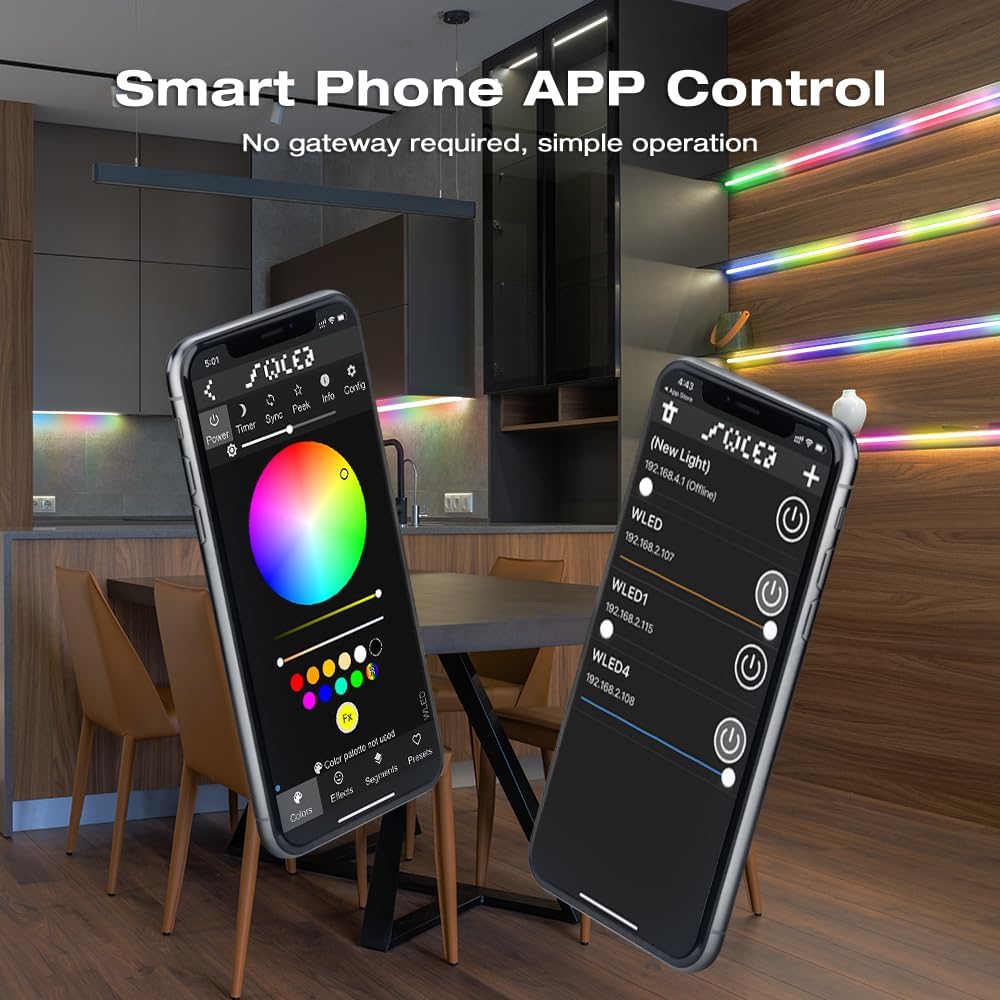
Image: Screenshots of the WLED smartphone application interface, demonstrating color selection, effects, and device management.
- Selezione del colore: Choose from a wide spectrum of colors using the color wheel or predefined palettes.
- Modalità dinamiche: Access over 100 dynamic lighting modes for various effects and atmospheres.
- Controllo del colore segmentato: Personalize individual segments of your LED strip to display different colors simultaneously.

Image: Visual representation of segmented color control, allowing users to apply different colors to distinct sections of an LED strip.
Compatibilità
The GLEDOPTO WLED Digital Strip Controller is designed for high compatibility with various types of addressable LED strips, including:
- Modello WS2812B
- WS2811
- SK6812
- SM16703P
- TM1814
- WS2813
- WS2815
- Other RGB and RGBW addressable LED strips.

Immagine: Examples of various compatible LED strip types, including WS2812B, SM16703P, SK6812, and WS2811.
Manutenzione
The GLEDOPTO WLED Digital Strip Controller requires minimal maintenance.
- Pulizia: Use a soft, dry cloth to wipe the controller. Do not use liquid cleaners or solvents.
- Ambiente: Ensure the controller is kept in a clean, dry environment within the specified operating temperature range (-20 to 45°C).
- Aggiornamenti del firmware: Periodically check the WLED community or official GLEDOPTO channels for firmware updates to ensure optimal performance and access to new features.
Risoluzione dei problemi
- La striscia LED non si accende:
- Check power connections to the controller and LED strip. Ensure correct polarity (V+ to V+, V- to V-).
- Verificare il vol dell'alimentatoretage is within the DC 5-24V range and provides sufficient current for your LED strip (max 10A for controller).
- Confirm the LED strip is correctly connected to the data (D) and ground (G) pins of the controller.
- Ensure the correct LED strip type is selected in the WLED app configuration.
- Il controller non si connette al Wi-Fi/all'app:
- Ensure your smartphone is connected to a 2.4GHz WiFi network during the initial setup process.
- Restart the controller by disconnecting and reconnecting power.
- Controlla se il controller si trova nel raggio di azione del tuo router WiFi.
- If issues persist, try resetting the controller (refer to WLED documentation for specific reset procedures, often involving holding the button during power-up).
- Colori o effetti errati:
- Verify the LED strip type and color order settings in the WLED app match your specific strip.
- Ensure the number of ICs configured in the app matches the actual number of ICs on your LED strip.
Informazioni sulla garanzia
GLEDOPTO products are typically covered by a limited warranty against defects in materials and workmanship. Please refer to the retailer's return policy or the official GLEDOPTO website for specific warranty terms and conditions applicable to your region and purchase date. Keep your proof of purchase for warranty claims.
Supporto
For technical assistance, troubleshooting beyond this manual, or general inquiries, please visit the official GLEDOPTO website or contact their customer support. You may also find helpful resources and community support on the WLED project's official forums and documentation.
- GLEDOPTO Official Websito: www.gledoto.com (Nota: questo è un segnaposto URL, si prega di verificare l'effettivo ufficiale websito.)
- WLED Project Documentation: kno.wled.ge


