Introduzione
The AKASO V50 Elite is a high-performance action camera designed to capture your adventures in stunning detail. It records 4K/60fps video and 20MP images, offering advanced features like voice control, Electronic Image Stabilization (EIS), and adjustable view angles. With its improved waterproof case, it's ready for underwater exploration up to 131 feet (40 meters).
This manual provides comprehensive instructions for setting up, operating, maintaining, and troubleshooting your AKASO V50 Elite action camera.
Cosa c'è nella scatola
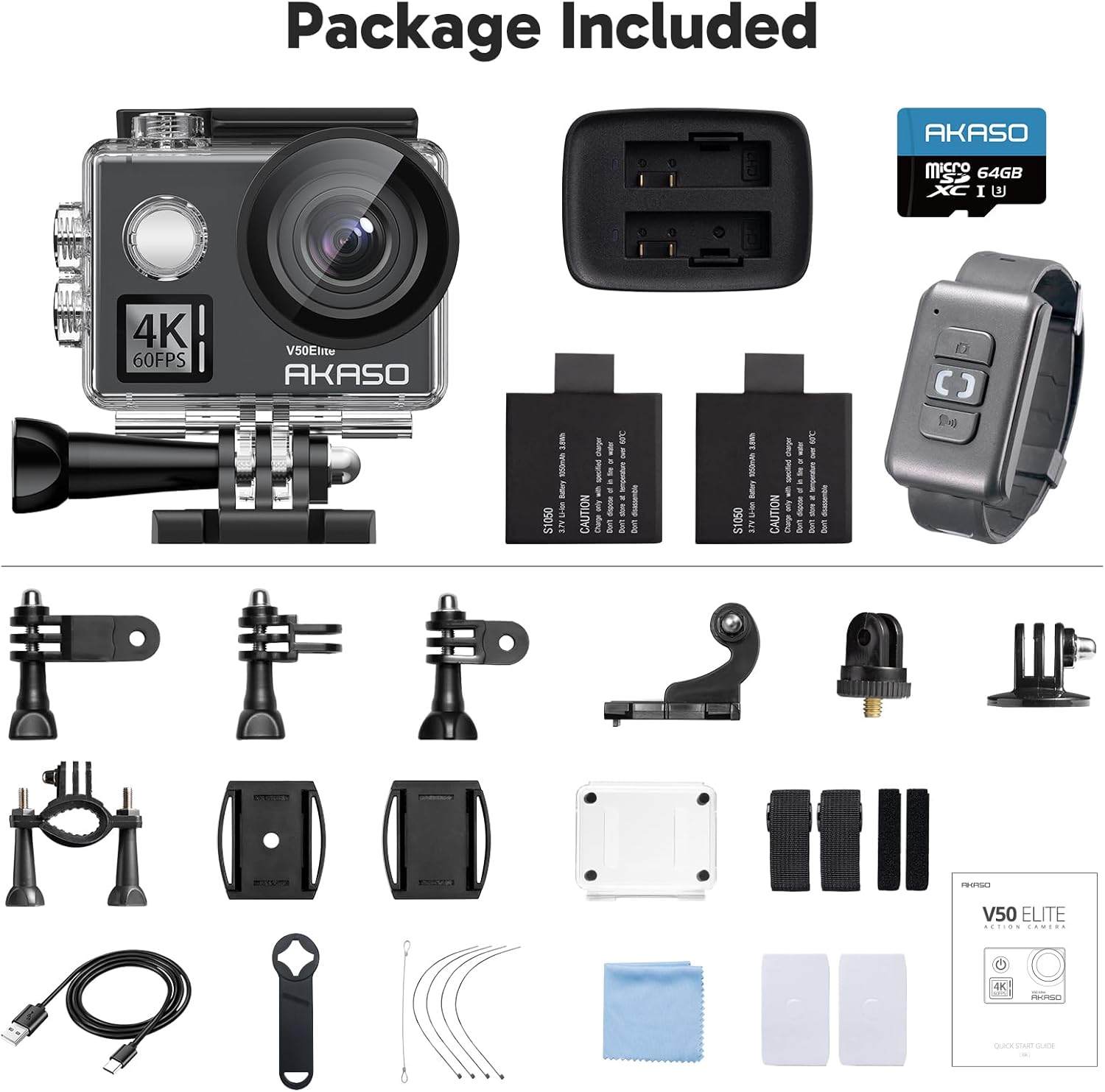
Your AKASO V50 Elite package includes the following items:
- Corpo della fotocamera
- Pacco batteria (2 incluse)
- Various Mounts
- Custodia impermeabile
- Scheda MicroSD da 64 GB
- Telecomando
- Caricabatterie
- Cavo USB
- Panno per la pulizia
- Guida rapida
Impostare
Caricare la batteria:
Insert the included Lithium Polymer batteries into the battery charger. Connect the charger to a USB power source using the provided USB cable. The indicator light will show charging status and turn off when fully charged.
Inserire la scheda MicroSD:
Open the battery compartment cover on the camera. Locate the microSD card slot and gently insert the 64GB MicroSD card with the gold contacts facing the back of the camera until it clicks into place. Ensure the card is formatted in the camera settings before first use.

Figura 2: Fronte view of the AKASO V50 Elite camera, showing the lens and main controls. Attach Waterproof Case (Optional):
For underwater use or protection against harsh environments, place the camera inside the improved waterproof case. Ensure the case is properly sealed before submersion. The camera can be used up to 131 feet (40 meters) deep with this case.

Figure 3: The AKASO V50 Elite camera securely enclosed within its waterproof case.
Utilizzo della fotocamera
Accensione/spegnimento
Press and hold the Power/Mode button on the front of the camera to turn it on or off. A short press of the Power/Mode button cycles through different modes (Video, Photo, Playback, Settings).
Registrazione video
In Video mode, press the Shutter/Select button on top of the camera to start recording. Press it again to stop. The V50 Elite supports various resolutions and frame rates, including:
- 4K a 60 fotogrammi al secondo (fps)
- 4K a 30 fotogrammi al secondo (fps)
- 2.7K a 60 fotogrammi al secondo (fps)
- 2.7K a 30 fotogrammi al secondo (fps)
- 1080P a 120 fotogrammi al secondo (fps)
- 720P a 240 fotogrammi al secondo (fps)

Scattare foto
Switch to Photo mode using the Power/Mode button. Press the Shutter/Select button to capture a 20MP image.
Controllo vocale
The AKASO V50 Elite supports hands-free operation using voice commands. Common commands include:
- "Action Start Video"
- "Action Stop Video"
- "Action Photo"
- "Action Turn Off"

Eccellente stabilizzazione dell'immagine (EIS)
The built-in Advanced Electronic Image Stabilization (EIS) technology helps to smooth out shaky footage, delivering incredibly stable videos even during dynamic activities. This feature predicts your movements and corrects for camera shake.

Regolabile View Angolo
You can customize the field of view for your recordings and photos. The camera offers Wide, Medium, and Narrow view angles. It also includes a distortion calibration feature to correct image distortion, especially noticeable at wider angles.

Instant Sharing via WiFi
Connect your AKASO V50 Elite to your smartphone via Wi-Fi using the dedicated AKASO app. This allows for instant preview, playback, and sharing of your captured content directly from your camera to your mobile device and social media platforms.

Manutenzione
Pulizia della lente:
Use a soft, lint-free cloth, preferably a microfiber cloth, to clean the camera lens. Avoid using harsh chemicals or abrasive materials that could scratch the lens.
Cura della custodia impermeabile:
After using the waterproof case in saltwater, rinse it thoroughly with fresh water and allow it to air dry. Inspect the O-ring seal regularly for any debris or damage and clean it as needed to ensure a watertight seal.
Conservazione della batteria:
When storing the camera for extended periods, remove the batteries. Store batteries in a cool, dry place, ideally at around 50% charge to prolong their lifespan.
Conservazione generale:
Conservare la fotocamera in un ambiente asciutto e privo di polvere, lontano dalla luce solare diretta e da temperature estreme.
Risoluzione dei problemi
| Problema | Possibile causa | Soluzione |
|---|---|---|
| La fotocamera non si accende. | Low or dead battery; battery not inserted correctly. | Assicurarsi che le batterie siano completamente cariche e inserite correttamente. Provare con una batteria diversa, se disponibile. |
| Screen is unresponsive or erratic. | Temporary software glitch; calibration issue. | Restart the camera. If issue persists, remove and reinsert the battery. Ensure firmware is up to date. |
| Camera overheats and shuts down. | Prolonged recording in high temperatures or high resolution. | Allow the camera to cool down. Reduce recording resolution/frame rate in hot environments. Ensure proper ventilation. If it doesn't turn back on, remove battery and microSD card, then connect to a 5W/2A USB power source. |
| Pippotage is shaky despite EIS. | EIS may not be active at highest resolutions/frame rates; extreme motion. | Check camera settings to ensure EIS is enabled for the selected resolution. Note that EIS may have limitations at certain high settings (e.g., 4K/60fps). |
| Errore della scheda MicroSD. | Card not formatted; incompatible card; faulty card. | Format the microSD card using the camera's settings. Ensure you are using a compatible card (U3 or higher recommended). Try a different microSD card. |
Specifiche
| Caratteristica | Dettaglio |
|---|---|
| Marca | AKASO |
| Numero di modello | V50Elite-2023 |
| Risoluzione video | Fino a 4K/60 fps |
| Risoluzione dell'immagine | 20MP |
| Stabilizzazione dell'immagine | Stabilizzazione elettronica avanzata dell'immagine (EIS) |
| Controllo vocale | Supportato |
| Profondità impermeabile | Up to 131 feet (40 meters) with case |
| Ingrandire | Zoom digitale 8X |
| Dimensioni dello schermo | 2 pollici (touch screen) |
| Connettività | Wi-Fi, HDMI, USB |
| Magazzinaggio | Micro SD (up to 64GB included, supports higher) |
| Tipo di batteria | Polimero di litio (2 incluso) |
| Peso dell'articolo | 1.8 once |
| Dimensioni del prodotto | 2.32 x 1.57 x 1.3 pollici |
Garanzia e supporto
AKASO products typically come with a standard manufacturer's warranty. Please refer to the warranty card included in your package or visit the official AKASO websito per termini e condizioni di garanzia dettagliati.
For technical support, troubleshooting assistance, or warranty claims, please contact AKASO customer service through their official websito o le informazioni di contatto fornite nella documentazione del prodotto. Conservare la ricevuta d'acquisto come prova d'acquisto ai fini della garanzia.
Negozio ufficiale AKASO: AKASO Amazon Store


