Introduzione
The Hercules Stream 100 is an intuitive audio controller designed for content creators, streamers, and gamers. It simplifies audio management during live sessions, allowing real-time control over various sound sources. With its built-in LCD screen, you can monitor and adjust up to 8 audio tracks simultaneously, ensuring quick reactions to your audio environment. The device also features 4 assignable action buttons for customized controls and a fully customizable interface to match your personal setup.
Contenuto della confezione
- Hercules Stream 100 Audio Mixer
- Cavo di collegamento USB
- Manuale di istruzioni (questo documento)

Image: Hercules Stream 100 Audio Mixer, front view.
Prodotto finitoview
The Hercules Stream 100 features a compact design with an integrated LCD screen, four rotary encoders, and four action buttons. The device is designed for easy integration into your Windows PC setup.
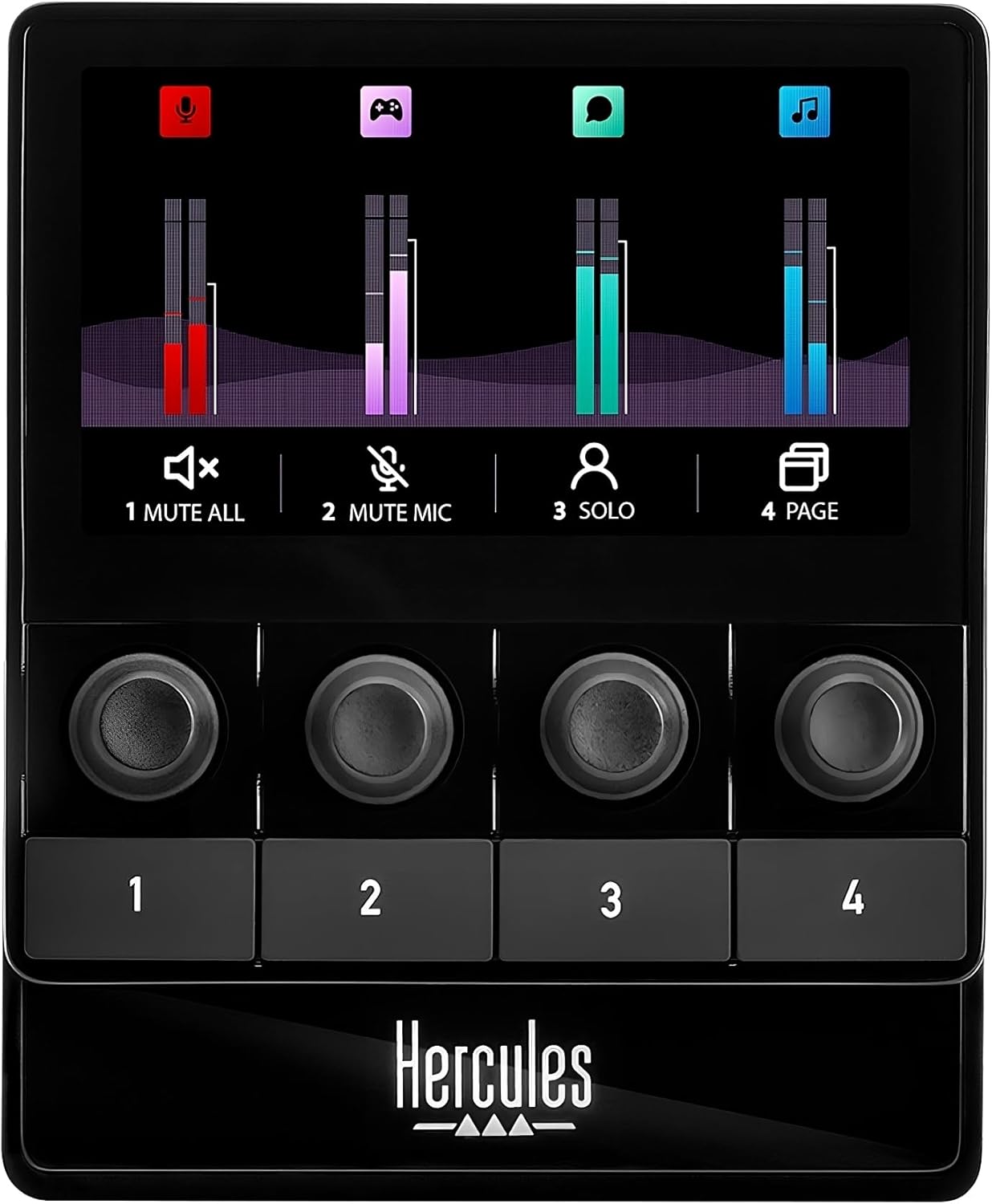
Immagine: Frontale view of the Hercules Stream 100, showing the LCD screen, four rotary encoders, and four action buttons.

Immagine: Lato view of the Hercules Stream 100, highlighting its ergonomic angle.

Immagine: Indietro view of the Hercules Stream 100, showing the USB-C port for connectivity.
Impostare
Requisiti di sistema
- Compatible with Windows PC only.
Collegamento del dispositivo
Connect the Hercules Stream 100 to your Windows PC using the provided USB cable. The device is powered via USB.

Image: Hercules Stream 100 connected to a PC setup, demonstrating typical use.
Installazione del software
Download and install the Hercules Stream Control app from the official Hercules website. This software is essential for configuring your audio sources, customizing buttons, and managing profiles. The app includes built-in guidance for setup assistance and features a drag-and-drop interface. Core streaming applications like OBS and Streamlabs are pre-integrated.
Operazione
Audio Source Management
The Hercules Stream 100 allows complete management of your audio. Configure up to 8 tracks simultaneously across 2 pages of 4 tracks each. Use the 4 volume level management encoders to adjust sound levels and mute/unmute tracks. The device is compatible with USB microphones.

Image: Illustration of centralized gaming audio control with up to 32 tracks across 8 pages, 4 rotary buttons, and USB mic compatibility.
Monitoraggio in tempo reale
Monitor all streaming volume levels in real-time on the high-brightness LCD screen. The screen displays 4 dynamic VU meters, providing visual feedback on your audio. A dedicated button allows you to turn the screen ON/OFF.

Image: User interacting with the Hercules Stream 100, adjusting audio levels on the LCD screen.
Customizable Actions and Interface
Utilize the 4 assignable action buttons for various streaming controls, such as multiple mute, URL launcher, or scene changes. The interface is completely customizable, allowing you to choose colors and styles for VU meters, set custom backgrounds and icons, and manage up to 12 profiles.

Image: Illustration of the fully customizable interface, showing options for action buttons, VU meter styles, backgrounds, icons, and profile gestione.

Image: Screenshot of the Hercules Stream Control app interface, highlighting pre-integrated streaming apps and built-in guidance.
Manutenzione
To ensure the longevity and optimal performance of your Hercules Stream 100, follow these maintenance guidelines:
- Pulizia: Use a soft, dry cloth to clean the device. Avoid abrasive cleaners or solvents that could damage the surface.
- Magazzinaggio: Quando non in uso, conservare il dispositivo in un luogo fresco e asciutto, lontano dalla luce solare diretta e da temperature estreme.
- Aggiornamenti software: Regularly check the official Hercules websito per gli aggiornamenti firmware e software per assicurarti di disporre delle funzionalità più recenti e delle correzioni di bug.
Risoluzione dei problemi
If you encounter issues with your Hercules Stream 100, consider the following common troubleshooting steps:
- Nessuna uscita audio: Ensure the device is properly connected via USB and the Hercules Stream Control app is running. Check your PC's audio settings to confirm the Stream 100 is selected as the output device. Restarting your system and reinstalling the software may resolve persistent issues.
- Software Freezing/Bugs: Ensure your Hercules Stream Control app and device firmware are up to date. If the software becomes unresponsive, try restarting the application or your computer.
- Pulsanti/codificatori non rispondono: Verify the USB connection. If the issue persists, restart the device and the software.
Specifiche
| Caratteristica | Dettaglio |
|---|---|
| Peso dell'articolo | 1.19 libbre |
| Dimensioni del prodotto | 7.48 x 6.89 x 4.33 pollici |
| Numero modello articolo | 4780933 |
| Numero di canali | 8 |
| Tecnologia di connettività | USB |
| Tipo di materiale | Plastica |
| Nome del colore | Nero |
| Fonte di alimentazione | Elettrico con cavo |
Garanzia e supporto
For warranty information and technical support, please refer to the documentation provided with your purchase or visit the official Hercules websito. Sono disponibili piani di protezione per una copertura estesa.


