Introduzione
Grazie per l'acquistoasing the i-box Stylus N10 Record Player. This manual provides essential information for setting up, operating, and maintaining your new turntable. Please read it thoroughly before use to ensure optimal performance and longevity of your device. The i-box Stylus N10 combines vintage aesthetics with modern features, offering a high-quality audio experience for your vinyl collection and seamless Bluetooth connectivity for digital music.

Image: The i-box Stylus N10 Record Player, showcasinil suo design elegante in un ambiente domestico.
Informazioni importanti sulla sicurezza
- Leggere tutte le istruzioni prima di utilizzare l'unità.
- Conservare questo manuale per riferimento futuro.
- Non esporre l'unità alla pioggia, all'umidità o alla luce solare diretta.
- Assicurare una ventilazione adeguata; non ostruire le aperture di ventilazione.
- Utilizzare solo gli accessori specificati dal produttore.
- Scollegare l'unità durante i temporali o quando non viene utilizzata per lunghi periodi.
- Affidare tutti gli interventi di assistenza a personale qualificato.
Contenuto della confezione
Si prega di verificare che tutti gli articoli elencati di seguito siano inclusi nel pacchetto:
- i-box Stylus N10 Record Player
- Cavo di alimentazione e adattatore
- Manuale dell'utente (questo documento)
- Slipmat (pre-installed on platter)
Prodotto finitoview
Familiarize yourself with the components of your i-box Stylus N10 Record Player:
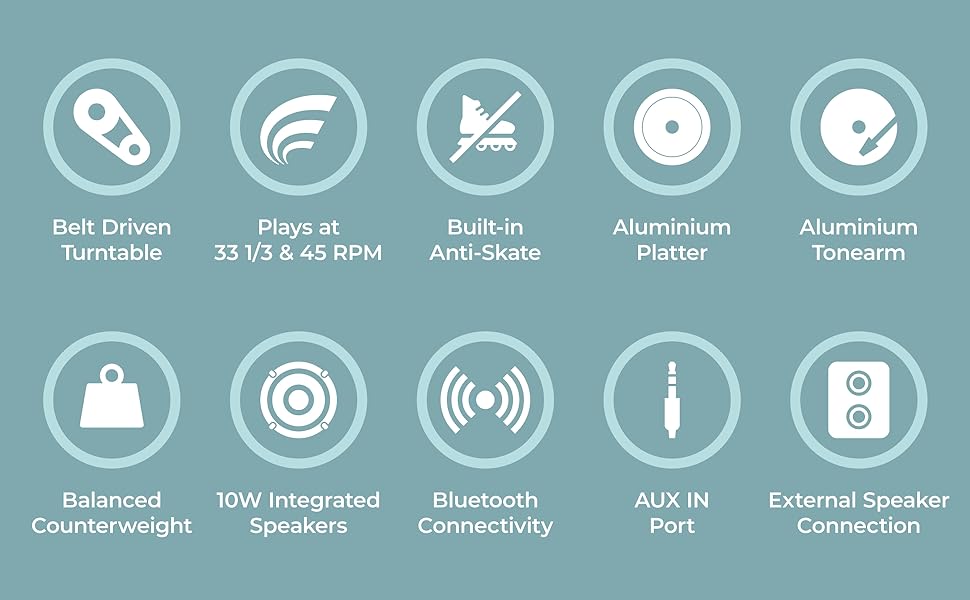
Image: Detailed diagram showing the various parts of the i-box Stylus N10, including the dust cover, spindle, counterweight, tonearm, lift lever, auto-off control, speed & Bluetooth selector, volume control, headshell, stylus & cartridge, slipmat, aluminum platter, power switch, line out ports, and AUX in port.
- 1. Copertura antipolvere: Protegge il piatto e il braccio dalla polvere.
- 2. Spindle: Mantiene il record al suo posto.
- 3. Counterweight: Bilancia il braccio e regola la forza di tracciamento.
- 4. Leva di sollevamento: Alza e abbassa il braccio.
- 5. Braccio: Holds the headshell and stylus.
- 6. Auto Off Control: Enables or disables automatic platter stop at the end of a record.
- 7. Speed & BT Selector: Selects playback speed (33/45 RPM) or Bluetooth mode.
- 8. Controllo del volume: Regola il volume di uscita degli altoparlanti integrati.
- 9. Headshell: Contiene lo stilo e la cartuccia.
- 10. Stylus & Cartridge: Reads the grooves of the record. (Audio-Technica integrated)
- 11. Slipmat: Provides a soft surface for records and reduces static.
- 12. Aluminum Platter: The rotating surface on which records are placed.
- 13. Interruttore di alimentazione: Accende/spegne l'unità.
- 14. Phono Line Out Switch: (Not explicitly labeled in diagram but implied by Line Out Ports) Switches between Phono and Line output levels if applicable.
- 15. Line Out Ports (RCA): Per il collegamento a dispositivi esterni amplifier o altoparlanti amplificati.
- 16. AUX In Port: Per collegare dispositivi audio esterni tramite un cavo da 3.5 mm.
- 17. 10W Integrated Speakers: Altoparlanti stereo integrati per la riproduzione audio diretta.
Impostare
1. Disimballaggio e posizionamento
- Estrarre con cautela il giradischi dalla confezione.
- Place the unit on a flat, stable surface away from direct sunlight, heat sources, or excessive dust.
- Assicurarsi che vi sia spazio sufficiente attorno all'unità per la ventilazione.
2. Installazione del piatto e della cinghia
The aluminum platter and drive belt are typically pre-installed. If not, follow these steps:
- Gently place the aluminum platter onto the spindle.
- Locate the drive belt, usually found around the inner rim of the platter.
- Carefully stretch the belt around the motor pulley, which is a small brass cylinder located near the spindle.
- Posizionare il tappetino sopra il piatto.
3. Counterweight Adjustment
Proper counterweight adjustment is crucial for optimal sound and to prevent damage to your records and stylus.

Image: The adjustable counterweight on the tonearm, used for precise pressure.
- Rimuovere la protezione dello stilo.
- Gently hold the tonearm and release the tonearm clamp.
- Rotate the counterweight at the rear of the tonearm until the tonearm is balanced horizontally and floats freely.
- Una volta bilanciato, tenere fermo il contrappeso e ruotare l'anello numerato su '0'.
- Rotate the counterweight (including the numbered ring) counter-clockwise to the recommended tracking force, typically between 2.0 and 3.0 grams for the integrated Audio-Technica cartridge. Refer to the cartridge manufacturer's specifications for the exact recommended force.
4. Regolazione anti-pattinamento
The i-box Stylus N10 features built-in anti-skating to minimize distortion and ensure optimal tracking accuracy. No manual adjustment is typically required for this feature.
5. Installazione della copertura antipolvere
Insert the hinges of the dust cover into the slots at the back of the turntable. The dust cover protects the unit when not in use.
6. Collegamento elettrico
- Connect the power adapter to the DC IN port on the back of the turntable.
- Collegare l'adattatore di alimentazione a una presa a muro adatta.
Istruzioni per l'uso

Immagine: un primo piano view of the control dials on the i-box Stylus N10, including volume, speed, and auto-off controls.
1. Riproduzione di un disco in vinile

Image: The i-box Stylus N10 Record Player with its dust cover open, ready for playing a record.
- Accendere l'unità utilizzando l'interruttore di alimentazione.
- Metti un disco sul piatto.
- Select the appropriate speed (33 RPM or 45 RPM) using the Speed & BT Selector. For 45 RPM records, place the included 45 RPM adapter on the spindle if needed.
- Lift the tonearm using the Lift Lever.
- Spostare manualmente il braccio sul solco iniziale desiderato del disco.
- Gently lower the tonearm using the Lift Lever. The stylus will descend onto the record and playback will begin.
- Adjust the volume using the Volume Control dial.
- At the end of the record, if Auto Off Control is enabled, the platter will stop spinning. You will need to manually return the tonearm to its rest. If Auto Off Control is disabled, the platter will continue to spin.
- When finished, lift the tonearm, return it to its rest, and secure it with the tonearm clamp. Turn off the unit.
2. Connettività Bluetooth

Image: A couple enjoying music, demonstrating the Bluetooth connectivity feature of the i-box Stylus N10, allowing wireless streaming from a smartphone.
The i-box Stylus N10 can receive audio wirelessly from your Bluetooth-enabled devices.
- Accendere l'unità.
- Set the Speed & BT Selector to the 'BT' position. The unit will enter Bluetooth pairing mode, indicated by a flashing light (refer to indicator light section if available).
- Sul tuo dispositivo Bluetooth (ad esempio smartphone, tablet), attiva il Bluetooth e cerca i dispositivi disponibili.
- Select "i-box Stylus N10" from the list of devices.
- Once paired, the indicator light will become solid (refer to indicator light section if available), and you can play audio from your device through the turntable's speakers.
- Adjust volume using the Volume Control on the turntable or on your connected device.
3. Ingresso ausiliario (AUX IN)
Connect external audio sources like MP3 players or CD players using the AUX IN port.
- Connect a 3.5mm audio cable (not included) from your external audio device's headphone or line-out jack to the AUX IN port on the turntable.
- The turntable will automatically switch to AUX IN mode when a cable is connected.
- Riproduci l'audio dal tuo dispositivo esterno.
- Adjust volume using the Volume Control on the turntable or on your connected device.
4. Connecting to External Speakers (Line Out)

Image: The i-box Stylus N10 Record Player connected to an external speaker, demonstrating its versatility for enhanced audio output.
For enhanced audio, you can connect the i-box Stylus N10 to external powered speakers or an amplifier using the RCA Line Out ports.
- Ensure both the turntable and your external audio system are turned off.
- Connect an RCA cable (not included) from the Line Out ports (red for right, white for left) on the turntable to the corresponding audio input jacks on your amplificatore o altoparlanti amplificati.
- Turn on your external audio system, then turn on the turntable.
- Play a record. The audio will now be routed through your external speakers.
- Adjust the volume using the controls on your external audio system. The turntable's volume control will not affect the Line Out audio.
Manutenzione
1. Pulizia dell'unità
- Scollegare sempre l'unità dalla presa di corrente prima di pulirla.
- Utilizzare un panno morbido e asciutto per pulire le superfici esterne. Non utilizzare detergenti abrasivi, cere o solventi.
- Il coperchio antipolvere può essere pulito con un panno morbido eamp stoffa.
2. Pulizia dello stilo

Immagine: un primo piano view of the Audio-Technica stylus and cartridge, highlighting its precision component.
- Utilizzare una spazzola morbida specifica per la pulizia dello stilo, spazzolando delicatamente dal retro verso la parte anteriore.
- Evitare di toccare lo stilo con le dita.
3. Sostituzione dello stilo
The stylus has a limited lifespan (typically 300-500 hours of playback) and should be replaced when sound quality deteriorates or the stylus is visibly damaged. The i-box Stylus N10 uses an Audio-Technica cartridge, and replacement styli for this type are widely available.
- Gently pull the old stylus assembly downwards and forwards to remove it from the cartridge body.
- Allineare il nuovo gruppo stilo con il corpo della cartuccia e spingerlo verso l'alto e all'indietro finché non scatta in posizione.
- Ensure the new stylus is securely seated before use.
Risoluzione dei problemi
| Problema | Possibile causa | Soluzione |
|---|---|---|
| Nessun potere | Adattatore di alimentazione non collegato; presa di corrente non attiva. | Assicurati che l'adattatore di corrente sia collegato correttamente. Prova una presa di corrente diversa. |
| Nessun suono dagli altoparlanti | Volume too low; Incorrect mode selected (e.g., BT when playing record); Stylus protector still on; Stylus damaged. | Increase volume. Ensure correct mode is selected. Remove stylus protector. Inspect stylus for damage; replace if necessary. |
| Suono distorto o saltante | Record is dirty or scratched; Stylus is dirty or worn; Tracking force incorrect; Turntable not level. | Clean record. Clean or replace stylus. Re-adjust counterweight. Place turntable on a level surface. |
| Il Bluetooth non si connette | Turntable not in BT mode; Device too far; Device already connected to another Bluetooth unit. | Ensure Speed & BT Selector is in 'BT' position. Move device closer to turntable. Disconnect device from other Bluetooth units. |
| Il piatto non gira | Drive belt dislodged or broken; Auto Off Control activated at end of record. | Check and re-seat the drive belt. If at end of record, this is normal behavior; manually return tonearm. |
Specifiche
- Nome modello: Stilo N10
- Numero modello articolo: 79339PI/1
- Marca: ibox
- Tecnologia di connettività: Bluetooth, ausiliario
- Componenti inclusi: Cavo di alimentazione e adattatore
- Caratteristiche speciali: Built-in Bluetooth, Belt Driven Turntable, Precise Counterweight, Built-in Anti-Skating, RCA/Phono Sockets for External Speaker Connection
- Materiale: Wood (Walnut Veneer)
- Stile: Moderno
- Colore: Noce
- Dispositivi compatibili: Oratore
- Tipo di motore: Motore a corrente continua
- Potenza di uscita: 10W (Integrated Speakers)
- Velocità di riproduzione: 33 1/3 giri/min, 45 giri/min
- Materiale del piatto: Alluminio
- Tonearm Material: Alluminio
- Tipo di cartuccia: Audio-Technica (Moving Magnet)
- Consumo energetico (modalità accesa): 20 watt
- Peso dell'articolo: 14.62 libbre
- Dimensioni della confezione: 20.4 x 19.2 x 11.6 pollici
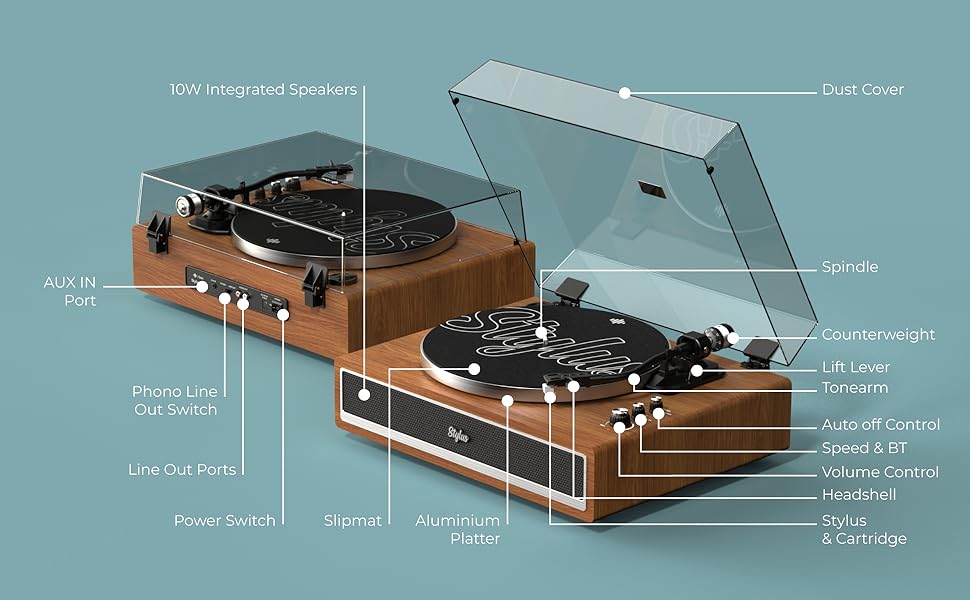
Image: Visual representation of key features including belt-driven, 33/45 RPM, built-in anti-skate, aluminum platter, aluminum tonearm, balanced counterweight, 10W integrated speakers, Bluetooth connectivity, AUX in port, and external speaker connection.
Garanzia e supporto
i-box is a proud British brand committed to quality. This product comes with a Garanzia di 3 anno. For any support inquiries, troubleshooting assistance, or warranty claims, please contact our friendly UK-based customer service team.
Please visit the official i-box websito per le informazioni di contatto e le risorse di supporto più aggiornate.Visit the i-box Store on Amazon