1. Prodotto finitoview
The Pulido Fingerprint Door Knob offers a modern and secure keyless entry solution for your home or office. This smart door knob provides two primary methods of unlocking: fingerprint recognition and mobile application control. It is designed for ease of use and enhanced security, storing all user data locally on the device.

Image: The Pulido Fingerprint Door Knob highlighting its fingerprint sensor, app management capability, and power interface.
2. Contenuto della confezione
Verificare che tutti i componenti siano presenti prima di iniziare l'installazione:
- Pomello per porta con impronta digitale (maniglie interne ed esterne)
- Meccanismo di chiusura
- Piastra d'urto
- Viti di montaggio
- Modello di installazione
- Manuale d'uso
3. Identificazione dei componenti
Familiarize yourself with the different parts of your Pulido Fingerprint Door Knob:
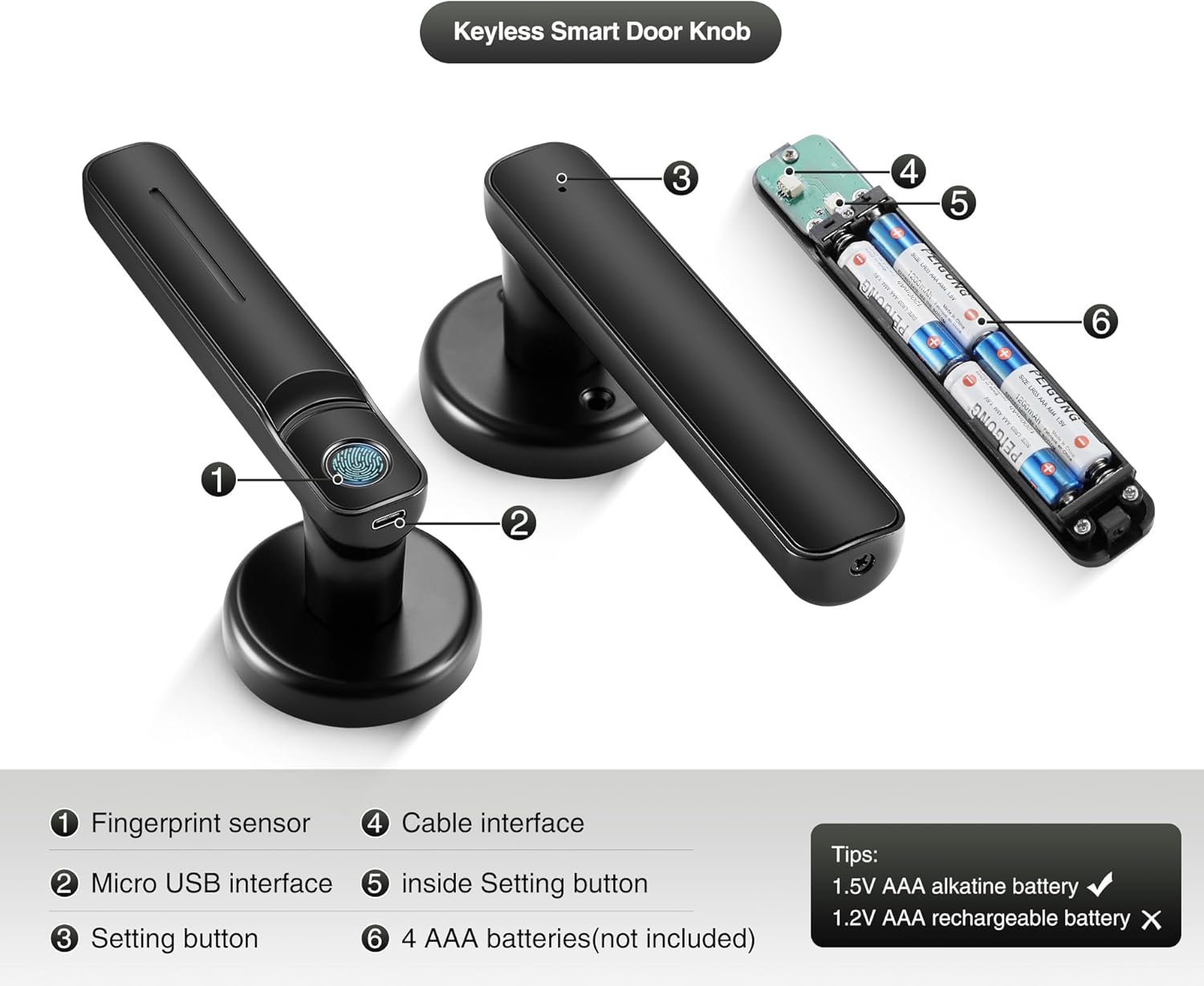
Immagine: dettagliata view of the door knob's internal and external components.
- Sensore di impronte digitali: Used for biometric unlocking.
- Interfaccia micro USB: For emergency power supply.
- Setting Button (Exterior): Used for initial setup and pairing.
- Interfaccia via cavo: Connects the exterior and interior components.
- Inside Setting Button: Used for internal settings and resets.
- AAA Batteries Compartment: Contiene 4 batterie AAA (non incluse).
4. Guida all'installazione
This section provides instructions for installing your new Pulido Fingerprint Door Knob. It is designed to replace standard mechanical door knobs.

Image: Visual representation of replacing a mechanical lock with the smart door knob.
4.1 Preparazione
- Assicurati che lo spessore della porta sia compatibile con la serratura.
- Rimuovere qualsiasi ferramenta esistente sulla porta.
- Verify the door bore hole and backset dimensions match the installation template.
4.2 Passaggi di installazione
- Installa il fermo: Insert the latch into the door edge and secure it with screws. Ensure the latch bolt faces the correct direction for your door swing.
- Installare la piastra di battuta: Mount the strike plate on the door frame, aligning it with the latch bolt.
- Installare la maniglia esterna: Feed the cable and spindle through the door bore hole from the exterior side.
- Install the Interior Handle: Connect the cable from the exterior handle to the interior handle. Align the interior handle with the spindle and mounting posts.
- Secure the Handles: Use the provided screws to firmly attach the interior handle to the exterior handle, ensuring the lock is flush with the door surface.
- Inserire le batterie: Open the battery compartment on the interior handle and insert 4 new AAA alkaline batteries.
- Operazione di prova: After installation, test the mechanical function of the knob to ensure smooth rotation and latch engagement.
5. Initial Setup & App Configuration
To fully utilize your smart door knob, you will need to set it up with the mobile application and register fingerprints.
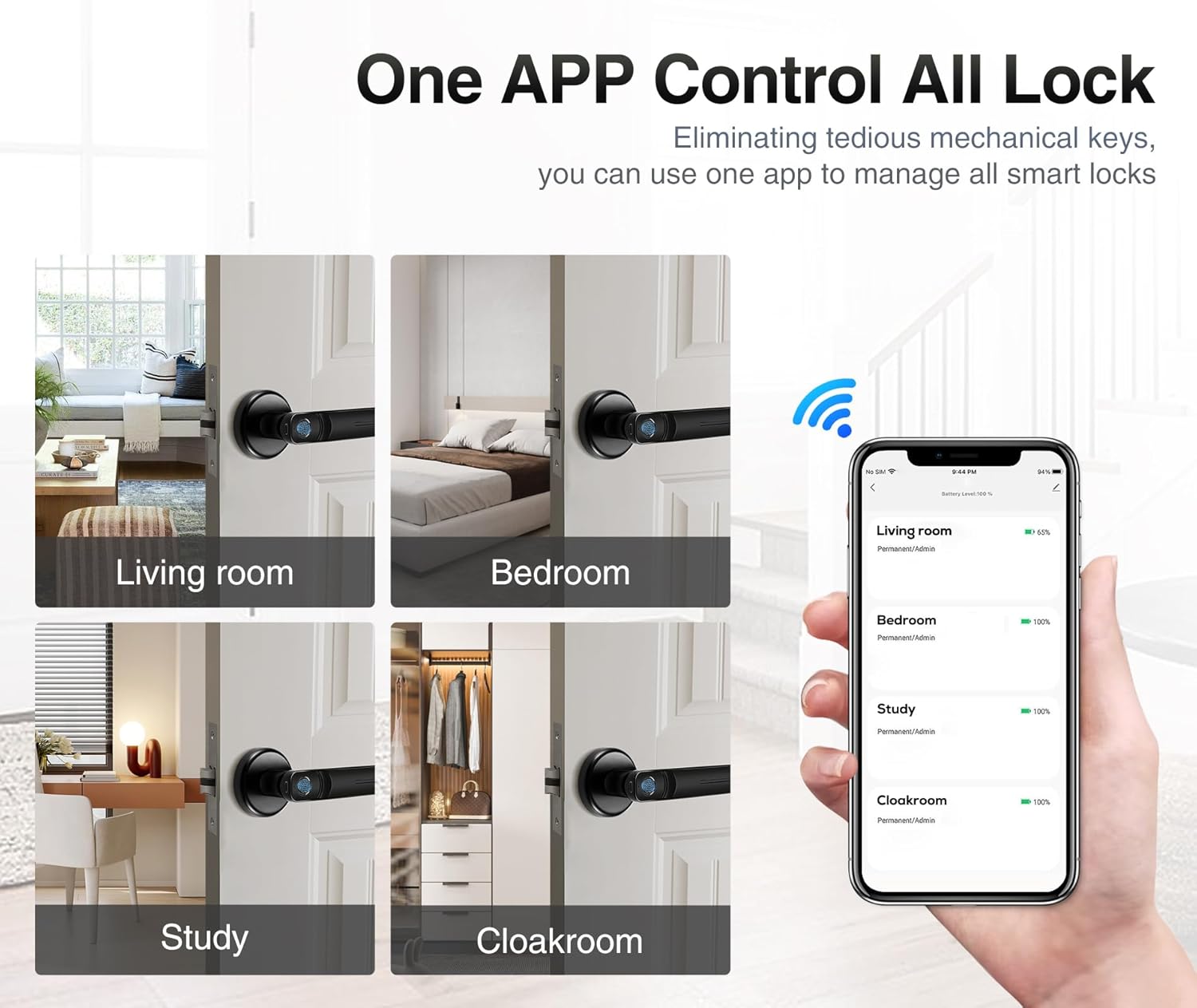
Image: The mobile application interface demonstrating control over multiple locks.
5.1 Download e associazione dell'app
- Scarica l'App: Cercare the 'Tuya Smart' or 'Smart Life' app in your smartphone's app store (iOS or Android) and install it.
- Creare un account: Apri l'app e registrati per un nuovo account oppure accedi se ne hai già uno.
- Aggiungi dispositivo: In the app, tap '+' to add a new device. Select 'Door Lock' or 'Smart Lock' from the device categories.
- Abbina il lucchetto: Follow the in-app instructions to put the door knob into pairing mode (usually by pressing and holding the setting button on the exterior handle until an indicator light flashes). The app will detect and connect to the lock via Bluetooth.
5.2 Registrazione delle impronte digitali
The lock supports up to 100 user fingerprints. Fingerprint information is stored locally on the lock for security.
- Access Fingerprint Management: In the app, navigate to the settings for your connected door lock and find the 'Fingerprint Management' section.
- Aggiungi impronta digitale: Select 'Add Fingerprint' and follow the on-screen prompts.
- Scan Fingerprint: Place your finger on the fingerprint sensor multiple times, adjusting the position slightly with each scan, until the app confirms successful registration.
- Repeat for Additional Users: Repeat the process for any other users who require fingerprint access.
6. Funzionamento
Your Pulido Fingerprint Door Knob offers convenient and secure unlocking methods.
6.1 Sblocco con impronta digitale

Image: Demonstrating the quick fingerprint unlock feature.
- Posizionare saldamente il dito registrato sul sensore delle impronte digitali.
- The lock will unlock within 0.5 seconds if the fingerprint is recognized.
- Rotate the door knob to open the door.
6.2 Sblocco tramite App
- Apri l'app 'Tuya Smart' o 'Smart Life' sul tuo smartphone.
- Select the desired door lock from your device list.
- Tap the 'Unlock' button within the app interface.
- L'app ti consente anche di view unlocking records and manage user access.
6.3 Modalità di passaggio

Image: The door knob in a hallway, illustrating the Passage Mode feature.
- Passage Mode allows the door to remain unlocked for continuous access without requiring fingerprint or app authentication.
- To activate Passage Mode, open the app, select your door lock, and find the 'Passage Mode' setting.
- Enable Passage Mode as needed. Remember to disable it when you require the door to be locked.
7. Gestione della batteria
The Pulido Fingerprint Door Knob is powered by 4 AAA batteries.
7.1 Installazione/sostituzione della batteria
- Locate the battery compartment on the interior handle (refer to Section 3, Component 6).
- Aprire il coperchio del vano.
- Insert 4 new 1.5V AAA alkaline batteries, ensuring correct polarity. Do not use 1.2V rechargeable batteries.
- Chiudere saldamente il coperchio del vano batterie.
7.2 Avviso di batteria scarica
- The lock will provide an audible or visual indicator when battery power is low.
- Replace batteries promptly to ensure continuous operation.
7.3 Alimentazione di emergenza
- In case of complete battery depletion, the lock can be temporarily powered via the Micro USB interface (refer to Section 3, Component 2) using a standard power bank or USB charger.
- This allows you to unlock the door and replace the batteries.
8. Risoluzione Dei Problemi
This section addresses common issues you might encounter with your Pulido Fingerprint Door Knob.
8.1 Impronta digitale non riconosciuta
- Sensore pulito: Assicurarsi che il sensore delle impronte digitali sia pulito e privo di sporco o umidità.
- Posizionamento corretto: Place your finger firmly and completely on the sensor. Try different angles if necessary.
- Registra nuovamente l'impronta digitale: If issues persist, delete the existing fingerprint in the app and re-register it, ensuring a thorough scanning process.
- Multiple Attempts: The lock allows multiple attempts. If still unsuccessful, use the app to unlock.
8.2 Problemi di connettività delle app
- Bluetooth abilitato: Assicurati che il Bluetooth sia abilitato sul tuo smartphone.
- Prossimità: Be within Bluetooth range of the door knob.
- Riavvio dell'app: Chiudere e riaprire l'app.
- Ripara dispositivo: If the app consistently fails to connect, try removing the device from the app and re-pairing it.
- Controllare le batterie: Low batteries can affect Bluetooth connectivity.
8.3 Lock Does Not Engage/Disengage
- Controllare le batterie: Assicurarsi che le batterie non siano scariche. Sostituirle se necessario.
- Controllo dell'installazione: Verify that the lock was installed correctly and that the spindle and latch mechanism are properly aligned.
- Ostruzioni: Check for any physical obstructions preventing the latch from extending or retracting fully.
9. Specifiche
| Caratteristica | Specificazione |
|---|---|
| Numero di modello | door konb 140 |
| Materiale | Alluminio, acciaio inossidabile |
| Dimensioni del prodotto | 5.7"L x 2.5"W |
| Peso dell'articolo | 1.61 libbre |
| Metodi di sblocco | Fingerprint, Mobile App |
| Fingerprint Recognition Rate | Fino al 99% |
| Sblocca la velocità | Entro 0.5 secondi |
| Capacità dell'utente | Fino a 100 impronte digitali |
| Alimentazione elettrica | 4 batterie alcaline AAA da 1.5 V (non incluse) |
| Alimentazione di emergenza | Micro USB |
10. Garanzia e supporto
Pulido is committed to providing reliable products and customer satisfaction.
10.1 Informazioni sulla garanzia
This product includes a free replacement service for 12 mesi from the date of purchase for non-human caused damage. Please retain your proof of purchase for warranty claims.
10.2 Supporto tecnico
Lifelong technical support is provided for the Pulido Fingerprint Door Knob. If you have any questions, require assistance with installation, setup, or troubleshooting, please contact our customer service team.
Per assistenza, fare riferimento alle informazioni di contatto fornite sulla confezione del prodotto o al nostro sito ufficiale websito.


