1. Introduzione
The Qolsys IQ Lock-PG Push Button Deadbolt provides enhanced security and convenient access to your property. This smart motorized deadbolt integrates PowerG wireless communication for reliable and stable connectivity, compatible with IQ Panel 4, IQ4 Hub, and IQ4 NS systems. It offers multiple access methods, including a pushbutton keypad, traditional key, thumb-turn, and remote control via the Alarm.com app.
Designed for durability, the IQ Lock-PG meets ANSI Grade 2 certifications and features an attractive oil-rubbed bronze finish to complement various door styles.
2. Caratteristiche principali
- Catenaccio motorizzato: Push button operation with an attractive finish.
- Metodi di accesso multipli: Lock/unlock via PowerG wireless communication (App and Panel), user code, thumb-turn, or physical key.
- Capacità del codice utente: Supports up to 250 user codes (4 to 8 digits) for family, friends, or temporary guests.
- Gestione remota: Create or remove individual codes remotely via the Alarm.com app.
- Installazione semplice: Battery-powered (AA batteries, not included), requiring no complex wiring.
- Costruzione durevole: ANSI/BHMA Grade 2 certified for strong, reliable security.
3. Contenuto della confezione
Prima di iniziare l'installazione, verificare che tutti gli elementi siano presenti nel pacchetto:
- Qolsys IQ Lock-PG Deadbolt Assembly
- (2) Chiavi in mano
- Hardware di montaggio
- Manuale di istruzioni (questo documento)
4. Configurazione e installazione
The Qolsys IQ Lock-PG motorized deadbolt is designed for straightforward installation. All necessary hardware and detailed instructions are included. Please read these instructions carefully before proceeding.
4.1 Compatibility and Requirements
- Spessore della porta: Installs on standard doors measuring 1-3/8 inches to 2-1/4 inches (35-58mm) thick.
- Entrata: Il chiavistello regolabile si adatta alle entrate esistenti da 2-3/8 pollici o 2-3/4 pollici (60/70 mm).
- Consegna della porta: Suitable for both right-handed and left-handed door operations.
- Integrazione del sistema: Requires an IQ Panel 4, IQ4 Hub, or IQ4 NS (sold separately) and an active Internet connection for smart features.
- Energia: Requires four (4) AA alkaline batteries (not included).
4.2 Passaggi di installazione (oltreview)
While detailed steps are provided in the included physical manual, here is a general overview:
- Prepare the door: Ensure the door bore holes and backset are compatible with the lock.
- Install the latch and strike plate.
- Installare il gruppo tastiera esterno.
- Installare la piastra di montaggio interna.
- Collegare il cavo dal gruppo esterno al gruppo interno.
- Installare l'assieme interno.
- Insert four (4) AA alkaline batteries into the battery compartment.
- Eseguire il processo di movimentazione della porta (regolazione automatica).
- Test the lock's functionality with the keypad and thumb-turn.
- Pair the lock with your IQ Panel system and Alarm.com app for smart features.

Figura 4.1: Fronte view of the Qolsys IQ Lock-PG Deadbolt, showcasing the keypad and keyhole.
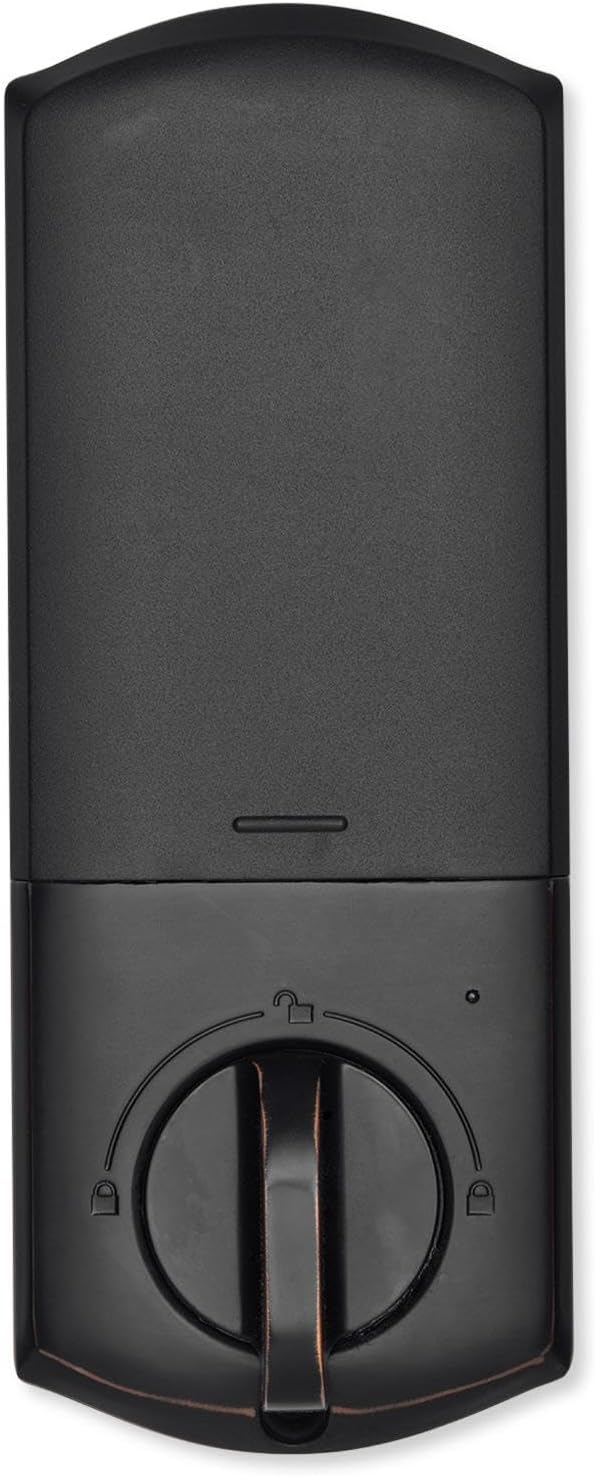
Figura 4.2: Interno view of the Qolsys IQ Lock-PG Deadbolt, highlighting the thumb-turn and battery cover.

Figure 4.3: Qolsys IQ Lock-PG Deadbolt installed on a door, illustrating its appearance in a real-world setting.
5. Istruzioni per l'uso
Qolsys IQ Lock-PG offre diversi modi comodi per bloccare e sbloccare la porta.
5.1 Metodi di accesso
- Tastiera a pulsanti: Enter a valid 4-to-8 digit user code on the exterior keypad to unlock the deadbolt. The lock will automatically engage when closed.
- Chiave fisica: Use one of the provided turnkeys in the exterior key cylinder for manual unlocking and locking.
- Thumb-Turn: From the interior, rotate the thumb-turn to manually lock or unlock the deadbolt.
- PowerG Wireless Communication (Alarm.com App/Panel):
The Alarm.com mobile app allows for remote monitoring and control of your Qolsys devices. Once paired with your IQ Panel, you can:
- Lock or unlock your smart doors from anywhere.
- Create, modify, or delete up to 250 individual user codes. User codes are managed through the Alarm.com app and sent to the lock.
- Receive notifications regarding lock status and activity.
The Alarm.com app is available for Android, iOS, Windows, and Blackberry devices.
6. Manutenzione
Regular maintenance ensures the longevity and optimal performance of your Qolsys IQ Lock-PG deadbolt.
6.1 Sostituzione della batteria
The deadbolt is powered by four (4) AA alkaline batteries. Battery life is approximately 12 months, based on typical usage (6 user code unlock events and 10 locking/unlocking cycles per day). The lock features a low battery alarm to notify you when replacement is needed.
- When the low battery alarm sounds or is indicated, replace all four AA batteries simultaneously.
- Remove the interior cover to access the battery compartment.
- Rimuovere le batterie vecchie e smaltirle secondo le normative locali.
- Inserire nuove batterie alcaline AA, assicurandosi della corretta polarità.
- Replace the interior cover.
6.2 Pulizia
Clean the exterior and interior surfaces of the lock with a soft, damp panno. Evitare l'uso di detergenti abrasivi o solventi, poiché potrebbero danneggiare la finitura.
7. Risoluzione Dei Problemi
This section addresses common issues you might encounter with your Qolsys IQ Lock-PG deadbolt.
7.1 Blocco tastiera
If 10 consecutive invalid user codes are entered, the keypad will enter a lockout mode for 3 minutes. During this time, no codes can be entered. Wait for the lockout period to expire before attempting to enter a valid code again.
7.2 Blocco non risponde
- Check the batteries: Ensure they are correctly installed and not depleted. Replace all four AA batteries if necessary.
- Verify connection to IQ Panel: Ensure the lock is properly paired with your IQ Panel 4, IQ4 Hub, or IQ4 NS. Check the panel's status for the lock.
- Check door alignment: Ensure the door and frame are properly aligned and there is no obstruction preventing the deadbolt from extending or retracting smoothly.
7.3 Issues with Alarm.com App Control
- Ensure your IQ Panel has an active Internet connection.
- Verify your smartphone or tablet has a stable internet connection.
- Log out and log back into the Alarm.com app.
- Ensure the lock is properly enrolled in your Alarm.com account.
8. Specifiche tecniche
| Caratteristica | Specificazione |
|---|---|
| Cod. produttore | IQ Lock-PGK-ORB |
| Codice UPC | 7290109986104 |
| Fine | Bronzo strofinato ad olio |
| Auto-consegna | Supportato |
| Tipo di bullone | Catenaccio motorizzato/standard |
| Entrata | 2-3/8" / 2-3/4" regolabile (60/70 mm) |
| Preparazione della porta | 1-1/2" / 2-1/8" (38/54mm) |
| Spessore della porta | Regolazione automatica da 1-3/8" a 2-1/4" (35-58 mm) |
| Metodo di sblocco | PowerG wireless communication (App and Panel), Button keypad, key, thumb-turn |
| Capacità del codice | Codice utente x 250 |
| Lunghezza del codice | 4-8 cifre |
| Cilindro con chiave di override | SÌ |
| Cilindro | KW1 cava per chiavetta |
| Volume di lavorotage | CC 6V |
| Batteria (non inclusa) | AA x 4 |
| Temperatura di lavoro esterna | Da -31°C a 150°C (da -35°F a 65°F) |
| Temperatura di lavoro interna | da 32°F a 140°F (da 0°C a 60°C) |
| Grado di protezione IP Montaggio esterno | Grado di protezione IP54 |
| Modalità di blocco (limite di ingresso errato) | Blocco tastiera per 3 minuti dopo 10 immissioni di codice utente non valido |
| Allarme batteria scarica | SÌ |
| Durata della batteria | Min. 12 mesi (6 eventi di sblocco codice utente e 10 cicli di sblocco e blocco per ogni giorno) |
| Certificazioni | FCC, IC, ANSI BHMA A156.36 Grado 2, UL10C (resistenza al fuoco 20 min) |
| Connessione IoT | PotenzaG |
| Peso del prodotto | 1.6KG (3.6 LB) |
| Umidità di esercizio esterna | 100% di condensazione |
| Umidità di esercizio interna | 20% ~ 95% senza condensa |
9. Garanzia e supporto
9.1 Informazioni sulla garanzia
The Qolsys IQ Lock-PG Push Button Deadbolt comes with a warranty of Twelve months from the date of purchaseSi prega di conservare la prova d'acquisto per eventuali reclami in garanzia.
9.2 Assistenza clienti
For technical assistance, troubleshooting beyond this manual, or warranty inquiries, please contact Qolsys customer support. Refer to the Qolsys official websito o sulla confezione del prodotto per ottenere le informazioni di contatto più aggiornate.


