1. Introduzione
The KAIWEETS KM201 Digital Multimeter is a smart auto-ranging voltage tester designed for daily use. It features True RMS measurement, 2000 counts display, Non-Contact Voltage (NCV) function, Live wire detection, Phase Sequence, and Zero/Live Wire Check. This manual provides essential information for safe and effective operation of your multimeter.
2. Informazioni sulla sicurezza
AVVERTIMENTO:
- Do not use the meter to test voltage over 600V, as this may damage the instrument.
- Testare sempre il voltage with the meter before using it to confirm the instrument function is intact.
- Ensure proper connection of test leads to the source or load being measured.
- Do not short-circuit or reverse the polarity of batteries.
- Remove batteries when not in use for a long period to prevent leakage.
This device complies with CAT II 600V and CAT III 300V safety standards.
3. Caratteristiche del prodotto
- True RMS 2000 Counts Display: Provides accurate readings for various measurements.
- Smart Auto-Ranging: Automatically recognizes and measures AC/DC voltage, resistenza e continuità.
- Volume senza contattotage (NCV) Funzione: Rileva AC voltage senza contatto diretto.
- Controllo del filo sotto tensione: Identifies live wires for safety.
- Phase Sequence: Determina la sequenza di fase nei sistemi trifase.
- Built-in Test Leads: Integrated leads with storage clips for convenience.
- Torcia elettrica: Integrated LED flashlight for illumination in dark areas.
- Retroilluminazione: Display backlight for improved visibility.
- Data Hold: Blocca la misurazione corrente sul display.
- Design compatto: Portatile e facile da riporre.
4. Impostazione
4.1 Installazione della batteria
The multimeter requires 2x 1.5V AAA batteries. To install or replace batteries:
- Individuare il vano batteria sul retro del dispositivo.
- Unscrew the screw holding the battery cover with a Phillips screwdriver.
- Carefully remove the cover. Note that the screw is not captive, so ensure it is not lost.
- Insert the 2x AAA batteries, observing correct polarity (+/-).
- Riposizionare il coperchio della batteria e fissarlo con la vite.
4.2 Probe Handling
The built-in test leads have protective caps on their tips. These caps can be removed to expose more of the probe for certain measurements or to achieve a CAT III rating.

Figure 1: KAIWEETS Digital Multimeter with built-in test leads.
5. Modalità operative
5.1 Accensione/spegnimento
To power on or off the multimeter, long press the Energia pulsante ( ).
).
5.2 Auto Mode (Default)
Upon powering on, the meter defaults to Auto Mode, indicated by "Auto" on the display. In this mode, the meter automatically recognizes and measures voltage, resistenza e continuità.

Figure 2: Multimeter display in Auto Mode.
Voltage Misura: Connect the test leads to the source or load. The meter will display the voltage (AC or DC) and polarity automatically.
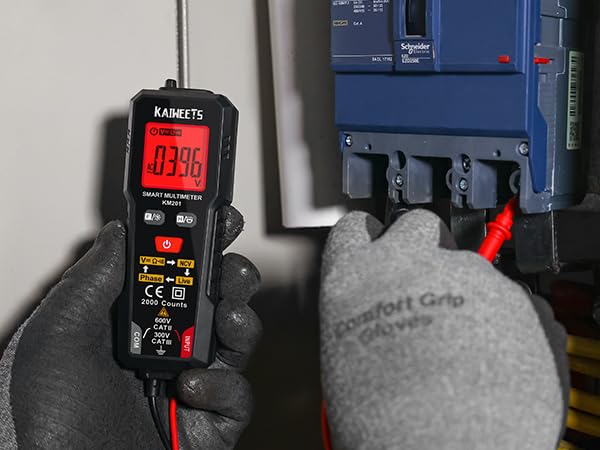
Figura 3: Misurazione del volumetage con il multimetro.
Resistenza e continuità: If the measured resistance is less than 50Ω, the buzzer will beep and the green backlight will illuminate, indicating continuity.
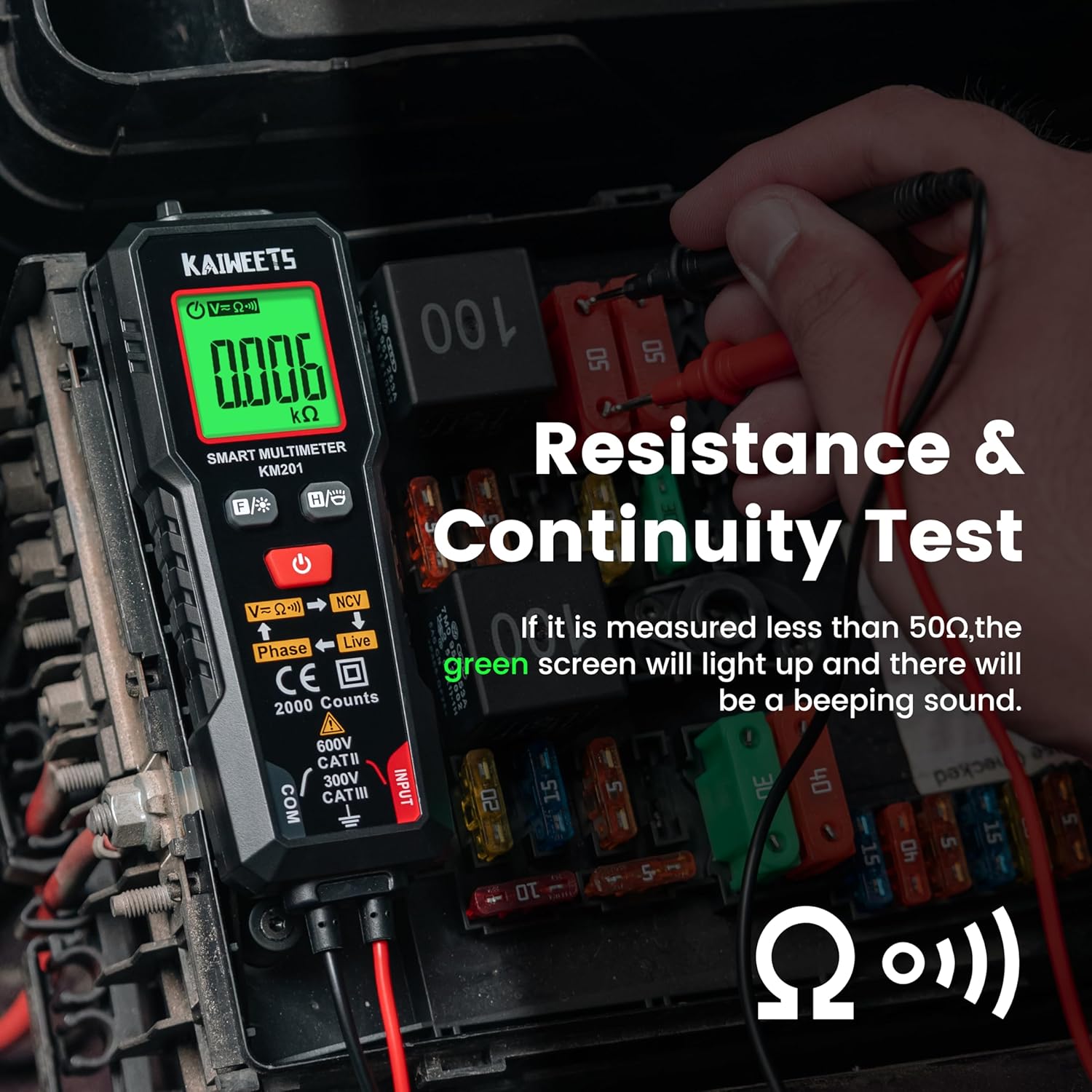
Figure 4: Resistance and Continuity Test.
5.3 Function Selection (FUNC Button)
Premere brevemente il tasto FUNC pulsante () to cycle through different measurement functions if you do not wish to use Auto Mode.
5.4 Senza contatto voltage (NCV) Misurazione
Premere brevemente il tasto FUNC button until "NCV" is displayed. Place the NCV probe (top of the meter) near the detected point.
- When weak AC signals are sensed, the green backlight lights and the meter beeps slowly. The display shows "---L".
- When strong AC signals are sensed, the red backlight lights and the meter beeps fast. The display shows "---H".
5.5 Live Measurement
Premere brevemente il tasto FUNC button until "Live" is displayed. Connect the red test lead to the test point.
- When weak AC signals are sensed, the green backlight lights and the meter beeps slowly. The display shows "---L".
- When strong AC signals are sensed, the red backlight lights and the meter beeps fast. The display shows "---H".
5.6 Phase Measurement
Premere brevemente il tasto FUNC button until "Phase" is displayed. This function is used for three-phase wire detection.
- The display flashes the "PABC" symbol (A and B fixed, C flashing) for the first phase wire.
- Place the NCV sense probe against the second phase wire to show the "PAB" symbol (A fixed, B flashing).
- Place the NCV sense probe against the third phase wire to show the "P" symbol (A, B, C fixed).
- The "P---L" symbol indicates phase sequence left rotation.
- The "P---R" symbol indicates phase sequence right rotation.
5.7 Controllo della retroilluminazione
Premere a lungo il tasto FUNC pulsante per accendere o spegnere la retroilluminazione del display.
5.8 Data Hold (H/O Button)
Premere brevemente il tasto Acqua/Olio pulsante () to activate or deactivate the data hold function. This will freeze the current reading on the display.
5.9 Torcia elettrica
Premere a lungo il tasto Acqua/Olio pulsante per accendere o spegnere la torcia integrata.
5.10 Modalità di sospensione
The meter automatically enters sleep mode if there is no operation for 15 minutes to conserve battery energy. To disable auto-off, long press the FUNC pulsante e il Energia button simultaneously when turning on the meter.
6. Manutenzione
To ensure the longevity and accuracy of your KAIWEETS Multimeter, follow these maintenance guidelines:
- Pulizia: Keep the instrument clean and dry. Wipe contacts in each input terminal with a clean, damp panno e detersivo delicato. Non utilizzare abrasivi o solventi.
- Sostituzione della batteria: Replace batteries when the battery power is low. Refer to Section 4.1 for instructions.
- Magazzinaggio: If the meter will not be used for a long period, remove the batteries to prevent leakage and damage. Store in a cool, dry place.
7. Risoluzione Dei Problemi
Se riscontri problemi con il tuo multimetro, prendi in considerazione i seguenti passaggi comuni per la risoluzione dei problemi:
- Nessun display/alimentazione: Controllare che le batterie siano installate correttamente e abbiano una carica sufficiente. Sostituirle se necessario.
- Letture imprecise: Ensure test leads are properly connected and clean. Verify that the correct measurement mode is selected (or use Auto Mode).
- Nessun rilevamento NCV/in tempo reale: Ensure the NCV probe is correctly positioned and that the function is activated. Test against a known live source to confirm functionality.
- Il contatore non risponde: Try turning the meter off and on again. If the issue persists, remove batteries for a few minutes and reinsert them.
For further assistance, please contact KAIWEETS customer support.
8. Specifiche
| Caratteristica | Specificazione |
|---|---|
| Misurazioni dello schermo | 2000 counts, True - RMS |
| Volume massimotage | CATII 600V |
| Tipo di batteria | Batterie 2x 1.5V AAA |
| Temperatura di esercizio | Temperatura ambiente: da 0°C a 40°C |
| Temperatura di conservazione | Temperatura ambiente -10°C ~ 60°C |
| Umidità di esercizio | <80% UR |
| Umidità di stoccaggio | <70% UR |
| Funzione di spegnimento automatico | 15 minuti senza intervento chirurgico |
| Indicazione della polarità di ingresso | "-" is displayed automatically |
| Intervallo di resistenza | Fino a 20.00 MΩ |
| Precisione della resistenza | ±(1.0%+3) |
| Continuity Threshold | <50Ω |
9. Garanzia e supporto
For warranty information or technical support, please visit the official KAIWEETS websito o contattare direttamente il servizio clienti. Puoi anche visitare il sito Negozio KAIWEETS su Amazon per maggiori dettagli sul prodotto e sulle opzioni di supporto.


