Introduzione
The AUTOPHIX F803 is a professional diagnostic tool designed for heavy-duty trucks and cars. It offers comprehensive system diagnostics, DPF regeneration functions, and standard OBD2 capabilities. This manual provides detailed instructions for its proper use and maintenance.
Caratteristiche principali
- DPF Regeneration Functions: Supports OEM-level DPF functions for Cummins, Detroit, Caterpillar, and Paccar engines, including DPF regen, reset, and related information reset.
- Diagnostica completa del sistema: Reads and clears trouble codes, displays ECU information, and shows live data for all systems in diesel trucks (Engine, ABS, SRS, SAS, Transmission, TPMS, ESP, EPB, Suspension, etc.).
- Ampia compatibilità con i veicoli: Supports major truck models complying with SAE J1939/J1708/J1850/J1587/J27145 protocols, including Volvo, Mack, International, Freightliner, Peterbilt, Kenworth, Western Star, Cummins, Caterpillar, Detroit, Paccar, Isuzu, Fuso. Also supports OBD2 diagnostics for most cars, minivans, and light trucks from 1996 onwards.
- PIN Detect & Simulation Mode: Measures OBD port voltage and diagnoses connection status. Includes a simulation/demo mode for beginners.
- Hardware migliorato: Features a 5-inch LCD display, 1GB RAM/8GB ROM, DC 10V-36V/3A power input, 2.4GHz WiFi, Quad-Core ARM Cortex-A7 CPU, and a capacitive touchscreen.
- Aggiornamenti gratuiti a vita: Provides constant software and database updates via WiFi.
Contenuto della confezione
The F803 diagnostic tool package typically includes:
- F803 Unità principale
- Diagnostic Cables (e.g., OBDII, 6-pin, 9-pin connectors)
- Cavo USB
- Manuale d'uso
- Custodia per il trasporto
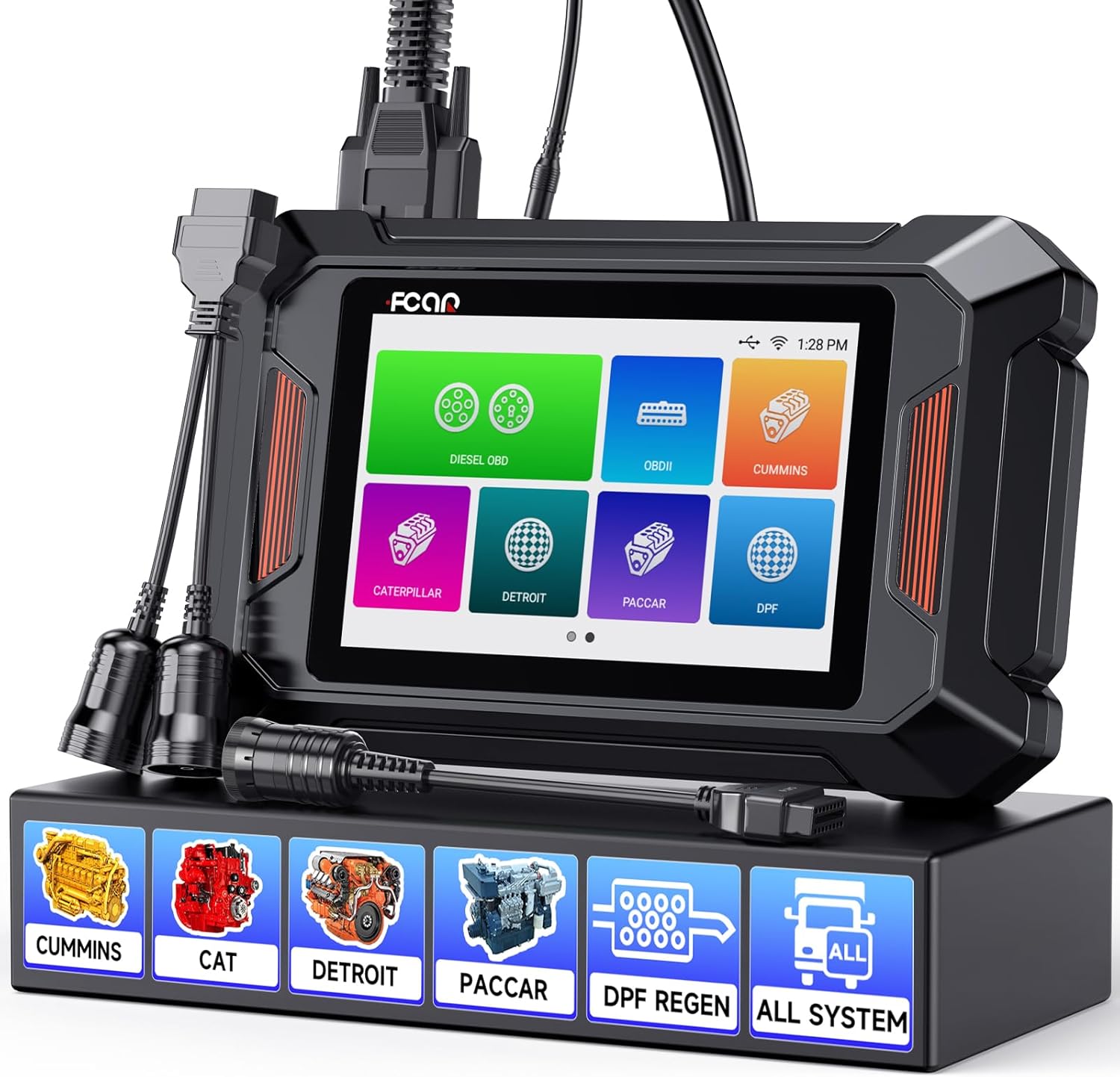
Image: The AUTOPHIX F803 diagnostic scanner with various diagnostic cables and connectors, displayed on a stand.
Impostare
- Carica il dispositivo: Ensure the F803 unit is sufficiently charged before first use. Connect the device to a power source using the provided USB cable if needed.
- Accensione: Tieni premuto il pulsante di accensione per accendere il dispositivo.
- Configurazione iniziale: Follow the on-screen prompts to select language (English or Spanish), set time zone, and connect to a Wi-Fi network for updates.
- Attiva dispositivo: The device requires activation. Follow the one-click activation process as prompted on the screen.
- Aggiorna software: Connect to Wi-Fi and navigate to the update section to download and install the latest software and vehicle databases. This ensures compatibility with the newest vehicle models and features.
Istruzioni per l'uso
Collegamento a un veicolo
- Individuare la porta di diagnostica: For heavy-duty trucks, this is typically a 6-pin, 9-pin, or 16-pin (OBDII) connector, often found in the cab or near the dashboard. For cars, it's usually a 16-pin OBDII port under the dashboard.
- Seleziona il cavo appropriato: Choose the correct diagnostic cable for your vehicle's port.
- Collegare lo scanner: Plug one end of the diagnostic cable into the F803 unit and the other end into the vehicle's diagnostic port.
- Accendere l'accensione: Portare l'accensione del veicolo in posizione "ON" (motore spento).
- PIN Detect (Optional): Use the "PIN Detect" function on the F803 to verify the connection status and voltage of the OBD port.
Performing Diagnostics (Heavy Duty Trucks)

Image: Diagram illustrating the F803's ability to scan various truck systems including Engine, ABS, SRS, Transmission, Suspension, and more.
- Select "Diesel OBD" or Specific Manufacturer: From the main menu, choose "Diesel OBD" for general heavy-duty diagnostics or select a specific manufacturer (e.g., Cummins, Caterpillar, Detroit, Paccar) if available for more advanced functions.
- Identificazione del veicolo: The scanner will attempt to automatically identify the vehicle. If unsuccessful, you may need to manually enter vehicle information.
- Scansione del sistema: Select "Full System Scan" to diagnose all available electronic control units (ECUs) or choose specific systems (e.g., Engine, ABS, Transmission) for targeted diagnostics.
- Codici di lettura/cancellazione: View diagnostic trouble codes (DTCs) and their descriptions. After addressing the underlying issue, clear the codes.
- Dati in tempo reale: Monitor real-time sensor data in text or graphical format to observe vehicle performance and identify anomalies.
- Informazioni sulla ECU: Access detailed information about the vehicle's ECUs.
DPF Regeneration Functions

Image: Diagram illustrating the Diesel Particulate Filter (DPF) and Diesel Exhaust Fluid (DEF) system, showing the DPF regeneration process.
The F803 supports various DPF functions for compatible engines.
- Access DPF Menu: From the main menu or specific manufacturer menu, navigate to the DPF functions.
- Seleziona la funzione: Choose the desired DPF function, such as:
- Rigenerazione DPF
- Ripristino DPF
- DPF Related Information Reset
- DPR State Reset
- Forced DPD Regen
- Ash Service Regen
- Reset Soot Level
- Segui le istruzioni sullo schermo: The tool will guide you through the specific steps required for each DPF function. Ensure all safety precautions are followed.
OBDII Diagnostics (Cars & Light Trucks)

Image: Illustration showing the F803 performing OBDII diagnostics on both a heavy-duty truck and a passenger car, highlighting functions like Read Codes, Erase Codes, Live Data, and I/M Readiness.
- Select "OBDII": From the main menu, choose the "OBDII" option.
- Leggi i codici: Retrieve generic and manufacturer-specific diagnostic trouble codes.
- Cancella codici: Cancella i DTC e disattiva l'indicatore di malfunzionamento Lamp (MIL) dopo le riparazioni.
- Flusso di dati in tempo reale: View parametri operativi del motore in tempo reale.
- Prontezza I/M: Controllare lo stato dei monitor relativi alle emissioni.
- Blocca dati fotogramma: View un'istantanea delle condizioni operative quando si è verificato un guasto correlato alle emissioni.
- Test sensore O2: Recupera i risultati del test di monitoraggio del sensore O2.
- Test del monitor di bordo: Recupera i risultati per i componenti e i sistemi di propulsione correlati alle emissioni.
- Test del sistema EVAP: Avviare un test del sistema di emissione evaporativa.
- Informazioni sul veicolo: Recupera il numero di identificazione del veicolo (VIN), l'ID di calibrazione e il numero di verifica della calibrazione (CVN).
Funzioni aggiuntive
- Schermata: Catturare immagini dello schermo per la documentazione.
- Feedback: Send diagnostic feedback to technical support.
- Create/Send Report: Generate diagnostic reports and send them via email.
- Dati Review e riproduzione: Review dati diagnostici registrati in precedenza.
Wide Truck Compatibility Overview
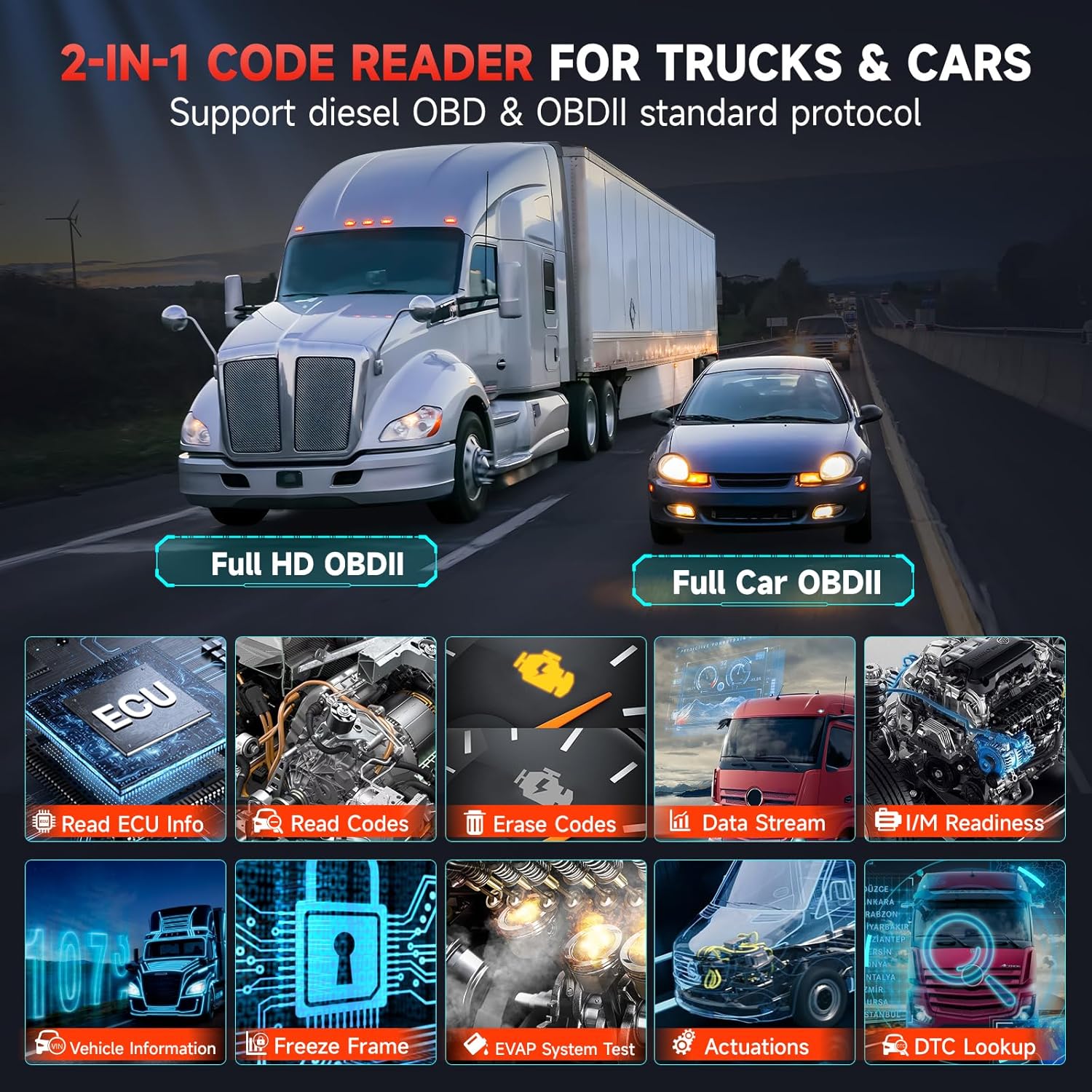
Image: Visual representation of the F803's compatibility with various truck brands including Freightliner, Peterbilt, International, Caterpillar, Volvo, and Ford Pickup.

Image: A table detailing F803 compatibility across various engine types (Cummins, Caterpillar, Paccar, Detroit) and corresponding vehicle brands and models.
Manutenzione
- Mantenere pulito: Pulire il dispositivo con un panno morbido e asciutto. Evitare l'uso di detergenti abrasivi o solventi.
- Conservare correttamente: Store the F803 in its protective case in a dry, cool environment when not in use.
- Aggiornamenti software: Regularly update the software via Wi-Fi to ensure optimal performance and access to the latest vehicle data.
- Cura della batteria: Avoid fully discharging the battery frequently. Charge the device regularly, especially if stored for extended periods.
- Ispezione dei cavi: Periodically inspect diagnostic cables for any signs of damage (fraying, bent pins). Replace damaged cables immediately.
Risoluzione dei problemi
- Il dispositivo non si accende:
- Ensure the battery is charged. Connect to a power adapter.
- Controllare il corretto funzionamento del pulsante di accensione.
- Nessuna comunicazione con il veicolo:
- Verify the ignition is in the "ON" position.
- Check if the diagnostic cable is securely connected to both the F803 and the vehicle's OBD port.
- Ensure the correct diagnostic cable is used for the vehicle.
- Use the "PIN Detect" function to check the OBD port's voltage stato della connessione.
- Try the scanner on another compatible vehicle to rule out a vehicle-specific issue.
- Software update failed:
- Assicurare una connessione Wi-Fi stabile.
- Verificare che lo spazio di archiviazione sul dispositivo sia sufficiente.
- Riavviare il dispositivo e riprovare l'aggiornamento.
- Lo schermo non risponde:
- Eseguire un soft reset tenendo premuto il pulsante di accensione finché il dispositivo non si riavvia.
- Assicurarsi che lo schermo sia pulito e privo di detriti.
Specifiche
| Caratteristica | Dettaglio |
|---|---|
| Modello | F803 |
| Display | 5-inch LCD, Capacitive Touchscreen |
| Processore | Processore ARM Cortex-A7 quad-core |
| Memoria | 1 GB di RAM / 8 GB di ROM |
| Volume di eserciziotage | DC 10V-36V / 3A |
| Connettività | Wi-Fi a 2.4 GHz |
| Dimensioni | 28 x 15 x 10 cm (circa) |
| Protocolli supportati | SAE J1939, SAE J1708, SAE J1850, SAE J1587, SAE J27145, OBDII |
| Lingue supportate | Inglese, Spagnolo |

Image: Visual representation of the F803's enhanced hardware components, including the 5-inch LCD, 1GB RAM/8GB ROM, DC 10V-36V/3A power, 2.4GHz WiFi, Quad-Core ARM Cortex-A7 CPU, and capacitive screen.
Garanzia e supporto
The AUTOPHIX F803 diagnostic tool comes with a 2-year warranty. Additionally, a 60-day free return period for refund or replacement is offered.
For technical assistance, the manufacturer provides 24/7 technical support. Users can utilize the "Feedback" function within the device to send diagnostic logs and inquiries directly to support.
Lifetime free software updates are provided via Wi-Fi to ensure the device remains current with the latest vehicle technologies and diagnostic capabilities.


