1. Introduzione
This manual provides essential information for the safe and efficient operation of your Ulefone Armor Pad 2 Rugged Tablet. Please read this manual thoroughly before using the device to ensure proper functionality and to prevent damage. Keep this manual for future reference.
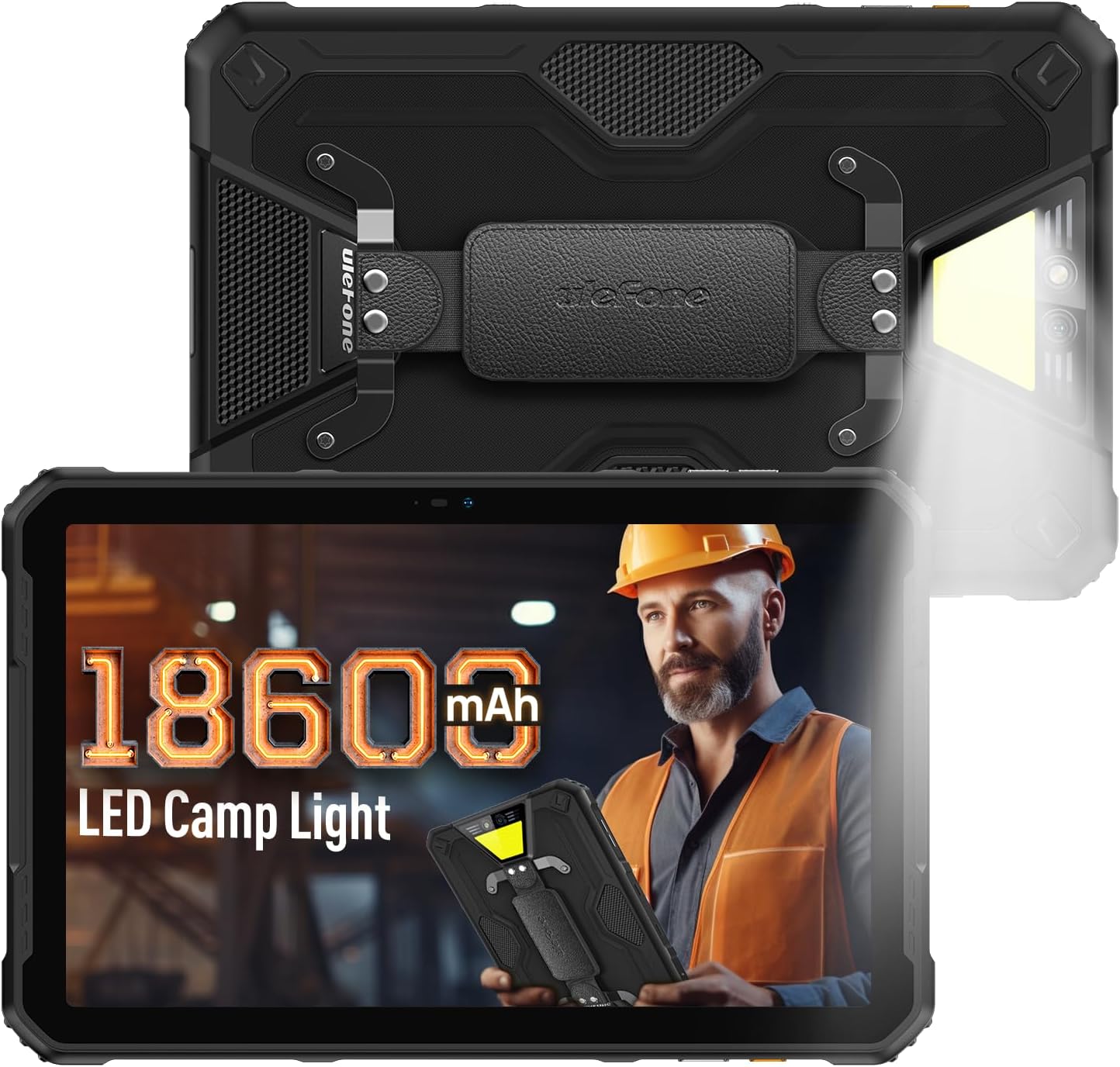
Figure 1: Ulefone Armor Pad 2 Rugged Tablet. This image displays the tablet from both front and back angles, highlighting its robust design and integrated camping luce.
2. Contenuto della confezione
Verificare che tutti gli articoli siano presenti nel pacco:
- 1 x Ulefone Armor Pad 2 Tablet
- 1 x AC Power Charger
- 1 x USB Type-C 2.0 Charging Cable
- 1 x cinturino da polso
- 1 x Cacciavite
- 8 x Screws (for hand strap attachment)
- 1 x pellicola protettiva (preinstallata)
- 1 x Ago SIM
- 1 x Manuale utente (questo documento)
Video 1: Armor Pad 2 Unboxing Video. This video demonstrates the unboxing process and shows all included accessories.
3. Disposizione del dispositivo
Familiarize yourself with the physical components and ports of your Armor Pad 2 tablet.

Figura 2: Oltreview of Ulefone Armor Pad 2 features. This image highlights various components such as the camera, camping light, uSmart connector, and buttons.
- Fotocamera frontale: 16 MP per videochiamate e selfie.
- Display: 11-inch 2K display with Corning Gorilla Glass 5.
- Pulsante di accensione: Located on the side, typically integrated with the fingerprint sensor.
- Pulsanti del volume: Regola i livelli audio.
- Chiave personalizzata: Programmable button for quick access to functions (e.g., PTT, flashlight).
- Porta USB di tipo C: Per la ricarica e il trasferimento dei dati.
- Jack audio da 3.5 mm: Per le cuffie.
- Slot per scheda SIM/TF: Supports dual Nano SIM cards and one TF card.
- Telecamera posteriore: Fotocamera principale da 48 MP.
- CampLuce di accensione: 750 lumens LED light with multiple modes.
- Connettore di espansione uSmart: For connecting compatible external accessories.
- Doppi altoparlanti stereo: Front-facing for clear and balanced audio.
4. Impostazione
4.1 Accensione iniziale
- Press and hold the Power Button (usually on the side) until the Ulefone logo appears.
- Seguire le istruzioni sullo schermo per completare la configurazione iniziale, inclusa la selezione della lingua, la connessione Wi-Fi e la configurazione dell'account Google.
4.2 Installazione della scheda SIM/TF
- Individuare lo slot per la scheda SIM/TF sul lato del tablet.
- Use the provided SIM needle to gently eject the card tray.
- Place your Nano SIM cards and/or TF card into the tray according to the diagram on the tray. Ensure correct orientation.
- Carefully reinsert the card tray into the slot until it clicks into place.
4.3 Ricarica del tablet
- Collegare il cavo USB Type-C alla porta di ricarica del tablet.
- Connect the other end of the cable to the AC Power Charger.
- Plug the AC Power Charger into a wall outlet.
- L'indicatore di carica sullo schermo mostrerà lo stato di carica.
- For optimal charging, use the provided Ulefone charger and cable.

Figure 3: Battery and Charging Features. This image illustrates the tablet's large 18600mAh battery capacity, 33W fast charging capability, and support for reverse charging.
5. Funzionamento di base
5.1 Accensione/spegnimento
- Accensione: Press and hold the Power Button until the device vibrates and the screen lights up.
- Spegni: Press and hold the Power Button for a few seconds, then select "Power off" from the options on the screen.
- Ricomincia: Press and hold the Power Button for a few seconds, then select "Restart" from the options.
5.2 Gesti del touchscreen
Utilizza i gesti standard di Android per navigare sul tuo tablet:
- Rubinetto: Seleziona un elemento o attiva una funzione.
- Tocca e tieni premuto: Accedi ai menu contestuali o trascina gli elementi.
- Scorri: Scorri schermate, elenchi o contenuti.
- Pizzica per ingrandire: Ingrandisci o rimpicciolisci le immagini e web pagine.
5.3 Funzioni dei tasti personalizzati
The custom key on the side of the tablet can be programmed for various shortcuts:
- Access settings to assign single-click, double-click, and long-press actions.
- Common assignments include Push-to-Talk (PTT), flashlight, or quick camera launch.
5.4 Modalità guanto
Activate Glove Mode in settings to enable touchscreen responsiveness while wearing gloves, ideal for outdoor or industrial environments.
6. Caratteristiche principali
6.1 Design robusto
The Armor Pad 2 is built to withstand harsh conditions:
- Grado di protezione IP68/IP69K: Certificato per la resistenza all'acqua e alla polvere.
- Certificazione MIL-STD-810H: Soddisfa gli standard militari per la resistenza a cadute, urti e temperature estreme.
- Vetro Corning Gorilla Glass 5: Enhanced scratch and drop resistance for the display.

Figure 4: Ruggedness features. This image demonstrates the tablet's water, dust, and drop resistance, highlighting its IP68/IP69K and MIL-STD-810H certifications.
6.2 Visualizzazione
Experience clear visuals on the 11-inch 2K display:
- Misurare: 11 pollici.
- Risoluzione: 2K (2000x1200 pixels).
- Luminosità: 500 nits for visibility in various lighting conditions.

Figure 5: 11-inch 2K Display. This image showcases the vibrant display protected by Corning Gorilla Glass 5.
6.3 Prestazioni
The tablet is powered by a MediaTek Helio G99 processor, ensuring smooth operation:
- Processore: MediaTek Helio G99 (8-core, 2.2GHz, 6nm).
- Memoria RAM: Up to 16GB (8GB physical + 8GB virtual).
- Memoria interna: 256 GB.
- Archiviazione espandibile: Up to 2TB via TF card.
- Sistema operativo: Android 13.

Figure 6: Performance specifications. This image details the MediaTek Helio G99 chipset, RAM, and ROM capabilities of the tablet.
6.4 Telecamere
Cattura i momenti più belli con le fotocamere integrate:
- Telecamera posteriore: 48 MP.
- Fotocamera frontale: 16 MP.

Figure 7: Camera capabilities. This image shows examples of photos taken with the 48MP rear and 16MP front cameras.
6.5 Connettività
Stay connected with a range of communication options:
- Cellulare: 4G Dual SIM Dual Standby (Note: Not compatible with AT&T, Cricket).
- Wifi: Wi-Fi 6 for faster wireless connections.
- Bluetooth: Versione Bluetooth 5.2.
- Navigazione: GPS + GLONASS + Galileo + BeiDou.
- NFC: Per pagamenti contactless e scambio dati.
6.6 Audio
Enjoy immersive sound with:
- Doppi altoparlanti stereo: Front-facing for clear and balanced audio.
- Jack audio da 3.5 mm: Per cuffie cablate.
6.7 gradi Celsiusamping luce
The integrated 750 lumens LED camping light provides versatile illumination:
- Luminosità: 750 lumens, 383 lighting beads, 5.5 watts.
- Modalità: 3 lighting modes (e.g., Lighting, Sharp Light, SOS).
- Livelli di luminosità: 3 livelli regolabili.
- Activated via a physical button for quick access.

Figure 8: 750LM Camping Light. This image shows the tablet's powerful integrated LED light in use during a campscenario di ing.
6.8 Connettore di espansione uSmart
Ulefone's exclusive uSmart Expansion offers fast and stable connections to professional tools with plug-and-play convenience. Compatible expansion devices (e.g., endoscope, 1000x microscope) require additional purchases.
Video 2: Ulefone Armor Pad 2 Rugged Tablet Overview. This video demonstrates various features including the uSmart Expansion Connector.
7. Manutenzione
- Pulizia: Utilizzare un morbido, damp cloth to clean the tablet. Avoid harsh chemicals or abrasive materials. Ensure all port covers are securely closed before cleaning with liquids.
- Protezione da acqua/polvere: Always ensure all port covers (USB, audio jack, SIM slot) are firmly sealed to maintain IP68/IP69K water and dust resistance.
- Cura della batteria: Avoid exposing the tablet to extreme temperatures. For long-term storage, charge the battery to approximately 50-70%.
- Protezione dello schermo: The tablet comes with a pre-installed protective film. For additional protection, consider using a tempered glass screen protector.
8. Risoluzione Dei Problemi
| Problema | Possibile causa | Soluzione |
|---|---|---|
| Il tablet non si accende. | Batteria scarica o crash del sistema. | Charge the tablet for at least 30 minutes. If still unresponsive, press and hold the Power Button for 10-15 seconds to force restart. |
| Il touchscreen non risponde. | Problema software o danno allo schermo. | Restart the tablet. If the issue persists, perform a factory reset (backup data first). If physical damage is suspected, contact support. |
| Impossibile connettersi al Wi-Fi. | Incorrect password, router issue, or tablet Wi-Fi module issue. | Verify Wi-Fi password. Restart router and tablet. Try connecting to other Wi-Fi networks. |
| Scarsa qualità delle chiamate o assenza di segnale. | Weak network signal, incorrect SIM installation, or carrier issue. | Move to an area with better signal. Reinstall SIM card. Contact your mobile carrier for network status. |
| Tablet is slow or freezes. | Troppe app in esecuzione, spazio di archiviazione insufficiente o software obsoleto. | Close unnecessary apps. Clear cache. Free up storage. Check for system updates. |
9. Specifiche
| Caratteristica | Dettaglio |
|---|---|
| Modello | Ulefone Armor Pad 2 |
| Dimensioni | 10.94 x 7 x 0.55 pollici |
| Peso | 2.24 libbre |
| Sistema operativo | Androide 13 |
| Processore | MediaTek Helio G99 (8-core, 2.2GHz) |
| Memoria RAM | Fino a 16 GB (8 GB fisici + 8 GB virtuali) |
| Memoria interna | 256 GB |
| Archiviazione espandibile | Fino a 2 TB (scheda TF) |
| Display | 11-inch 2K (1280 x 800 pixels, 500 nits, Corning Gorilla Glass 5) |
| Telecamera posteriore | 48MP |
| Fotocamera frontale | 16MP |
| Capacità della batteria | 18600mAh |
| Ricarica | Ricarica rapida da 33 W, ricarica inversa (OTG) |
| Durata | IP68/IP69K, certificato MIL-STD-810H |
| Connettività | Doppia SIM 4G, Wi-Fi 6, Bluetooth 5.2, NFC |
| Navigazione | GPS, GLONASS, Galileo, BeiDou |
| Caratteristiche speciali | 750LM Camping Light, uSmart Expansion Connector, Custom Key, PTT, Digital Toolbox, Fingerprint Sensor, Glove Mode, Stereo Dual Speakers |
10. Garanzia e supporto
Ulefone products come with a standard manufacturer's warranty. For detailed warranty information, technical support, or service inquiries, please visit the official Ulefone webo contattare direttamente il servizio clienti. Conservare la ricevuta d'acquisto come prova d'acquisto per eventuali reclami in garanzia.
Ulefone ufficiale Websito: www.ulefone.com


