Prodotto finitoview
The R-Volution Player ONE 8k is an advanced media player and server designed to deliver a revolutionary home cinema experience. It supports impressive image quality with Dolby Vision and HDR10+, powered by a robust Realtek RTD1619DR chipset. This device allows streaming content to other R_volution devices within your network using the exclusive R_share Advanced Streaming Protocol.
Le caratteristiche principali includono:
- Support for Dolby Vision and HDR10+ for superior image quality.
- Internal storage capacity for up to 32 TB (expandable via USB).
- Two HDMI outputs for versatile connectivity.
- UHD 4K content support and upscaling to 4K Ultra HD (3840 x 2160).
- Automatic volume leveling.
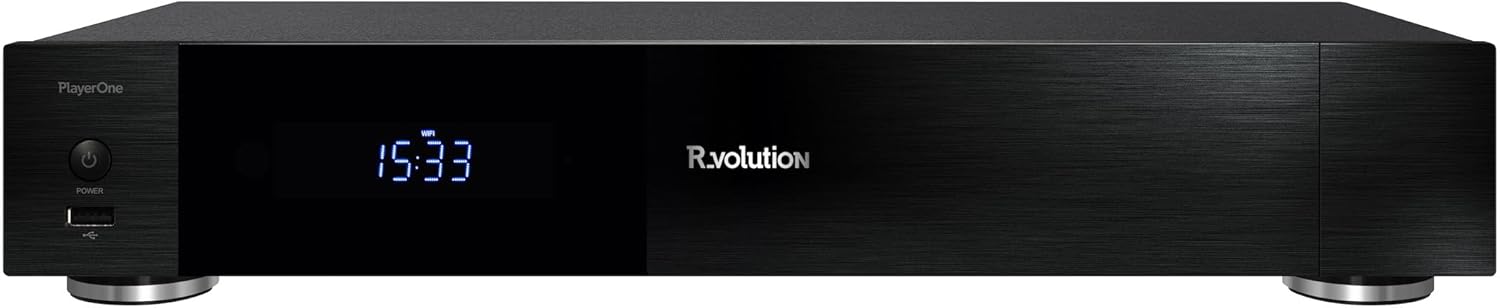
Figura 1: Fronte view of the R-Volution Player ONE 8k. This image displays the sleek black design of the media player, featuring a power button on the left, a front USB port, and a central digital display showing the time.
Impostare
Connecting Your Player ONE 8k
Before operating your R-Volution Player ONE 8k, ensure all necessary connections are made. Refer to the rear panel diagram for port identification.

Figure 2: Rear panel connections of the R-Volution Player ONE 8k. This image shows the comprehensive array of ports on the back of the device, including HDMI outputs, USB ports, Ethernet, optical, coaxial, and analog audio outputs, along with Wi-Fi and Bluetooth antennas.
Descrizioni delle porte:
- HDMI OUT (Audio Only): Connects to an audio receiver for dedicated audio output.
- HDMI OUT (Main): Connects to your TV, monitor, or projector for video and audio.
- Porte USB: 3.0 Per collegare dispositivi di archiviazione esterni o altre periferiche USB.
- USB Tipo-C: Additional high-speed connectivity.
- Ethernet (LAN): Per la connessione di rete cablata.
- Antenne WiFi: Per la connettività di rete wireless.
- Antenna Bluetooth: For connecting Bluetooth devices.
- Optical (SPDIF) & Coaxial Audio Outputs: For digital audio connections to compatible audio systems.
- Uscite audio RCA (L/R): For analog stereo audio connections.
- INGRESSO CA: Ingresso di alimentazione per il dispositivo.
Passaggi iniziali per la connessione:
- Connect the Player ONE 8k to your display (TV, monitor, or projector) using an HDMI cable from the Uscita HDMI (principale) porta.
- If using a separate audio receiver, connect it via the Uscita HDMI (solo audio) port or digital/analog audio outputs.
- For network access, connect an Ethernet cable to the Rete locale port or ensure Wi-Fi antennas are attached for wireless setup.
- Collegare il cavo di alimentazione al INGRESSO AC port and plug it into a power outlet.
- Premere il pulsante di accensione sul pannello frontale o sul telecomando per accendere il dispositivo.
Istruzioni per l'uso
Funzioni del telecomando
The included remote control provides full command over your Player ONE 8k. Familiarize yourself with its layout and button functions.

Figure 3: Remote control for the R-Volution Player ONE 8k. This image displays the ergonomic design of the remote, with clearly labeled buttons for power, volume, navigation, media playback controls, and dedicated R.video and Explorer buttons.
Key Remote Buttons:
- Pulsante di accensione: Accende o spegne il dispositivo.
- Tastierino di navigazione (Su/Giù/Sinistra/Destra/OK): Per la navigazione e la selezione del menu.
- Volume +/-: Regola il volume audio.
- Controlli di riproduzione (Riproduci, Pausa, Interrompi, Avanzamento rapido, Riavvolgimento, Salta): Funzioni standard di riproduzione multimediale.
- R.video: Accesses the R.video media library interface.
- Esploratore: Accessi file browser for local or network storage.
- Tastiera numerica: Per input diretto o funzioni specifiche.
Media Playback and Interface
The Player ONE 8k features an intuitive interface for managing and playing your media content. The R.video application provides a rich visual experience for your movie and TV show collection.

Figure 4: R.video user interface in action. This image illustrates the Player ONE 8k connected to a display, showcasing the R.video media management system with movie details, cover art, and playback options.
Per riprodurre contenuti multimediali:
- Garantisci i tuoi contenuti multimediali files are accessible, either on an internal hard drive, connected USB storage, or a network share.
- Vai a R.video application for an organized library view, or use Esploratore per navigare filedirettamente.
- Select your desired movie, TV show, or music file e premere OK per iniziare la riproduzione.
- Utilize the playback controls on the remote for pause, fast forward, rewind, and chapter navigation.
Funzionalità avanzate
- Dolby Vision e HDR10+: The Player ONE 8k supports these advanced HDR formats, providing deeper blacks, brighter highlights, and a wider color gamut. Ensure your display is compatible to fully experience these features. The player supports direct playback of Blu-ray Disc Images in Dolby Vision and various other formats.
- 4K Ultra HD Upscaling: Even if your content is not native 4K, the player can upscale videos to a resolution of 4K Ultra HD (3840 x 2160) for enhanced visual clarity on compatible displays.
- Memoria interna: The device accommodates an internal hard drive of up to 32 TB, allowing for a vast local media library. Additional storage can be connected via USB.
- R_share Advanced Streaming Protocol: Stream content seamlessly to other R_volution devices within your home network.
Manutenzione
To ensure the longevity and optimal performance of your R-Volution Player ONE 8k, follow these maintenance guidelines:
- Pulizia: Utilizzare un panno morbido e asciutto per pulire l'esterno del dispositivo. Evitare l'uso di detergenti liquidi o materiali abrasivi.
- Ventilazione: Ensure the player is placed in a well-ventilated area. Do not block any ventilation openings.
- Ambiente: Tenere il dispositivo lontano dalla luce solare diretta, da fonti di calore e da umidità eccessiva.
- Aggiornamenti del firmware: Periodically check for firmware updates from the R_volution official websito per assicurarti di disporre delle funzionalità e delle correzioni di bug più recenti.
Risoluzione dei problemi
If you encounter issues with your Player ONE 8k, refer to the following common troubleshooting steps:
| Problema | Possibile causa/soluzione |
|---|---|
| Nessuna alimentazione / Il dispositivo non si accende. |
|
| Nessuna uscita video. |
|
| Nessuna uscita audio. |
|
| Il telecomando non risponde. |
|
| Problemi di connessione di rete. |
|
Specifiche
| Caratteristica | Dettaglio |
|---|---|
| Nome del modello | Player ONE 8k |
| Marca | R_volution |
| ASIN | B0CM2JRBR6 |
| Dimensioni del prodotto | 16L x 43B x 8H cm (16 x 43 x 8 cm) |
| Colore | Nero (Black) |
| Tecnologia di connettività | Bluetooth, USB, HDMI, WLAN (Wi-Fi) |
| Tipo di connettore | Cavo HDMI |
| Risoluzione | 3840 x 2160 (4K Ultra HD) |
| Caratteristica speciale | Automatische Volumennivellierung (Automatic Volume Leveling) |
| Supporto per tipo di supporto | DVD, Blu-Ray-Disc (playback of images/files) |
| Modalità di uscita audio | Stereo (supports various multi-channel formats via HDMI passthrough) |
| Memoria interna | Supports up to 32 TB internal hard drive (not included) |
Garanzia e supporto
For warranty information and technical support, please refer to the official R_volution webo contattare direttamente il servizio clienti. Conservare la ricevuta d'acquisto come prova d'acquisto per eventuali reclami in garanzia.
Note: Specific warranty terms and support channels may vary by region.