1. Introduzione
This manual provides detailed instructions for the installation, operation, maintenance, and troubleshooting of your maXpeedingrods 7" Portable Car Stereo. Please read this manual thoroughly before using the device to ensure proper functionality and safety.
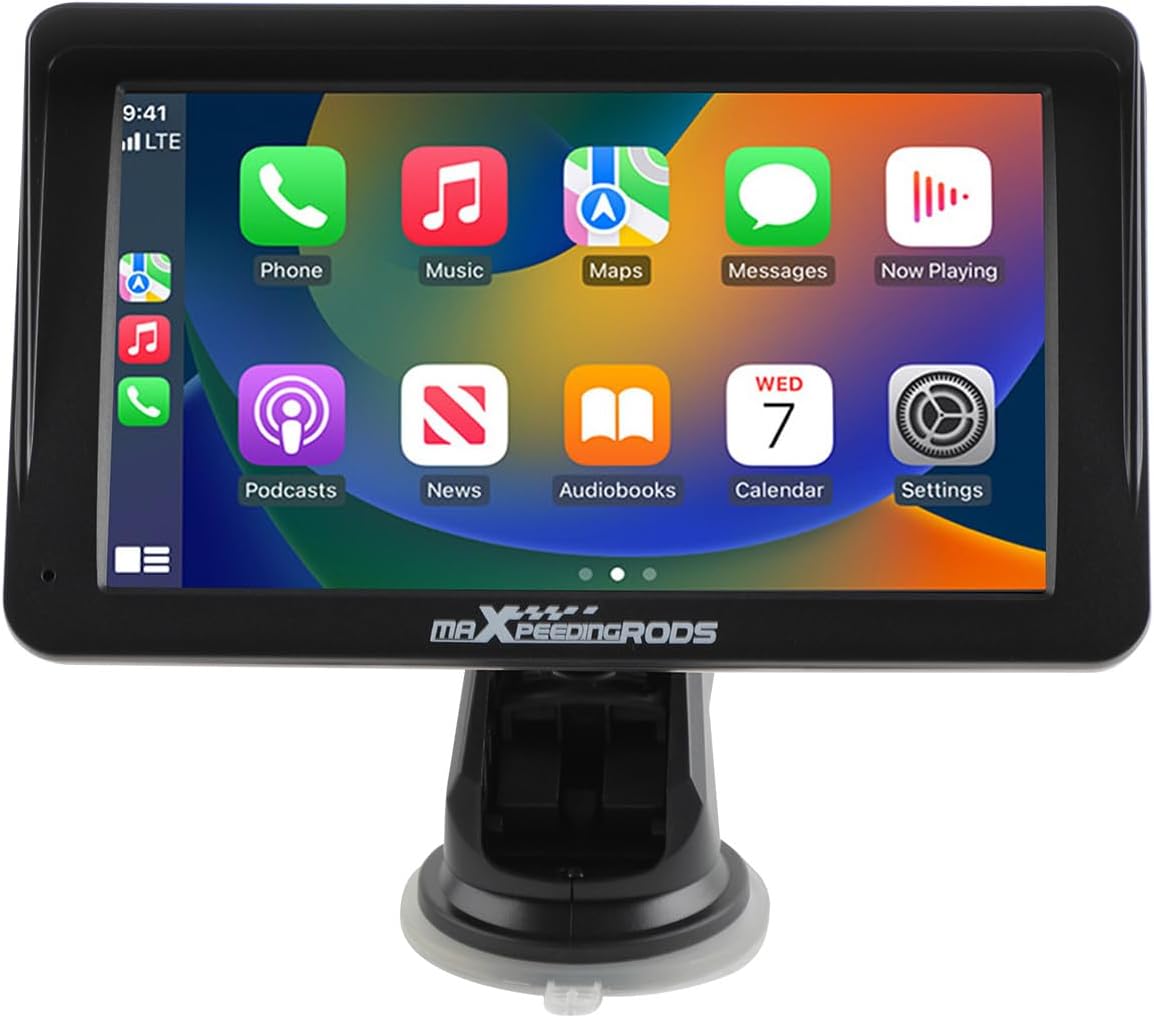
Figure 1.1: maXpeedingrods 7" Portable Car Stereo
Caratteristiche principali:
- 7" HD IPS Display (1024*600 resolution)
- Apple CarPlay wireless e Android Auto
- AHD Backup Camera support
- GPS Navigation & Voice Control (Siri/Google Assistant)
- Bluetooth connectivity and Mirror Link functionality
- Easy, non-invasive installation
2. Contenuto della confezione
Verifica che tutti gli articoli elencati di seguito siano inclusi nel pacco. Se alcuni articoli risultano mancanti o danneggiati, contatta l'assistenza clienti.

Figura 2.1: Cosa c'è nella scatola
- Portable Car Stereo Device
- Backup Camera + Camera Cable
- Cavo GPS
- Mounting Bracket (with suction cup)
- Cavo di alimentazione (adattatore per accendisigari)
- Cavo AUX
3. Configurazione e installazione
3.1 Montaggio del dispositivo
The portable car stereo is designed for easy, non-permanent installation on your dashboard or windshield.
- Superficie pulita: Ensure the dashboard or windshield surface is clean and dry where you intend to mount the device.
- Fissare la staffa: Secure the mounting bracket to the device.
- Dispositivo di posizione: Peel off the protective film from the suction cup and firmly press the bracket onto the chosen surface. Engage the locking mechanism on the suction cup for a secure hold.

Figura 3.1: Fasi di installazione semplici
3.2 Collegamento di alimentazione
Connect the provided power cable to the device and then plug the cigarette lighter adapter into your vehicle's 12V-24V power socket.
3.3 Collegamenti esterni
The device features various ports for connectivity:

Figura 3.2: Porte del dispositivo
- Cavo di alimentazione: Per il collegamento all'alimentazione elettrica del veicolo.
- Presa per scheda TF: Per inserire una scheda TF (MicroSD) per la riproduzione multimediale.
- USB: Per collegare dispositivi USB o per la ricarica.
- AVINO: Per collegare la telecamera di retromarcia AHD.
- AUDIO: For AUX audio output.
3.4 Installazione della telecamera di backup (facoltativa)
If you choose to install the AHD backup camera, connect its cable to the AVIN port on the main unit. Route the camera cable carefully to the rear of your vehicle and mount the camera in a suitable position, typically near the license plate. Ensure the camera is connected to your vehicle's reverse light power for automatic activation when reversing.

Figure 3.3: AHD Backup Camera Features
3.5 Compatibilità del veicolo
The device is compatible with a wide range of vehicles supporting 12V-24V power systems.

Figura 3.4: Ampia compatibilità dei veicoli
4. Istruzioni per l'uso
4.1 Accensione/Spegnimento
The device will power on automatically when your vehicle's ignition is turned on and power is supplied to the cigarette lighter socket. To power off, simply turn off your vehicle's ignition or unplug the power cable.
4.2 Funzionamento del touchscreen
The device features a responsive 7-inch HD IPS touchscreen with 1024x600 resolution and adjustable brightness for clear visibility.

Figure 4.1: Touchscreen Features
4.3 Apple CarPlay e Android Auto wireless
Connect your smartphone wirelessly via Bluetooth to access Apple CarPlay or Android Auto. This allows you to use your phone's navigation, music, messaging, and other compatible apps directly on the car stereo display.
- Abilita Bluetooth: Attiva il Bluetooth sul tuo smartphone.
- Accoppia dispositivo: On the car stereo, navigate to the Bluetooth settings and pair with your smartphone.
- Attiva CarPlay/Android Auto: Once paired, the device should prompt you to activate Apple CarPlay or Android Auto. Follow the on-screen instructions.

Figura 4.2: Connettività wireless CarPlay e Android Auto
4.4 Navigazione GPS e controllo vocale
Utilize your preferred navigation apps (e.g., Google Maps, Apple Maps) through Apple CarPlay or Android Auto. Voice control features (Siri or Google Assistant) are supported for hands-free operation, allowing you to manage calls, music, and navigation commands safely while driving.

Figura 4.3: Navigazione GPS e controllo vocale
4.5 Collegamento specchio
The Mirror Link function allows you to mirror your smartphone's screen directly onto the car stereo display. This is useful for apps not natively supported by CarPlay or Android Auto.
4.6 Modalità di uscita audio
The car stereo offers multiple ways to output audio to your vehicle's sound system:

Figura 4.4: Opzioni di uscita audio
- Bluetooth: Stream audio wirelessly to your vehicle's Bluetooth-enabled stereo (if available).
- Ingresso cavo AUX: Connect the provided AUX cable from the stereo's AUDIO port to your vehicle's AUX input for a wired audio connection.
- Trasmettitore FM: Broadcast audio from the portable stereo to your vehicle's FM radio by tuning both to the same unused FM frequency.
- Altoparlante incorporato: Il dispositivo è dotato di un altoparlante integrato per l'uscita audio diretta.
5. Manutenzione
5.1 Pulizia
To clean the device, use a soft, dry, lint-free cloth. For stubborn smudges on the screen, lightly dampen the cloth with water or a screen-safe cleaning solution. Avoid using harsh chemicals, abrasive cleaners, or solvents, as these can damage the screen and casing.
5.2 Conservazione
Se si conserva il dispositivo per un periodo prolungato, scollegarlo dall'alimentazione e conservarlo in un luogo fresco e asciutto, lontano dalla luce solare diretta e da temperature estreme.
6. Risoluzione Dei Problemi
If you encounter issues with your maXpeedingrods car stereo, please refer to the following common problems and solutions:
| Problema | Possibile causa | Soluzione |
|---|---|---|
| Il dispositivo non si accende. | No power supply; faulty cable; vehicle socket issue. | Controllare il collegamento del cavo di alimentazione. Assicurarsi che la presa accendisigari del veicolo funzioni correttamente. Provare una fonte di alimentazione diversa, se disponibile. |
| CarPlay/Android Auto wireless non si connette. | Bluetooth not enabled; incorrect pairing; software glitch. | Ensure Bluetooth is active on your phone and the stereo. Delete previous pairings and re-pair. Restart both the stereo and your phone. |
| Nessun suono o scarsa qualità del suono. | Incorrect audio output mode; volume too low; loose cable. | Verify the selected audio output mode (Bluetooth, AUX, FM). Adjust volume on both the stereo and your vehicle's system. Check AUX cable connections. Ensure FM frequency is clear if using FM transmitter. |
| Il touchscreen non risponde. | Problema software temporaneo; interferenza con la pellicola protettiva dello schermo. | Restart the device. Ensure no debris or liquid is on the screen. If a screen protector is installed, ensure it is properly applied and not interfering with touch sensitivity. |
| La telecamera di retromarcia non viene visualizzata. | Cavo della telecamera allentato; cablaggio errato; malfunzionamento della telecamera. | Check the AVIN cable connection. Ensure the camera is receiving power and correctly wired to the reverse light circuit. |
If the problem persists after trying these solutions, please contact maXpeedingrods customer support for further assistance.
7. Specifiche
Detailed technical specifications for the maXpeedingrods 7" Portable Car Stereo:
| Caratteristica | Dettaglio |
|---|---|
| Dimensioni del prodotto | 9.06 x 5.51 x 4.72 pollici |
| Peso dell'articolo | 1.87 libbre |
| Numero di modello | 7001 |
| Marca | maXpeedingrods |
| Tipo di servizio del veicolo | Auto |
| Dimensioni dello schermo | 7 pollici |
| Caratteristica speciale | Schermo tattile |
| Tecnologia di connettività | Bluetooth |
| Tipo di mappa | Road (via connected smartphone) |
| Modalità di uscita audio | Stereo |
| Tipo di montaggio | Supporto per cruscotto |
| Risoluzione | 1024x600 |
| Sistema operativo | Android (underlying system for CarPlay/Android Auto functionality) |
8. Garanzia e supporto
8.1 Garanzia del prodotto
maXpeedingrods garantisce i suoi prodotti contro difetti di fabbricazione nei materiali e nella lavorazione per 1 anno from the date of purchase. This warranty covers defects that arise under normal use of the product.
8.2 Technical Support & Customer Service
maXpeedingrods provides unlimited technical support and customer service. If you have any questions, require assistance with installation, operation, or troubleshooting, or need to make a warranty claim, please contact our customer support team. Refer to your purchase documentation or the official maXpeedingrods websito per le informazioni di contatto.


