1. Prodotto finitoview
This manual provides instructions for the CHUNGHOP ASK-STI6220 Voice Remote Control. This remote is designed as a replacement for specific Verizon Stream TV Box models, offering intelligent voice control and responsive button functionality for an enhanced entertainment experience.
2. Informazioni sulla compatibilità
The ASK-STI6220 Voice Remote Control is specifically designed to work ONLY with Verizon Stream TV Box voice remote control V2 ARRIS CCAM21LP1890T2, 2AGOFRC451A, RC451A, STI6220-D315, ASK-STI6220. It is NOT a universal remote for Verizon FiOS and is NOT compatible with Verizon Stream TV JS8V, Verizon FiOS TV 2019 - MG3-R32140B VRC4100 BLE Remote, or any Verizon remote with a "LAST" button. Please ensure your original remote's design and button layout match this model for proper functionality.
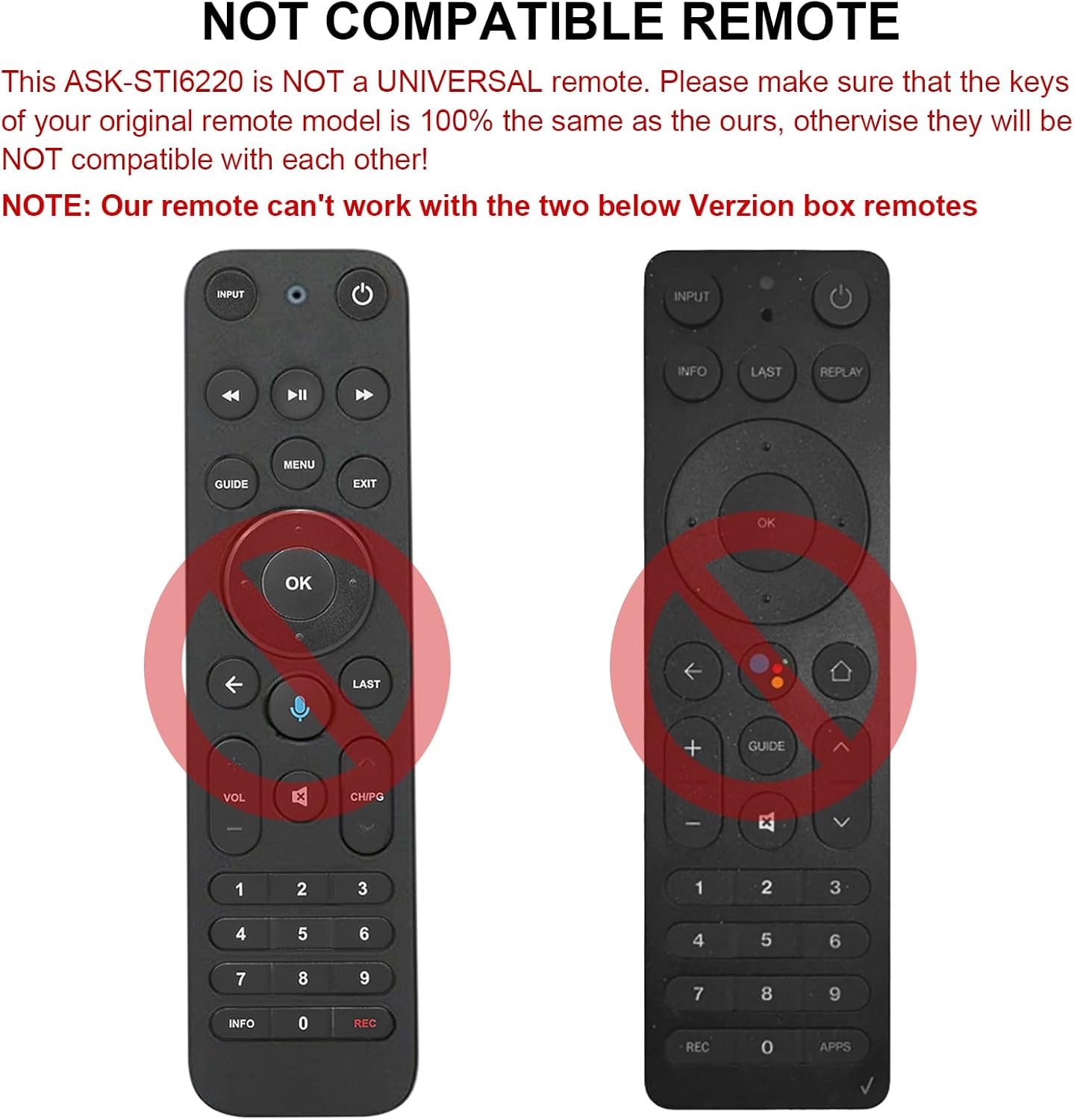
Figura 2.1: Esamples of incompatible Verizon remotes. Ensure your original remote's buttons match the ASK-STI6220 model.

Figure 2.2: The ASK-STI6220 Voice Remote Control, compatible with Verizon Stream TV Box.
3. Configurazione e installazione
3.1 Installazione della batteria
Il telecomando richiede due batterie AAA (non incluse). Per installare le batterie:
- Rimuovere il coperchio della batteria dal retro del telecomando.
- Inserire due batterie AAA, assicurandosi che la polarità (+ e -) corrisponda alle indicazioni all'interno del vano.
- Riposizionare saldamente il coperchio della batteria.

Figura 3.1: Vano batterie per due batterie AAA.
Video 3.1: Demonstration of battery installation and initial setup for the ASK-STI6220 Voice Remote.
3.2 Istruzioni per l'associazione
To use the voice remote, it must first be paired with your Verizon Stream TV Box. Follow one of the methods below:
- Metodo 1: Premere il tasto "Ritorno" E "APP" buttons simultaneously to initiate pairing.
- Metodo 2: Alternatively, press the "OK" E "CASA" buttons simultaneously to initiate pairing.
Nota importante:
- A device can only be paired with one voice remote at a time. Before pairing this new remote, please disconnect your old remote control (e.g., by removing its batteries).
- If pairing fails on the first attempt, try turning your TV Box off and then back on. If you continue to experience issues, clear any existing remote settings on your TV Box before attempting to pair again.

Figure 3.2: Visual guide for pairing the remote control.
4. Istruzioni per l'uso
4.1 Funzioni generali dei pulsanti
The ASK-STI6220 remote features a standard layout for easy navigation and control of your Verizon Stream TV Box:
- Pulsante di accensione: Accende o spegne il TV Box.
- Pulsante di ingresso: Switches input sources on your TV.
- Tastierino di navigazione (Su/Giù/Sinistra/Destra/OK): Utilizzato per la navigazione e la selezione del menu.
- Volume su/giù: Regola il volume.
- Canale su/giù: Cambia canale.
- Riproduzione/Pausa, Avanzamento rapido, Riavvolgimento: Controlli di riproduzione multimediale.
- Pulsante Home: Ritorna alla schermata principale.
- Pulsante Guida: Accede alla guida ai programmi.
- Tastierino numerico (0-9): Accesso diretto al canale.
- Pulsante informazioni: Visualizza le informazioni sul programma.
- APPs Button: Accesses applications.
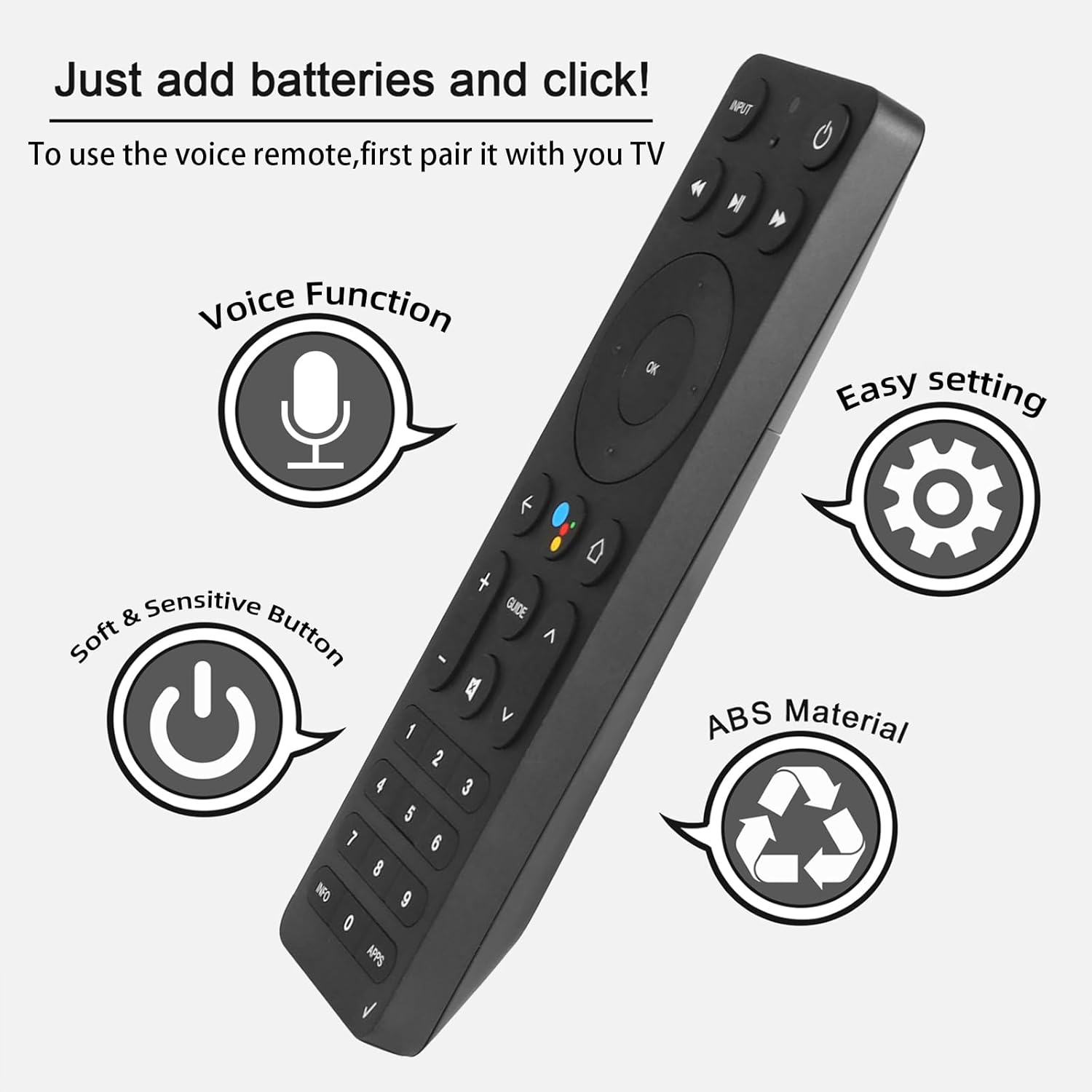
Figure 4.1: Key features and button layout of the remote control.
4.2 Controllo vocale intelligente
The remote features an intelligent voice function, allowing you to control your TV Box with voice commands. Press the dedicated voice button (often represented by a microphone icon) and speak clearly into the remote.
Example di comandi vocali:
- "Launch channels"
- "Lower the volume"
- "Play action movie"
If the voice function does not work correctly, follow these steps:
- Go to the home page of your TV Box.
- Press the "Settings" button on the remote control.
- Select "Remote Controls and Accessories" and then "Remote Controls."
- Select to add a new remote control and follow the on-screen steps to complete the setup.

Figure 4.2: Using intelligent voice search and control.

Figure 4.3: The remote offers a 0.2-second fast response and a 33-foot transmitting distance for accurate control.
5. Manutenzione
Per garantire la longevità e le prestazioni ottimali del tuo telecomando:
- Mantenere pulito il telecomando pulendolo con un panno morbido e asciutto. Evitare l'uso di detergenti liquidi o materiali abrasivi.
- Replace batteries promptly when the remote's responsiveness decreases. Always use fresh AAA batteries.
- Evitare di esporre il telecomando a temperature estreme, alla luce solare diretta o all'umidità.
- Non far cadere il telecomando e non sottoporlo a forti urti.
6. Risoluzione Dei Problemi
If you encounter issues with your ASK-STI6220 remote control, please refer to the following common solutions:
- Il telecomando non risponde:
- Assicurarsi che le batterie siano installate correttamente e non siano scariche. Se necessario, sostituirle con batterie AAA nuove.
- Verify that the remote is properly paired with your Verizon Stream TV Box (refer to Section 3.2).
- Assicurarsi che non vi siano ostacoli tra il telecomando e il TV Box.
- Problemi di abbinamento:
- Confirm that your original remote is disconnected (e.g., by removing its batteries) as only one Bluetooth remote can be paired at a time.
- If pairing fails, try turning the TV Box off and on again, then re-attempt the pairing process.
- Clear existing remote settings on your TV Box before trying to pair again.
- Il controllo vocale non funziona:
- Ensure the remote is successfully paired and the voice function is enabled on your TV Box.
- Follow the voice control setup steps outlined in Section 4.2.
- Parlare in modo chiaro e diretto nel microfono del telecomando.
- Remote not compatible with my device:
- This remote is specifically designed for Verizon Stream TV Box voice remote control V2 ARRIS CCAM21LP1890T2, 2AGOFRC451A, RC451A, STI6220-D315, ASK-STI6220. It is not a universal remote. Please verify your device's model number and compare your original remote's buttons with the ASK-STI6220.

Figure 6.1: Common questions and answers regarding the remote's functionality and compatibility.
7. Specifiche
| Caratteristica | Dettaglio |
|---|---|
| Marca | CHUNGHOP |
| Numero di modello | CHIEDERE-STI6220 |
| Dispositivi compatibili | Verizon Stream TV Box (specific models as listed in Section 2) |
| Numero massimo di dispositivi supportati | 1 |
| Caratteristica speciale | Ergonomico, controllo vocale |
| Colore | As Shown (typically black) |
| Batterie richieste | 2 batterie AAA |
| Peso dell'articolo | 3.2 once |
| Dimensioni del pacco | 8.19 x 3.54 x 0.94 pollici |
8. Garanzia e supporto
For any questions or concerns regarding your CHUNGHOP ASK-STI6220 Voice Remote Control, including pairing, setup, or functionality, please contact the seller directly. Refer to your purchase documentation for specific warranty details, as these may vary.
The manufacturer, CHUNGHOP, is committed to providing support for their products.


