Introduzione
This manual provides essential information for the proper setup, operation, and maintenance of your Synido TempoKEY K25 25-Key USB MIDI Keyboard Controller. Please read this manual thoroughly before using the device to ensure optimal performance and longevity.
Impostare
1. Disimballaggio e contenuto della confezione
Carefully unpack your TempoKEY K25 and verify all contents. The package should include:
- Controller tastiera MIDI TempoKEY K25
- Quality Carrying Bag
- 3.5mm to 5-Pin MIDI Adapter
- Adattatore OTG da USB-A a USB-C
- Power Supply Cable (USB-A to DC)
- Cavo da USB-A a USB-C
- Manuale dell'utente (questo documento)

Image: Synido TempoKEY K25 with its carrying bag, various cables, and adapters.
2. Connectivity and Power
The TempoKEY K25 offers versatile connectivity options:
- Porta USB-C: Connect to your computer (PC/Mac), smartphone, or tablet for both data transfer and power supply. This port ensures fast data transfer and a stable power source.
- Ingresso CC 5 V: For continuous performance, an external DC 5V power adapter can be used (not always included, check package contents).
- 1/8" MIDI Out: Connect to external synthesizers, drum machines, or other MIDI-compatible hardware using the provided 3.5mm to 5-Pin MIDI adapter.
- 1/4" Sustain Input: Connect a sustain pedal for expressive playing.
The device is plug-and-play compatible with most operating systems (Windows, macOS, iOS, Android), generally requiring no additional driver installation.
Video: An unboxing video demonstrating the contents and initial setup of the Synido TempoKEY K25.
Operating the TempoKEY K25
1. Keys and Velocity Curves
The TempoKEY K25 features 25 velocity-sensitive keys with a deeper 0.59" key travel for an authentic touch. You can customize the response to match your playing style by choosing from 4 velocity curves:
- Normale: Standard response.
- Difficile: Requires more force for higher velocity.
- Leggero: Achieves higher velocity with less force.
- Fisso: Consistent velocity regardless of playing force.
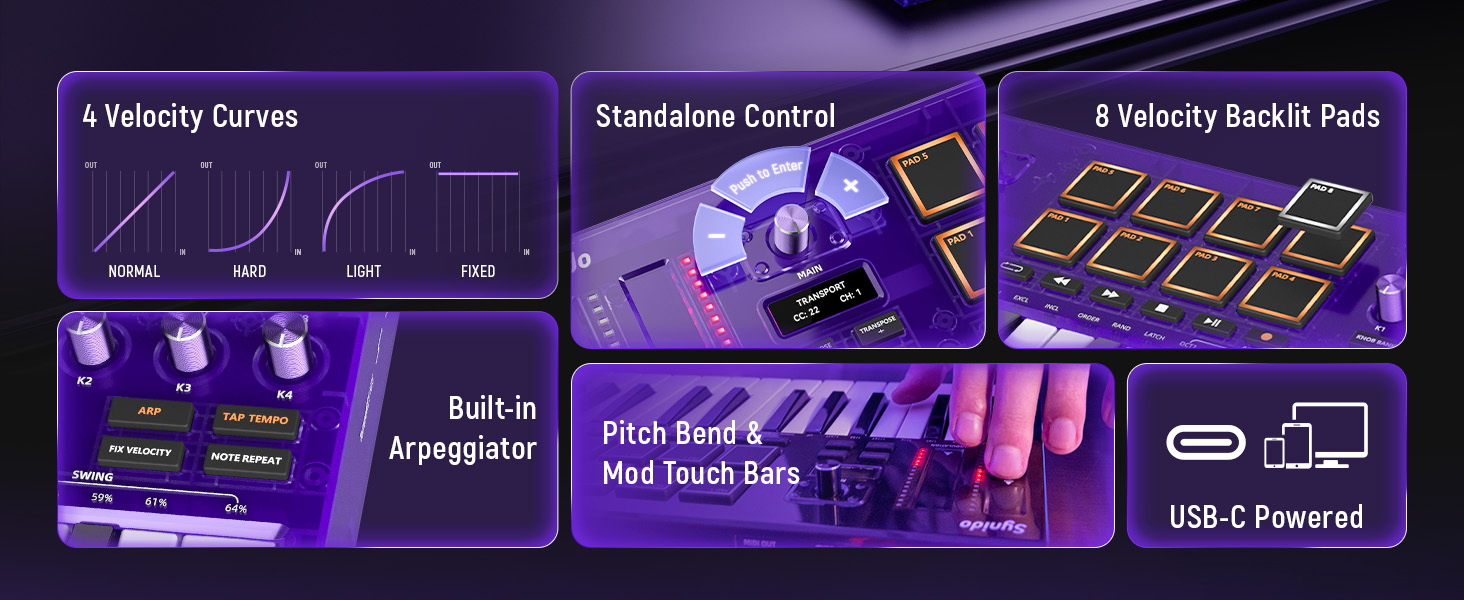
Image: Visual representation of the four selectable velocity curves: Normal, Hard, Light, and Fixed.
2. Pads and Performance Controls
The controller includes 8 velocity-sensitive backlit pads with 2 drum banks. These pads support precise note repeat, full MIDI mapping, and customizable dual-color lighting for dynamic performance. Two touch bars provide real-time pitch bend and modulation with instant visual feedback, enhancing expressive control.

Image: Close-up of the TempoKEY K25 highlighting the backlit pads and pitch/modulation touch bars.
3. Assignable Knobs and Transport Buttons
Eight assignable knobs (with 2 banks for a total of 16 controls) allow for extensive MIDI CC control. Six transport buttons provide control over your Digital Audio Workstation (DAW) functions, supporting both CC and MMC (MIDI Machine Control).
4. Built-in Arpeggiator
Generate unique melodies and rhythms with the powerful built-in arpeggiator. It features adjustable tempo, direction, swing amount, and a LATCH on/off function for sustained arpeggios.
Video: Demonstration of the powerful Arpeggiator function on the Synido TempoKEY K25.
5. OLED Display and Onboard Editing
Quickly change functions and MIDI parameters (Note, CC, PC, Channel, etc.) directly on the keyboard using the high-clarity OLED display and 360° push encoder. Press and rotate the main knob to instantly map controls, streamlining your workflow.

Image: Close-up of the OLED display and 360° push encoder for direct onboard editing.
6. Compatibilità DAW
The TempoKEY K25 is fully compatible with universal DAWs, including but not limited to Ableton Live, FL Studio, Logic Pro X, Pro Tools, Cubase, Studio One, Reason, GarageBand, Reaper, and Cakewalk by BandLab.

Image: The TempoKEY K25 connected to a computer, illustrating its compatibility with major DAWs.
Video: A demonstration of making music with the Synido TempoKEY K25 MIDI Keyboard Controller.
Manutenzione
1. Pulizia
To maintain the appearance and functionality of your TempoKEY K25, regularly wipe the surface with a soft, dry, lint-free cloth. For stubborn marks, a slightly damp cloth can be used, followed by immediate drying. Avoid using harsh chemicals, abrasive cleaners, or solvents, as these can damage the finish and components.
2. Conservazione
When not in use, store the TempoKEY K25 in its provided carrying bag to protect it from dust, spills, and physical damage. Store in a cool, dry place away from direct sunlight and extreme temperatures.
Risoluzione dei problemi
If you encounter issues with your TempoKEY K25, consider the following common solutions:
- Nessuna alimentazione/Nessuna risposta: Ensure the USB-C cable is securely connected to both the controller and your computer/power source. If using a DC 5V adapter, confirm it is properly plugged in and functioning. Try a different USB port or cable.
- Non riconosciuto dal computer/DAW: Verify that the USB cable is correctly connected. Restart your computer and DAW software. Check your DAW's MIDI settings to ensure the TempoKEY K25 is enabled as an input device.
- I tasti/pad non rispondono: Check the velocity curve settings on the device. Ensure the correct MIDI channel is selected on both the controller and your DAW.
- Problemi software/firmware: Visit the official Synido website to download the latest software editor and firmware updates. Firmware updates can resolve performance issues and add new features.
Specifiche
| Caratteristica | Dettaglio |
|---|---|
| Nome del modello | TempoKEY K25 |
| Numero di chiavi | 25 (sensibile alla velocità) |
| Pastiglie | 8 Velocity-sensitive Backlit Pads (2 banks) |
| Manopole | 8 Assignable Knobs (2 banks) |
| Display | High-clarity OLED |
| Connettività | USB-C, 1/8" MIDI Out, 1/4" Sustain Input, DC 5V In |
| Caratteristiche speciali | Built-In Arpeggiator, Digital Display, Portable, Programmable, Velocity Sensitive Keys/Pads, Pitch/Modulation Touch Bars |
| Dispositivi compatibili | Computer portatile, PC, smartphone, tablet |
| Software compatibile | Ableton Live, FL Studio, Logic Pro X, Pro Tools, Cubase, Studio One, Reason, GarageBand, Reaper, Cakewalk by BandLab, most DAWs |
| Dimensioni | 15 x 9 x 2 pollici |
| Peso dell'articolo | 3.89 libbre |
| Tipo di materiale | PC+ABS (with Premium UV Coating) |
Garanzia e supporto
1. Informazioni sulla garanzia
For detailed warranty information regarding your Synido TempoKEY K25, please refer to the official Synido webo la scheda di garanzia inclusa nella confezione del prodotto. Conservare la prova d'acquisto per eventuali reclami in garanzia.
2. Assistenza clienti
If you require assistance, have questions, or need technical support, please contact Synido customer service. You can typically find contact information on the official Synido website. For software and firmware updates, visit the Synido official website to ensure your device is running the latest versions.

Image: Guide on how to contact Synido support via Amazon's messaging assistant.


