Introduzione
The Astrum KT210 is a versatile wireless keyboard featuring a multi-mode connection, integrated touchpad, and RGB backlighting. It is designed for seamless use across multiple devices such as laptops, PCs, tablets, and smartphones, supporting both Bluetooth and 2.4GHz wireless connections. This manual provides detailed instructions for setting up, operating, and maintaining your keyboard.
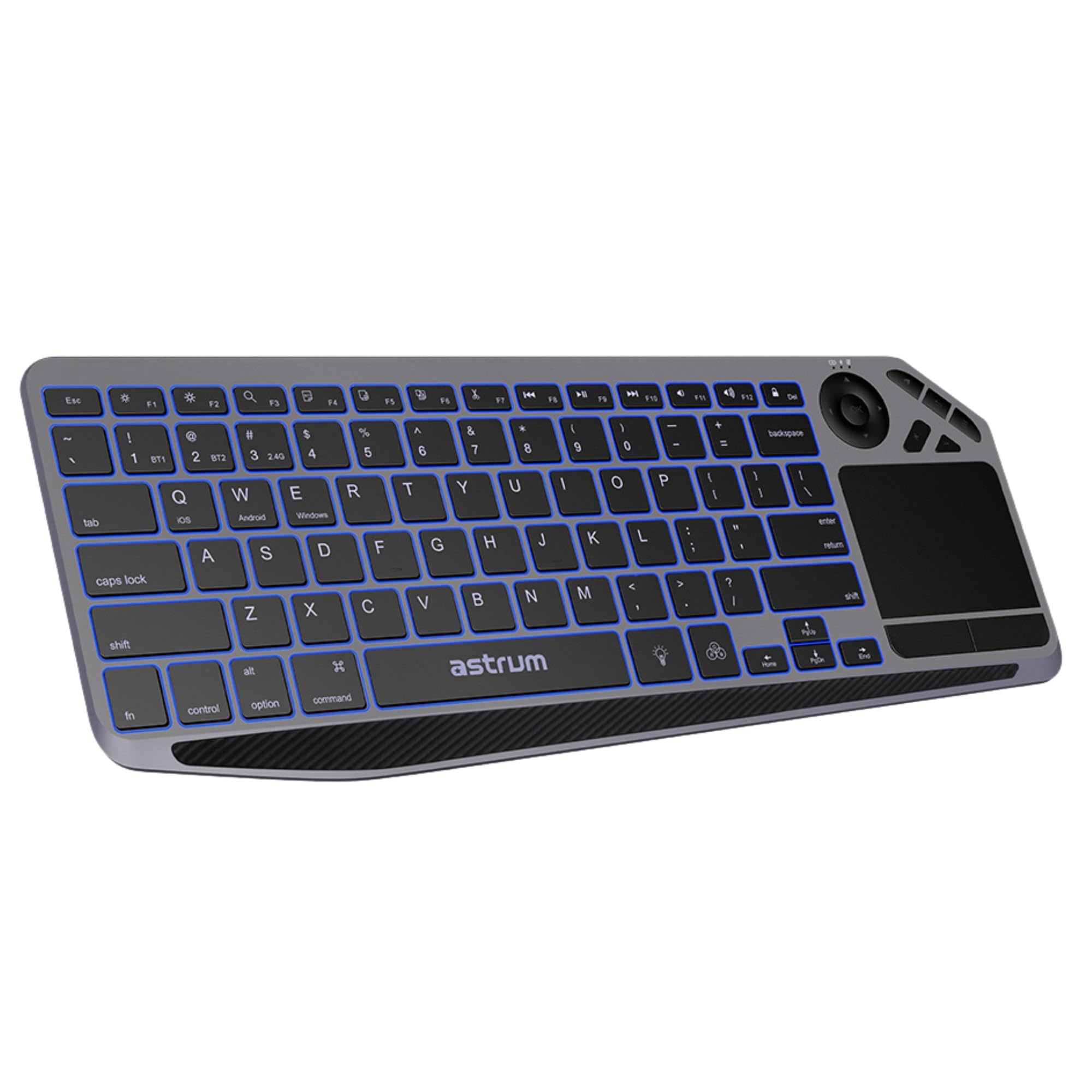
Immagine: in alto view of the Astrum KT210 Wireless Touch Multi-mode Keyboard, showcasing its full layout including the integrated touchpad and multimedia keys.
Istruzioni di installazione
Contenuto della confezione
- Astrum KT210 Wireless Touch Multi-mode Keyboard
- Cavo di ricarica USB
- Manuale d'uso
Caricamento della tastiera
Before first use, fully charge the keyboard. Connect the provided USB charging cable to the keyboard's charging port and to a USB power source (e.g., computer USB port, USB wall adapter). The charging indicator light will show the charging status and turn off when fully charged. A full charge provides up to 160 hours of working time.

Image: Close-up of the Astrum KT210 keyboard showing the USB charging port with a cable connected, indicating the charging process.
Accensione/spegnimento
Locate the power switch on the keyboard. Slide the switch to the "ON" position to power on the keyboard. Slide it to "OFF" when not in use to conserve battery life.

Image: Illustration showing the location of the On/Off switch on the Astrum KT210 keyboard, emphasizing battery saving.
Connecting to Devices (Multi-mode Pairing)
The keyboard supports connecting up to three devices via Bluetooth. Use the dedicated function keys to switch between paired devices.
- Accoppiamento Bluetooth:
- Premere e tenere premuto Fn + BT1 (O Modello BT2, Modello BT3) per 3-5 secondi finché la spia corrispondente non lampeggia rapidamente. Ciò indica che la tastiera è in modalità di associazione.
- Sul tuo dispositivo (laptop, tablet, smartphone), attiva il Bluetooth e cerca i dispositivi disponibili.
- Select "Astrum KT210" from the list of found devices.
- Seguire le istruzioni sullo schermo per completare il processo di associazione. La spia luminosa smetterà di lampeggiare una volta effettuata la connessione.
- Passaggio da un dispositivo all'altro:
- Once paired, simply press Fn + BT1, Fn + BT2, O Fn + BT3 to switch between your connected devices. The indicator light will illuminate steadily for the active connection.
Istruzioni per l'uso
Funzionalità del touchpad
The integrated multipoint touchpad allows for precise navigation and gesture control. Refer to your operating system's settings for specific multi-touch gesture configurations.
- Tocco con un solo dito: Fare clic con il pulsante sinistro del mouse.
- Tocco con due dita: Fare clic con il pulsante destro del mouse.
- Scorrimento con due dita: Scorri verso l'alto/il basso o verso sinistra/destra.
- Pizzica per ingrandire: Zoom in/out (if supported by application).

Image: The Astrum KT210 keyboard highlighting the multipoint touchpad and dedicated multimedia hotkeys for seamless control.
Controllo della retroilluminazione RGB
The keyboard features multi-color LED backlighting with adjustable brightness levels.
- Premere il tasto icona lampadina chiave (usually near the spacebar) to cycle through different backlight colors or turn the backlight on/off.
- Premere Fn + Light Brightness Up/Down keys (often F11/F12 or dedicated keys) to adjust the backlight brightness through 3 levels.

Image: The Astrum KT210 keyboard displaying its multi-color LED backlighting feature with different color options.
Tasti di scelta rapida multimediali
The keyboard includes dedicated multimedia hotkeys for quick access to media controls. These are typically located in the function key row (F1-F12) and may require pressing the Fn tasto contemporaneamente.
- Fn + F1-F12: Control media playback, volume, and other system functions. Refer to the key legends for specific functions.
Compatibilità del sistema operativo
The Astrum KT210 keyboard is compatible with a wide range of operating systems:
- Finestre
- Sistema operativo Mac
- Sistema operativo Chrome
- Linux
- Android
Some keys may have dual legends (e.g., Windows/Android, iOS/Mac). The keyboard automatically adapts to the connected operating system or can be manually switched using Fn + Q (iOS), Fn + W (Android), Fn + E (Windows).
Manutenzione
Pulizia
Per pulire la tastiera, spegnerla e scollegare tutti i cavi. Utilizzare un panno morbido e privo di lanugine leggermente dampened with water or a mild cleaning solution. Avoid excessive moisture and harsh chemicals. Do not immerse the keyboard in liquid.
Resistenza alle fuoriuscite
The keyboard features a spill-resistant design, offering protection against accidental liquid spills. In case of a spill, immediately power off the keyboard, disconnect it, and gently wipe away the liquid. Allow it to dry completely before powering on again. While spill-resistant, it is not waterproof; avoid intentional exposure to liquids.
Risoluzione dei problemi
| Problema | Soluzione |
|---|---|
| La tastiera non si accende. | Ensure the power switch is in the "ON" position. Charge the keyboard fully using the provided USB cable. |
| Impossibile effettuare l'associazione tramite Bluetooth. |
|
| I tasti non rispondono o digitano in modo errato. |
|
| La retroilluminazione non funziona o è scarsa. |
|
| Il touchpad non risponde. |
|
Specifiche
| Marca | ASTRUM |
| Numero di modello | A51021-B (KT210) |
| Tecnologia di connettività | Bluetooth (Multi-mode) |
| Dispositivi compatibili | Computer portatile, PC, tablet, smartphone |
| Compatibilità del sistema operativo | Windows, Mac OS, Chrome OS, Linux, Android |
| Caratteristiche speciali | Multi-Device Pairing and Switching, RGB Backlight (3 levels), Integrated Multipoint Touchpad, Spill-Resistant Design, Rechargeable Battery |
| Tipo di batteria | Ioni di litio |
| Durata della batteria | Fino a 160 ore (orario di lavoro) |
| Colore | Nero |
| Materiale | Plastica |
Informazioni sulla garanzia
The Astrum KT210 Wireless Touch Multi-mode Keyboard comes with a 12 mesi di garanzia limitata from the manufacturer. This warranty covers defects in materials and workmanship under normal use. It does not cover damage caused by misuse, accident, unauthorized modification, or external causes such as spills (beyond spill resistance), drops, or extreme temperatures.
Please retain your proof of purchase for warranty claims. For detailed warranty terms and conditions, refer to the warranty card included with your product or visit the official Astrum websito.
Assistenza clienti
For technical assistance, troubleshooting, or warranty inquiries, please contact Astrum customer support through their official websito o le informazioni di contatto fornite nella confezione del prodotto.
Ufficiale Websito: www.astrum.com
Please have your product model number (A51021-B) and proof of purchase ready when contacting support.


