1. Introduzione
Welcome to the user manual for your MAXCOM FW67 Titan Pro Smartwatch. This device is designed to enhance your daily life by providing convenient access to notifications, health monitoring, and fitness tracking features directly from your wrist. Please read this manual carefully to ensure proper use and to fully understand the capabilities of your new smartwatch.
2. Informazioni sulla sicurezza
- Non tentare di smontare, riparare o modificare il dispositivo. Ciò potrebbe invalidare la garanzia e causare danni.
- Tenere il dispositivo lontano da temperature estreme, luce solare diretta e fiamme libere.
- Evitare di esporre il dispositivo a forti urti o vibrazioni.
- This device is water-resistant (IP69K rating), suitable for splashes and swimming. However, avoid hot water, steam, or prolonged submersion in deep water.
- Consult a medical professional before starting any new exercise regimen or if you have any health concerns. The health data provided by the smartwatch is for reference only and should not be used for medical diagnosis or treatment.
- Utilizzare solo il cavo di ricarica fornito e un adattatore di alimentazione compatibile.
3. Contenuto della confezione
Si prega di controllare la confezione per verificare la presenza dei seguenti elementi:
- MAXCOM FW67 Titan Pro Smartwatch (Orange)
- Cavo di ricarica
- Manuale d'uso
4. Dispositivo suview
Prendi familiarità con i componenti principali del tuo smartwatch.

Figura 4.1: Davanti view of the MAXCOM FW67 Titan Pro Smartwatch, displaying the main watch face with time, date, weather, battery level, and activity metrics like calories burned and step count.

Figura 4.2: Lato view of the smartwatch, highlighting the 'POWER' button at the top and the 'BACK' button below it, both located on the right side of the watch casing.
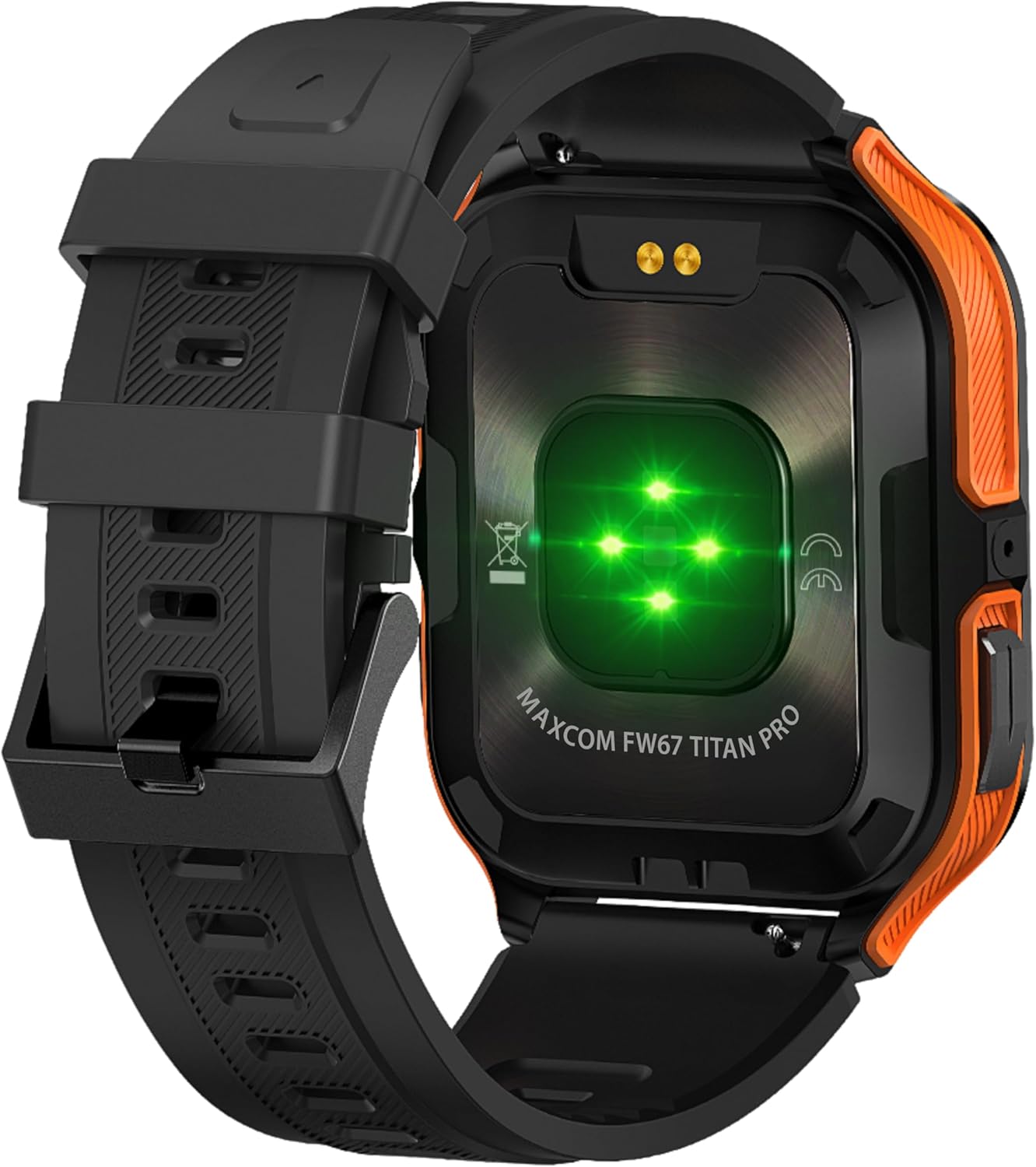
Figura 4.3: Posteriore view of the smartwatch, showing the optical heart rate sensors (glowing green) and the magnetic charging pins. The model name 'MAXCOM FW67 TITAN PRO' is also visible.
5. Impostazione
5.1. Ricarica iniziale
Prima del primo utilizzo, caricare completamente lo smartwatch.
- Connect the charging cable to the magnetic charging pins on the back of the smartwatch. Ensure the pins align correctly.
- Plug the USB end of the charging cable into a compatible USB power adapter (e.g., 5V/1A) or a computer's USB port.
- Il display dell'orologio indicherà lo stato di carica. Una carica completa richiede in genere circa 2-3 ore.
5.2. Installazione e associazione dell'app
To unlock the full potential of your smartwatch, you need to pair it with your smartphone via the dedicated companion application.
- Scarica l'App: Cercare the official MAXCOM smartwatch application (e.g., 'GloryFit' or similar, refer to packaging for exact app name) on the Google Play Store (for Android) or Apple App Store (for iOS). Install the app on your smartphone.
- Abilita Bluetooth: Assicurati che il Bluetooth sia abilitato sul tuo smartphone.
- Apri l'app: Avvia l'app installata e segui le istruzioni sullo schermo per creare un account o effettuare l'accesso.
- Aggiungi dispositivo: Within the app, navigate to the 'Device' or 'Add Device' section. The app will search for available smartwatches.
- Seleziona il tuo smartwatch: Select 'FW67 Titan Pro' from the list of discovered devices.
- Conferma associazione: Potrebbe apparire una richiesta di associazione sia sul telefono che sullo smartwatch. Conferma l'associazione su entrambi i dispositivi.
- Configurazione completa: Follow any remaining prompts in the app to set up your profile, autorizzazioni e preferenze.
6. Utilizzo dello smartwatch
6.1. Navigazione di base
- Pulsante di accensione: Press and hold to power on/off. Short press to wake the screen or return to the main watch face.
- Pulsante Indietro: Short press to go back to the previous screen or exit a function.
- Gesti touchscreen:
- Scorrere verso l'alto: Accedi alle impostazioni rapide/centro di controllo.
- Scorri verso il basso: View notifiche.
- Scorri verso sinistra/destra: Navigare tra i widget (ad esempio, attività, frequenza cardiaca, meteo).
- Rubinetto: Seleziona un elemento o accedi a un menu.
6.2. Caratteristiche principali

Figura 6.1: Il display dello smartwatch mostraasing various health metrics including steps taken, calories burned, heart rate, blood oxygen saturation (SpO2), and blood pressure, along with battery status.
- Monitoraggio della frequenza cardiaca: The watch continuously monitors your heart rate. Access this feature from the main menu or by swiping to the heart rate widget.
- Monitoraggio delle attività: Tracks steps, distance, and calories burned throughout the day. Set daily goals in the companion app.
- Monitoraggio del sonno: Tiene traccia automaticamente dei tuoi ritmi del sonno, inclusi sonno profondo, sonno leggero e orari di veglia. View analisi dettagliata nell'app.
- Modalità Sportive: Select from various sports modes (e.g., running, walking, cycling) to track specific workout data. Start a workout from the 'Sport' menu.
- Notifiche: Receive call, message, and app notifications directly on your wrist. Ensure notification permissions are granted in the companion app.
- Ossigeno nel sangue (SpO2) e pressione sanguigna: The watch can measure SpO2 and blood pressure. These measurements are for reference only and not for medical use.
- Tempo atmosferico: View current weather conditions after syncing with the app and granting location permissions.
- Controllo della musica: Controlla la riproduzione musicale sul tuo smartphone direttamente dall'orologio.
7. Manutenzione
- Pulizia: Regularly clean your smartwatch and strap with a soft, dry, lint-free cloth. If necessary, use a slightly damp panno con sapone neutro, quindi risciacquare e asciugare accuratamente.
- Evitare i prodotti chimici: Non utilizzare prodotti chimici aggressivi, solventi o detergenti aggressivi, poiché potrebbero danneggiare la finitura e le guarnizioni dell'orologio.
- Porta di ricarica: Keep the charging pins clean and dry to ensure proper charging.
- Magazzinaggio: Quando non lo si utilizza per lunghi periodi, conservare lo smartwatch in un luogo fresco e asciutto.
- Resistenza all'acqua: While the watch is IP69K water-resistant, it is not recommended for diving or high-pressure water activities. Always dry the watch thoroughly after exposure to water.
8. Risoluzione Dei Problemi
Se riscontri problemi con il tuo smartwatch, fai riferimento ai seguenti problemi comuni e alle relative soluzioni:
| Problema | Soluzione |
|---|---|
| Lo smartwatch non si accende | Assicurati che l'orologio sia completamente carico. Collegalo al caricabatterie per almeno 30 minuti. |
| Impossibile associare allo smartphone | 1. Ensure Bluetooth is enabled on your phone. 2. Make sure the smartwatch is within range. 3. Restart both the smartwatch and your phone. 4. Clear Bluetooth cache on your phone. 5. Try pairing through the app, not directly via phone's Bluetooth settings. |
| Le notifiche non vengono ricevute | 1. Check if the smartwatch is connected to the app. 2. Ensure notification permissions are granted for the app on your phone. 3. Verify that app notifications are enabled within the smartwatch app settings. 4. Disable 'Do Not Disturb' mode on both the watch and phone. |
| Dati sanitari imprecisi | 1. Ensure the watch is worn snugly on your wrist, not too loose or too tight. 2. Clean the sensors on the back of the watch. 3. Avoid excessive movement during measurements. 4. Remember that data is for reference and not medical diagnosis. |
| Durata breve della batteria | 1. Reduce screen brightness. 2. Limit continuous heart rate monitoring if not needed. 3. Turn off unnecessary notifications. 4. Ensure the watch is fully charged each time. |
9. Specifiche
Key technical specifications for the MAXCOM FW67 Titan Pro Smartwatch:
| Caratteristica | Specificazione |
|---|---|
| Marca | MAXCOM |
| Modello | FW67 Titan Pro |
| Colore | Arancia |
| Sistema operativo | Proprietary OS (compatible with Android/iOS) |
| Dimensioni dello schermo | 1.85 pollici |
| Connettività | Bluetooth |
| Caratteristiche speciali | Heart Rate Monitor, Notifications, SpO2, Blood Pressure, Activity Tracking |
| Dispositivi compatibili | Smartphone |
| Composizione della batteria | Agli ioni di litio |
| Capacità della batteria | 380 mAh |
| GPS | GPS tramite smartphone |
| Forma | Rettangolare |
10. Garanzia e supporto
Your MAXCOM FW67 Titan Pro Smartwatch comes with a standard manufacturer's warranty. Please refer to the warranty card included in your package for specific terms and conditions, including warranty duration and coverage details. For technical support, troubleshooting assistance beyond this manual, or warranty claims, please contact MAXCOM customer service through their official websito o le informazioni di contatto fornite con la documentazione del prodotto.


