1. Introduzione
This user manual provides comprehensive instructions for the installation, operation, and maintenance of your ESCAM QF218 1080p 355º IP Security Camera. Designed for reliable surveillance, this camera offers high-definition video, wide-angle coverage, and essential security features. Please read this manual thoroughly before using the product to ensure proper setup and optimal performance.
2. Contenuto della confezione
Si prega di verificare che tutti gli articoli siano presenti e in buone condizioni all'apertura del pacco:
- ESCAM QF218 IP Security Camera
- Adattatore di alimentazione
- Kit di montaggio (viti, tasselli)
- Manuale dell'utente (questo documento)
3. Prodotto finitoview
Familiarize yourself with the components of your ESCAM QF218 IP Security Camera:
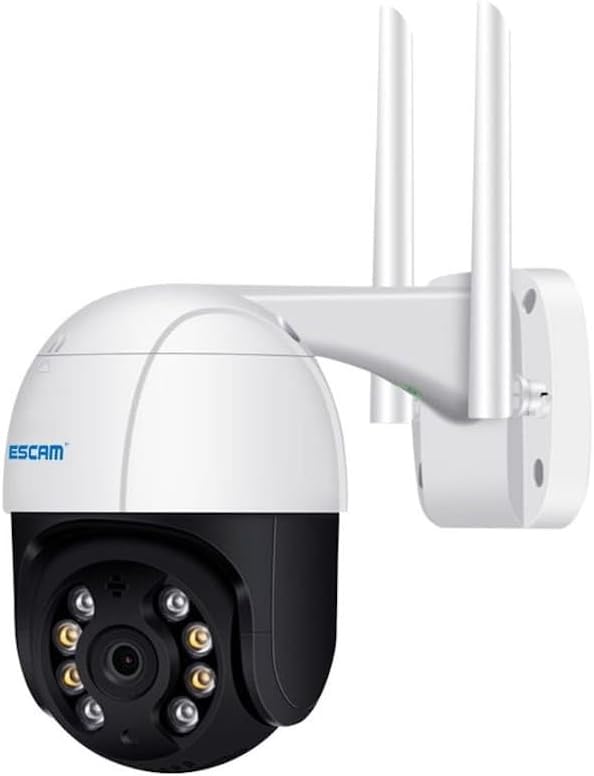
Figure 3.1: ESCAM QF218 IP Security Camera. This image displays the white and black dome-shaped camera unit, featuring a lens surrounded by infrared LEDs for night vision. Two prominent white antennas extend upwards from the rear, indicating wireless connectivity. The camera is attached to a white wall-mounting bracket.
The camera features a robust housing, a high-definition lens, multiple infrared lights for clear night vision, and two external antennas for stable wireless connectivity. The pan-tilt mechanism allows for a 355-degree horizontal rotation and vertical tilt, providing extensive coverage.
4. Guida all'installazione
4.1 Accensione iniziale
- Disimballare la macchina fotografica e tutti gli accessori.
- Collegare l'adattatore di alimentazione alla porta di ingresso dell'alimentazione della fotocamera.
- Plug the power adapter into a standard electrical outlet. The camera will power on and initiate its self-test sequence, which may include a brief rotation.
4.2 Installazione dell'app e creazione dell'account
- Download the official ESCAM security camera application from your mobile device's app store (e.g., App Store for iOS, Google Play Store for Android). Cercare "ESCAM Security" or refer to the QR code on the product packaging if available.
- Installa e apri l'applicazione.
- Follow the on-screen prompts to create a new user account or log in if you already have one.
4.3 Connessione di rete
- Nell'app, tocca "Aggiungi dispositivo" o l'icona "+".
- Select your camera model (QF218) or choose the "Scan QR Code" option if the camera has one.
- Follow the in-app instructions to connect the camera to your Wi-Fi network. This typically involves entering your Wi-Fi password and allowing the camera to scan a QR code displayed on your phone screen, or using an audio pairing method.
- Wait for the camera to connect to the network. A voice prompt or indicator light will confirm successful connection.
4.4 Montaggio della telecamera
- Scegliere una posizione adatta per il montaggio, assicurandosi che sia ben visibile view e la vicinanza a una presa di corrente.
- Use the provided mounting template (if included) or mark the drill holes on the wall/ceiling.
- Praticare dei fori pilota e, se necessario, inserire i tasselli.
- Fissare la staffa di montaggio alla superficie utilizzando le viti fornite.
- Attach the camera to the mounting bracket, ensuring it is firmly locked in place.
- Adjust the camera's angle manually or via the app to achieve the desired viewzona di ingaggio.
5. Utilizzo della fotocamera
5.1 Vivere View
Open the ESCAM app and select your camera from the device list to access the live video feed. You can view pippo in tempo realetage da qualsiasi luogo con una connessione Internet.
5.2 Controllo panoramica e inclinazione
In diretta view screen, use the directional controls (usually a joystick or arrow icons) within the app to remotely pan (horizontal rotation) and tilt (vertical movement) the camera lens, allowing you to cover a wider area.
5.3 Registrazione e riproduzione
- Registrazione manuale: Tap the record button in the app to start and stop manual video recording. Recordings are saved to your phone or the camera's inserted SD card (if applicable).
- Registrazione attivata dal movimento: Enable motion detection in the camera settings. The camera will automatically record when motion is detected and send alerts to your phone.
- Riproduzione: Accedi a foo registratotage through the app's playback or history section. You can filter by date and time to review eventi specifici.
5.4 Audio bidirezionale
If your camera supports two-way audio (common for this model type), tap the microphone icon in the app to speak through the camera's speaker, and listen to audio from the camera's built-in microphone.
5.5 Rilevamento del movimento e avvisi
Configure motion detection sensitivity and alert settings in the app. You can set specific detection zones and schedule alert times to receive push notifications on your mobile device when motion is detected.
6. Manutenzione
- Pulizia: Pulisci delicatamente l'obiettivo e il corpo della fotocamera con un panno morbido e asciutto. Non utilizzare prodotti chimici aggressivi o detergenti abrasivi.
- Aggiornamenti del firmware: Regularly check the app for available firmware updates. Keeping your camera's firmware up-to-date ensures optimal performance, security, and access to new features.
- Gestione della memoria: If using a local storage card (e.g., microSD), periodically review e gestire i foo registratitage to prevent the card from filling up. Most cameras support loop recording, overwriting the oldest footage quando è pieno.
- Stabilità della rete: Ensure your Wi-Fi network is stable and strong at the camera's location for uninterrupted operation.
7. Risoluzione Dei Problemi
| Problema | Possibile soluzione |
|---|---|
| La fotocamera non si accende. | Check the power adapter connection to the camera and the wall outlet. Ensure the outlet is functional. |
| Impossibile connettersi al Wi-Fi. | Ensure your Wi-Fi password is correct. Move the camera closer to the router. Check if your router is 2.4GHz (most IP cameras do not support 5GHz). Restart the camera and router. |
| Scarsa qualità video o ritardo. | Check your internet connection speed. Reduce the video resolution in the app settings if available. Ensure strong Wi-Fi signal. |
| Il rilevamento del movimento non funziona. | Verify motion detection is enabled in the app settings. Adjust sensitivity. Check detection zones. Ensure there are no obstructions. |
| Nessun audio dalla telecamera. | Check microphone and speaker settings in the app. Ensure volume is not muted on your device. |
If you encounter issues not listed here, please refer to the support section of the ESCAM app or contact customer support.
8. Specifiche
| Caratteristica | Dettaglio |
|---|---|
| Numero di modello | QF218 (Part No. 47570) |
| Marca | ESCURSIONE |
| Risoluzione | 1080p (Full HD) |
| Gamma di panoramica/inclinazione | 355º Pan |
| Tipo di avviso | Solo movimento |
| Tipo di sorgente luminosa | Infrarossi |
| Peso dell'articolo | 1.76 libbre |
| Dimensioni del pacco | 13.78 x 9.45 x 6.3 pollici |
| Materiale | Plastica |
| Sono necessarie batterie? | NO |
| ASIN | B0CPPMTWJ4 |
9. Garanzia e supporto
9.1 Informazioni sulla garanzia
ESCAM products typically come with a limited manufacturer's warranty. Please refer to the warranty card included with your product or visit the official ESCAM webPer i termini e le condizioni di garanzia dettagliati, consultare il sito. Conservare la ricevuta d'acquisto come prova d'acquisto per eventuali reclami in garanzia.
9.2 Assistenza clienti
For technical assistance, troubleshooting, or product inquiries, please contact ESCAM customer support. Contact information can usually be found on the official ESCAM website or within the product application. When contacting support, please have your product model (QF218) and serial number ready.
Puoi anche visitare il ESCAM Brand Store on Amazon per ulteriori informazioni sul prodotto.


