1. Introduzione e oltreview
This manual provides essential instructions for the safe and efficient use of your Maxcom MM135L Basic Mobile Phone. The MM135L is designed for straightforward communication, featuring a user-friendly interface, large keys, and a 1.77-inch screen. It supports 2G networks and includes dual SIM capability, an SOS button for emergencies, and convenient USB-C charging. Please read this manual thoroughly before operating the device.
2. Contenuto della confezione
Verificare che tutti gli articoli siano presenti nel pacco:
- Maxcom MM135L Mobile Phone
- Battery (Lithium-Ion, 600 mAh)
- Cavo USB
- Espulsore del vassoio SIM
- Manuale dell'utente (questo documento)
3. Disposizione del dispositivo
Familiarize yourself with the physical components of your Maxcom MM135L phone.
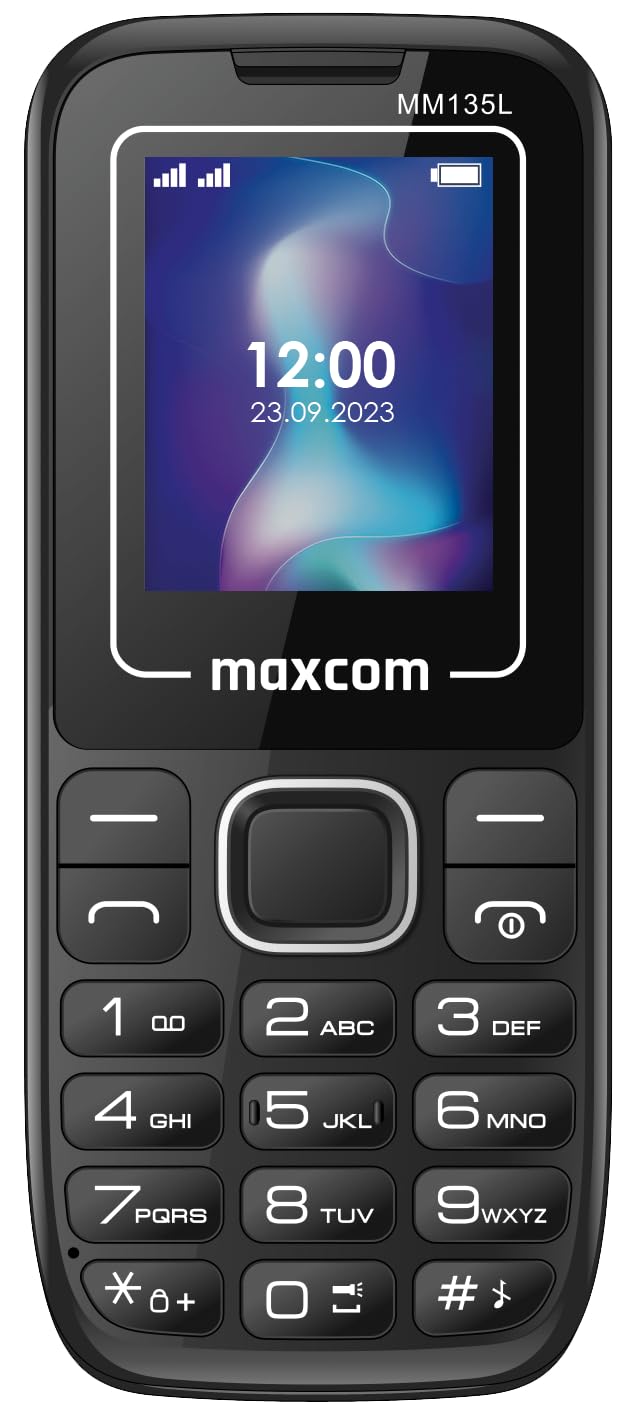
Figura 3.1: Posteriore view of the Maxcom MM135L phone, showing the blue textured back cover, Maxcom logo, and speaker grille at the top.

Figura 3.2: Fronte view of the Maxcom MM135L phone, displaying the screen, large numeric keypad, and call/end buttons.

Figure 3.3: Bottom edge of the phone, featuring the USB-C charging port and a 3.5mm headphone jack.

Figure 3.4: Top edge of the phone, highlighting the integrated flashlight.
Componenti chiave:
- Schermo di visualizzazione: 1.77-inch LCD for clear text and call information.
- Tastiera numerica: Large, tactile buttons for easy dialing and texting.
- Pulsanti di chiamata/fine chiamata: Dedicated buttons for managing calls.
- Tasti di navigazione: Per la navigazione nel menu.
- Pulsante SOS: Located on the rear for emergency calls (refer to Figure 3.1).
- Torcia elettrica: Integrated at the top of the device (refer to Figure 3.4).
- Porta USB-C: For charging the device (refer to Figure 3.3).
- Jack per cuffie: 3.5mm port for audio accessories (refer to Figure 3.3).
4. Impostazione
4.1 Installazione della batteria
- Rimuovere con cautela la cover posteriore del telefono.
- Allineare i contatti della batteria con i terminali all'interno del vano batteria.
- Premere delicatamente la batteria in posizione.
- Riposizionare il coperchio posteriore, assicurandosi che scatti saldamente.
4.2 Installazione della scheda SIM
The Maxcom MM135L supports dual SIM cards.
- With the phone powered off and the back cover removed, locate the SIM card slots.
- Inserire la/le scheda/e SIM negli slot designati con i contatti dorati rivolti verso il basso, seguendo l'orientamento indicato sul telefono.
- Assicurarsi che la/le scheda/e SIM siano inserite completamente.
- Replace the back cover and battery.
4.3 Ricarica del telefono
The phone uses a USB-C port for charging.
- Connect the USB-C cable to the charging port at the bottom of the phone (refer to Figure 3.3).
- Collegare l'altra estremità del cavo USB a un adattatore di alimentazione USB compatibile o alla porta USB di un computer.
- L'indicatore della batteria sullo schermo mostrerà lo stato di carica.
- Scollegare il caricabatterie quando la batteria è completamente carica.
Nota: For optimal battery life, fully charge the phone before first use.
5. Istruzioni per l'uso
5.1 Accensione/spegnimento
- Per accendere: Premere e tenere premuto il tasto Call/Power pulsante finché lo schermo non si illumina.
- Per spegnere: Premere e tenere premuto il tasto Fine/Potere finché non vengono visualizzate le opzioni di spegnimento, quindi confermare.
5.2 Effettuare e ricevere chiamate
- Per effettuare una chiamata: Inserire il numero di telefono utilizzando la tastiera e premere il tasto Chiamata pulsante.
- Per rispondere a una chiamata: Premere il tasto Chiamata pulsante quando squilla il telefono.
- Per terminare una chiamata: Premere il tasto FINE pulsante.
5.3 Invio e ricezione di messaggi
- Navigate to the "Messages" menu using the navigation keys.
- Select "Create New Message" to compose an SMS.
- Inserisci il numero del destinatario e il tuo messaggio, quindi invia.
- I messaggi ricevuti appariranno nella "Posta in arrivo".
5.4 Utilizzo del pulsante SOS
The SOS button is located on the rear of the phone. It is designed for emergency situations.
- Attivare: Press and hold the SOS button for several seconds.
- The phone will automatically sound an alarm and send emergency SMS messages to pre-set contacts.
- It will then automatically call the saved emergency contacts in a loop until a call is answered.
- Ensure emergency contacts are properly configured in the phone settings.
5.5 Funzione torcia
The built-in flashlight can be activated for convenience.
- Refer to the phone's specific settings or a dedicated side button for flashlight activation. Typically, a long press on a designated key or a side switch controls it.
6. Manutenzione
- Pulizia: Utilizzare un panno morbido e asciutto per pulire la superficie del telefono. Evitare detergenti liquidi.
- Cura della batteria: Do not expose the battery to extreme temperatures. Avoid fully discharging the battery frequently.
- Magazzinaggio: Quando non lo si utilizza per lunghi periodi, conservare il telefono in un luogo fresco e asciutto.
- Resistenza all'acqua: Questo telefono non è resistente all'acqua. Evitare l'esposizione ai liquidi.
7. Risoluzione Dei Problemi
| Problema | Possibile soluzione |
|---|---|
| Il telefono non si accende. | Assicurarsi che la batteria sia installata correttamente e carica. Collegare il caricabatterie e riprovare. |
| Impossibile effettuare o ricevere chiamate. | Check if the SIM card is properly inserted and activated. Verify network signal strength. Contact your service provider if issues persist. |
| Batteria non in carica. | Ensure the USB-C cable and charger are securely connected and functional. Try a different charging cable or adapter. |
| Il pulsante SOS non funziona. | Verify that emergency contacts are saved in the phone's settings. Ensure the phone has network coverage. |
| Scarsa qualità delle chiamate. | Move to an area with better network reception. Check the speaker and microphone for obstructions. |
8. Specifiche
| Caratteristica | Dettaglio |
|---|---|
| Nome del modello | MM135L |
| Dimensioni dello schermo | 1.77 pollici |
| Tipo di visualizzazione | LCD |
| Risoluzione | 128x160 |
| Tecnologia cellulare | 2G |
| Supporto SIM | Doppia SIM |
| Tipo di batteria | Ioni di litio |
| Capacità della batteria | 600 mAh |
| Porta di ricarica | USB-C |
| Dimensioni (L x P x A) | Dimensioni: 7 x 14 x 3.5 cm |
| Peso | 60 grammi |
| Caratteristiche speciali | SOS Button, Flashlight, Expandable Memory, Fast Charging Support |
9. Garanzia e supporto
For warranty information, technical support, or service inquiries, please refer to the warranty card included with your product or contact Maxcom customer service directly. Keep your proof of purchase for warranty claims.


