1. Introduzione
The Mastfuyi FY12DMM is a versatile 2-in-1 device combining a high-resolution thermal imager with a comprehensive digital multimeter. This instrument is designed for professionals and enthusiasts requiring precise measurements and visual thermal analysis in various fields, including electrical, mechanical, construction, and automotive diagnostics. This manual provides essential information for safe and effective operation.
2. Informazioni sulla sicurezza
Always adhere to the following safety precautions to prevent personal injury or damage to the device.
- Leggere e comprendere tutte le istruzioni prima dell'uso.
- Non utilizzare il dispositivo se appare danneggiato o non funziona correttamente.
- Ensure proper test lead connection before taking any measurements.
- Non superare i valori massimi di ingresso per nessuna funzione.
- Prestare attenzione quando si lavora su circuiti elettrici sotto tensione.
- Mantieni il dispositivo asciutto e pulito.
- Utilizzare solo accessori e pezzi di ricambio specificati dal produttore.
3. Contenuto della confezione
Verificare che tutti gli articoli siano presenti nel pacco:
- 1 x Mastfuyi FY12DMM Thermal Imager Multimeter
- 1 x cavo di ricarica (USB tipo C)
- 1 x Custodia per il trasporto
- 1 x Manuale utente (questo documento)
- Cavi di prova (rosso e nero)
Nota: La corrente alternata flessibile clamp is not included in the standard package.

4. Dispositivo suview
The Mastfuyi FY12DMM integrates thermal imaging and digital multimeter functionalities into a single, portable unit. Its design focuses on ease of use and comprehensive diagnostic capabilities.

I componenti chiave includono:
- 3.98-inch TFT LCD Touch Screen: A full-view display for clear visualization of thermal images, multimeter readings, and intuitive menu navigation.
- Thermal Imager Lens: The optical component responsible for capturing infrared radiation.
- Jack di ingresso del multimetro: Standard ports for connecting test leads for electrical measurements.
- Pulsante di accensione: Controlla lo stato di alimentazione del dispositivo.
- Rotella/Pulsanti di navigazione: Provides alternative control for menu selection and parameter adjustments.
- Porta USB di tipo C: Used for charging the internal battery and transferring data to a computer.

5. Impostazione
5.1 Carica iniziale
Prima del primo utilizzo, caricare completamente il dispositivo.
- Connect the supplied USB Type-C charging cable to the device's charging port.
- Collegare l'altra estremità del cavo a un adattatore di alimentazione USB standard (non incluso) o a una porta USB del computer.
- L'indicatore di carica si illuminerà. Lasciare caricare il dispositivo finché l'indicatore non mostra una carica completa.

5.2 Accensione/spegnimento
- Per accendere: tenere premuto il pulsante di accensione finché lo schermo non si illumina.
- Per spegnere: tenere premuto il pulsante di accensione finché non viene visualizzato il messaggio di spegnimento, quindi confermare.
6. Utilizzo della termocamera
6.1 Immagini termiche di base
Upon powering on, the device typically defaults to thermal imaging mode, displaying a real-time thermal image with temperature readings.
- Intervallo di temperatura: Misura temperature da -20℃ a 550℃ (da -4℉ a 1022℉).
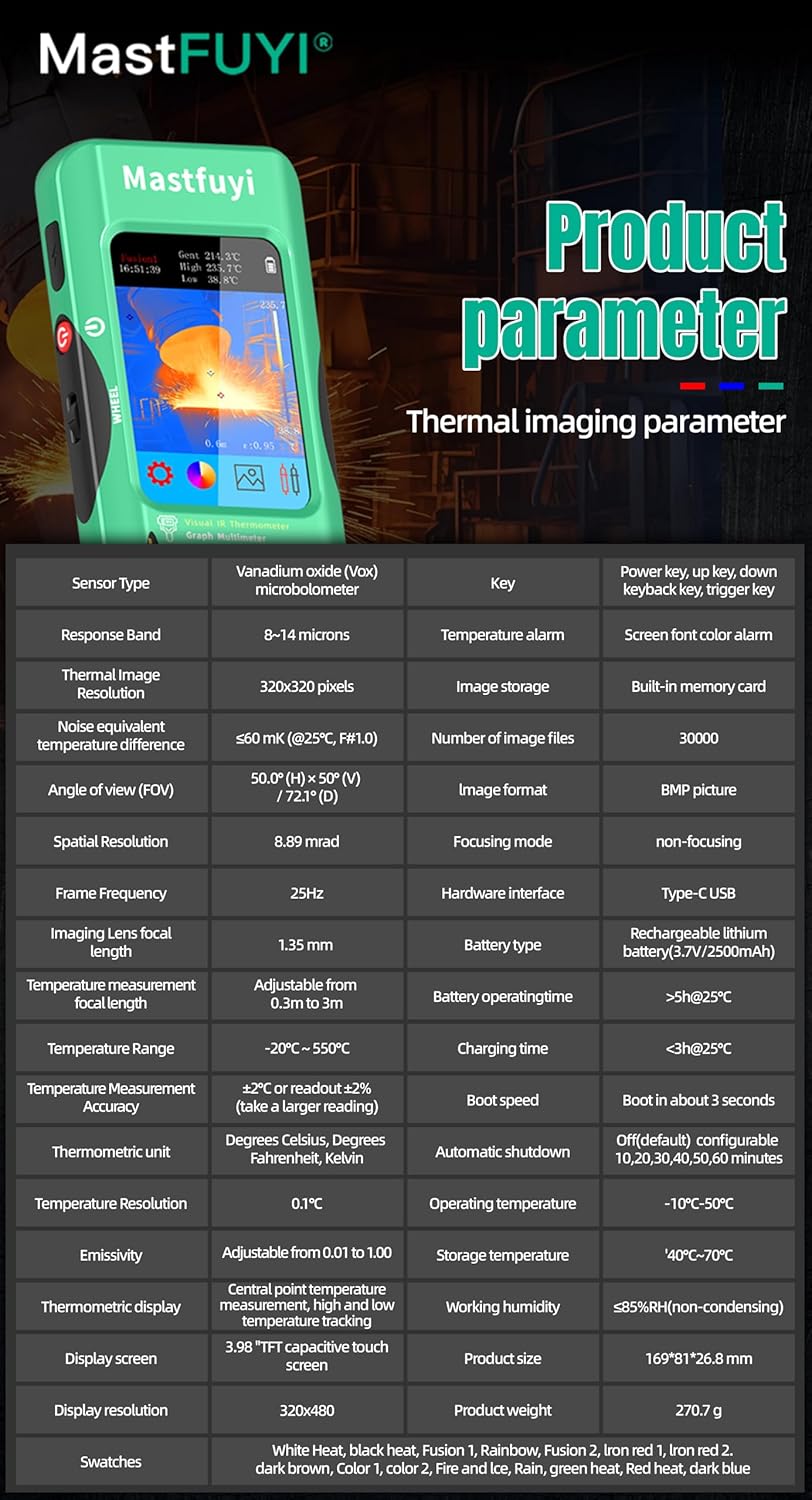
- Risoluzione IR: Features a 320 x 320 pixel infrared resolution for clear and detailed thermal images.
- Frequenza di aggiornamento: Operates at 25Hz, providing a smooth, real-time thermal video feed.
- Sensibilità termica (NETD): With a sensitivity of less than 60mk, the device can detect subtle temperature differences.
The device can perform microscopic detection at a component level, though a macro lens is not included as a standard accessory. If detailed close-up thermal imaging is required, a corresponding macro lens package would need to be acquired separately.

6.2 Thermal Palettes
The device offers 15 distinct thermal palettes to enhance the visualization of temperature differences. Selecting the appropriate palette can significantly improve the clarity of thermal patterns for specific applications.
- Access palette options via the touchscreen menu or navigation controls.
- Experiment with palettes like Iron Red, Rainbow, White Hot, and Black Hot to find the most suitable display for your inspection.
6.3 Regolazione dell'emissività
Accurate temperature measurements depend on correct emissivity settings. The emissivity value (adjustable from 0.01 to 1.0) should match the material surface being measured.
- Locate the emissivity setting in the thermal imaging menu.
- Consult standard emissivity tables for common materials or adjust the value to achieve the most accurate readings for your specific target.
6.4 Allarme temperatura alta e bassa
The intelligent alarm function allows you to set custom temperature thresholds. The device will trigger immediate audible and visual alerts if temperatures exceed or fall below these predefined safety ranges.
- Access the alarm settings through the thermal imaging interface.
- Configure the upper and lower temperature limits to suit your monitoring requirements.
7. Utilizzo del multimetro
The FY12DMM includes a 20,000-count digital multimeter for precise electrical measurements.
7.1 Collegamento dei puntali di prova
- Insert the red test lead into the "VΩmA" input jack.
- Inserire il puntale di prova nero nel jack di ingresso "COM" (comune).
- For AC current measurements with an optional clamp, refer to the clamp's instructions.
7.2 Funzioni di misura
Use the touchscreen or navigation to select the desired measurement function. The device supports auto-ranging for most functions.
- Volume DCtage: Fino a 1000 V.
- Volume ACtage: Fino a 750 V.
- Resistenza: Fino a 200 MΩ.
- Capacità: Fino a 99.999 mF.
- Prova del diodo: Controlla la funzionalità del diodo.
- Test di continuità: Audible indication for continuity.
- Flexible AC Current: Up to 2000A (requires optional clamp).
- Temperatura: -20℃ to 1300℃ (-4℉ to 2372℉) using a K-type thermocouple (not included).
Il dispositivo è dotato di un Presa function to freeze the current reading and Allineare measurement modes for manual range selection if desired.
8. Gestione dei dati
8.1 Memorizzazione delle immagini
The FY12DMM has a built-in memory card capable of storing up to 30,000 images in BMP format.
- To save a thermal image, press the designated capture button on the screen.
- Images are automatically saved to the internal memory.

8.2 Esportazione dei dati
Stored images and recorded waveform data can be exported to a computer for further analysis.
- Collegare il dispositivo al computer tramite il cavo USB Type-C.
- Il dispositivo dovrebbe apparire come un dispositivo di archiviazione rimovibile.
- Copy the desired BMP image files or data logs to your computer.
9. Manutenzione
9.1 Pulizia
- Pulisci l'esterno del dispositivo con un panno morbido eamp panno. Non usare detergenti abrasivi o solventi.
- Gently clean the thermal imager lens with a lens cleaning cloth.
- Prima di procedere alla pulizia, assicurarsi che il dispositivo sia spento e scollegato da qualsiasi fonte di alimentazione.
9.2 Cura della batteria
- Per preservare la salute della batteria, ricaricarla regolarmente, anche se il dispositivo non viene utilizzato frequentemente.
- Evitare di conservare il dispositivo a temperature estreme.
10. Risoluzione Dei Problemi
| Problema | Possibile causa | Soluzione |
|---|---|---|
| Il dispositivo non si accende. | Batteria scarica o scarica. | Charge the device fully using the supplied USB Type-C cable. |
| Letture della temperatura imprecise. | Incorrect emissivity setting; dirty lens. | Adjust emissivity for the target material; clean the thermal imager lens. |
| Multimeter readings are unstable or incorrect. | Poor test lead connection; incorrect function selected. | Ensure test leads are securely connected; verify the correct measurement function is selected. |
| Cannot transfer data to computer. | Cavo USB difettoso; modalità di connessione errata. | Try a different USB Type-C cable; ensure the device is properly connected and recognized by the computer. |
11. Specifiche
11.1 Infrared Camera Specifications
| Caratteristica | Specificazione |
|---|---|
| Dimensioni dello schermo | LCD TFT 3.98 pollici |
| Risoluzione IR | 320 x 320 pixel |
| Risoluzione dello schermo | 320 x 480 pixel |
| Angolo di View (campo visivo) | 50.0°(O) x 50.0°(V) / 72.1°(P) |
| Risoluzione spaziale (IFOV) | 8.89 mrad |
| Intervallo di temperatura | Da -20 ℃ a 550 ℃ (da -4 ℉ a 1022 ℉) |
| Sensibilità termica/NETD | Meno di 60mk |
| Frequenza di aggiornamento | 25 Hz |
| Impostazioni distanza | 0.3 - 3 metri |
| Emissività | 0.01 - 1.0 (adjustable) |
| Palette termiche | 15 |
| Number of Storage Images | 19,000 (internal memory) |
11.2 Specifiche del multimetro digitale
| Caratteristica | Allineare | Risoluzione | Precisione |
|---|---|---|---|
| Display MASSIMO | 20000 conteggi | ||
| Volume DCtage | 20mV/200mV/2V/20V/200V/1000V | Da 0.001 mV a 0.1 V | ±(0.05%+3) a ±(0.5%+3) |
| Volume ACtage | 20mV/200mV/2V/20V/200V/750V | Da 0.001 mV a 0.1 V | ±(0.1%+3) a ±(0.5%+3) |
| Corrente alternata flessibile | 200A/2000A | 0.1A/1A | ±(1.0%+5) |
| Resistenza | da 200Ω a 200MΩ | da 0.01Ω a 0.01MΩ | ±(0.2%+3) a ±(5%+5) |
| Capacità | da 999.99nF a 99.999mF | da 0.01nF a 0.001mF | ±(2%+5) a ±(5%+20) |
| Temperatura | -20℃~1300℃/-4℉-2372℉ | 1 /1 | ±(2%+5) |
| Diodo | SÌ | ||
| Continuità | SÌ | ||

11.3 Specifiche generali
- Energia: Batteria ricaricabile da 2500 mAh (integrata)
- Misurare: Dimensioni: 169 x 81 x 26.8 mm
- Peso: 270g
- Operating System Languages: English, Spanish, German, French, Italian, Japanese, Chinese (selectable)

12. Garanzia e supporto
For warranty information and technical support, please refer to the warranty card included with your product or visit the official Mastfuyi websito.
Visit the Mastfuyi Store on Amazon per ulteriori prodotti e risorse di supporto.


