1. Prodotto finitoview
The Kungfuking Wall Mount Power Strip with USB is designed to provide convenient power access and charging capabilities for multiple devices. This unit features 3 standard AC outlets, 2 USB-A ports with QC 3.0 fast charging, and 1 USB-C port with 18W power delivery. It includes surge protection and a 6-foot extension cord, making it suitable for various mounting applications such as under desks, on walls, or on tabletops.
Caratteristiche principali:
- 3 prese CA: Provides standard power connections for electronic devices (100V-125V, 12A=1500W).
- 3 porte USB: Includes 2 QC 3.0 USB-A ports and 1 18W USB-C port for fast charging of compatible devices.
- Protezione contro le sovratensioni: Protegge i dispositivi collegati dalle sovratensioni.
- Design montabile: Features mounting holes for secure installation on various surfaces (walls, desks, table legs).
- Cavo di prolunga da 6 piedi: Offre flessibilità nel posizionamento.
- Elencato UL: Certificato per gli standard di sicurezza.

Figura 1: Fronte view of the Kungfuking Wall Mount Power Strip, showing 3 AC outlets, 2 USB-A ports, 1 USB-C port, an on/off switch, and the coiled 6-foot power cord.
2. Importanti istruzioni di sicurezza
Please read and follow all safety instructions carefully before using this product to prevent injury or damage.
- Non superare la capacità di carico massima di 12A / 1500W.
- Questo prodotto è destinato esclusivamente all'uso in ambienti interni. Non esporre all'umidità né utilizzare in ambienti umidi.
- Non smontare o modificare la ciabatta. Per qualsiasi intervento di manutenzione, rivolgersi a personale qualificato.
- Tenere lontano dalla portata dei bambini e degli animali domestici.
- Ensure the power cord is fully inserted into a grounded wall outlet.
- Avoid running the power cord under carpets or in areas where it can be tripped over or damaged.
- If the power strip shows signs of damage, discontinue use immediately.
- The surge protector feature protects against power surges; however, it is not a substitute for proper grounding or protection against direct lightning strikes.
3. Configurazione e installazione
The Kungfuking Wall Mount Power Strip offers flexible installation options. Choose the method that best suits your needs.
Istruzioni di montaggio:
- Seleziona una posizione: Choose a flat, stable surface for mounting, such as a wall, under a desk, or on table legs. Ensure the location is dry and free from obstructions.
- Segna punti di montaggio: Position the power strip in the desired location. Use a pencil to mark the positions of the four mounting holes located on the flanges at each end of the power strip.
- Praticare dei fori pilota (se necessario): Depending on the mounting surface material, you may need to drill small pilot holes at the marked points. Use an appropriate drill bit size for the screws provided (or suitable screws for your surface).
- Secure the Power Strip: Align the mounting holes on the power strip with the pilot holes (or marks) and secure the unit using screws. Ensure the power strip is firmly attached and does not wobble.
- Connettiti all'alimentazione: Plug the 6-foot extension cord into a standard grounded wall outlet.

Figure 2: Illustration of the power strip's mounting holes for secure installation.

Figura 3: Esamples of mounting locations: tabletop, under desk, and table legs.
4. Istruzioni per l'uso
Once installed and connected to power, the power strip is ready for use.
Accensione/spegnimento:
- Locate the red ON/OFF switch on the power strip.
- Press the switch to the "ON" position to supply power to the outlets and USB ports. The switch will illuminate when power is active.
- Press the switch to the "OFF" position to cut power to all connected devices.
Utilizzo delle prese CA:
- Plug your electronic devices directly into the 3 AC outlets.
- Ensure that the total power consumption of all connected devices does not exceed 1500W.
Utilizzo delle porte di ricarica USB:
- Porte USB-A (QC 3.0): Connect compatible devices using a USB-A cable for fast charging. These ports support Quick Charge 3.0 for accelerated charging speeds.
- USB-C Port (18W): Connect compatible devices using a USB-C cable for 18W power delivery. This port is suitable for charging smartphones, tablets, and other USB-C powered devices.
- The USB ports provide power automatically when a device is connected and the power strip is on.
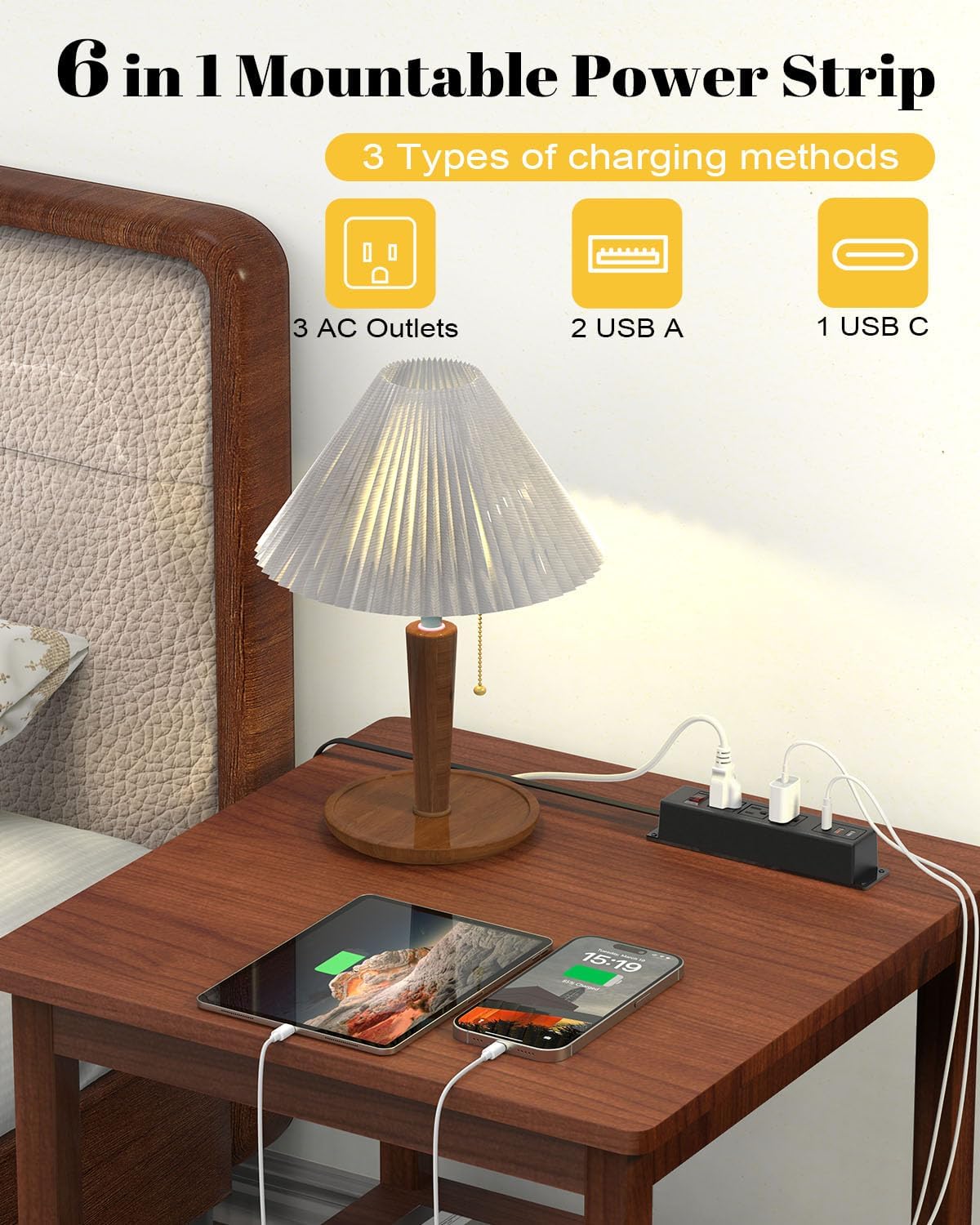
Figure 4: The power strip providing power to a lamp, phone, and tablet via AC and USB ports.

Figure 5: A device charging rapidly via the 18W USB-C port.
5. Manutenzione
Una corretta manutenzione garantisce la longevità e il funzionamento sicuro della tua ciabatta elettrica.
- Pulizia: Scollegare la ciabatta dalla presa a muro prima di pulirla. Utilizzare un panno asciutto e morbido per pulire l'esterno. Non utilizzare detergenti liquidi o spray.
- Ispezione: Periodically inspect the power cord and the power strip for any signs of damage, such as frayed wires, cracks, or loose connections. If damage is found, discontinue use and replace the unit.
- Magazzinaggio: If storing the power strip, ensure it is disconnected from power and stored in a dry, cool place away from direct sunlight.
6. Risoluzione Dei Problemi
Se riscontri problemi con la tua ciabatta, fai riferimento ai seguenti problemi comuni e alle relative soluzioni:
| Problema | Possibile causa | Soluzione |
|---|---|---|
| Nessuna alimentazione alle prese/porte USB. |
|
|
| Dispositivi che non si caricano tramite USB. |
|
|
| La ciabatta è calda. |
|
|
7. Specifiche
| Caratteristica | Dettaglio |
|---|---|
| Marca | Kung fuking |
| Modello | B0CT5QM5KD |
| Prese AC | 3 |
| Porte USB | 2 x USB-A (QC 3.0), 1 x USB-C (18W) |
| Voltage Valutazione | 100V-125V |
| Uscita CA | 12A / 1500W (massimo) |
| Lunghezza del cavo di prolunga | 6 piedi |
| Peso dell'articolo | 15.8 once |
| Dimensioni (confezione) | 9.21 x 3.62 x 2.87 pollici |
| Caratteristiche speciali | Desk Mount, Wall Mount, On/Off Switch, USB Slot, Surge Protection |
| Certificazioni | Elencato UL |
8. Garanzia e supporto
For warranty information or technical support, please contact Kungfuking customer service. You can find more information and contact details on the official Kungfuking store page:
