Introduzione
This manual provides essential instructions for the proper setup, operation, and maintenance of your 3nStar PTA0157-432 All-in-One POS System. Please read this manual thoroughly before using the device to ensure optimal performance and longevity.
Informazioni sulla sicurezza
Osservare le seguenti precauzioni di sicurezza per evitare danni al dispositivo o lesioni a se stessi e agli altri:
- Non esporre il dispositivo all'acqua o a umidità eccessiva.
- Evitare di posizionare il dispositivo vicino a fonti di calore o alla luce diretta del sole.
- Utilizzare solo l'adattatore CA fornito.
- Non tentare di aprire o riparare il dispositivo da soli. Per qualsiasi intervento di assistenza, rivolgersi a personale qualificato.
- Assicurare una ventilazione adeguata attorno al dispositivo durante il funzionamento.
Contenuto della confezione
Verificare che tutti gli articoli siano presenti nel pacco:
- 3nStar PTA0157-432 All-in-One POS System
- Adattatore CA
- Manuale dell'utente (questo documento)
Prodotto finitoview
The 3nStar PTA0157-432 is a 15.6-inch All-in-One Point of Sale system designed for various business environments. It features a 10-point capacitive touchscreen, runs on Android 11, and is powered by a Quad-Core processor with 4GB RAM and 32GB storage. Integrated Wi-Fi and Bluetooth connectivity are also included.

Figura 1: Fronte view of the 3nStar PTA0157-432 All-in-One POS System, showcasing the 15.6-inch display and integrated stand.

Figure 2: A user interacting with the 10-point capacitive touchscreen of the POS system, demonstrating its touch responsiveness.

Figura 3: Posteriore view of the 3nStar POS System, showing the ventilation slots and the sturdy integrated stand.
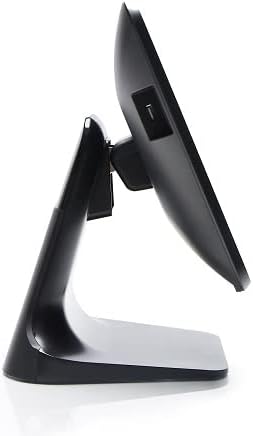
Figura 4: Prospettiva lateralefile of the 3nStar POS System, highlighting its slim design and adjustable screen angle.
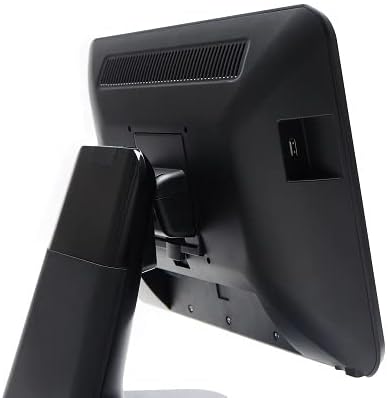
Figura 5: Lato posteriore view of the 3nStar POS System, illustrating the location of various connectivity ports for peripherals.
Impostare
- Disimballare il sistema: Carefully remove the POS system and all accessories from the packaging.
- Posizionare il sistema: Place the POS system on a stable, flat surface, ensuring adequate ventilation around the device.
- Connetti alimentazione: Connect the AC adapter to the power input port on the back of the POS system, then plug the adapter into a standard electrical outlet.
- Accensione iniziale: Press the power button, usually located on the side or back of the display. The system will boot up to the Android 11 operating system.
- Configurazione iniziale: Follow the on-screen prompts to complete the initial Android setup, including language selection, Wi-Fi connection, and Google account setup (optional).
- Connetti le periferiche: Connect any necessary peripherals such as barcode scanners, receipt printers, or cash drawers to the available USB or other designated ports. Refer to the peripheral's manual for specific connection instructions.
Istruzioni per l'uso
The 3nStar PTA0157-432 operates on Android 11, providing a familiar and intuitive user experience.
Navigazione di base
- Schermo tattile: Use your fingers to tap, swipe, pinch, and zoom on the 15.6-inch capacitive display.
- Schermata iniziale: Access your installed applications and widgets from the main home screen.
- Cassetto delle applicazioni: Swipe up from the bottom of the screen or tap the app drawer icon to view tutte le applicazioni installate.
- Notifiche: Scorri verso il basso dalla parte superiore dello schermo per accedere alle notifiche e alle impostazioni rapide.
Connessione al Wi-Fi
- Vai a Impostazioni > Rete e Internet > Wifi.
- Attiva/disattiva Wi-Fi On.
- Seleziona la rete desiderata dall'elenco e inserisci la password se richiesta.
Collegamento di dispositivi Bluetooth
- Vai a Impostazioni > Dispositivi connessi > Preferenze di connessione > Bluetooth.
- Attiva Bluetooth On.
- Assicurati che il tuo dispositivo Bluetooth sia in modalità di associazione.
- Selezionare dall'elenco il dispositivo da associare.
Using POS Software
The system is designed to run various Android-compatible Point of Sale applications. Install your preferred POS software from the Google Play Store or other trusted sources. Refer to your specific POS software's documentation for detailed usage instructions.
Manutenzione
Pulizia del dispositivo
- Schermo: Utilizzare un panno morbido e privo di lanugine leggermente dampPulire con acqua o con un detergente per schermi specificamente progettato per display elettronici. Non spruzzare il detergente direttamente sullo schermo.
- Corpo: Pulire le superfici esterne con un panno morbido e asciutto. Evitare detergenti abrasivi o solventi.
- Ventilazione: Ensure ventilation slots are free from dust and debris to prevent overheating. Use compressed air if necessary.
Aggiornamenti software
Regularly check for and install system updates for Android 11 to ensure optimal performance, security, and compatibility. Go to Impostazioni > Sistema > Aggiornamento del sistema.
Gestione dell'archiviazione
Monitor the 32GB internal storage to ensure sufficient space for applications and data. Delete unnecessary files or uninstall unused applications to free up space. Go to Impostazioni > Magazzinaggio.
Risoluzione dei problemi
| Problema | Possibile causa | Soluzione |
|---|---|---|
| Il dispositivo non si accende. | Power cable not connected properly; AC adapter malfunction. | Ensure the AC adapter is securely connected to the device and a working power outlet. Test the outlet with another device. |
| Il touchscreen non risponde. | Software glitch; screen dirty; physical damage. | Restart the device. Clean the screen with a soft cloth. If the issue persists, contact support. |
| Problemi di connessione Wi-Fi. | Password errata; fuori portata; problema con il router. | Verify Wi-Fi password. Ensure the device is within range of the router. Restart the router and the POS system. |
| Peripheral (e.g., printer) not detected. | Incorrect connection; driver issue; peripheral not powered on. | Check physical connections. Ensure the peripheral is powered on. Install necessary drivers or apps for the peripheral. Restart the POS system. |
Specifiche
| Caratteristica | Dettaglio |
|---|---|
| Numero di modello | PTA0157-432 |
| Sistema operativo | Androide 11 |
| Dimensioni dello schermo | 15.6 pollici |
| Risoluzione dello schermo | 1920 x 1080 pixel |
| Schermo tattile | 10-point Capacitive |
| Processore | Quad-Core (Rockchip 3568, 2 GHz) |
| Memoria RAM | 4 GB LPDDR4 |
| Magazzinaggio | 32GB SSD (Flash Memory) |
| Grafica | Grafica integrata |
| Connettività | Wi-Fi, Bluetooth |
| Dimensioni del prodotto (LxWxH) | 10 x 13 x 16 pollici |
| Peso dell'articolo | 11 libbre |
| Colore | Nero |
Garanzia e supporto
For warranty information, technical support, or service inquiries, please refer to the official 3nStar webo contattare il rivenditore autorizzato. Conservare la ricevuta d'acquisto come prova d'acquisto per eventuali reclami in garanzia.
Online resources and frequently asked questions may be available on the manufacturer's support page: Supporto 3nStar


