1. Informazioni sulla sicurezza
Si prega di leggere attentamente tutte le informazioni di sicurezza e le istruzioni per l'uso prima di utilizzare questo strumento. Il mancato rispetto di queste istruzioni potrebbe causare scosse elettriche, incendi o lesioni gravi.
- Sicurezza generale: Always use the correct function and range for measurements. Do not exceed the maximum input values specified for each range.
- Dispositivi di protezione individuale: Always wear appropriate personal protective equipment (PPE), such as safety glasses and insulated gloves, when working with electrical circuits.
- Circuiti attivi: Never touch live circuits with bare hands or uninsulated tools. Assume all circuits are live until proven otherwise.
- Connessione sonda: Connect the common (COM) test lead first, then the live test lead. Disconnect the live test lead first, then the common test lead.
- Controllo della batteria: Per garantire letture accurate e un funzionamento corretto, sostituire immediatamente le batterie quando compare l'indicatore di batteria scarica.
- Condizioni ambientali: Do not use the device in wet environments or in the presence of explosive gases or dust.
- Ispezione dei danni: Before each use, inspect the device and test leads for any damage. Do not use if damaged.
- Volume senza contattotageTester: The NCV function is for indication only. Always verify voltage presence or absence with a contact method before working on circuits.
2. Prodotto finitoview
The KAIWEETS HT118A Digital Multimeter and HT100s Non-Contact Voltage Tester are versatile tools designed for electrical measurements and safety checks. The HT118A multimeter offers a wide range of functions for professional and home use, while the HT100s provides a convenient and safe way to detect AC voltage senza contatto diretto.

Figura 2.1: Multimetro digitale KAIWEETS HT118A e misuratore di tensione senza contatto HT100stage Tester. This image displays both the digital multimeter on the left and the non-contact voltage tester on the right, showcasing their overall design and key features.
2.1. KAIWEETS HT118A Digital Multimeter Features
- Vero valore efficace (TRMS): Fornisce letture accurate per forme d'onda non sinusoidali.
- Visualizzazione di 6000 conteggi: Display ad alta risoluzione per misurazioni precise.
- Gamma automatica: Automatically selects the correct measurement range, simplifying operation.
- Wide Measurement Capabilities: Misura il volume AC/DCtage (up to 600V), AC/DC Current (up to 10A), Resistance (up to 60 MOhms), Capacitance, Frequency, Duty Cycle, Temperature, Diode, and Continuity.
- LED Lightning Jacks: Flashing LED lights on the input jacks guide correct test lead placement.
- Ampio display LCD retroilluminato: 2.9-inch HTN backlit screen for easy readability in various lighting conditions.
- Conservazione dei dati (HOLD): Blocca la lettura visualizzata.
- Massimo/Minimo (MAX/MIN): Registra le letture più alte e più basse.

Figura 2.2: KAIWEETS HT118A Multimeter Functions and Battery Compartment. This image highlights the various measurement functions available on the multimeter's rotary dial and shows the rear battery compartment.
2.2. KAIWEETS HT100s Non-Contact Voltage Tester Features
- Vol. AC senza contattotage Rilevamento (NCV): Rileva AC voltage senza contatto fisico.
- Sensibilità a doppia gamma: Rileva standard (70-1000 V CA) e basso volumetage (12-1000V AC) for diverse applications.
- Rilevamento filo attivo/nullo: Identifica automaticamente i fili sotto tensione o neutri.
- Allarmi visivi e acustici: Provides sound and light indications for voltagpresenza e intensità.
- Test del punto di interruzione: Useful for identifying breaks in insulated wires.
- Torcia LED integrata: Aiuta a lavorare in aree scarsamente illuminate.
3. Impostazione
3.1. Installazione della batteria
Both the HT118A Multimeter and HT100s Voltage Tester require batteries for operation.
- Assicurarsi che il dispositivo sia spento.
- Individuare il coperchio del vano batteria sul retro del dispositivo.
- Utilizzare un cacciavite (se necessario) per aprire il vano batteria.
- Inserire le batterie necessarie rispettando la polarità corretta (+/-).
- Chiudere saldamente il coperchio del vano batterie.
3.2. Test Lead Connection (HT118A Multimeter)
Per la maggior parte delle misurazioni, collegare i puntali di prova come segue:
- Inserire il puntale nero nel jack "COM" (comune).
- Insert the red test lead into the "VΩmA" jack for voltage, resistenza e misurazioni di piccole correnti.
- For current measurements up to 10A, insert the red test lead into the "10A" jack.

Figura 3.1: KAIWEETS HT118A Multimeter LED Lightning Jacks. This image shows the multimeter's input jacks with LED lights, which illuminate to guide the user to the correct probe connection point for the selected function.
4. Istruzioni per l'uso
4.1. KAIWEETS HT118A Digital Multimeter Operation
Turn the rotary dial to select the desired measurement function. The multimeter features auto-ranging, which automatically selects the appropriate measurement range.

Figura 4.1: KAIWEETS HT118A Multimeter 2.9-inch Backlit Screen. This image displays the multimeter's large, backlit LCD screen showing a measurement, emphasizing its readability and dual reading capability.
4.1.1. Volumetage Misurazione (AC/DC)
- Set the rotary dial to the "V~" (AC Voltage) o "V-" (Vol. DCtage) posizione.
- Collegare il puntale di prova nero alla presa "COM" e il puntale di prova rosso alla presa "VΩmA".
- Toccare con attenzione i puntali di prova nei punti del circuito in cui il voltage deve essere misurato (in parallelo al carico).
- Leggi il vol.tage valore sul display.
4.1.2. Misurazione della corrente (CA/CC)
Attenzione: Always connect the multimeter in series with the circuit when measuring current. Never connect it in parallel with a voltage fonte.
- Set the rotary dial to the "A~" (AC Current) or "A-" (DC Current) position. For small currents, use the "mA" or "μA" range.
- Connect the black test lead to the "COM" jack. Connect the red test lead to the "10A" jack for currents up to 10A, or to the "VΩmA" jack for mA/μA measurements.
- Aprire il circuito in cui si desidera misurare la corrente e collegare le sonde di prova in serie.
- Leggere il valore corrente sul display.
4.1.3. Misurazione della resistenza
Attenzione: Ensure the circuit is de-energized before measuring resistance. Disconnect power to the component being tested.
- Set the rotary dial to the "Ω" (Resistance) position.
- Collegare il puntale di prova nero a "COM" e il puntale di prova rosso a "VΩmA".
- Toccare con le sonde di prova il componente da misurare.
- Leggere il valore di resistenza sul display.
4.1.4. Test di continuità
- Set the rotary dial to the "Continuity" position (often shared with Diode/Resistance).
- Collegare il puntale di prova nero a "COM" e il puntale di prova rosso a "VΩmA".
- Touch the test probes to the two points of the circuit or component.
- Se esiste continuità (bassa resistenza), il multimetro emetterà un segnale acustico.
4.1.5. Prova del diodo
- Set the rotary dial to the "Diode" position (often shared with Continuity/Resistance).
- Collegare il puntale di prova nero a "COM" e il puntale di prova rosso a "VΩmA".
- Mettere a contatto la sonda rossa con l'anodo e la sonda nera con il catodo del diodo.
- Il display mostrerà il volume in avantitage goccia. Invertire le sonde; una lettura di circuito aperto (OL) indica un buon diodo.
4.1.6. Misura della capacità
Attenzione: Discharge capacitors before testing to prevent damage to the multimeter.
- Set the rotary dial to the "Capacitance" position.
- Collegare il puntale di prova nero a "COM" e il puntale di prova rosso a "VΩmA".
- Toccare i puntali di prova sui terminali del condensatore.
- Leggere il valore della capacità sul display.
4.1.7. Misurazione della frequenza e del ciclo di lavoro
- Set the rotary dial to the "Hz%" (Frequency/Duty Cycle) position.
- Collegare il puntale di prova nero a "COM" e il puntale di prova rosso a "VΩmA".
- Collegare le sonde di prova alla sorgente del segnale.
- Read the frequency (Hz) or duty cycle (%) on the display. Use the "FUNC" button to switch between modes if necessary.
4.1.8. Misurazione della temperatura
The HT118A supports temperature measurement using a K-Type thermocouple.
- Set the rotary dial to the "°C/°F" (Temperature) position.
- Connect the K-Type thermocouple to the appropriate input jacks (usually marked for temperature).
- Posizionare la punta della termocoppia sull'oggetto di cui si desidera misurare la temperatura o nelle sue vicinanze.
- Leggere il valore della temperatura sul display.

Figura 4.2: KAIWEETS HT118A Multimeter Temperature Measurement. This image illustrates the multimeter measuring the temperature of a liquid using the included K-Type thermocouple.
4.2. KAIWEETS HT100s Non-Contact Voltage Funzionamento del tester
The HT100s allows for quick and safe detection of AC voltage senza contatto diretto.
4.2.1. Basic NCV Detection
- Press the power button to turn on the HT100s.
- Place the tip of the tester near a terminal strip, outlet, or insulated wire.
- Se AC voltage is detected, the tip will glow red, and the tester will emit an audible beep. The frequency of the beep and the percentage value on the screen will increase with stronger voltage segnali.

Figura 4.3: KAIWEETS HT100s NCV Tester in use on an outlet. This image shows the non-contact voltage tester being used to detect voltage in an electrical outlet, with the tip glowing red.
4.2.2. Sensitivity Adjustment (Dual Range)
The HT100s offers two sensitivity modes:
- High Sensitivity Mode (12-1000V AC): Adatto per rilevare volumi inferioritages, such as those in doorbells, thermostats, or irrigation wiring.
- Low Sensitivity Mode (70-1000V AC): Standard mode for detecting higher voltages in typical household wiring.
Press the "S" button to switch between high and low sensitivity modes. The display will indicate the current mode.
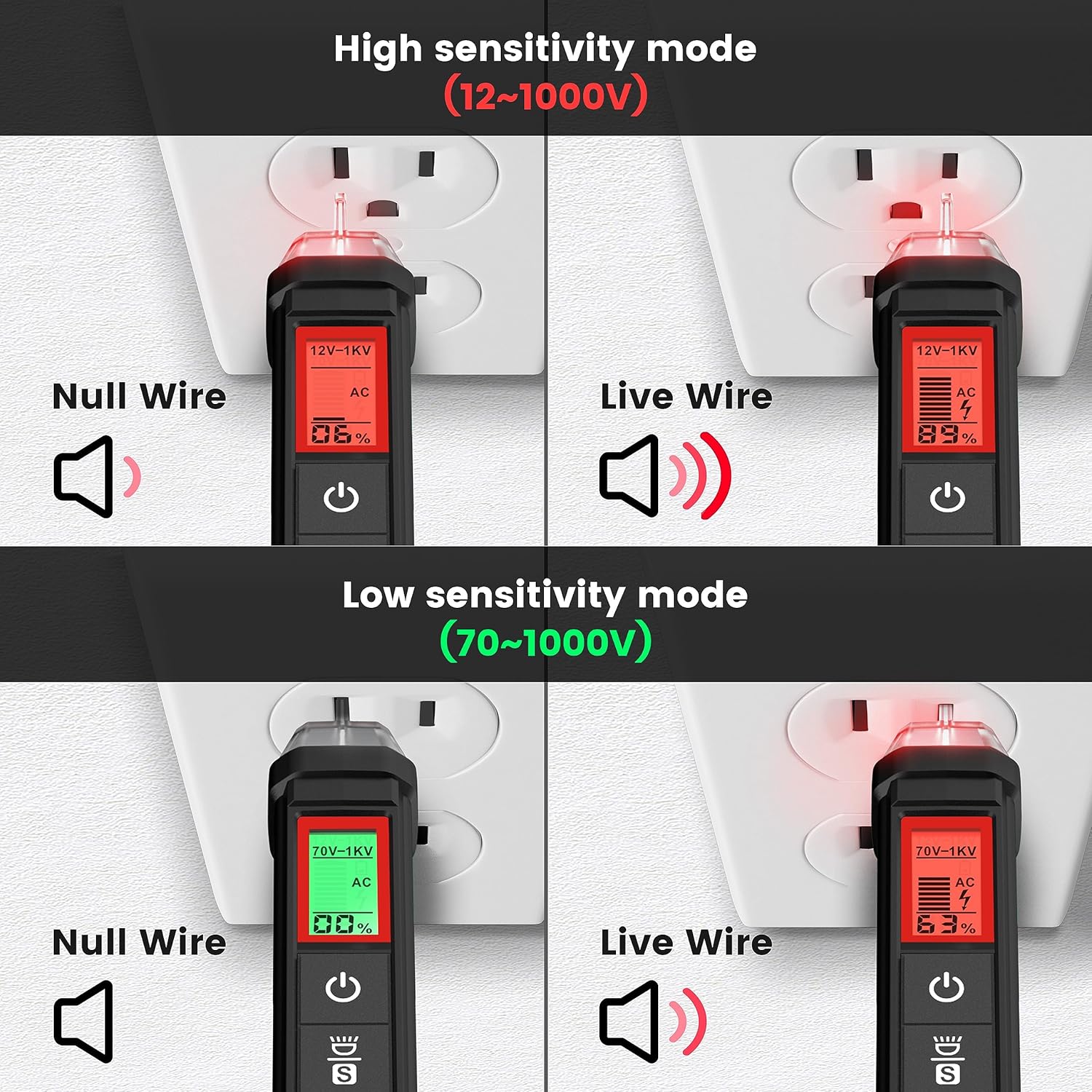
Figura 4.4: KAIWEETS HT100s NCV Tester High and Low Sensitivity Modes. This image demonstrates the difference in detection for null and live wires under both high (12-1000V) and low (70-1000V) sensitivity settings.
4.2.3. Live/Null Wire Detection
Quando si rileva voltage, the screen will display red for a live wire (high voltage) and green for a null (neutral) wire (low voltage). This provides a quick visual indication of wire status.
4.2.4. Breakpoint Test
To perform a breakpoint test, run the NCV tester along an insulated wire. The tester will indicate voltage up to the point of a break in the wire, where the signal will cease.

Figura 4.5: KAIWEETS HT100s NCV Tester Breakpoint Test. This image shows the NCV tester being used to identify a break in an insulated electrical cable by detecting the presence or absence of voltage along its length.
4.2.5. Torcia a LED
Press the flashlight button to activate the integrated LED flashlight, useful for illuminating work areas in low-light conditions.

Figura 4.6: KAIWEETS HT100s NCV Tester with LED Flashlight. This image shows the NCV tester's tip illuminating a dark electrical panel with its built-in LED flashlight.
5. Manutenzione
5.1. Pulizia
Pulisci il dispositivo con un annuncioamp panno e detergente delicato. Non utilizzare detergenti abrasivi o solventi. Assicurarsi che il dispositivo sia completamente asciutto prima di riporlo o di utilizzarlo nuovamente.
5.2. Sostituzione della batteria
Quando sul display compare l'indicatore di batteria scarica, sostituire immediatamente le batterie per mantenere la precisione della misurazione. Fare riferimento alla Sezione 3.1 per le istruzioni di installazione delle batterie.
5.3. Conservazione
If the device is not used for an extended period, remove the batteries to prevent leakage. Store the device in a cool, dry place, away from direct sunlight and extreme temperatures.
6. Risoluzione Dei Problemi
- Il dispositivo non si accende: Controllare l'installazione delle batterie e assicurarsi che non siano scariche. Sostituirle se necessario.
- Letture imprecise: Ensure test leads are properly connected. Check battery level. Verify the correct function and range are selected.
- Nessun rilevamento NCV: Ensure the device is powered on. Check sensitivity settings (high/low). Ensure the tip is close enough to the voltage fonte.
- Il test di continuità non emette alcun segnale acustico: Ensure the circuit is de-energized. Check for actual continuity in the component.
7. Specifiche
| Caratteristica | Specificazione |
|---|---|
| Marca | KAIWEET - dolciumi |
| Modello | HT118A (Multimeter), HT100s (Voltage Tester) |
| Display | 6000 conteggi, LCD retroilluminato HTN da 2.9" |
| Volume AC/DCtage | Fino a 600V |
| Corrente AC / DC | Fino a 10A |
| Resistenza | Fino a 60 MΩ |
| Capacità | SÌ |
| Frequenza / ciclo di lavoro | SÌ |
| Temperatura | Yes (K-Type Thermocouple) |
| Test di continuità | Sì (con segnale acustico) |
| Test diodi | SÌ |
| Intervallo di rilevamento NCV | 12-1000V AC / 70-1000V AC (Dual Range) |
| Fonte di alimentazione | Alimentato a batteria |
| Valutazione di sicurezza | CAT III 600V (HT118A) |
8. Garanzia e supporto
I prodotti KAIWEETS sono progettati per garantire affidabilità e prestazioni. Per informazioni sulla garanzia, supporto tecnico o richieste di assistenza, consultare il sito ufficiale KAIWEETS. webo contattare direttamente il servizio clienti. Conservare la ricevuta d'acquisto come prova d'acquisto per eventuali reclami in garanzia.
Per ulteriore assistenza, visitare: www.kaiweets.com


