Introduzione
Welcome to the user manual for your Lamax Street2 Bluetooth Speaker. This guide provides essential information for setting up, operating, maintaining, and troubleshooting your device. Please read this manual carefully before using the speaker and keep it for future reference.
Informazioni sulla sicurezza
To ensure safe and proper operation, please observe the following safety guidelines:
- Non esporre il dispositivo a temperature estreme, alla luce solare diretta o a elevata umidità.
- Do not immerse the device in water. It is designed to be splash-resistant, not waterproof.
- Tenere l'altoparlante fuori dalla portata dei bambini e degli animali domestici.
- Use only approved charging cables and adapters to prevent damage and ensure safety.
- Non tentare di smontare, riparare o modificare autonomamente l'altoparlante. Contattare personale di assistenza qualificato per assistenza.
Prodotto finitoview
The Lamax Street2 is a portable Bluetooth speaker designed to deliver powerful sound with convenience. Its compact size, splash resistance, and long battery life make it ideal for various environments.
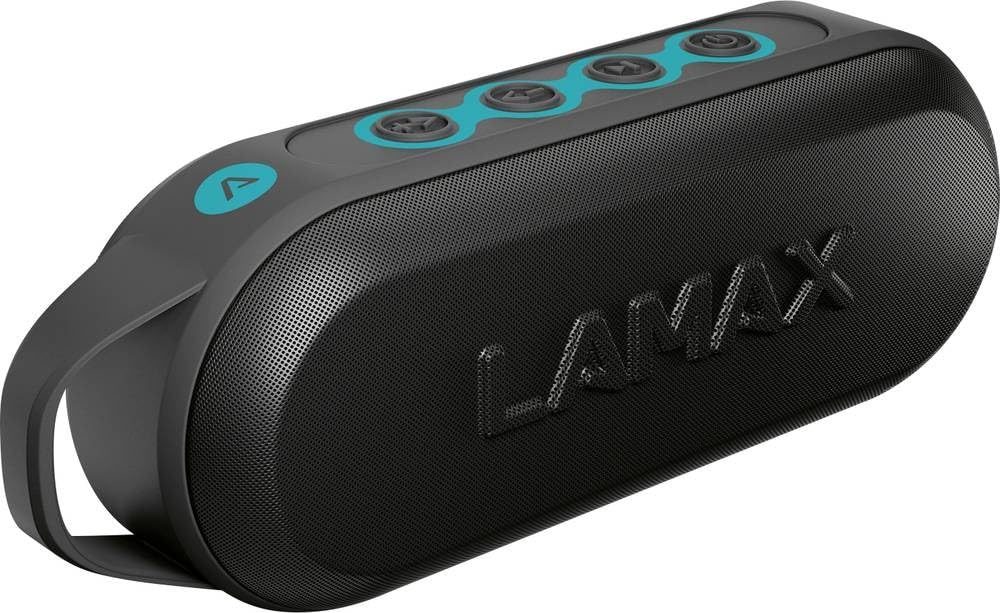
This image displays the front of the Lamax Street2 Bluetooth Speaker, showing its main body, control panel, and a sturdy carrying loop for portability.
Key features of your Lamax Street2 speaker include:
- Suono eccellente: Enjoy clear and powerful audio output.
- Potenza 15 W: Delivers robust sound performance.
- Bluetooth 5.0: Per una connettività wireless stabile ed efficiente.
- Stereo senza fili (TWS): Pair two Street2 speakers for an immersive stereo experience.
- Resistenza agli schizzi: Progettato per resistere agli schizzi, è adatto all'uso esterno.
- Batteria a lunga durata: Extended playtime for uninterrupted music.
- Design portatile: Features a fixed eyelet and carabiner for easy transport.
Impostare
1. Ricarica dell'altoparlante
Before using your Lamax Street2 speaker for the first time, ensure it is fully charged.
- Collegare il cavo di ricarica in dotazione alla porta di ricarica dell'altoparlante.
- Collegare l'altra estremità del cavo a un adattatore di alimentazione USB (non incluso) o alla porta USB di un computer.
- The charging indicator light will illuminate. It will typically turn off or change color once the speaker is fully charged.
2. Accensione/Spegnimento
To turn the speaker on or off:
- Accensione: Press and hold the power button for approximately 3 seconds until you hear a power-on sound.
- Spegni: Press and hold the power button for approximately 3 seconds until you hear a power-off sound.
3. Accoppiamento Bluetooth
To connect your Lamax Street2 to a Bluetooth-enabled device:
- Ensure the speaker is powered on and in pairing mode. The LED indicator will typically flash rapidly.
- Sul tuo smartphone, tablet o altro dispositivo Bluetooth, attiva il Bluetooth e cerca i dispositivi disponibili.
- Select "LAMAX Street2" from the list of found devices.
- Once connected, the speaker will emit a confirmation sound, and the LED indicator will stop flashing and remain solid.
4. Accoppiamento True Wireless Stereo (TWS)
To pair two Lamax Street2 speakers together for a stereo sound experience:
- Ensure both Lamax Street2 speakers are powered on and are not connected to any other Bluetooth device.
- On one of the speakers, press and hold the TWS button (often indicated by a chain-link icon) for 2-3 seconds.
- Gli altoparlanti si cercheranno e si accoppieranno automaticamente. Un suono di conferma indicherà l'avvenuto abbinamento TWS.
- Now, connect your primary device (smartphone, etc.) to the primary speaker via Bluetooth as described in the "Bluetooth Pairing" section.
Utilizzo dell'altoparlante
Controlli di base
- Pulsante di accensione: Press and hold for 3 seconds to turn the speaker on or off.
- Pulsante Play/Pausa: Premere una volta per riprodurre o mettere in pausa la riproduzione audio.
- Volume su (+): Premere una volta per aumentare il volume. Tenere premuto per passare alla traccia successiva.
- Volume basso (-): Press once to decrease the volume. Press and hold to skip to the previous track.
- Call Button (if available): Press once to answer an incoming call or end an ongoing call. Press and hold to reject an incoming call.
Opzioni di connettività
- Bluetooth: The primary method for wireless audio streaming from your devices.
Manutenzione
Proper care and maintenance will extend the life of your Lamax Street2 speaker.
- Pulizia: Gently wipe the speaker's surface with a soft, dry, lint-free cloth. Do not use abrasive cleaners, solvents, or chemical sprays.
- Magazzinaggio: Quando non viene utilizzato per lunghi periodi, conservare l'altoparlante in un luogo fresco e asciutto, lontano dalla luce solare diretta e da temperature estreme.
- Cura della batteria: To maintain optimal battery performance, avoid fully discharging the battery frequently. Charge the speaker regularly, even if not in active use.
Risoluzione dei problemi
If you encounter issues with your Lamax Street2 speaker, refer to the following table for common problems and solutions.
| Problema | Soluzione |
|---|---|
| L'altoparlante non si accende. | Assicurati che la batteria sia carica. Collega l'altoparlante a una fonte di alimentazione e riprova. |
| Impossibile effettuare l'associazione tramite Bluetooth. | Ensure the speaker is in Bluetooth pairing mode (flashing LED). Turn off and on your device's Bluetooth. Move closer to the speaker and ensure no other devices are connected. |
| Nessun suono o volume basso. | Check volume levels on both the speaker and your connected device. Ensure the speaker is correctly paired and not muted. |
| Scarsa qualità del suono o connessione intermittente. | Move your device closer to the speaker to minimize interference. Ensure there are no major obstacles between the devices. Disconnect and re-pair the Bluetooth connection. |
Specifiche
Technical specifications for the Lamax Street2 Bluetooth Speaker:
- Nome modello: Street2
- Riferimento del produttore: LMXST2
- Marca: Lamax
- Tecnologia di connettività: Bluetooth 5.0
- Potenza di uscita: 15 Watt
- Modalità di uscita audio: Stereo
- Tipo di montaggio: Montaggio da tavolo
- Fonte di energia: Alimentato a batteria
- Caratteristiche speciali: Bluetooth, Splash Resistance
- ASIN: B0CV5TH488
Garanzia e supporto
The Lamax Street2 Bluetooth Speaker is covered by a limited warranty. For detailed information regarding warranty terms, conditions, and duration, please refer to the warranty card included with your product or visit the official Lamax websito.
For technical assistance, troubleshooting, or to inquire about warranty claims, please contact Lamax customer support. You can typically find contact information on the official Lamax websito o tramite il rivenditore presso cui hai acquistato il prodotto.


