1. Introduzione
The Pronomic DX-50 USB MKII is a professional 4-channel DJ mixer designed for a wide range of applications, including discos, parties, restaurants, and presentations. Its user-friendly design ensures that both experienced and less experienced users can fully utilize its features. This manual provides detailed instructions for setting up, operating, and maintaining your mixer.
Key features include a recording function, integrated Bluetooth interface, USB player with transport controls, and multiple input channels.
2. Importanti istruzioni di sicurezza
- Leggi le istruzioni: Prima di utilizzare il prodotto, leggere tutte le istruzioni di sicurezza e di funzionamento.
- Conservare le istruzioni: Conservare le istruzioni di sicurezza e operative per riferimento futuro.
- Attenzione alle avvertenze: Rispettare tutte le avvertenze sul prodotto e nelle istruzioni per l'uso.
- Seguire le istruzioni: Seguire tutte le istruzioni per l'uso e il funzionamento.
- Acqua e umidità: Do not use this apparatus near water (e.g., bathtub, washbowl, kitchen sink, laundry tub, wet basement, or swimming pool).
- Ventilazione: Non ostruire le aperture di ventilazione. Installare secondo le istruzioni del produttore.
- Calore: Non installare vicino a fonti di calore come radiatori, bocchette di riscaldamento, stufe o altri apparecchi (inclusi amplificatori) che producono calore.
- Fonti di energia: Use only power sources specified by the manufacturer.
- Protezione del cavo di alimentazione: Proteggere il cavo di alimentazione per evitare che venga calpestato o schiacciato, in particolare in corrispondenza delle spine, delle prese di corrente e del punto in cui esce dall'apparecchio.
- Pulizia: Pulire solo con un panno asciutto.
- Manutenzione: Non tentare di riparare questo prodotto da soli poiché l'apertura o la rimozione delle coperture potrebbe esporvi a pericolitage o altri pericoli. Affidare tutti gli interventi di assistenza a personale qualificato.
3. Contenuto della confezione
Si prega di verificare che tutti gli articoli elencati di seguito siano inclusi nella confezione. Se alcuni articoli risultano mancanti o danneggiati, contattare immediatamente il rivenditore.
- Pronomic DX-50 USB MKII DJ Mixer
- Power Adapter (AC 12V)
- USB Stick (32 GB, if included in your specific bundle)
- Manuale dell'utente (questo documento)
4. Prodotto finitoview
Familiarize yourself with the various controls and connections on your DX-50 USB MKII mixer.
4.1 Controlli del pannello frontale
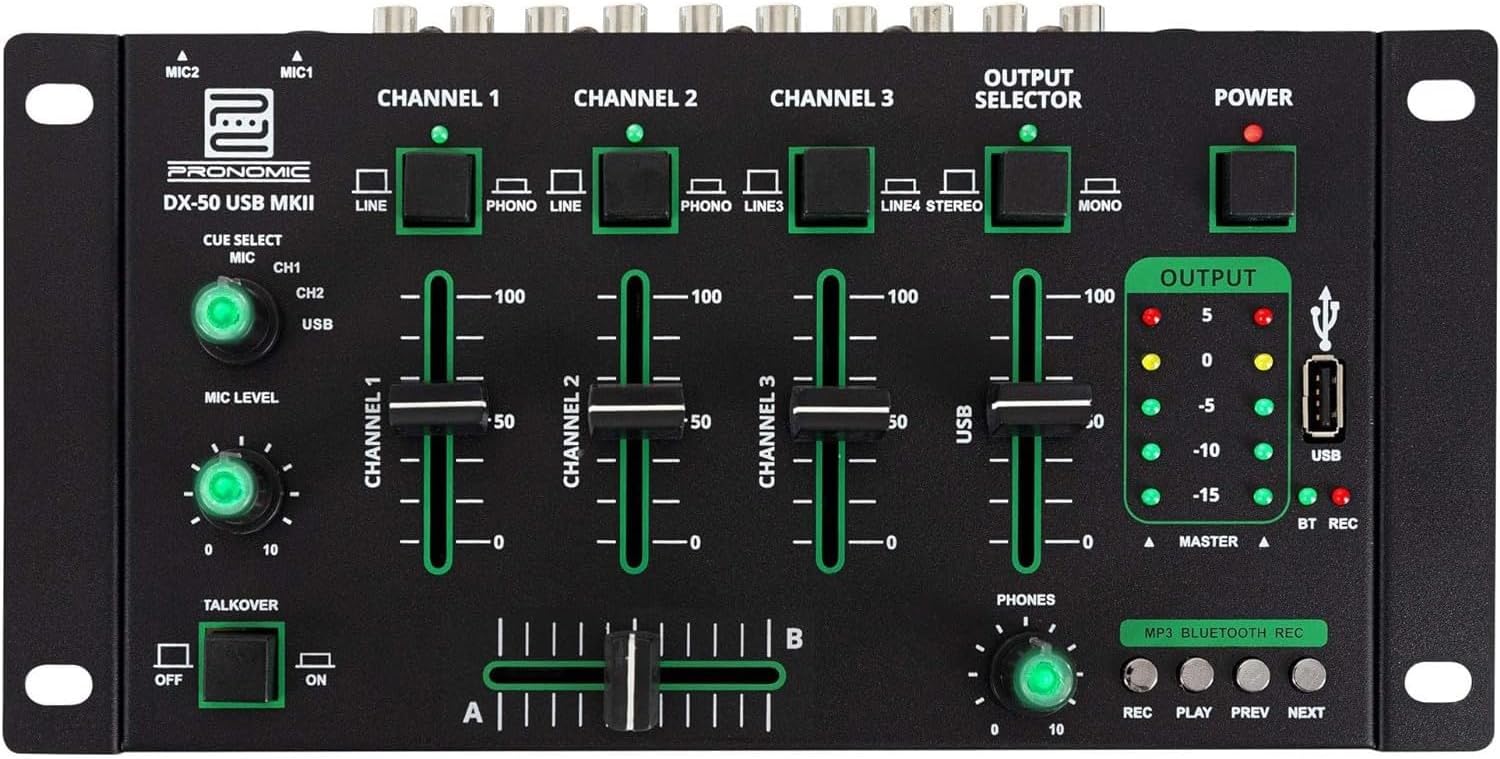
- MIC 1/2 Inputs: Connect microphones.
- Channel 1-4 Input Selectors: Switch between LINE, PHONO, or USB/Bluetooth inputs for each channel.
- Fader di canale: Adjust the volume level for each channel.
- CUE Select Buttons: Route specific channels to the headphone output for monitoring.
- MIC Level Knob: Adjust the volume of the microphone inputs.
- Talkover Switch: Activates the talkover function, which automatically lowers music volume when speaking into the microphone.
- Selettore di uscita: Choose between Stereo or Mono master output.
- Interruttore di alimentazione: Accende/spegne il mixer.
- Misuratori del livello di uscita: LED indicators showing the master output level.
- Porta USB: Connect a USB drive for MP3 playback and recording.
- MP3/Bluetooth/REC Player Controls: Buttons for Play/Pause, Previous, Next, and Record functions for the integrated player.
- Manopola di livello del telefono: Regola il volume dell'uscita cuffie.
- Crossfader (A/B): Blends between channels assigned to A and B.
4.2 Collegamenti del pannello posteriore

- Ingresso alimentazione CA 12 V: Collegare qui l'adattatore di alimentazione fornito.
- Uscita TELEFONI: Jack da 6.3 mm per il collegamento delle cuffie.
- MASTER OUT L/R (RCA): Connect to your main amplificatore o altoparlanti amplificati.
- Channel 1 & 2 Inputs (RCA Line/Phono): Connect turntables (Phono) or other line-level devices (CD players, media players). Use the front panel selector to switch.
- Channel 3 & 4 Inputs (RCA Line): Connect line-level devices.
- MIC 1 & 2 Inputs (6.3mm Jack): Connect microphones.
5. Impostazione
Follow these steps to set up your Pronomic DX-50 USB MKII mixer:
- Collegamento elettrico: Ensure the mixer's power switch is in the OFF position. Connect the supplied AC 12V power adapter to the "AC 12V" input on the rear panel of the mixer. Plug the adapter into a suitable power outlet.
- Master Output Connection: Connect the "MASTER OUT L/R" RCA outputs on the rear panel to the inputs of your amplificatore o altoparlanti amplificati.
- Collegamento del dispositivo di ingresso:
- Giradischi: Connect turntables to the "CHANNEL 1" or "CHANNEL 2" RCA inputs. Set the corresponding input selector on the front panel to "PHONO".
- CD Players/Line Devices: Connect CD players, media players, or other line-level devices to "CHANNEL 1", "CHANNEL 2", "CHANNEL 3", or "CHANNEL 4" RCA inputs. Set the corresponding input selector on the front panel to "LINE".
- Microfoni: Connect microphones to the "MIC 1" or "MIC 2" 6.3mm jack inputs on the rear panel.
- Collegamento cuffie: Connect your headphones to the "PHONES" 6.3mm jack on the rear panel.
- Unità USB (facoltativa): If using a USB drive for playback or recording, insert it into the "USB" port on the front panel.
- Accensione: Once all connections are made, switch the mixer's power switch to the ON position. The power indicator LED will illuminate.
6. Istruzioni per l'uso
6.1 Mixaggio di base
- Seleziona ingresso: For each channel, use the input selector switch (LINE/PHONO/USB/BT) to choose the desired audio source.
- Regola il volume del canale: Use the vertical faders for each channel to adjust its individual volume level.
- Uscita principale: Monitor the "OUTPUT" LED meters and adjust the master volume knob (if present, otherwise rely on channel faders and amplifier volume) to achieve a suitable overall output level without clipping.
- Crossfader: Use the crossfader to smoothly transition between channels assigned to A and B. Channels 1 and 2 are typically assigned to the crossfader.
6.2 Utilizzo del microfono
- Connect your microphone to one of the MIC inputs on the rear panel.
- Adjust the "MIC LEVEL" knob on the front panel to control the microphone's volume.
- Talkover Function: Activate the "TALKOVER" switch to automatically reduce the volume of the music when you speak into the microphone. This is useful for announcements.
6.3 Riproduzione e registrazione USB
- Riproduzione USB: Inserisci un'unità USB contenente MP3 files into the "USB" port. Select "USB" as the input source for the dedicated USB channel. Use the "PLAY/PAUSE", "PREV", and "NEXT" buttons to control playback.
- Registrazione USB: Press the "REC" button to start recording the master output to the connected USB drive. Press "REC" again to stop recording. Ensure your USB drive has sufficient free space and is formatted correctly (FAT32 is commonly supported).
6.4 Connettività Bluetooth
- Attiva Bluetooth: Select "BT" as the input source for the dedicated Bluetooth channel. The mixer will enter pairing mode.
- Accoppia dispositivo: On your Bluetooth-enabled device (smartphone, tablet, etc.), search for available Bluetooth devices. Select "Pronomic DX-50 USB MKII" (or similar name) from the list to pair.
- Riproduci audio: Once paired, you can play audio from your device through the mixer. Control playback from your device or using the mixer's transport controls (if supported by your device).
6.5 Monitoraggio con le cuffie
- Connect headphones to the "PHONES" output.
- Use the "CUE SELECT" buttons to choose which channels you want to monitor in your headphones without affecting the main output.
- Adjust the "PHONES" level knob to set your desired headphone volume.
7. Manutenzione
- Pulizia: Disconnect the power before cleaning. Use a soft, dry cloth to wipe the surface of the mixer. Do not use liquid cleaners, aerosols, or solvents.
- Magazzinaggio: Conservare il mixer in un luogo fresco e asciutto, lontano dalla luce solare diretta e da temperature estreme.
- Fader and Knob Care: Avoid excessive force when operating faders and knobs. Periodically check for dust or debris accumulation around moving parts.
- Gestione dei cavi: Ensure cables are not kinked or strained, which can lead to damage.
8. Risoluzione Dei Problemi
| Problema | Possibile causa | Soluzione |
|---|---|---|
| Nessun potere | Adattatore di alimentazione non collegato; Interruttore di alimentazione spento; Presa di corrente difettosa. | Check power adapter connection; Ensure power switch is ON; Try a different power outlet. |
| Nessun suono dall'uscita principale | Master volume too low; Amplifier/speakers off or disconnected; Incorrect input selection; Channel faders down. | Increase master volume; Check amplifier/speaker connections and power; Verify correct input selected for channels; Raise channel faders. |
| Nessun suono dalle cuffie | Headphone volume too low; Headphones not connected; No CUE selected. | Increase PHONES level; Connect headphones properly; Press CUE button for desired channel. |
| Bluetooth non associato | Mixer non in modalità di associazione; Dispositivo troppo lontano; Interferenza. | Ensure BT input is selected; Bring device closer; Restart mixer and device. |
| La riproduzione USB non funziona | Unità USB non inserita correttamente; Non corretto file format; USB drive not formatted correctly. | Reinserire l'unità USB; assicurarsi files are MP3; Format USB drive to FAT32. |
9. Specifiche
| Modello | Pronomic DX-50 USB MKII |
| Numero di canali | 4 |
| Tecnologia di connettività | Bluetooth, USB |
| Ingresso audio | RCA (line/phono), 6.3mm microphone, Bluetooth, USB |
| Tipo di connettore di uscita | RCA (Master Out), 6.3mm (Phones) |
| Fonte di alimentazione | Electric Cable (AC 12V adapter) |
| Dimensions (without corner brackets and controls) | 222 x 129 x 28 mm (larghezza x profondità x altezza) |
| Total Dimensions (with corner brackets and controls) | 267 x 136 x 51 mm (larghezza x profondità x altezza) |
| Peso | 790 grammi |
10. Garanzia e supporto
Per informazioni sulla garanzia e assistenza tecnica, consultare la documentazione fornita con l'acquisto o contattare il rivenditore. Conservare la prova d'acquisto per eventuali reclami in garanzia.
For further assistance, you may also visit the official Pronomic websito o contattare il loro servizio clienti.


