1. Prodotto finitoview
The FEELWORLD SC6 is a high-performance 6-inch SDI monitor designed for professional filmmaking and video production. It features a full HD IPS panel with an impressive 1500nits brightness, ensuring clear visibility even in daylight. Constructed with a durable aluminum alloy body, the SC6 offers both touch screen and physical knob controls for intuitive operation. Advanced features include 3D LUT and HDR monitoring, 3G SDI and 4K HDMI input/output, flexible power options, and an efficient cooling system.
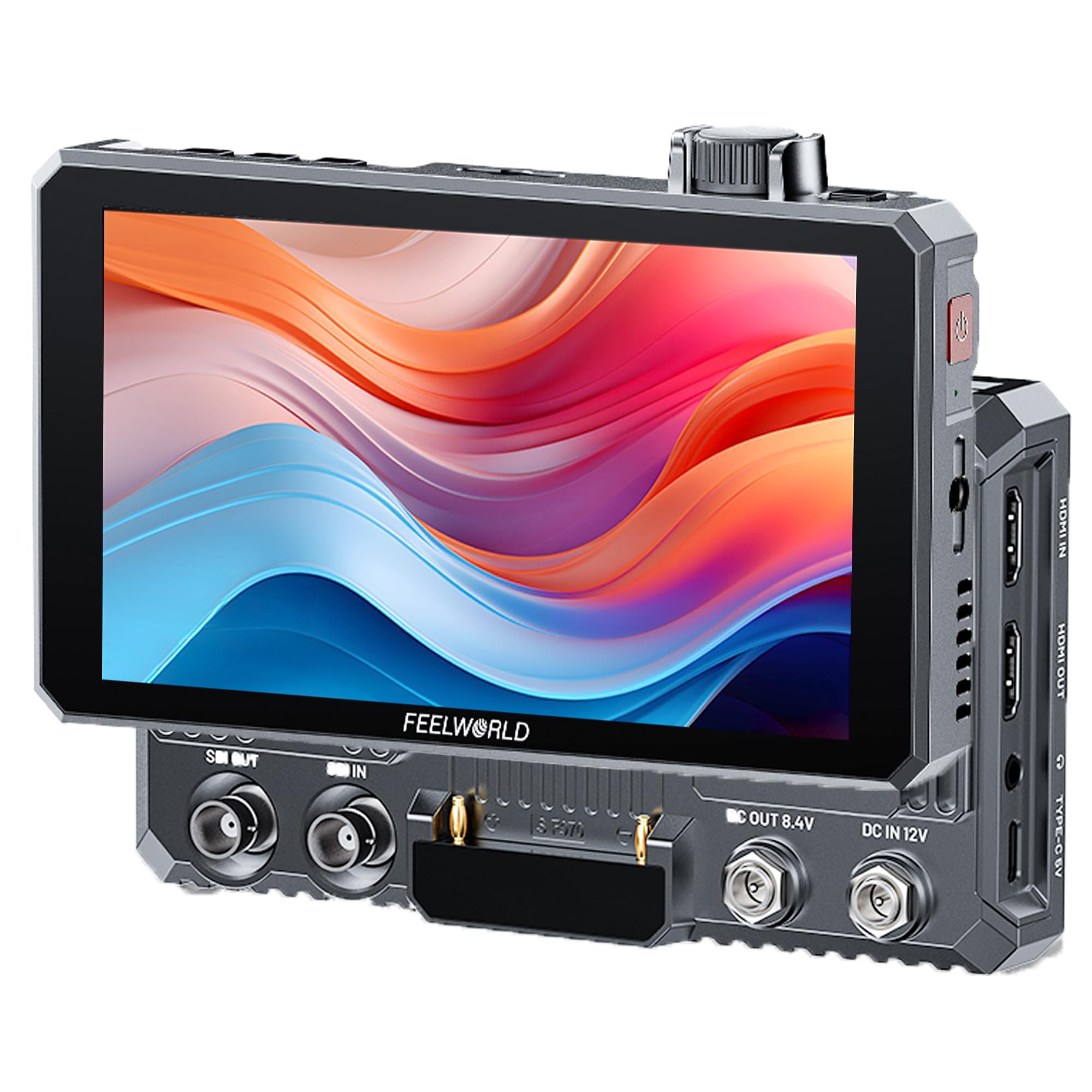
Immagine 1: anteriore view of the FEELWORLD SC6 6-inch SDI Monitor, showcasingrazie al suo design compatto e al display brillante.
2. Cosa c'è nella scatola
Upon unboxing your FEELWORLD SC6 monitor, please verify that all the following items are included:
- 1 x Monitor
- 1 cavo HDMI
- 1 x Micro HDMI Cable
- 1 x Mini Hot Shoe Mount + Hex Wrench
- 1 x Sun-hood
- 1 cavo da USB-A a USB-C
- 1 fascetta per la gestione dei cavi
- 1 x Manuale utente

Image 2: An illustration showing all components included in the FEELWORLD SC6 package.
3. Impostazione
3.1 Montaggio del monitor
The FEELWORLD SC6 monitor can be easily mounted to your camera rig using the included Mini Hot Shoe Mount Adapter. This adapter allows for flexible positioning with 180° viewing angle adjustment and 360° base rotation.

Image 3: The monitor attached to a camera via the Mini Hot Shoe Mount Adapter, demonstrating its adjustable angles.
3.2 Collegamento delle sorgenti video
The SC6 is equipped with both 3G SDI and 4K HDMI input and output ports for high-speed signal transmission. Use the provided HDMI or Micro HDMI cables to connect your camera or other video sources to the monitor.

Image 4: Close-up of the monitor's rear panel, highlighting the 3G SDI and 4K HDMI input/output ports.
3.3 Accensione iniziale
Ensure the monitor is securely connected to a power source (NP-F battery or DC power) before powering on. Press and hold the power button located on the side of the monitor until the FEELWORLD logo appears on the screen.
Video 1: This video demonstrates the setup and initial use of the FEELWORLD SC6 monitor, including connecting it to a camera and showcasing its bright display and professional tools for accurate exposure and focus.
4. Istruzioni per l'uso
4.1 Dual Control Mode (Touch Screen & Knob)
The SC6 offers an innovative dual control interface. You can navigate menus and adjust settings using simple tap and swipe gestures on the touch screen. Alternatively, the physical knob allows for quick selection and function adjustments by rotating and pressing.

Image 5: A user interacting with the touch screen interface of the FEELWORLD SC6, showing swipe and tap gestures for control.
4.2 Strumenti di monitoraggio professionali
The monitor includes a comprehensive suite of professional tools to assist with accurate focus and exposure:
- 3D LUT & HDR Monitoring: Load custom 3D-LUT tables or use built-in DE-log LUTs to quickly recombine color tones. HDR reproduces a greater dynamic range of luminosity, enhancing detail in highlights and shadows.
- Waveform, Vector Scope, Histogram: Visual aids for analyzing video signals and ensuring proper exposure and color balance.
- Peaking Filter & Focus Assist: Helps achieve sharp focus by highlighting in-focus edges.
- False Color & Zebra Pattern: Assists with exposure control by displaying areas of over/under exposure.
- Audio incorporato: Monitor audio levels directly on the screen.
- Aspect Ratio & Center Marker: Guides for framing and composition.
- Codice temporale: Display timecode for multi-camera synchronization during post-production.
- 9:16 Vertical Screen Marker: Specifically designed for vertical video formats, useful for social media content creation.

Image 6: A visual representation of the diverse professional auxiliary functions available on the FEELWORLD SC6 monitor.
Video 2: This video highlights the touch screen interface and various professional monitoring tools of the FEELWORLD P6XL, which shares similar operational features with the SC6, demonstrating ease of use and advanced functionalities.
5. Opzioni di alimentazione
The FEELWORLD SC6 offers flexible power solutions to suit various shooting environments:
- Batteria serie NP-F: Install an NP-F series battery (e.g., F970 6600mAh lasts approximately 3 hours) for mobile applications. (Batteria non inclusa)
- Ingresso alimentazione CC: Connect to a DC power input (suitable for a 2A power adapter, DC 5.5*2.1mm power plug) for continuous power.
- USCITA CC 8.4V: The monitor can also provide 8.4V DC power output to other devices. When using this feature, a 12V/3A power adapter is recommended for the monitor's input.

Image 7: A visual guide to the flexible power options of the FEELWORLD SC6, including battery and DC input/output.
6. Sistema di raffreddamento
The FEELWORLD SC6 incorporates a built-in cooling fan to ensure effective heat dissipation during extended use. The fan speed can be adjusted from 1 to 5 levels based on the body temperature, with a default setting of 3.

Immagine 8: Un interno view highlighting the cooling fan and heat dissipation pathways within the FEELWORLD SC6 monitor.
7. Specifiche
| Caratteristica | Dettaglio |
|---|---|
| Dimensioni dello schermo | 6 pollici |
| Risoluzione | Risoluzione Full HD 1920 x 1080 |
| Luminosità | 1500 nidi |
| Proporzioni | 16:9 |
| Rapporto di contrasto | 1000:1 |
| Viewangolo di ing | 160° |
| Ingressi video | 3G SDI, 4K HDMI |
| Uscite video | 3G SDI, 4K HDMI |
| Uscita audio | Jack per cuffie da 3.5 mm |
| Opzioni di alimentazione | NP-F Battery, DC 12V Input, Type-C 9V/2A |
| Peso | 1 libbre (circa 453 g) |
| Dimensioni | 1.13 x 4.06 x 1.13 pollici |
| Materiale del corpo | Lega di alluminio |
8. Manutenzione
To ensure the longevity and optimal performance of your FEELWORLD SC6 monitor, follow these maintenance guidelines:
- Pulizia: Use a soft, dry cloth to clean the monitor's screen and body. For stubborn smudges, a slightly damp cloth with a mild, non-abrasive cleaner can be used, ensuring no liquid enters the ports.
- Magazzinaggio: Store the monitor in a cool, dry place away from direct sunlight and extreme temperatures. Use the provided carrying case or a padded bag to protect it from dust and physical damage.
- Gestione: Avoid dropping the monitor or subjecting it to strong impacts. Always handle cables carefully to prevent damage to the ports.
- Cura della batteria: If using NP-F batteries, ensure they are charged and stored according to the battery manufacturer's instructions. Remove batteries if the monitor will not be used for an extended period.
9. Risoluzione Dei Problemi
If you encounter issues with your FEELWORLD SC6 monitor, refer to the following common troubleshooting steps:
- Nessun potere: Ensure the power button is pressed correctly. Verify that the NP-F battery is fully charged and properly inserted, or that the DC power adapter is securely connected and providing adequate power (12V/3A recommended for full functionality).
- Nessun segnale: Check all HDMI and SDI cable connections between the camera/source and the monitor. Ensure the correct input source is selected on the monitor. Verify that the camera/source is outputting a signal.
- Problemi di visualizzazione (ad esempio, sfarfallio, colori non corretti): Check cable integrity. Ensure the monitor's resolution and frame rate settings match the input signal. Reset monitor settings to factory defaults if necessary.
- Difficulty Connecting/Disconnecting NP-F Battery: Some users have reported that the battery connection can be tight, requiring significant force to attach or remove. Ensure the battery is aligned correctly before applying force. If the issue persists across multiple batteries, contact customer support.
10. Garanzia e supporto
Per informazioni sulla garanzia, supporto tecnico o richieste di assistenza, fare riferimento al sito ufficiale FEELWORLD webo contattare il rivenditore autorizzato. Conservare la ricevuta d'acquisto come prova d'acquisto per eventuali reclami in garanzia.


