1. Introduzione
Thank you for choosing the Mecer 23.8 Inch Full HD LED Monitor. This manual provides essential information for setting up, operating, and maintaining your monitor. Please read it thoroughly before use to ensure proper functionality and longevity of your device.
This monitor features a 23.8-inch Full HD (1920 x 1080) display, offering crisp and clear visuals. It incorporates TFT LED panel technology for energy efficiency and vibrant colors, with a 16:9 aspect ratio suitable for widescreen viewing. Connectivity options include VGA and HDMI, making it compatible with various devices. Built-in speakers provide basic audio, and wide 178° viewing angles ensure comfortable use. With a 2ms response time, it is suitable for general computing and multimedia consumption.
2. Informazioni sulla sicurezza
- Fonte di energia: Utilizzare solo l'adattatore di alimentazione fornito con il monitor. Assicurarsi che la presa di corrente sia correttamente messa a terra.
- Ventilazione: Non ostruire le aperture di ventilazione. Lasciare spazio sufficiente attorno al monitor per garantire un flusso d'aria adeguato ed evitare il surriscaldamento.
- Posizionamento: Place the monitor on a stable, flat surface. Avoid placing it in direct sunlight, near heat sources, or in environments with excessive dust or humidity.
- Pulizia: Disconnect the power cord before cleaning. Use a soft, dry cloth for the screen and a slightly damp cloth for the casing. Evitare l'uso di detergenti abrasivi o solventi.
- Esposizione al liquido: Keep liquids away from the monitor. If liquid enters the monitor, disconnect power immediately and contact qualified service personnel.
- Smontaggio: Non tentare di smontare o riparare il monitor da soli. Per qualsiasi intervento di assistenza, rivolgersi a personale qualificato.
3. Contenuto della confezione
Si prega di controllare il contenuto della confezione per assicurarsi che siano presenti tutti gli articoli:
- Mecer 23.8 Inch LED Monitor
- Supporto per monitor (base e collo)
- Adattatore di alimentazione e cavo
- Cavo HDMI
- Cavo VGA
- Manuale dell'utente (questo documento)
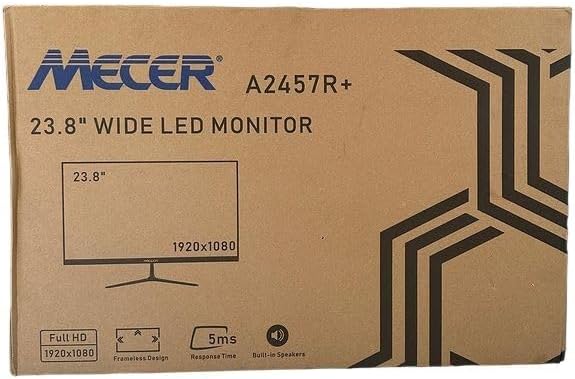
Immagine 3.1: The monitor packaging box, indicating the model A2457R+ and key features like 23.8" display, Full HD 1920x1080 resolution, frameless design, 5ms response time, and built-in speakers.
4. Impostazione
4.1. Assemblaggio del supporto del monitor
- Estrarre con cautela il monitor e i componenti del supporto dalla confezione.
- Fissare il collo del supporto al pannello del monitor allineando le linguette e spingendo con decisione finché non scatta in posizione.
- Attach the stand base to the stand neck, securing it with the provided screw (usually hand-tightened).
- Posizionare il monitor assemblato su una superficie stabile e piana.

Immagine 4.1: Davanti view of the Mecer 23.8 Inch LED Monitor with its stand assembled, ready for connection.
4.2. Connessione a un computer
Il monitor supporta sia connessioni HDMI che VGA. Scegli il cavo appropriato per il tuo computer.
- Connessione HDMI: Connect one end of the HDMI cable to the HDMI port on your computer's graphics card and the other end to the HDMI port on the monitor. HDMI transmits both video and audio signals.
- Connessione VGA: Connect one end of the VGA cable to the VGA port on your computer's graphics card and the other end to the VGA port on the monitor. VGA transmits only video signals.

Immagine 4.2: Posteriore view of the Mecer 23.8 Inch LED Monitor, showing the input ports including HDMI and VGA, as well as the power input.
4.3. Collegamento elettrico
- Connect the power adapter cable to the DC IN port on the back of the monitor.
- Collegare l'adattatore di corrente a una presa a muro.
5. Istruzioni per l'uso
5.1. Accensione/Spegnimento
Press the power button, typically located on the bottom right side or rear of the monitor, to turn the monitor on or off. The power indicator light will illuminate when the monitor is on.
5.2. Selezione della sorgente di ingresso
If you have multiple devices connected, you may need to manually select the input source. Use the monitor's control buttons (usually located near the power button) to navigate to the input selection menu and choose between HDMI or VGA.
5.3. Menu OSD (On-Screen Display).
The OSD menu allows you to adjust various display settings. Use the monitor's control buttons to:
- Accedi al menu OSD.
- Navigate through menu options (e.g., Brightness, Contrast, Color Settings, Input Source).
- Regola i valori o seleziona le opzioni.
- Esci dal menu OSD.
Le impostazioni regolabili più comuni includono:
- Luminosità/Contrasto: Regola la luminosità complessiva e la differenza tra aree chiare e scure.
- Impostazioni colore: Adjust color temperature, RGB values, or select preset color modes.
- Proporzioni: Change between 16:9, 4:3, or other available options.
- Audio: Adjust volume for the built-in speakers.
5.4. Altoparlanti incorporati
The monitor includes built-in speakers for basic audio output. If using an HDMI connection, audio will be transmitted automatically. For VGA connections, ensure your computer's audio output is configured correctly. Adjust the volume through the OSD menu or your computer's operating system.
6. Manutenzione
6.1. Pulizia del monitor
- Prima di pulire il monitor, scollegarlo sempre dalla presa di corrente.
- Schermo: Pulire delicatamente lo schermo con un panno morbido e privo di lanugine. Per i segni ostinati, strofinare leggermenteampImmergere il panno in acqua o in un detergente specifico per schermi (assicurarsi che sia privo di alcol e ammoniaca) e pulire con cura. Non spruzzare il liquido direttamente sullo schermo.
- Casing: Utilizzare un panno morbido e asciutto per pulire il monitor casing. If necessary, a slightly damp si può usare un panno, seguito da un panno asciutto.
6.2. Conservazione
Se si conserva il monitor per un periodo prolungato, scollegare tutti i cavi, imballarlo nella confezione originale (se disponibile) e conservarlo in un luogo fresco e asciutto, lontano dalla luce solare diretta e da temperature estreme.
7. Risoluzione Dei Problemi
Se riscontri problemi con il monitor, fai riferimento ai seguenti problemi comuni e alle relative soluzioni:
- Nessun potere:
- Assicurarsi che il cavo di alimentazione sia collegato saldamente al monitor e alla presa a muro.
- Verificare che la presa di corrente funzioni collegandovi un altro dispositivo.
- Controllare che l'adattatore di alimentazione funzioni correttamente.
- Nessun segnale:
- Ensure the video cable (HDMI or VGA) is securely connected to both the monitor and the computer.
- Verificare che sul monitor sia selezionata la sorgente di ingresso corretta (tramite il menu OSD).
- Check if your computer is powered on and outputting a video signal.
- Provare un cavo video diverso, se disponibile.
- L'immagine è sfocata o distorta:
- Assicurati che la risoluzione del monitor sia impostata sulla risoluzione nativa (1920 x 1080) nelle impostazioni di visualizzazione del computer.
- Adjust the monitor's OSD settings for brightness, contrast, and sharpness.
- For VGA connections, use the 'Auto Adjust' function in the OSD menu if available.
- No Audio from Built-in Speakers:
- Assicurarsi che il volume del monitor non sia disattivato o impostato su un livello troppo basso nel menu OSD.
- Check your computer's audio output settings to ensure the monitor is selected as the playback device.
- If using VGA, ensure your computer's audio is routed to an external speaker system, as VGA does not carry audio.
8. Specifiche
| Caratteristica | Specificazione |
|---|---|
| Marca | Mecer |
| Numero di modello | A2457R+ |
| Dimensioni dello schermo | 23.8 pollici |
| Risoluzione | 1920 x 1080 pixel (Full HD) |
| Tipo di visualizzazione | LED (TFT LED Panel) |
| Proporzioni | 16:9 |
| Tempo di risposta | 2 millisecondi |
| Frequenza di aggiornamento | Frequenza 75 Hz |
| Viewing angoli | 178° Orizzontale / 178° Verticale |
| Connettività | 1 HDMI, 1 VGA |
| Altoparlanti incorporati | SÌ |
| Colore | Nero |
| Dimensioni del prodotto (P x L x A) | 560D x 42W x 410H millimetri |
| Caratteristiche speciali | High performance intelligent multi-frequency scanning, Micro Computer digital technology control, no radiation, no glare, Comply with VESA DPMS international power saving regulation, Support DDC 1/2B and Windows PNP Plug and Play |
9. Garanzia e supporto
This Mecer monitor comes with a Garanzia limitata di 1 anno dalla data di acquisto. Conservare la prova d'acquisto per eventuali reclami in garanzia.
For technical support, service, or warranty inquiries, please contact your retailer or the authorized Mecer service center in your region. Do not attempt to repair the product yourself, as this may void your warranty.


