1. Introduzione
The Formuler Z Mini is a compact and powerful Android 12-based streaming media player designed to deliver a high-quality entertainment experience. Featuring 4K output resolution, 2GB RAM, 8GB ROM, and dual-band 5G Wi-Fi connectivity, it provides seamless streaming and access to a wide range of applications. This manual provides essential information for setting up, operating, maintaining, and troubleshooting your Formuler Z Mini device.
2. Informazioni sulla sicurezza
- Non esporre il dispositivo ad acqua, umidità o temperature estreme.
- Per evitare danni, utilizzare solo l'adattatore di alimentazione fornito.
- Ensure proper ventilation around the device to avoid overheating.
- Non tentare di smontare o riparare il dispositivo da soli. Rivolgersi a personale qualificato.
- Tenere il dispositivo e gli accessori fuori dalla portata dei bambini.
3. Contenuto della confezione
Verificare che tutti gli articoli siano presenti nel pacco:
- Formuler Z Mini Streaming Device
- Controllo remoto Bluetooth
- Power Adapter (5VDC / 1A)
- HDMI Extension Cable (integrated with device)
- 2 batterie AA (per il telecomando)

Image: Contents of the Formuler Z Mini package, including the streaming device, remote, and box.
4. Guida all'installazione
4.1 Collegamento del dispositivo
- Collegamento alla TV: Plug the HDMI connector of the Formuler Z Mini directly into an available HDMI port on your television or display.
- Connetti alimentazione: Insert the power adapter cable into the DC IN port on the Formuler Z Mini, then plug the adapter into a wall outlet.
- Accensione: Il dispositivo dovrebbe accendersi automaticamente. In caso contrario, premere il pulsante di accensione sul telecomando.
4.2 Configurazione iniziale
- Accoppiamento telecomando: Upon first use, the remote control may need to be paired. Follow the on-screen instructions, typically by pressing and holding specific buttons (e.g., Plus and Equals keys as indicated by some users) until the remote pairs.
- Selezione della lingua: Seleziona la tua lingua preferita dal menu sullo schermo.
- Connessione di rete: Connect the device to your Wi-Fi network. Select your network name (SSID) from the list and enter the password. The device supports Dual Band 5G 2x2 AC Wi-Fi for fast and stable connections.
- Configurazione dell'account Google: Accedi con il tuo account Google per accedere al Google Play Store e ad altri servizi Google.
- Configurazione completa: Follow any remaining on-screen prompts to finalize the initial setup process.

Image: The Formuler Z Mini device and its remote control, ready for connection.
5. Utilizzo del dispositivo
5.1 Controllo remoto finitoview
The Formuler Z Mini comes with an advanced Bluetooth remote control. Familiarize yourself with its functions:
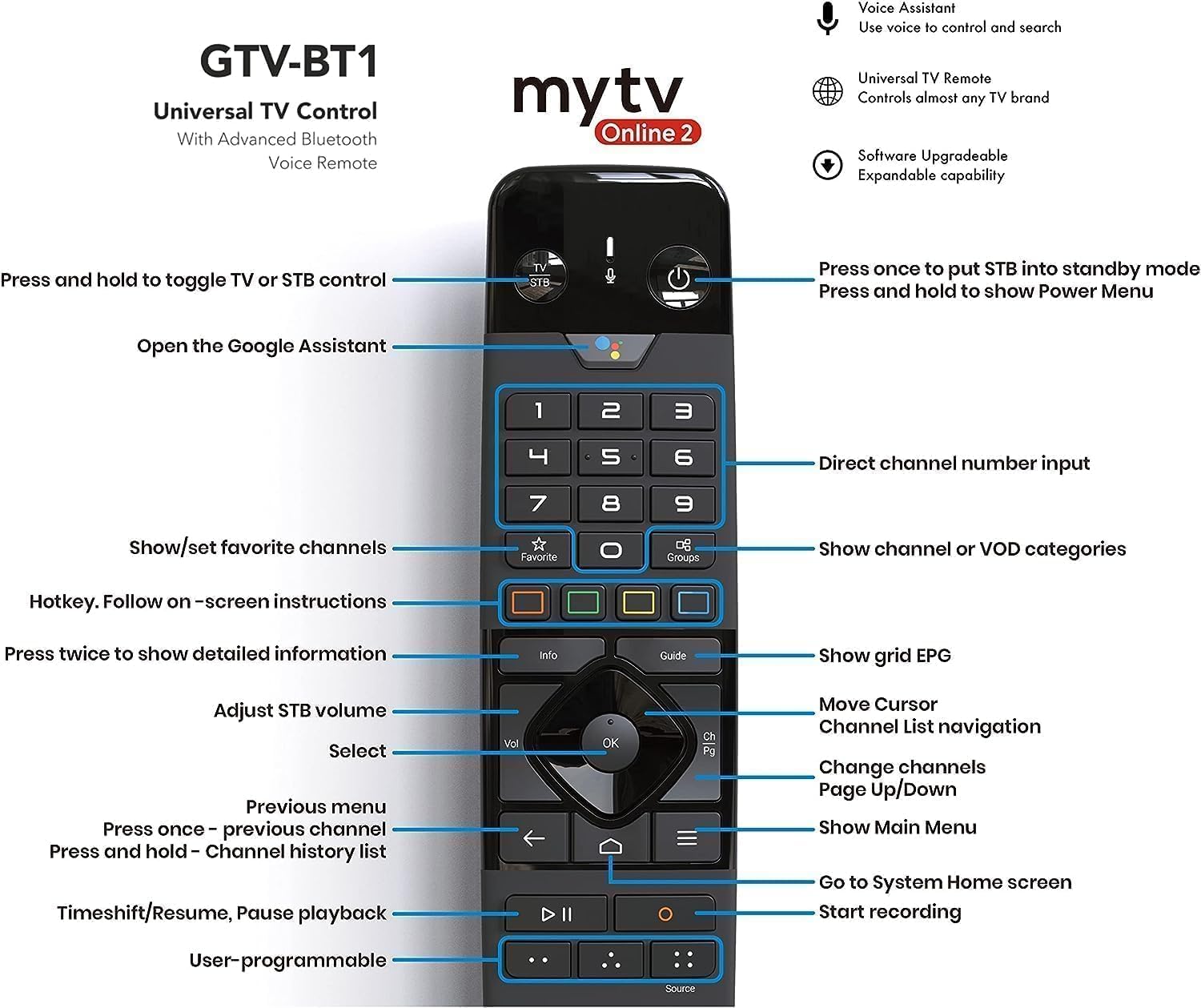
Immagine: dettagliata view of the remote control with labeled buttons for various functions.
- Pulsante di accensione: Press once to put the device into standby mode; press and hold to show the Power Menu.
- TV/STB Control: Press and hold to toggle between TV or STB control.
- Assistente Google: Apri l'Assistente Google per i comandi vocali.
- Tastierino numerico: Inserimento diretto del numero del canale.
- Tasti di navigazione (OK, Su, Giù, Sinistra, Destra): Navigare nei menu e selezionare le voci.
- Pulsante Indietro: Torna al menu o alla schermata precedente.
- Pulsante Home: Vai alla schermata Home del sistema.
- Pulsanti del volume: Regola il volume del decoder.
- Pulsanti canale: Change channels (Page Up/Down).
- Pulsante informazioni: Premere due volte per informazioni dettagliate.
- Pulsante Guida: Mostra la griglia EPG (Guida elettronica ai programmi).
- Preferiti/Gruppi: Mostra/imposta i canali preferiti o mostra le categorie canale/VOD.
- Controlli di riproduzione: Timeshift/Riprendi, Metti in pausa la riproduzione, Avvia la registrazione.
- Pulsanti programmabili dall'utente: Customize for quick access to preferred functions.
5.2 Navigazione e streaming
Once powered on, the Formuler Z Mini will display its home screen. Use the remote control's navigation pad to browse applications and settings. Launch your preferred streaming apps to enjoy content. The device supports 4K resolution, ensuring a crisp and clear viewesperienza sui display compatibili.
6. Manutenzione
- Pulizia: Per pulire il dispositivo, utilizzare un panno morbido e asciutto. Non utilizzare detergenti liquidi o spray.
- Aggiornamenti software: Regularly check for and install software updates to ensure optimal performance and access to the latest features. Updates are typically available through the device's settings menu.
- Ventilazione: Assicurarsi che il dispositivo sia posizionato in un'area ben ventilata e che le sue prese d'aria non siano ostruite.
7. Risoluzione Dei Problemi
| Problema | Possibile causa | Soluzione |
|---|---|---|
| Nessun potere | Adattatore di alimentazione non collegato; problema con la presa. | Ensure power adapter is securely connected to device and a working power outlet. |
| Nessun segnale sulla TV | È stato selezionato un ingresso HDMI errato; collegamento HDMI allentato. | Select the correct HDMI input on your TV. Check HDMI cable connection. |
| Il telecomando non risponde | Batterie scariche/scaricate; telecomando non associato. | Replace batteries. Re-pair the remote control by following on-screen instructions or referring to Section 4.2. |
| Problemi di connessione Wi-Fi | Password errata; problemi con il router; interferenza del segnale. | Verifica la password Wi-Fi. Riavvia il router. Avvicina il dispositivo al router o riduci le interferenze. |
| Il dispositivo è lento o si blocca | Troppe app in esecuzione; spazio di archiviazione insufficiente. | Close unused applications. Clear cache or uninstall unnecessary apps to free up storage. Restart the device. |
8. Specifiche
Detailed technical specifications for the Formuler Z Mini:
- Risoluzione di uscita: Risoluzione 4K (3840 x 2160)
- Memoria RAM: 2GB LPDDR4 @2400MHz
- Magazzinaggio: 8 GB eMMC
- Sistema operativo: Androide 12
- Creazione di reti: Wireless AC 2x2, Bluetooth 5.0
- Dimensions (L x W x T): 83 mm x 60 mm x 12.5 mm (3.3 x 2.4 x 0.5 pollici)
- Colore: Nero
- Potenza in ingresso: 5VDC / 1A
- Consumo energetico: Massimo 5 W
- Peso dell'articolo: 15.8 once
- Paese di origine: Cina


Immagine: parte superiore e laterale views of the Formuler Z Mini device, highlighting its compact design.
9. Garanzia e supporto
For warranty information, technical support, or further assistance, please refer to the official Formuler websito o contattare il servizio clienti. Conservare la prova d'acquisto per eventuali reclami in garanzia.


