
1. Introduzione
Grazie per aver scelto la stazione di alimentazione portatile BLUETTI AC20. Questo manuale fornisce informazioni essenziali per il funzionamento sicuro ed efficiente del dispositivo. Si prega di leggerlo attentamente prima dell'uso e di conservarlo per riferimento futuro.
Contenuto della confezione
- BLUETTI AC20 portable power station
- Adattatore CA
- Cavo di tipo C.
- Cavo di ricarica per auto
- Manuale d'uso
- Scheda di garanzia

An illustration showing the BLUETTI AC20 power station along with its included accessories: user manual, warranty card, AC adapter, Type-C cable, DC6530 to DC5521 cable, DC7909 to Car Charger cable, and cigarette lighter adapter.
2. Istruzioni di sicurezza
Per garantire un funzionamento sicuro, seguire sempre queste linee guida:
- Non smontare, riparare o modificare l'unità.
- Tenere l'unità lontana dal fuoco o dalla luce solare diretta.
- Non utilizzare o conservare l'unità in un bagno o in un'area esposta all'acqua o alla pioggia.
- Do not use the unit if it is damaged or modified.
- Tenere fuori dalla portata dei bambini.
- Garantire un'adeguata ventilazione durante l'uso per evitare il surriscaldamento.
- Utilizzare solo cavi di ricarica e adattatori originali o certificati.
The BLUETTI AC20 is built with an Auto-level battery cell and a premium BMS (Battery Management System) for comprehensive battery protection.
3. Guida all'installazione
Carica iniziale
Before first use, fully charge the BLUETTI AC20. Connect the provided AC adapter to the input port on the power station and plug it into a wall outlet. The display will indicate charging status.
Comprensione del display
The integrated display provides real-time information on battery level, input power, and output power for various ports.
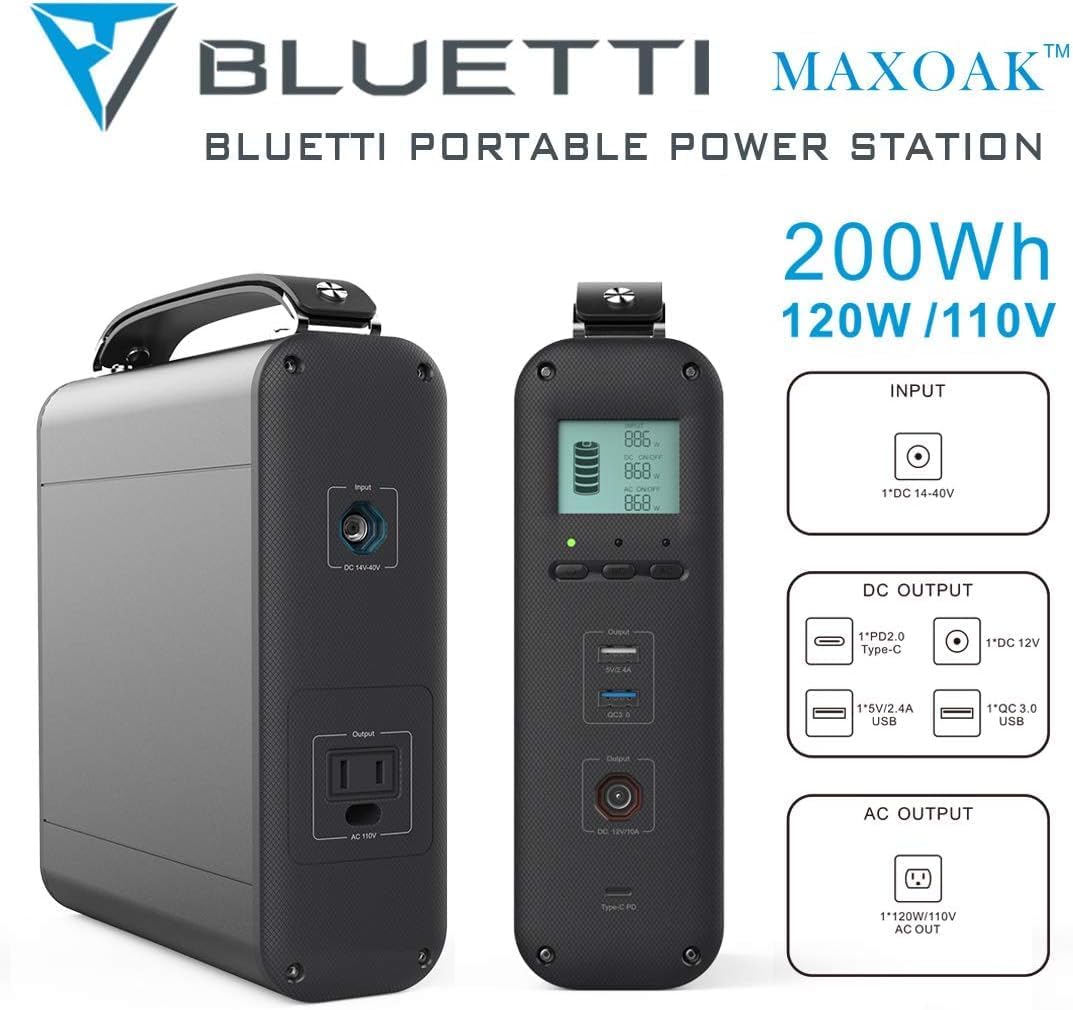
Un dettagliato view of the BLUETTI AC20 power station highlighting its input and output ports, including the DC 14-40V input, PD2.0 Type-C, 5V/2.4A USB-A, QC 3.0 USB, DC 12V, and 120W/110V AC outlet.
4. Istruzioni per l'uso
Accensione/spegnimento
Press and hold the power button for 3 seconds to turn the unit on or off.
Dispositivi di ricarica
The AC20 offers multiple output options:
- Presa CA: Provides 120W AC output for small appliances.
- Porta USB-C: Per dispositivi compatibili con la ricarica rapida.
- Porte USB-A: Standard USB ports for charging phones, tablets, and other USB-powered devices.
- DC 12V Car Output: Per alimentare elettrodomestici da 12 V per auto.
- QC USB Port: Quick Charge enabled USB port.
Simply plug your device into the appropriate port. The power station will automatically detect and begin charging.

The BLUETTI AC20 power station simultaneously charging a laptop, tablet, and multiple smartphones, demonstrating its versatility for various electronic devices.
Recharging the AC20
The BLUETTI AC20 can be recharged via:
- Presa a muro CA: Using the provided AC adapter.
- Pannello solare (opzionale): Connect a compatible solar panel to the DC input port for eco-friendly charging.
- Caricabatterie per auto: Use the included car charging cable to recharge from your vehicle's 12V outlet.
Monitor the display for charging progress.
5. Manutenzione
- Magazzinaggio: Conservare l'unità in un luogo fresco e asciutto, lontano dalla luce solare diretta e da temperature estreme.
- Frequenza di ricarica: Per una durata ottimale della batteria, caricare completamente l'unità ogni 3-6 mesi, anche se non viene utilizzata.
- Pulizia: Utilizzare un panno asciutto e morbido per pulire l'esterno. Non utilizzare prodotti chimici aggressivi o materiali abrasivi.
- Ventilazione: Assicurarsi che le aperture di ventilazione siano libere da polvere e detriti.

The BLUETTI AC20 power station positioned outdoors near a tent and a person, illustrating its suitability for camputilizzo fuori dalla rete elettrica.
6. Risoluzione Dei Problemi
| Problema | Possibile causa | Soluzione |
|---|---|---|
| L'unità non si accende | La batteria è scarica. | Caricare completamente l'unità utilizzando l'adattatore CA. |
| Nessuna uscita dalle porte | Porta di uscita non attivata o dispositivo che assorbe troppa energia. | Ensure the unit is on and the specific output port is active. Check if the device's power consumption exceeds the AC20's limits (120W AC). |
| Ricarica lenta | Using a non-optimal charging method or cable. | Use the original AC adapter for fastest charging. Ensure solar panels are in direct sunlight if applicable. |
| Surriscaldamento | Scarsa ventilazione o carico eccessivo. | Place the unit in a well-ventilated area. Reduce the number or power of connected devices. |
7. Specifiche
- Modello: MS-US-AC20
- Capacità: 200 Wh
- Uscita CA: 1 x 120W AC Outlet (110V)
- Uscita USB-C: 1 x Type-C (PD2.0)
- Uscita USB-A: 1 x 5V/2.4A, 1 x QC 3.0
- Uscita CC: 1 x DC 12V Car Output
- Ingresso: DC 14-40V
- Dimensioni: 7.87 x 8.15 x 2.63 pollici
- Peso: 7.7 libbre
- Tipo di batteria: Auto-level battery cell
- Ciclo di vita: 1000+ cicli
- Caratteristiche speciali: Built-in BMS for battery protection

An image of the BLUETTI AC20 power station with callouts indicating its 200Wh capacity, 120W/110V output, and various input/output ports including DC 14-40V input, PD2.0 Type-C, 5V/2.4A USB, QC 3.0 USB, DC 12V, and AC 120W/110V.
8. Garanzia e supporto
La stazione di alimentazione portatile BLUETTI AC20 è dotata di un Garanzia di 24 mesi dalla data di acquisto. Questa garanzia copre difetti di materiali e lavorazione in condizioni di normale utilizzo.
For technical support, warranty claims, or any inquiries, please contact BLUETTI customer service through their official websito o le informazioni di contatto fornite sulla scheda di garanzia.
BLUETTI Official Websito: www.bluettipower.com
9. Smaltimento ecologico
Do not dispose of the BLUETTI AC20 with household waste. This product contains a battery and should be recycled responsibly. Please contact your local waste management authority for information on proper disposal and recycling options for electronic devices and batteries.


