1. Finitaview
1.1 Descrizione del prodotto
The PNI GreenHouse SC1800C PRO Solar Inverter is a central component for small off-grid solar systems, suitable for areas with or without grid electricity. It provides a continuous output of 3000W with a pure sine wave, making it suitable for various household lighting installations and other small electronic motors, including refrigerators, pumps, tools, and charging devices for phones, laptops, and TVs.
1.2 Caratteristiche principali
- Maximum photovoltaic panel input power: 2000 W.
- Massimo ingresso DC voltage from photovoltaic panels: 30 - 120 VDC (Vmp).
- Maximum solar charge current: 30 A input from panels, 60 A output to batteries.
- Solar charging efficiency: 98%.
- MPPT solar charger type.
- Potenza nominale voltage: 230 V.
- Rated output power: 3000 W (under ideal conditions with proportional battery count and 100% charged batteries).
- Maximum apparent power: 6000 VA (peak, 0.5 seconds under ideal conditions).
- Volume di uscitatage waveform: Pure sine wave.
- Output signal frequency: 50, 60 Hz.
- Ingresso voltage: 230 V CA.
- Grid connection for backup.
- Compatible with 24V batteries: AGM, lead-acid, gel, flooded lithium-ion.
- Minimum battery start voltage: 23 V (cold start voltagE).
- Integrated high-frequency inverter type (switching).
- Inverter efficiency: 90% ~ 93% (100% charged battery).
- Typical transfer time: 10 ms (UPS, VDE) 20 ms (APL).
- Line mode efficiency: > 95% (rated R load, fully charged battery).
- Hybrid operating modes: SBU – Solar/Battery/Utility, Solar Utility (UPS).
- AC charge voltage: 230 V.
- Maximum AC charge current: 30 A.
- Automatic switching: Solar - Batteries - Grid.
- Funzione di risparmio energetico.
- Multiple protections.
- Display multifunzione.
- Dedicated menu for advanced settings.
- Monitoring with PC software (USB cable included).
- Remote monitoring from mobile/PC (with optional WiFi USB dongle).
1.3 Contenuto della confezione
- PNI GreenHouse SC1800C PRO Solar Inverter
- Cavo USB
- Manuale d'uso
- PNI Smart Dongle-WLAN (for WiFi monitoring)
2. Informazioni sulla sicurezza
Leggere attentamente tutte le istruzioni e le avvertenze prima dell'installazione e dell'uso. Il mancato rispetto di queste istruzioni può causare scosse elettriche, incendi o lesioni gravi.
- Personale qualificato: L'installazione e la manutenzione devono essere eseguite da personale qualificato.
- Rischio di scossa elettrica: Questo dispositivo funziona con alta voltages. Non aprire il casing unless specifically instructed.
- Sicurezza della batteria: Batteries can produce explosive gases. Ensure proper ventilation. Do not smoke or allow sparks or flames near batteries. Wear eye protection.
- Ventilazione adeguata: Installare l'inverter in un'area ben ventilata per evitare il surriscaldamento.
- Condizioni ambientali: Avoid exposure to rain, snow, spray, or any liquids. Operate within the specified temperature range (-26 °C to 80 °C).
- Messa a terra: Assicurarsi che l'inverter sia correttamente collegato a terra secondo le normative elettriche locali.
- Scollegare l'alimentazione: Always disconnect all power sources (solar, battery, AC grid) before performing any wiring or maintenance.
3. Componenti del prodotto
3.1 PNI GreenHouse SC1800C PRO Solar Inverter

Figura 3.1: Fronte view of the PNI GreenHouse SC1800C PRO Solar Inverter, showing the display and control buttons.

Figura 3.2: Posteriore view of the PNI GreenHouse SC1800C PRO Solar Inverter, illustrating the various connection ports for solar panels, batteries, AC input, and AC output.
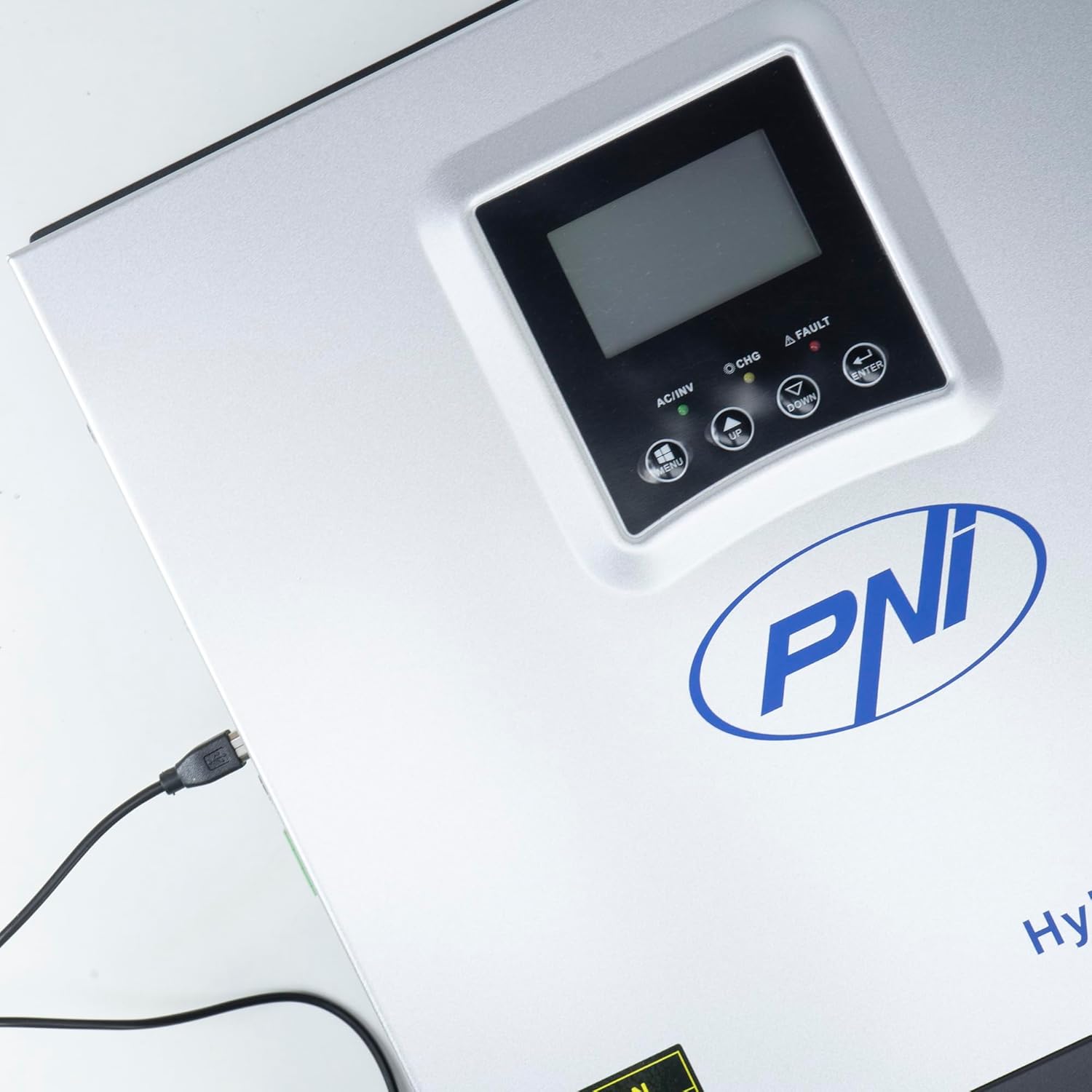
Figure 3.3: Close-up of the USB connection port on the inverter, used for PC monitoring.
3.2 PNI Smart Dongle-WLAN (Optional)

Figure 3.4: The PNI Smart Dongle-WLAN, an optional accessory for remote WiFi monitoring of the inverter.

Figure 3.5: The PNI Smart Dongle-WLAN connected to the inverter's dedicated port for WiFi communication.
4. Installazione e configurazione
4.1 Montaggio a parete
The inverter is designed for wall mounting. Choose a location that is dry, well-ventilated, and protected from direct sunlight and moisture. Ensure sufficient clearance around the unit for proper airflow and heat dissipation. Use appropriate mounting hardware for your wall type.
4.2 Schema di collegamento del sistema

Figure 4.1: Basic application diagram showing the connections between solar panels, utility grid, generator, inverter, battery, and home loads. Note: Generator, PV modules, WiFi module, and battery are not included with the inverter unless specified.
4.3 Collegamenti di cablaggio
Follow the diagram above and the labels on the inverter for correct wiring. Ensure all connections are secure and properly insulated. It is highly recommended that a qualified electrician performs all wiring.
- Connessione al pannello solare: Connect your solar panels to the designated PV input terminals. Observe correct polarity (positive to positive, negative to negative). The maximum DC input voltage è 120 VDC.
- Collegamento della batteria: Connect the 24V battery bank to the battery terminals. Ensure correct polarity. The inverter supports AGM, lead-acid, gel, and flooded lithium-ion batteries.
- Ingresso CA (rete/generatore): Connect the AC utility grid or a generator to the AC input terminals. This provides backup power and can charge batteries.
- Uscita CA (carichi): Connect your household loads to the AC output terminals.
4.4 Accensione iniziale
After all connections are made and verified:
- Accendere l'interruttore della batteria.
- Accendere l'interruttore del pannello solare (se applicabile).
- Accendere l'interruttore di ingresso CA (se collegato alla rete/generatore).
- Accendere l'interruttore di alimentazione dell'inverter.
- Observe the display for status indicators and initial readings.
5. Modalità operative
The PNI GreenHouse SC1800C PRO offers intelligent energy management with several configurable operating modes:
- Solar Priority Mode (SBU): In this mode, the inverter prioritizes power consumption from solar energy. If solar power is insufficient, it will draw from batteries. The utility grid acts as a backup.
- Modalità priorità batteria: The inverter prioritizes drawing power from the batteries. Solar energy will charge the batteries. The utility grid is used only when battery voltage scende al di sotto di una soglia impostata.
- Utility Priority Mode (UPS): This mode prioritizes power from the utility grid. Solar energy will charge the batteries. The inverter switches to battery power only when the grid is unavailable, functioning as an Uninterruptible Power Supply (UPS).
These modes can be configured via the inverter's multifunction display and dedicated menu for advanced settings.
5.1 Monitoraggio
The inverter supports monitoring through:
- PC Software (USB): Connect the inverter to a PC using the provided USB cable and dedicated software for detailed monitoring and analysis of parameters.
- Remote Monitoring (WiFi - Optional): With the optional PNI Smart Dongle-WLAN, you can monitor the inverter remotely via a mobile application or web interfaccia.
6. Manutenzione
Una manutenzione regolare garantisce prestazioni ottimali e longevità dell'inverter. Scollegare sempre tutte le fonti di alimentazione prima di eseguire qualsiasi intervento di manutenzione.
- Pulizia: Pulire periodicamente l'esterno dell'inverter con un panno asciutto. Assicurarsi che le aperture di ventilazione siano libere da polvere e detriti. Non utilizzare detergenti liquidi.
- Verifiche della connessione: Annually inspect all wiring connections (solar, battery, AC input/output) for tightness and signs of corrosion. Tighten any loose connections.
- Ispezione della batteria: Se si utilizzano batterie al piombo, controllare i livelli dell'elettrolita e le condizioni dei terminali secondo le linee guida del produttore della batteria.
- Controllo ambientale: Assicurarsi che l'ambiente di installazione rimanga entro gli intervalli di temperatura e umidità specificati.
7. Risoluzione Dei Problemi
Questa sezione fornisce indicazioni per i problemi più comuni. Per problemi più complessi, contattare personale di assistenza qualificato.
| Problema/Allarme | Possibile causa | Soluzione |
|---|---|---|
| Allarme batteria scarica | Volume della batteriatage è al di sotto del basso voltage warning threshold. | Check battery charge level. Ensure solar panels are producing power or AC input is connected for charging. Reduce load. |
| Battery Disconnected Alarm | Battery cables are loose or disconnected. | Safely disconnect all power sources and check battery connections. Reconnect securely. |
| Sovravoltage Allarme | Ingresso voltage (PV or AC) exceeds safe limits. | Verify solar panel array voltage or AC input voltage. Ensure it is within the inverter's specifications. |
| Protezione da sovraccarico CA | Connected loads exceed the inverter's output capacity. | Reduce the total load connected to the inverter. Check individual appliance power consumption. |
| Nessuna potenza in uscita | Inverter off, low battery, overload, or fault. | Check if the inverter is powered on. Verify battery voltage. Check for overload or fault codes on the display. |
8. Specifiche
| Caratteristica | Specificazione |
|---|---|
| Marca | PNI |
| Numero di modello | PNI-SC1800P-DG |
| Potenza nominale | 3000 L |
| Potenza di picco | 6000 VA (0.5 seconds) |
| Volume batteriatage | 24 Volt |
| Potenza massima in ingresso FV | 2000 L |
| massimo Ingresso FV Voltage(Vmp) | 30 - 120 VCC |
| MPPT Solar Charge Current | 60 A (output to batteries) |
| Ingresso CA Voltage | 230 Volt |
| Volume di uscita CAtage | 230 Volt |
| Forma d'onda di uscita | Onda sinusoidale pura |
| Frequenza di uscita | Frequenza 50/60 Hz |
| Corrente di carica CA massima | 30 A |
| Efficienza dell'inverter | 90% ~ 93% |
| Temperatura di esercizio | da -26 °C a 80 °C |
| Dimensioni (L x P x A) | Dimensioni: 29 x 12 x 35 cm |
| Peso | 6.9 kg |
| Consumo in standby | ≈ 25 W (Energy saving mode ≈ 12.5 W) |
| Comunicazione | USB, Optional WiFi Dongle |
9. Garanzia e supporto
Per informazioni sulla garanzia e assistenza tecnica, consultare la documentazione fornita con l'acquisto o contattare il rivenditore. Conservare la prova d'acquisto per eventuali reclami in garanzia.


