1. Introduzione
The Topping D50 III is a high-performance Digital-to-Analog Converter (DAC) and preamplifier designed for audiophiles and audio enthusiasts. It features dual ES9039Q2M D/A chips, LDAC Bluetooth 5.1 connectivity, and supports high-resolution audio formats up to DSD512 and PCM768kHz. This manual provides comprehensive instructions for setting up, operating, and maintaining your D50 III to ensure optimal performance and longevity.

Image 1.1: The Topping D50 III DAC Preamplifier shown with its remote control. The device is black with a front display and control knobs.
2. Caratteristiche principali
- 3rd Generation Upgraded Version: Utilizes 2x ES9039Q2M D/A chips for enhanced SNR (132dB), dynamic range (132dB), and reduced distortion (<1.3uVrms). Features a new I/V conversion circuit for improved audio reproduction.
- LDAC Wireless Connectivity: Equipped with QCC5125 and Bluetooth 5.1, supporting LDAC, aptX-Adaptive, aptX-HD, AAC, and SBC codecs up to 96kHz/24bit for high-quality wireless audio transmission.
- Compatibilità plug and play: Broad compatibility with Windows 10/11, MAC, Linux, iOS, and Android. Windows ASIO applications require driver installation (Thesycon driver for XMOS XU316 USB hardware). Supports up to PCM768kHz/32bit and DSD512.
- Dual Type-C Interface: Uses Type-C for both signal transmission and power. Auxiliary power supply is recommended for fixed desktop use or mobile connections for optimal performance.
- Ten-band PEQ Adjustment: Features a new PEQ adjustment algorithm supporting ten customizable frequency bands. Desktop software allows fine-tuning of frequency, gain, and bandwidth, with support for importing curves and saving multiple profiles. (Note: PEQ function supports up to PCM 192kHz/32bit and is only available for USB input).
- Modalità di output versatili: Offers RCA and TRS balanced outputs. Includes TRS 4V and RCA 2V, as well as TRS 5V and RCA 2.5V options for broader device compatibility and enhanced performance.
- PreampFunzione lifier: Includes a "preamp" mode allowing volume adjustment directly on the D50 III, ideal for use with active speakers or pure power amplificatori.
- Perfect Partner (A50 III): Designed to aesthetically and functionally complement the A50 III headphone amplifier, allowing synchronous power on/off via 12V Trigger.
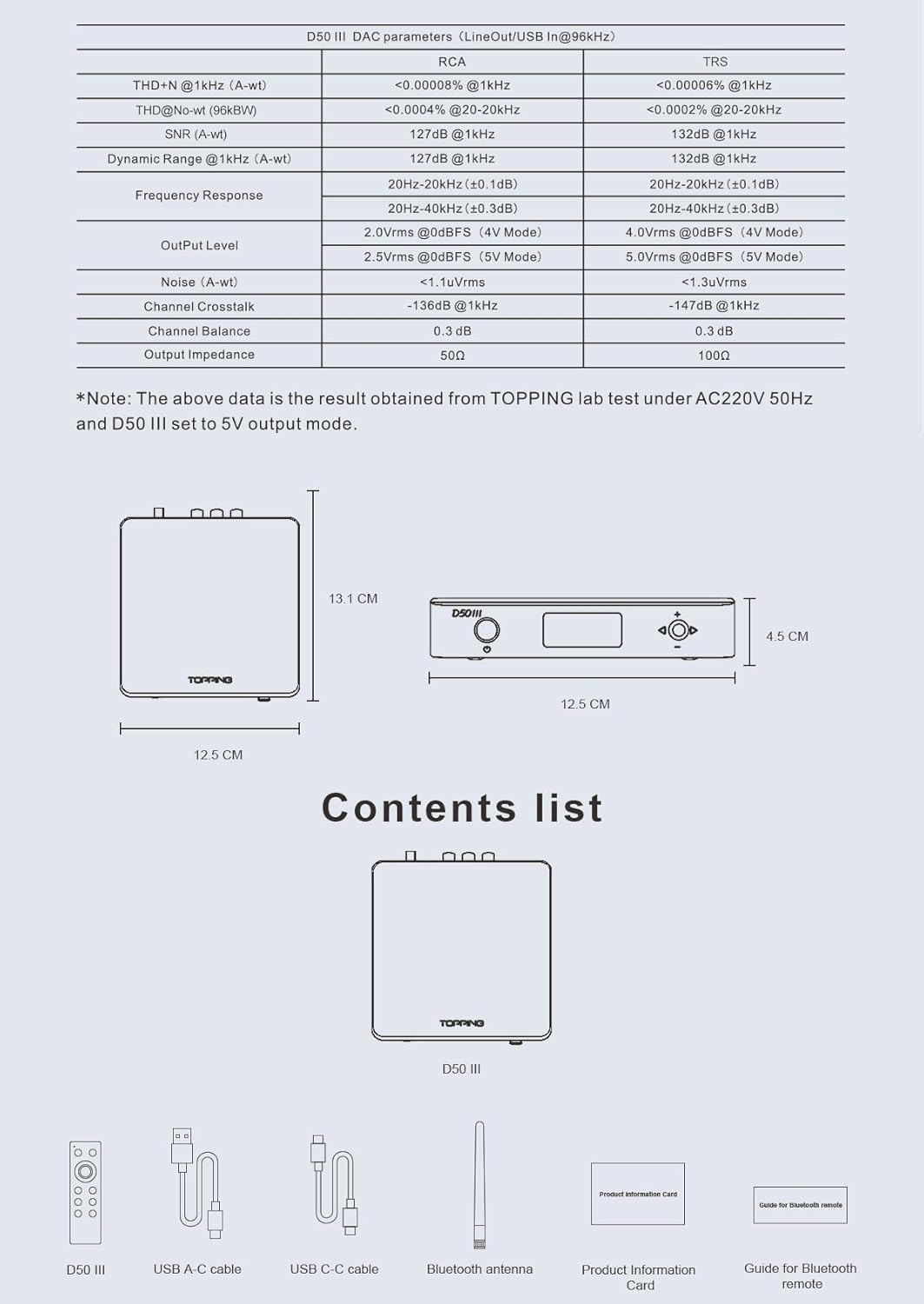
Image 2.1: An infographic highlighting the D50 III's features, including Dual ES9039Q2M, Hi-Res certification, LDAC, Dual Type-C, low THD+N, DSD/PCM support, PEQ adjustment, and remote control.
3. Guida all'installazione
3.1 Disimballaggio e ispezione
Carefully remove the D50 III and all accessories from the packaging. Inspect all components for any signs of damage. If any items are missing or damaged, contact your retailer immediately.
3.2 Collegamento dell'alimentazione
The D50 III uses a Type-C interface for both signal and power. Connect the provided USB A-C cable or USB C-C cable to the D50 III's USB-C port. For optimal performance, especially in fixed desktop setups or when connecting to mobile devices, it is recommended to use an auxiliary power supply connected to the dedicated POWER Type-C port.

Image 3.1: The D50 III connected via two Type-C cables, one for signal/power and another for auxiliary power, illustrating the dual Type-C interface.
3.3 Installazione del driver (solo Windows)
For Windows operating systems (Windows 10, Windows 11) and ASIO applications, you will need to install the dedicated Thesycon driver. For other operating systems (MAC, Linux, iOS/Android), no driver installation is required as the device is plug-and-play.
- Download the latest Thesycon driver from the official Topping websito.
- Eseguire il programma di installazione e seguire le istruzioni visualizzate sullo schermo.
- After installation, connect the D50 III to your computer via USB.
- Select "Topping D50 III" as the audio output device in your system's sound settings.

Image 3.2: Screenshots of Windows and macOS sound settings, demonstrating how to select the D50 III as the audio output device.
4. Istruzioni per l'uso
4.1 Funzionamento di base
The D50 III can be controlled via its front panel buttons and the included remote control.
- Pulsante di accensione: Located on the front panel, press to turn the unit on or off.
- Controllo del volume: Use the rotary knob on the front panel or the volume buttons on the remote to adjust the output volume.
- Selezione input: Cycle through available inputs (Bluetooth, USB, Optical, Coaxial) using the input selection button on the front panel or remote.
4.2 Output Mode Selection
The D50 III offers multiple output voltage options for its RCA and TRS balanced outputs:
- TRS 4V / RCA 2V: Standard output levels, suitable for most audio equipment.
- TRS 5V / RCA 2.5V: Higher output levels for devices that benefit from a stronger signal, potentially offering improved dynamics.
Refer to the device's menu or remote control options to switch between these output modes.

Image 4.1: The D50 III positioned on a desk alongside a pair of white active speakers, demonstrating its use as a preamppiù vivace.
4.3 preampFunzione lifier
In addition to its DAC capabilities, the D50 III can function as a preamplifier. In "preamp" mode, you can directly control the volume output from the D50 III, making it an ideal companion for active speakers or pure power amplifiers that do not have their own volume control.
4.4 Bluetooth Operation (LDAC)
The D50 III supports Bluetooth 5.1 with advanced codecs including LDAC. To pair your device:
- Select Bluetooth input on the D50 III.
- Enable Bluetooth on your source device (e.g., smartphone, tablet).
- Cercare "Topping D50 III" in your device's Bluetooth settings and select it to pair.
- Once paired, audio will be streamed wirelessly to the D50 III.
4.5 telecomando
The D50 III comes with a 2.4G Bluetooth remote control, offering convenient operation without the need for direct line-of-sight. The remote allows control over power, volume, input selection, and custom functions (C1, C2 buttons).

Image 4.2: The D50 III unit displayed next to its Bluetooth remote control, emphasizing the wireless control capability.
5. Connessioni
The D50 III provides a variety of input and output options for versatile connectivity with your audio system.
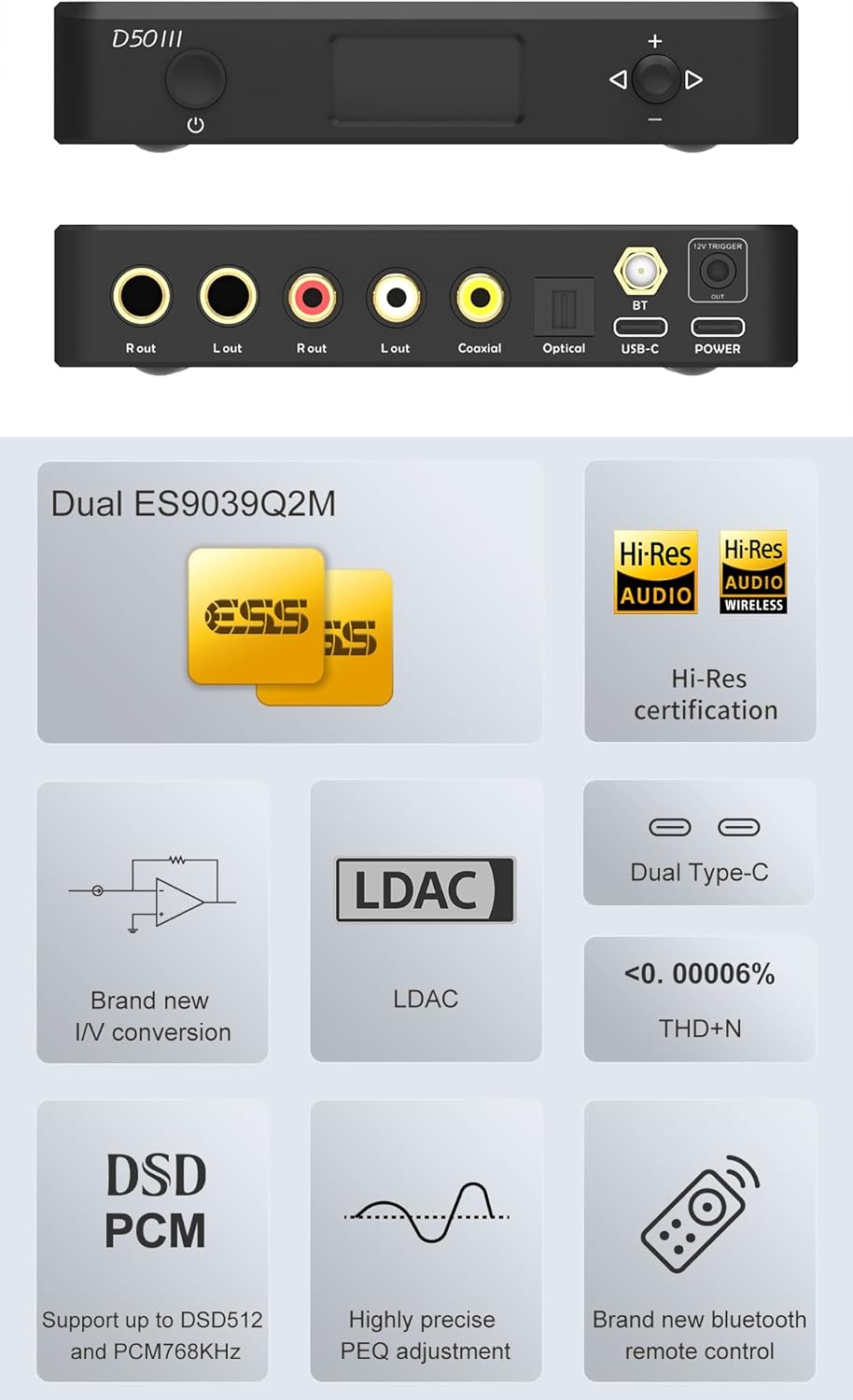
Immagine 5.1: Un dettaglio view of the D50 III's top and rear panels, clearly showing all input and output ports including RCA, TRS, Coaxial, Optical, USB-C, and 12V Trigger.
5.1 Porte di ingresso
- USB-C: Primary digital input for connecting to computers, smartphones, or other USB audio sources. Supports PCM up to 768kHz/32bit and DSD512.
- Ottico (TOSLINK): Digital input for connecting to TVs, CD players, or game consoles.
- Coaxial (RCA): Digital input for connecting to CD players, streamers, or other digital audio sources.
- Bluetooth: Wireless input for streaming audio from Bluetooth-enabled devices.
5.2 porte di uscita
- RCA (L/R): Unbalanced analog output for connecting to amplifiers, active speakers, or receivers.
- TRS (L/R): Balanced analog output for connecting to professional audio equipment, studio monitors, or amplifiers with balanced inputs.
5.3 Grilletto 12V
The D50 III is equipped with a 12V Trigger output. This feature allows the D50 III to synchronize power on/off with other compatible devices, such as the Topping A50 III amplifier, simplifying system control.
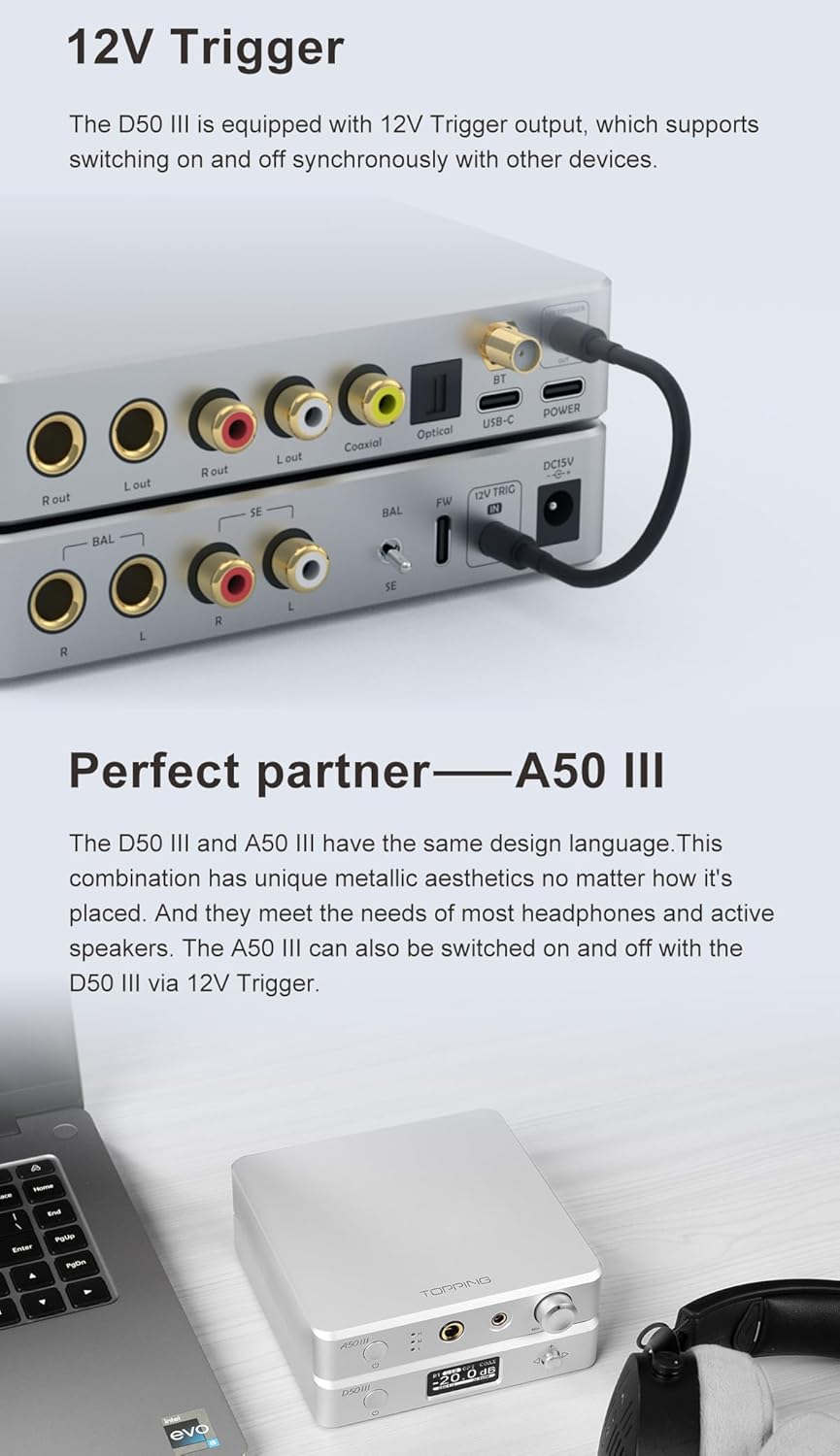
Image 5.2: The D50 III stacked with the A50 III amplifier, showing the 12V Trigger cable connecting the two units for synchronized power control.
6. Ten-band PEQ Adjustment
The D50 III features an advanced ten-band Parametric Equalizer (PEQ) adjustment function, allowing precise customization of the audio frequency response. This feature is supported only for USB input and up to PCM 192kHz/32bit.
6.1 Using the PEQ Software
To utilize the PEQ function, you will need to use the dedicated desktop software provided by Topping. This software allows you to:
- Fine-tune the frequency, gain, and bandwidth (Q factor) for each of the ten PEQ bands.
- Import target and original frequency response curves.
- Compensate curves using target curves for precise sound shaping.
- Save multiple PEQ profiles for easy switching between different sound preferences or headphone/speaker setups.
Refer to the software's user interface for detailed instructions on creating and managing PEQ profiles.
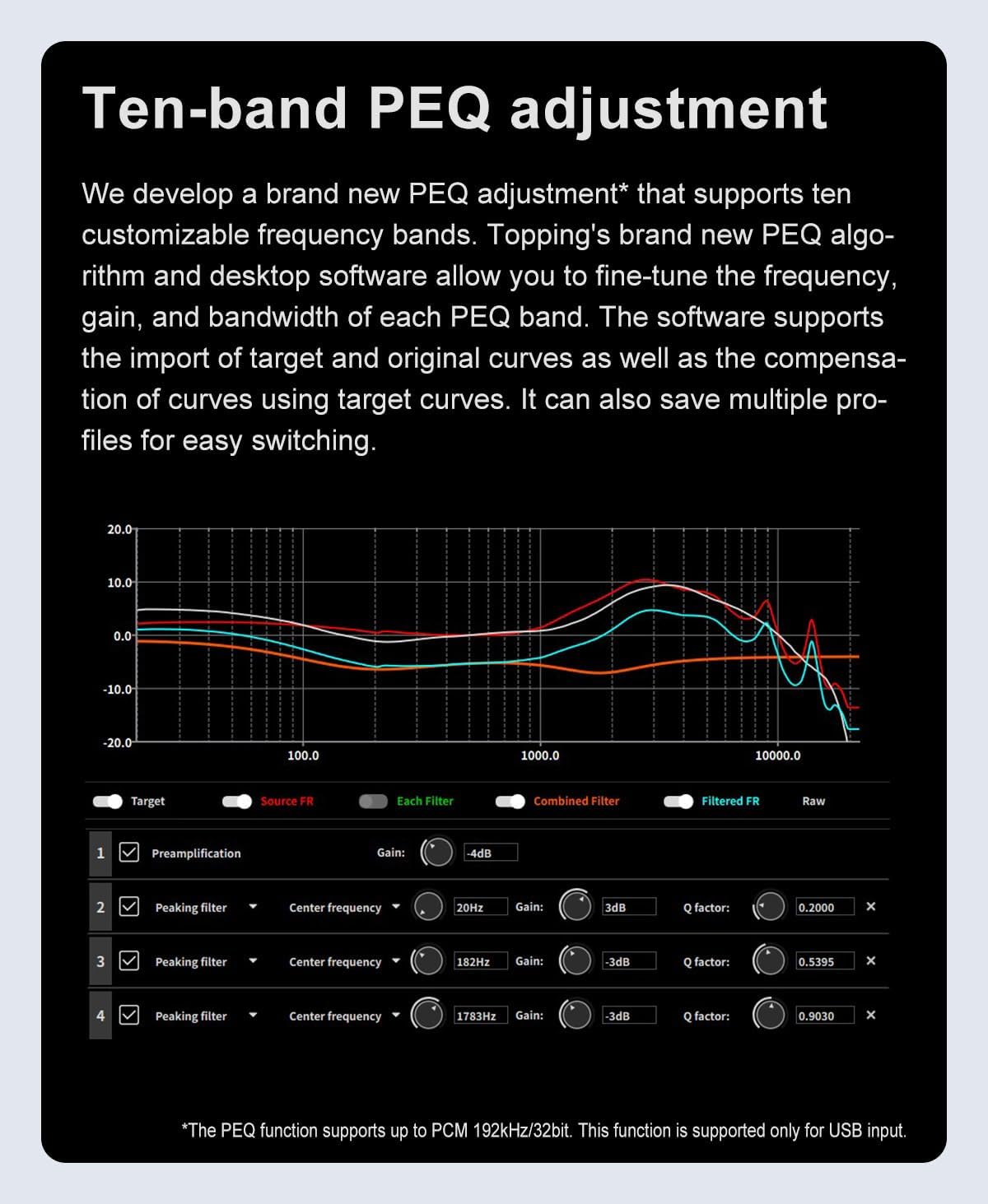
Image 6.1: A screenshot of the Topping PEQ adjustment software, showing the graphical equalizer interface and controls for adjusting frequency, gain, and Q factor for multiple bands.
7. Specifiche
The following table details the technical specifications of the Topping D50 III DAC Preamppiù vivace.
| Parametro | RCA | TRS |
|---|---|---|
| THD+N @1kHz (peso A) | <0.00008% @1kHz | <0.00006% @1kHz |
| THD+N @No-wt (90kBw) | <0.0004% @20-20kHz | <0.0002% @20-20kHz |
| SNR (peso A) | 127dB a 1kHz | 132dB a 1kHz |
| Gamma dinamica a 1 kHz (peso A) | 127dB a 1kHz | 132dB a 1kHz |
| Risposta in frequenza | Da 20 Hz a 20 kHz (± 0.1 dB) | Da 20 Hz a 20 kHz (± 0.1 dB) |
| Da 20 Hz a 40 kHz (± 0.3 dB) | Da 20 Hz a 40 kHz (± 0.3 dB) | |
| Livello di uscita | 2.0 Vrms @ 0 dBFS (modalità 4 V) | 4.0 Vrms @ 0 dBFS (modalità 4 V) |
| 2.5 Vrms @ 0 dBFS (modalità 5 V) | 5.0 Vrms @ 0 dBFS (modalità 5 V) | |
| Rumore (A-wt) | <1.1uVrms | <1.3uVrms |
| Crosstalk di canale | -136 dB a 1 kHz | -147 dB a 1 kHz |
| Bilanciamento del canale | 0.3 dB | 0.3 dB |
| Impedenza di uscita | 50Ω | 100Ω |
Note: The above data is the result obtained from TOPPING lab test under AC220V 50Hz and D50 III set to 5V output mode.
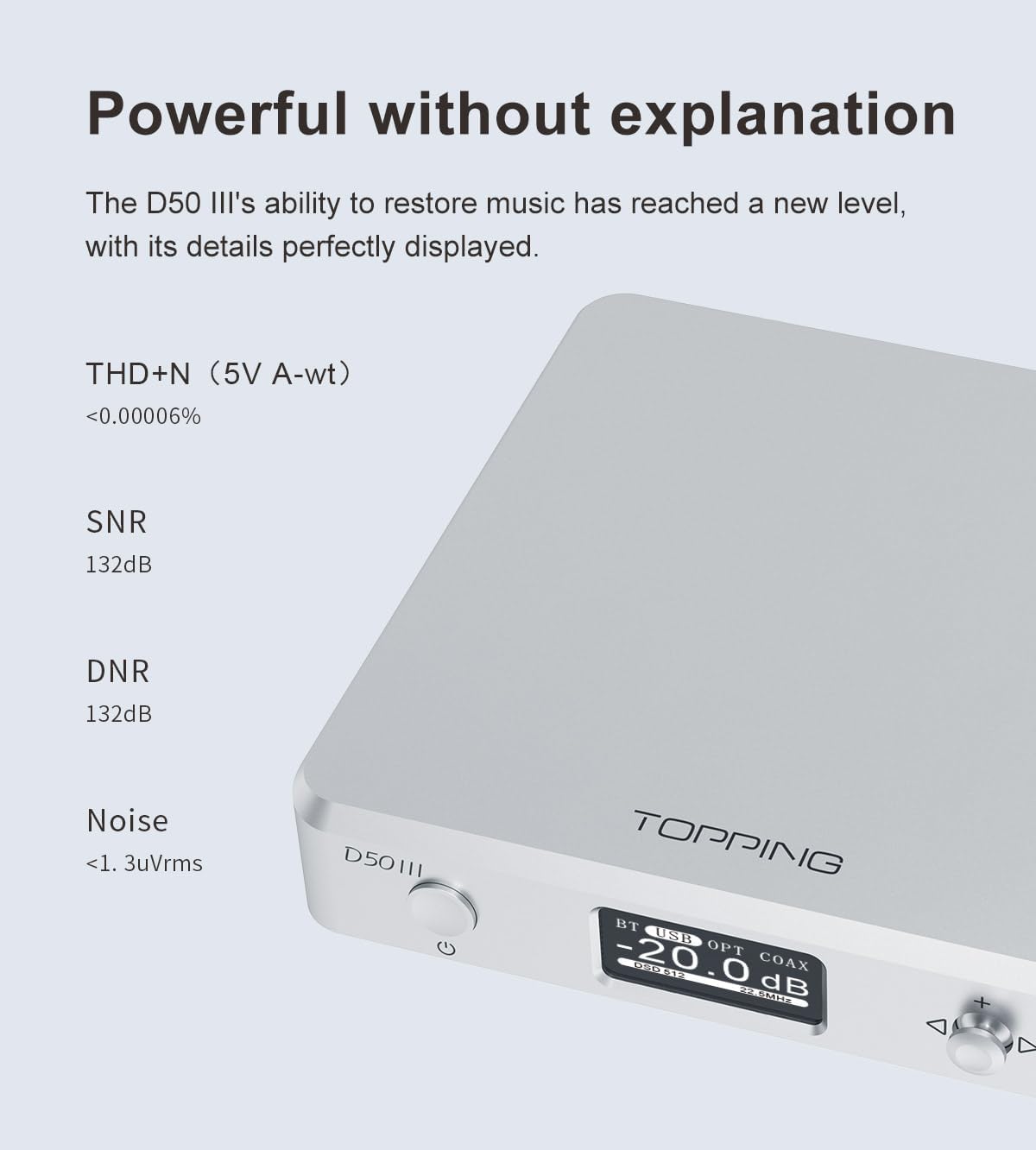
Image 7.1: A visual representation of the D50 III's technical specifications table, detailing various audio performance metrics for both RCA and TRS outputs.
7.1 Dimensioni fisiche e peso
- Dimensioni della confezione: 9.41 x 7.4 x 2.4 pollici
- Peso dell'articolo: 2.07 libbre
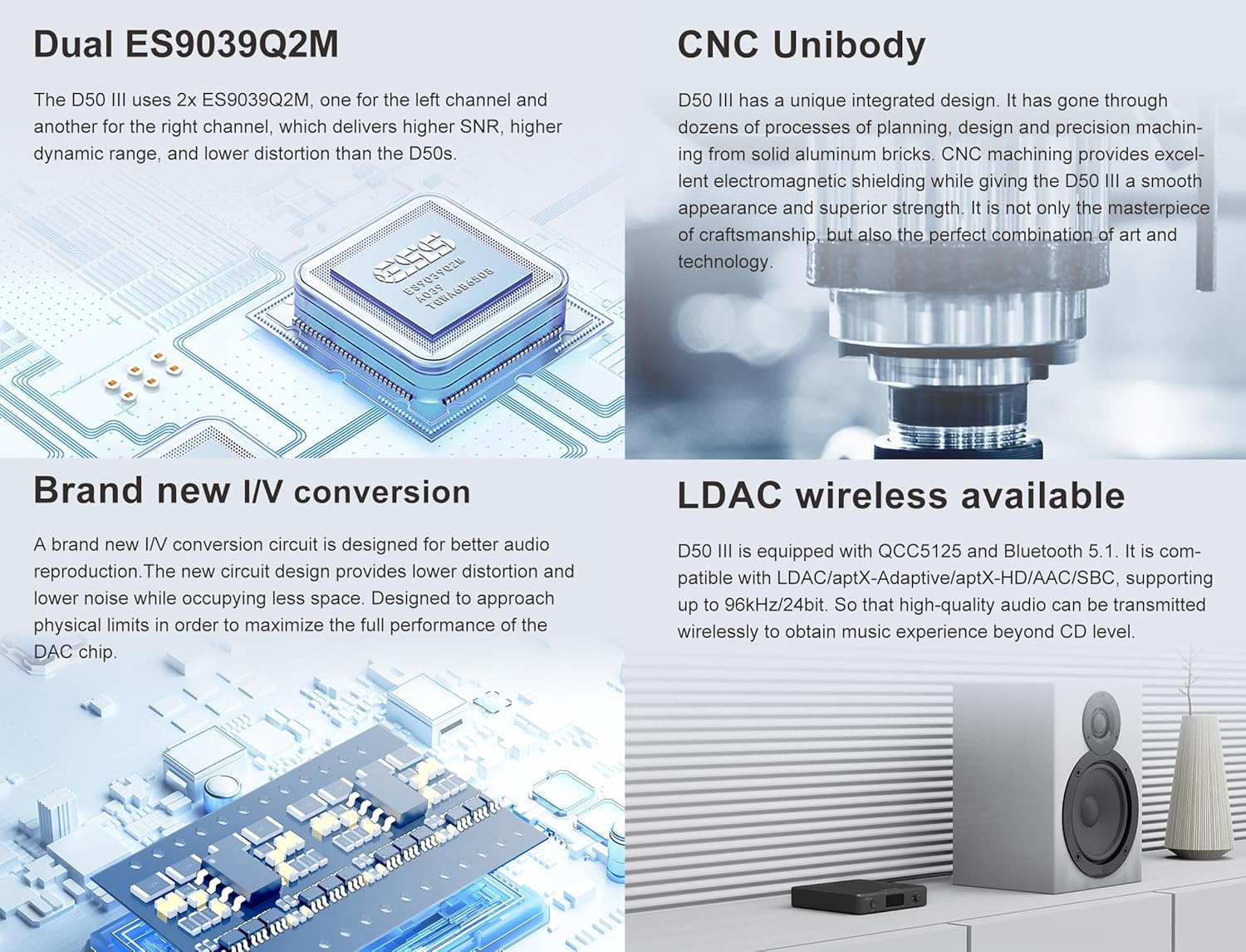
Image 7.2: A diagram illustrating the physical dimensions of the D50 III unit, including its length, width, and height.
8. Cosa c'è nella scatola
The Topping D50 III package includes the following items:
- D50 III Unit
- Telecomando
- Cavo USB CA
- Cavo USB CC
- Antenna Bluetooth
- Scheda informativa sul prodotto
- Manuale
Image 8.1: A visual representation of all items included in the D50 III product package, such as the DAC unit, remote, cables, and antenna.
9. Risoluzione Dei Problemi
This section addresses common issues you might encounter with your D50 III and provides potential solutions.
9.1 Nessuna uscita audio
- Controllare le connessioni: Ensure all audio cables (RCA, TRS, USB, Optical, Coaxial) are securely connected to both the D50 III and your audio system.
- Selezione input: Verify that the correct input source is selected on the D50 III (e.g., USB, Optical, Coaxial, Bluetooth).
- Livello del volume: Confirm that the volume on the D50 III and your connected amplifier/active speakers is not set to minimum or muted.
- Driver (Windows): If using Windows via USB, ensure the correct driver is installed and the D50 III is selected as the default playback device in your sound settings.
- Energia: Ensure the D50 III is powered on and receiving sufficient power, especially if using only one Type-C cable for both signal and power. Consider adding an auxiliary power supply.
9.2 Intermittent Audio or Distortion
- Qualità del cavo: Use high-quality, shielded audio and USB cables to minimize interference.
- Ciclo di terra: If you experience hum or buzzing, it might be a ground loop issue. Try connecting all audio equipment to the same power outlet or use a USB isolator (e.g., Topping HS02).
- Qualità della fonte: Assicurare la sorgente audio file o la qualità dello streaming è adeguata.
- Interferenza Bluetooth: If using Bluetooth, ensure there are no obstacles between the D50 III and the source device, and that other wireless devices are not causing interference.
9.3 Il telecomando non risponde
- Batteria: Controllare e sostituire la batteria del telecomando se necessario.
- Abbinamento: Ensure the remote is properly paired with the D50 III. Refer to the "Guide for Bluetooth remote" included in the box for pairing instructions.
9.4 PEQ Function Not Working
- Ingresso USB: The PEQ function is only available when using the USB input. Ensure your audio source is connected via USB.
- Sample Tariffa: The PEQ function supports up to PCM 192kHz/32bit. Ensure your audio is within this range.
- Software: Verify that the Topping PEQ desktop software is installed and running correctly on your computer.
10. Manutenzione
To ensure the longevity and optimal performance of your D50 III, follow these maintenance guidelines:
- Pulizia: Use a soft, dry cloth to clean the exterior of the unit. Avoid using abrasive cleaners, solvents, or strong chemicals, as they may damage the finish.
- Posizionamento: Place the D50 III on a stable, flat surface away from direct sunlight, heat sources, and excessive moisture. Ensure adequate ventilation around the unit.
- Spegni: Spegnere sempre l'unità prima di scollegare i cavi o spostarla.
- Aggiornamenti del firmware: Periodically check the official Topping website for firmware updates. Firmware updates can improve performance, add new features, or fix bugs. Follow the provided instructions carefully when performing updates.
11. Garanzia e supporto
The Topping D50 III is manufactured by TOPPING. For warranty information and technical support, please refer to the "Product Information Card" included in your package or visit the official TOPPING website. HIFI College, as an authorized retailer, offers more than 1 year of quality restoration and is responsible for repair and shipping costs within this period. They also offer 24/7 support for any questions you may have.
For direct support, you may contact HIFI College, the seller, through their Amazon store or contact information provided with your purchase. Please retain your proof of purchase for warranty claims.


