1. Introduzione
The Cherub WMT-560 is a versatile, rechargeable clip-on device designed for musicians. It integrates a highly accurate tuner, a flexible metronome, and a practical tone generator into a single compact unit. Its fast response time and bright LCD display ensure clear visibility and efficient operation in various environments. The robust clamp design provides stable attachment to your instrument.
2. Prodotto finitoview
2.1 Componenti e controlli
Familiarize yourself with the main components and controls of your WMT-560 unit:
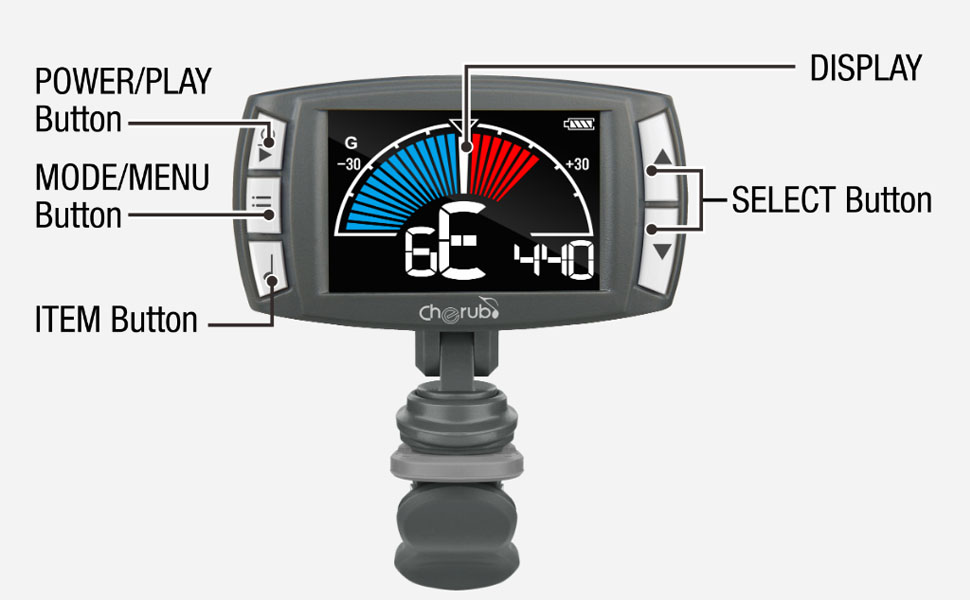
Image 2.1: Labeled diagram of the Cherub WMT-560, indicating the Power/Play button, Mode/Menu button, Item button, Select buttons (up/down), and the main display area.
- Power/Play Button: Used to turn the device on/off and to start/stop the metronome.
- Pulsante Modalità/Menu: Cycles through Tuner, Metronome, and Tone Generator modes. Also accesses menu settings within modes.
- Item Button: Used to select specific items or parameters within a menu.
- Pulsanti di selezione (su/giù): Adjusts values (e.g., pitch, tempo) or navigates menu options.
- Display: Shows tuning information, metronome settings, or tone generator pitch.
- Clip: Attaches the device securely to your instrument.
3. Impostazione
3.1 Ricarica del dispositivo
The WMT-560 is equipped with an internal Li-Po battery. Before first use, or when the battery indicator shows low power, charge the device:
- Connect a standard USB-C cable to the charging port on the WMT-560.
- Connect the other end of the USB-C cable to a USB power source (e.g., computer, USB wall adapter).
- The display will indicate charging status. A full charge typically takes a few hours.
3.2 Collegamento dell'accordatore
The WMT-560 features a newly designed clamp for stable attachment:
- Open the clip by pressing the levers.
- Attach the clip securely to the headstock of your guitar or other stringed instrument. Ensure the display is facing you for easy viewing.
- Adjust the angle of the display for optimal visibility.

Image 3.1: The Cherub WMT-560 tuner securely attached to the headstock of a guitar, demonstrating proper placement for tuning.
4. Modalità operative
4.1 Accensione/spegnimento
Premere e tenere premuto il tasto Potenza/Gioco button for approximately 2 seconds to turn the device on or off.
4.2 Modalità sintonizzatore
The WMT-560 offers fast and accurate tuning for various instruments.
Selezione della modalità sintonizzatore
Premere il tasto Modalità/Menu button repeatedly until 'Tuner' mode is displayed. The default tuning mode is Chromatic (C), but you can select specific instrument modes (Guitar, Bass, Ukulele, Violin) by pressing the Articolo pulsante e quindi utilizzando il pulsante Selezionare buttons to choose.
Tuning an Instrument
- Ensure the WMT-560 is securely clipped to your instrument's headstock.
- Pluck a single string on your instrument. The tuner will detect the pitch.
- Il display mostrerà il nome della nota e un misuratore che indica se la nota è bemolle, diesis o intonata.
- Adjust your instrument's tuning peg until the needle on the display is centered and the note name is correct. The display will typically turn green when in tune.

Image 4.1: The WMT-560 display in Tuner Mode, showing a note (G) and the tuning meter. A centered needle and green indication signify accurate tuning.
4.3 Modalità metronomo
The built-in metronome helps you practice with precise timing.
Activating Metronome
Premere il tasto Modalità/Menu button repeatedly until 'Metronome' mode is displayed. The display will show the current tempo (BPM) and beat pattern.
Adjusting Tempo and Beat
- Regolazione BPM: Utilizzare il Selezionare buttons (Up/Down) to increase or decrease the Beats Per Minute (BPM) from 30 to 250.
- Tocca Tempo: Premere il tasto Articolo button multiple times at your desired tempo. The WMT-560 will calculate and set the BPM automatically.
- Beat Pattern: Premere il tasto Modalità/Menu button briefly to cycle through different beat patterns (e.g., 1/4, 2/4, 3/4, 4/4).
- Avvio/Arresto: Premere il tasto Potenza/Gioco button to start or stop the metronome click.

Image 4.2: A hand demonstrating the use of the Item button, which is used for functions like Tap Tempo in Metronome mode.
4.4 Modalità generatore di toni
The tone generator produces a reference pitch for ear training or manual tuning.
Using Tone Generator
- Premere il tasto Modalità/Menu button repeatedly until 'Tone Generator' mode is displayed.
- Utilizzare il Selezionare buttons (Up/Down) to choose the desired reference pitch (e.g., A4=440Hz).
- The WMT-560 will emit the selected tone.
5. Manutenzione
5.1 Cura della batteria
- Ricaricare regolarmente la batteria per mantenere prestazioni ottimali.
- Evitare di scaricare completamente la batteria frequentemente, poiché ciò può ridurne la durata.
- Conservare il dispositivo in un luogo fresco e asciutto quando non viene utilizzato per lunghi periodi.
5.2 Pulizia
Pulire il dispositivo con un panno morbido e asciutto. Non utilizzare detergenti liquidi o materiali abrasivi.
6. Risoluzione Dei Problemi
| Problema | Possibile causa | Soluzione |
|---|---|---|
| Il dispositivo non si accende. | Batteria scarica o scarica. | Carica il dispositivo utilizzando un cavo USB-C. |
| Tuner not detecting pitch accurately. | Improper attachment; noisy environment; incorrect mode. | Ensure the tuner is securely clipped to the headstock. Move to a quieter area. Verify the correct instrument mode is selected. |
| Metronome click is not audible. | Volume troppo basso o disattivato. | Check metronome settings for volume control. |
| Il display è scuro o non risponde. | Batteria scarica; malfunzionamento del dispositivo. | Carica il dispositivo. Se il problema persiste, contatta l'assistenza clienti. |
7. Specifiche
- Gamma di sintonia: La0 (27.5 Hz) - Do8 (4186 Hz)
- Modalità di accordatura: Cromatico, Chitarra, Basso, Ukulele, Violino
- A4 Frequenza: 430-450Hz (adjustable)
- Metronome Tempo Range: 30-250 battiti al minuto
- Battere: 0, 1, 2, 3, 4, 5, 6, 7, 8, 9
- Ritmo: ♩, ♪, ♫, ♬ (various subdivisions)
- Tone Generator Range: C4-B4
- Energia: Built-in Rechargeable Li-Po Battery
- Porta di ricarica: USB-C
- Dimensioni: Circa 2.52 x 1.38 x 1.7 pollici
- Peso: Circa 1.3 once
8. Garanzia e supporto
Cherub products are designed for reliability and performance. For warranty information, technical support, or service inquiries, please refer to the official Cherub webo contattare il rivenditore autorizzato. Conservare la ricevuta d'acquisto come prova d'acquisto per eventuali reclami in garanzia.


