Introduzione
Welcome to the user manual for your new Machenike K500A 75% Mechanical Keyboard. This guide provides comprehensive instructions on setting up, operating, maintaining, and troubleshooting your keyboard to ensure optimal performance and longevity. Please read this manual carefully before using the product.
Contenuto della confezione
Si prega di verificare che tutti gli articoli elencati di seguito siano inclusi nel pacchetto:
- Machenike K500A 75% Mechanical Keyboard
- Cavo USB
Prodotto finitoview
The Machenike K500A is a compact 75% mechanical keyboard designed for gaming and general use. It features 84 keys, hot-swappable linear red switches, and customizable RGB LED backlighting.
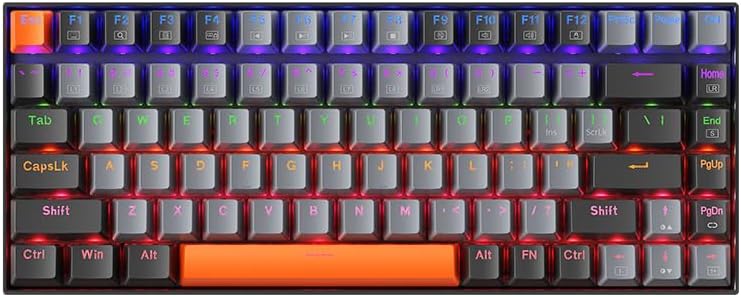
Figura 1: Superiore view of the Machenike K500A 75% Mechanical Keyboard, showcasing its compact 84-key layout and rainbow LED backlighting.
Caratteristiche principali:
- Fattore di forma compatto al 75%:
This keyboard features a space-saving 75% layout with 84 keys, providing essential keys while maintaining a compact design. This makes it portable and suitable for various desk setups.

Figura 2: Illustration of the 75% compact form factor (84 keys) compared to a standard full-sized 104-key keyboard, highlighting its space-saving design.
- Hot-Swappable Linear Red Switches:
Equipped with linear red switches, the keyboard offers a smooth and quiet typing experience. The hot-swappable design allows users to change switches without soldering, enabling customization of typing feel.
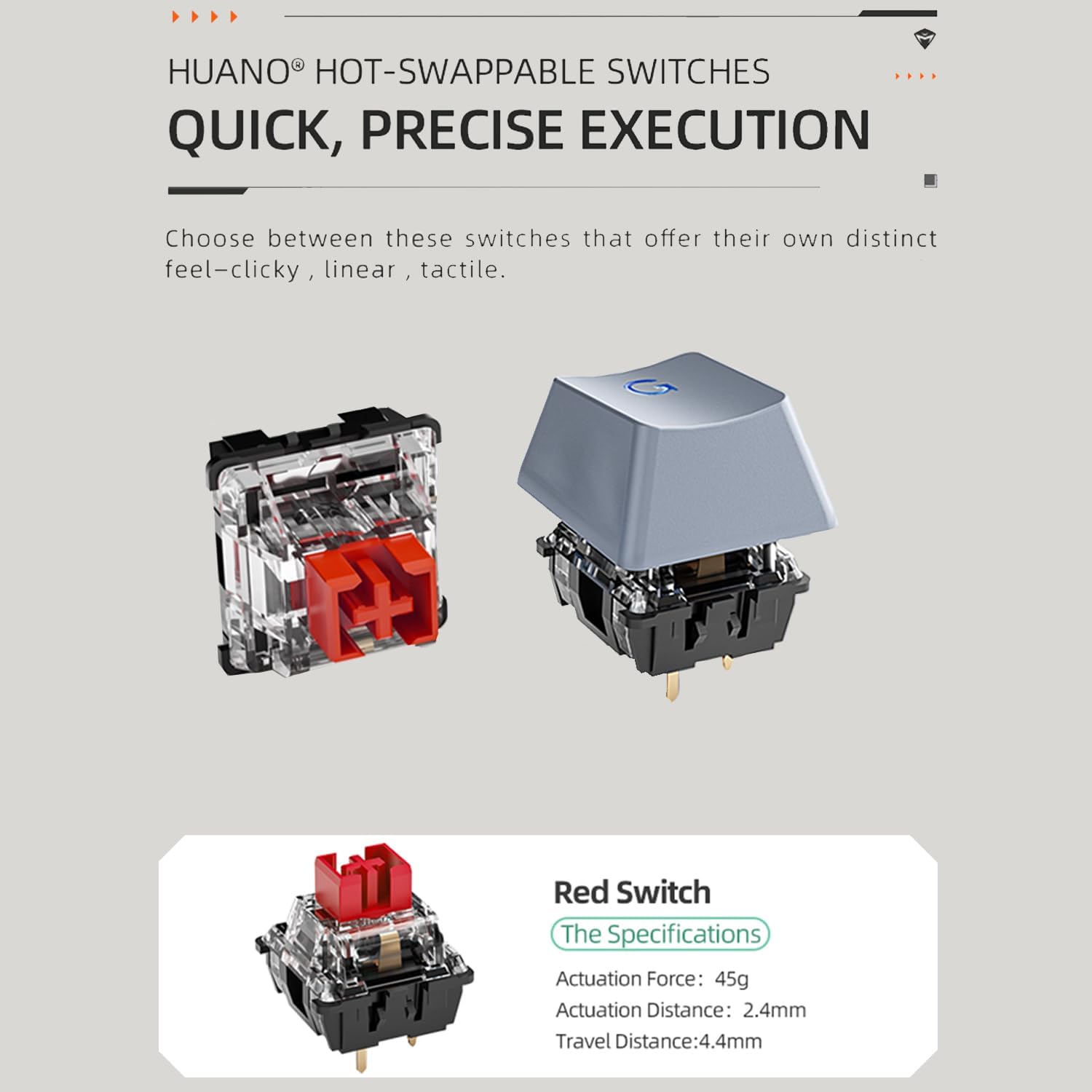
Figura 3: Diagram showing the components of a hot-swappable mechanical switch, emphasizing the ease of replacement without soldering. Specifications for the red switch are also shown: Actuation Force: 45g, Actuation Distance: 2.4mm, Travel Distance: 4.4mm.
- Retroilluminazione LED arcobaleno:
The keyboard features vibrant rainbow LED backlighting with 9 preset lighting effects. These effects can be cycled and adjusted for speed and brightness directly from the keyboard.

Figura 4: Avvicinamento view of the keyboard keys illuminated by the rainbow LED backlight, demonstrating the visual effects.
- Cavo USB staccabile:
The keyboard connects via a detachable USB cable, ensuring a stable and lag-free wired connection. This design also enhances portability and makes cable management easier.

Figura 5: Image illustrating the detachable USB cable connected to the keyboard, highlighting its convenience for setup and transport.
- Tasti PBT Double-Shot:
The durable double-shot PBT keycaps resist wear and shine, ensuring legends remain clear and legible over time.
- Anti-slip Feet and EVA Foam:
Features height-adjustable anti-slip feet for ergonomic positioning and EVA foam for sound dampening, reducing hollow sounds during typing.

Figura 6: Diagram showing the anti-slip feet for height adjustment and the internal EVA foam layer designed to reduce typing noise.
Impostare
Follow these steps to set up your Machenike K500A keyboard:
- Disimballare la tastiera: Estrarre con cautela la tastiera e il cavo USB dalla confezione.
- Collegare il cavo USB: Insert one end of the provided USB cable into the USB-C port on the keyboard and the other end into an available USB-A port on your computer.
- Installazione del driver: La tastiera è plug-and-play e in genere non richiede driver aggiuntivi. Il sistema operativo dovrebbe rilevare e installare automaticamente i driver necessari.
- Regola l'altezza: If desired, extend the adjustable feet on the underside of the keyboard to achieve a comfortable typing angle.
Istruzioni per l'uso
Funzioni di base:
- Digitando: Per digitare, utilizzare il layout QWERTY standard.
- Tasti funzione (F1-F12): Access multimedia controls and system functions by pressing the Fn key in combination with the corresponding F-key. Refer to the keycap legends for specific functions (e.g., Fn+F1 for Media Player, Fn+F2 for Volume Down).
Controllo della retroilluminazione a LED:
The Machenike K500A features 9 preset LED lighting effects. Use the following key combinations to control the backlight:
- Cycle Lighting Effects: Premere Fn + \ | to cycle through the 9 different lighting modes.
- Regola luminosità: Premere Fn+↑ per aumentare la luminosità e Fn + ↓ per diminuire la luminosità.
- Regola la velocità: Premere Fn+← to slow down the lighting effect speed and F + → per accelerare l'effetto luminoso.
Interruttori hot-swap:
The keyboard supports hot-swappable switches, allowing you to replace the existing switches with compatible 3-pin or 5-pin mechanical switches without soldering. Use a switch puller tool (not included) to carefully remove switches. When inserting new switches, ensure the pins align correctly with the sockets to avoid bending them.
Manutenzione
Una corretta manutenzione può prolungare la durata della tastiera:
- Pulizia dei tasti: Utilizzare un morbido, damp cloth to wipe down the keycaps. For deeper cleaning, keycaps can be carefully removed using a keycap puller (not included) and washed with mild soap and water. Ensure they are completely dry before reattaching.
- Pulizia del corpo della tastiera: Use a soft, dry cloth to wipe dust and debris from the keyboard body. Avoid using harsh chemicals or abrasive materials.
- Rimozione della polvere: Use compressed air to blow out dust and crumbs from between the keycaps.
- Cura del cavo: Per evitare danni, evitare di piegare bruscamente o tirare eccessivamente il cavo USB.
Risoluzione dei problemi
Se riscontri problemi con la tastiera, fai riferimento ai seguenti problemi comuni e alle relative soluzioni:
| Problema | Possibile causa | Soluzione |
|---|---|---|
| La tastiera non risponde | Connessione USB allentata; porta USB difettosa; problema con il driver. | Assicurati che il cavo USB sia collegato saldamente sia alla tastiera che al computer. Prova una porta USB diversa. Riavvia il computer. |
| Retroilluminazione non funzionante o incoerente | Retroilluminazione disattivata; Luminosità impostata al minimo; Problema software. | Premere Fn+↑ to increase brightness. Cycle through lighting modes using Fn + \ |. Disconnect and reconnect the keyboard. |
| Alcuni tasti non funzionano | Dust/debris under keycap; Faulty switch; Keycap not properly seated. | Remove the keycap and clean underneath. Ensure the keycap is pressed down firmly. If hot-swapping, ensure the switch is fully seated and pins are not bent. Consider replacing the switch if it's faulty. |
Specifiche
| Caratteristica | Dettaglio |
|---|---|
| Marca | Macchinari |
| Numero di modello | K500A-B84 |
| Disposizione | 75% (84 tasti) |
| Tipo di interruttore | Hot-swappable Linear Red Switches |
| Materiale del copritastiera | PBT a doppio colpo |
| Retroilluminazione | Rainbow LED (9 preset effects) |
| Connettività | USB cablato |
| Dimensioni del prodotto | 12.23 x 4.86 x 1.4 pollici |
| Peso dell'articolo | 5 libbre |
| Dispositivi compatibili | PC |
Garanzia e supporto
Machenike products are manufactured to high quality standards. For information regarding warranty coverage, please refer to the warranty card included with your product or visit the official Machenike website. If you encounter any issues not covered in this manual or require further assistance, please contact Machenike customer support through their official channels.
For the latest drivers, software, and support resources, please visit the official Machenike support page.


