1. Introduzione
This manual provides essential information for the safe and efficient operation of your Hisense 85E63NT 85-inch 4K UHD Smart TV. Please read it thoroughly before using the television and retain it for future reference. Your Hisense TV features a 4K Ultra HD display, VIDAA U7 Smart TV platform, Dolby Vision, HDR10+, DTS Virtual:X audio, Game Mode Plus, and integrated voice control with Alexa and VIDAA Voice.
2. Cosa c'è nella scatola
Carefully unpack your Hisense 85E63NT TV and ensure all items listed below are present and undamaged.
- Televisore (Television)
- Cavo di alimentazione (cavo di alimentazione)
- Telecomando (Remote Control)
- Manuale d'uso
- Batterie telecomando (Batterie telecomando)
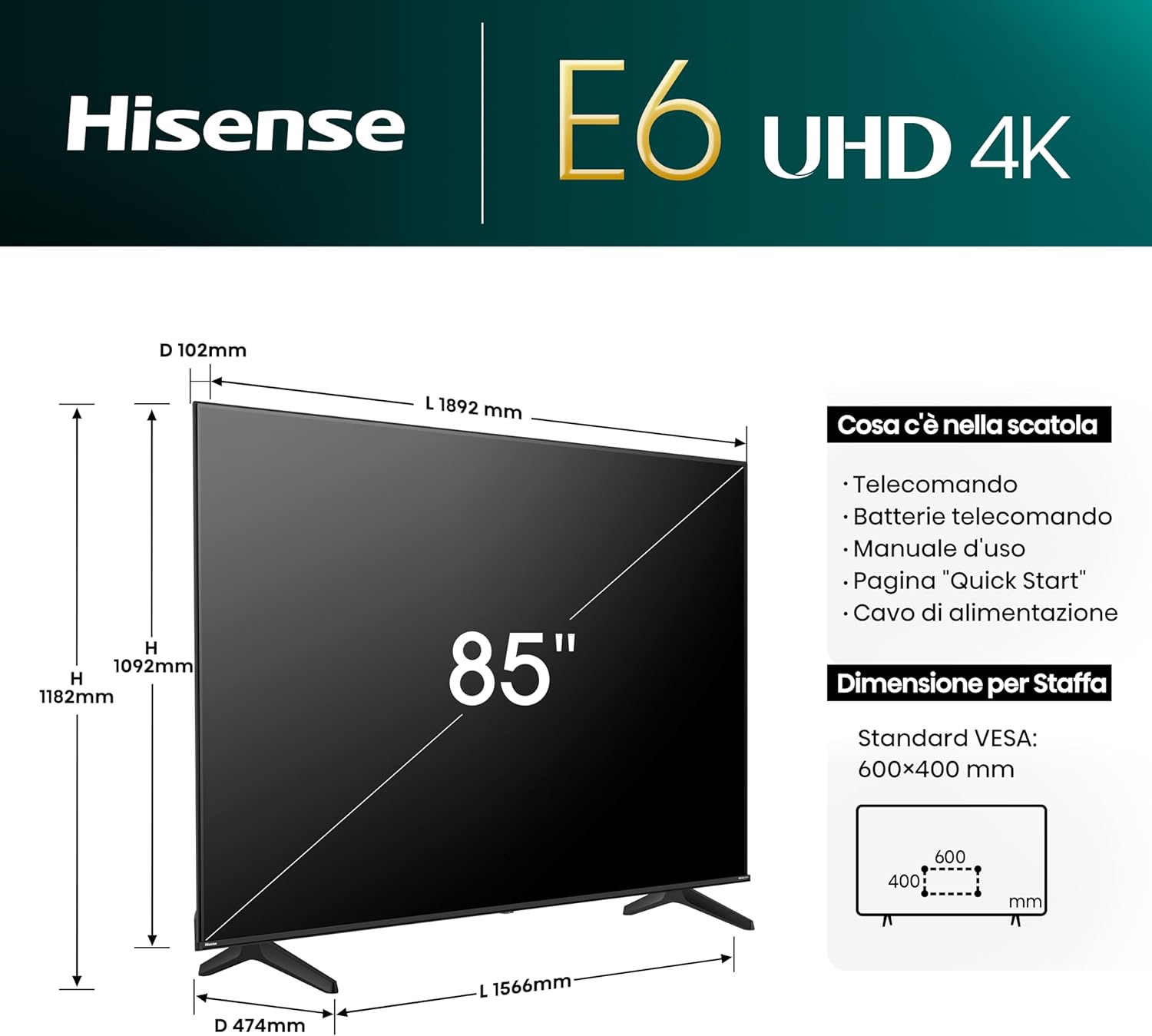
Image: The contents of the Hisense 85E63NT TV box are displayed, showing the television, remote control, power cable, and user manual. The image also illustrates the TV's dimensions (width, height, depth) and VESA mounting specifications.
3. Impostazione
3.1. Installazione dello stand
Place the TV screen face down on a soft, flat surface to prevent damage. Attach the included stands to the designated slots on the bottom of the TV using the provided screws. Ensure the stands are securely fastened.
3.2. Montaggio a parete
If you choose to wall mount your TV, use a VESA-compatible wall mount kit (not included). The Hisense 85E63NT supports a VESA standard of 600x400mm. Follow the instructions provided with your wall mount kit for proper installation. Always ensure the wall can support the weight of the TV.
3.3. Collegamento di periferiche
Connect your external devices to the appropriate ports on the back of the TV. Refer to the image below for port locations.
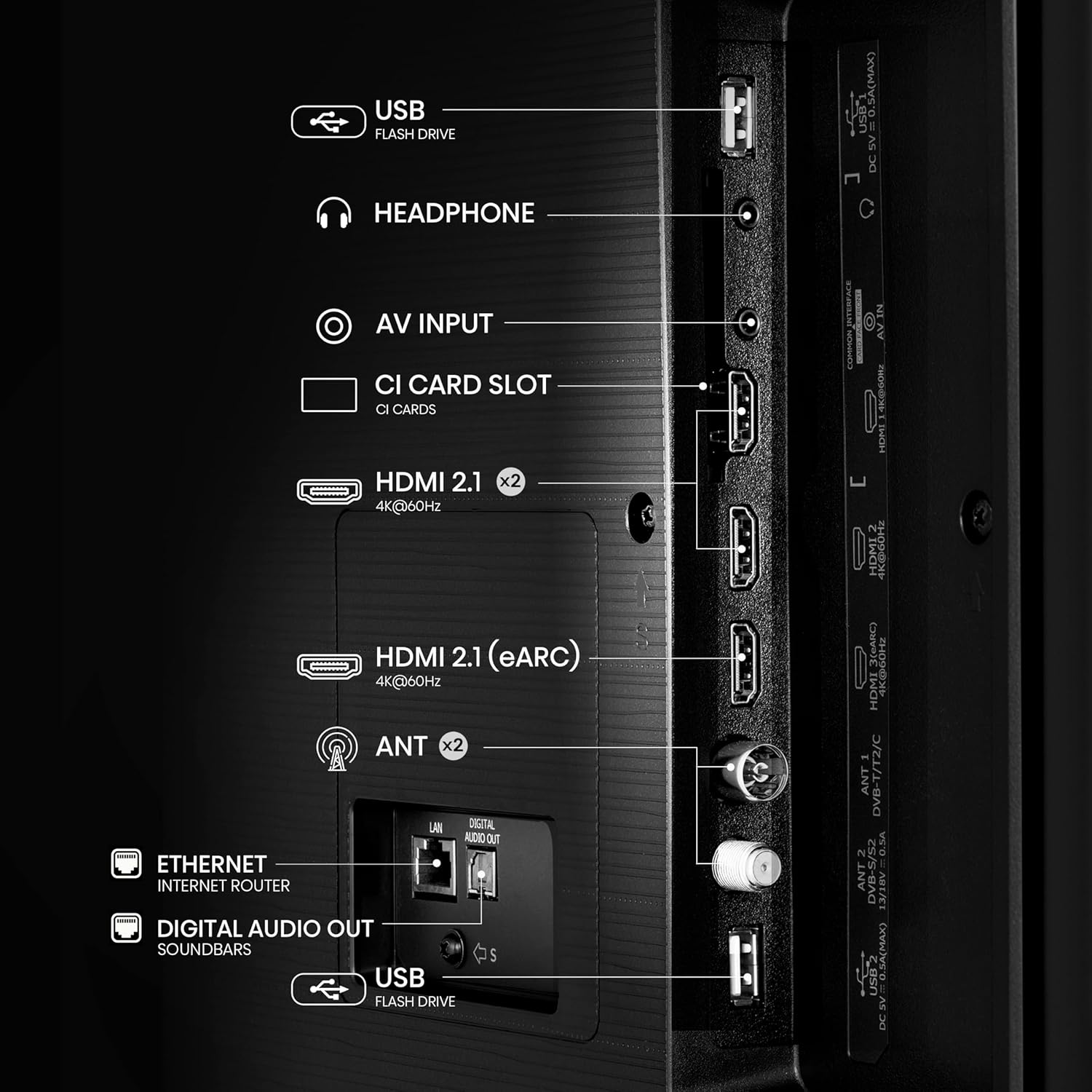
Immagine: Un dettaglio view of the rear panel of the Hisense 85E63NT TV, highlighting the various connectivity options including USB, Headphone, AV Input, CI Card Slot, multiple HDMI 2.1 ports (one with eARC), Antenna inputs, Ethernet, and Digital Audio Out.
- HDMI 2.1 (x3): Connect Blu-ray players, game consoles, and other HDMI devices. One port supports eARC for enhanced audio return channel functionality. These ports also support ALLM (Auto Low Latency Mode) and VRR (Variable Refresh Rate) for gaming.
- USB: Collegare unità flash USB per la riproduzione multimediale.
- Ethernet (LAN): Per la connessione di rete cablata.
- FORMICA (x2): Connect your terrestrial (DVB-T2) and satellite (DVB-S2) antennas.
- Uscita audio digitale (ottica): Per il collegamento a sistemi audio esterni.
- Cuffia: Per collegare le cuffie.
- Ingresso AV: Per collegare dispositivi più vecchi utilizzando cavi video composito e audio stereo.
- Slot per scheda CI: For inserting a Conditional Access Module (CAM) with a smart card for encrypted digital TV services.
3.4. Accensione iniziale
After connecting all necessary cables, plug the power cable into an electrical outlet. Press the power button on the remote control or on the TV. The TV will guide you through the initial setup process, including language selection, network connection, and channel scanning.
4. Utilizzo del televisore
4.1. Controllo remoto
The included remote control provides full functionality for your Hisense TV. It features dedicated buttons for popular streaming services and voice control capabilities.

Image: The Hisense remote control is shown, highlighting its layout with power, input, volume, channel, and navigation buttons. It also features one-touch access buttons for services like Disney+, YouTube, Prime Video, Netflix, and a dedicated voice control button with Alexa Built-in and VIDAA Voice logos.
- Pulsante di accensione: Accende o spegne la TV.
- Pulsante di ingresso: Seleziona la sorgente di ingresso.
- Pulsanti di navigazione (Su/Giù/Sinistra/Destra/OK): Navigare nei menu e selezionare le opzioni.
- Volume su/giù: Regola il volume.
- Canale su/giù: Cambia canale TV.
- One-Touch Access Buttons: Direct access to streaming applications like Netflix, Prime Video, YouTube, Disney+, etc.
- Pulsante vocale: Activates Alexa Built-in or VIDAA Voice for voice commands.
4.2. VIDAA U7 Smart TV
Your Hisense TV runs on the VIDAA U7 operating system, providing a fast, intuitive, and secure smart TV experience. Access a wide range of international and local content, applications, and streaming services.

Image: The VIDAA Smart TV home screen is displayed, featuring a clean interface with icons for popular streaming applications such as Netflix, YouTube, Disney+, Prime Video, and more. The Hisense logo is prominent at the top.
4.3. Voice Control (Alexa Built-in & VIDAA Voice)
Control your TV and smart home devices using your voice. Press the voice button on your remote and speak commands to change channels, adjust volume, search for content, or interact with virtual assistants.

Image: A person is shown on a sofa, holding the Hisense remote and using voice commands. Speech bubbles indicate commands like "fast forward," "pause," and "volume down," demonstrating the voice control feature.
4.4. Impostazioni e miglioramenti dell'immagine
Your Hisense TV offers advanced picture technologies for an optimized viewesperienza di acquisizione.
- Dolby Vision / HDR10+ / HLG: Supports multiple HDR formats for enhanced contrast, brightness, and color detail.
- Precision Colour: Delivers a wider range of colors for a more vibrant and realistic picture.
- Upscaler AI 4K: Enhances lower-resolution content to near 4K quality, providing sharper details and improved clarity.
- Smooth Motion with MEMC: Motion Estimation, Motion Compensation technology reduces motion blur and judder in fast-moving scenes, ensuring a fluid viewesperienza di acquisizione.
- Modalità Filmmaker: Preserves the original aspect ratio, colors, and frame rates of content, allowing you to experience movies and TV shows as the director intended.
- Sensore di luce ambientale: Automatically adjusts screen brightness based on the ambient light in your room for optimal viewing comfort day or night.

Image: A graphic illustrating key features of the Hisense E6 UHD 4K TV, including Precision Colour, Dolby Vision, VIDAA, 4K AI Upscaler, Smooth Motion with MEMC, and Game Mode Plus with VRR ALLM.
4.5. Impostazioni audio
Experience immersive audio with DTS Virtual:X technology, creating a multi-dimensional sound experience without additional speakers. You can also connect Bluetooth headphones for private listening.

Image: A Hisense TV screen displaying a concert scene, with text overlays highlighting "dts:X" and "Dolby Audio," indicating advanced sound technologies for an enhanced entertainment experience.
4.6. Caratteristiche di gioco
The Hisense 85E63NT is equipped with features to enhance your gaming experience.
- Modalità di gioco Plus: Combines a 60Hz panel with Variable Refresh Rate (VRR) and Auto Low Latency Mode (ALLM) to reduce input lag and screen tearing, providing a smoother and more responsive gaming experience.
- Barra di gioco: Provides quick access to game-related settings and information during gameplay.

Image: A dynamic image of a spaceship game displayed on a Hisense TV, with text highlighting "Game Mode Plus" and "60Hz VRR ALLM," emphasizing the TV's features for a fluid gaming experience.
4.7. Connectivity and Screen Sharing
Connect your mobile devices and share content seamlessly.
- AirPlay2 + Android Screen Sharing: Wirelessly cast content from your Apple or Android devices directly to your TV.
- Wi-Fi e Bluetooth: Built-in Wi-Fi for wireless internet access and Bluetooth for connecting wireless audio devices like headphones or soundbars.
5. Manutenzione
5.1. Pulizia della TV
Per pulire lo schermo, strofinarlo delicatamente con un panno morbido e privo di lanugine. Per macchie ostinate, strofinare leggermenteampen the cloth with water or a specialized screen cleaner. Never spray liquid directly onto the screen. For the TV body, use a soft, dry cloth. Avoid abrasive cleaners or solvents.
5.2. Aggiornamenti software
Il tuo televisore potrebbe ricevere periodicamente aggiornamenti software per migliorare le prestazioni e aggiungere nuove funzionalità. Assicurati che il televisore sia connesso a Internet per ricevere questi aggiornamenti. Di solito è possibile controllare manualmente la presenza di aggiornamenti nel menu delle impostazioni del televisore.
6. Risoluzione Dei Problemi
Se riscontri problemi con la tua TV, fai riferimento alle seguenti soluzioni comuni:
- Nessun potere: Assicurarsi che il cavo di alimentazione sia collegato saldamente sia al televisore che alla presa a muro. Verificare che la presa funzioni.
- Nessuna immagine/suono: Verify that the correct input source is selected. Check all cable connections (HDMI, antenna, etc.). Try restarting the TV by unplugging it for a few minutes and then plugging it back in.
- Il telecomando non funziona: Sostituisci le batterie del telecomando. Assicurati che non ci siano ostacoli tra il telecomando e il sensore IR del televisore.
- Problemi di connessione di rete: For Wi-Fi, ensure your router is on and within range. For wired connections, check the Ethernet cable. Try restarting your router and modem.
- Scarsa qualità dell'immagine: Check the broadcast signal strength or the quality of the source content. Adjust picture settings (brightness, contrast, sharpness, color) in the TV menu.
If the problem persists, consult the full electronic user manual or contact Hisense customer support.
7. Specifiche
Below are the key technical specifications for the Hisense 85E63NT 85-inch 4K UHD Smart TV.
| Caratteristica | Specificazione |
|---|---|
| Numero di modello | 85E63NT |
| Dimensioni dello schermo | 85 pollici |
| Risoluzione | 4K Ultra HD (3840x2160) |
| Tecnologia di visualizzazione | GUIDATO |
| Frequenza di aggiornamento | Frequenza 60 Hz |
| Supporto HDR | Dolby Vision, HDR10+, HLG |
| Piattaforma Smart TV | VITA U7 |
| Assistenti vocali | Alexa integrata, VIDAA Voice |
| Tecnologia audio | DTS Virtuale:X |
| Connettività | Wi-Fi, Bluetooth, Ethernet, 3x HDMI 2.1 (eARC, ALLM, VRR), USB |
| Sintonizzatore | DVB-T2/S2 HEVC 10 |
| Caratteristiche speciali | Game Mode Plus, AirPlay2 + Android Screen Sharing, Filmmaker Mode, Ambient Light Sensor, Precision Colour, 4K AI Upscaler, Smooth Motion with MEMC |
| Dimensioni (senza supporto) | Dimensioni: 10.2 x 189.2 x 109.2 cm |
| Peso | 53.4 kg |
| Compatibilità VESA | 600x400mm |
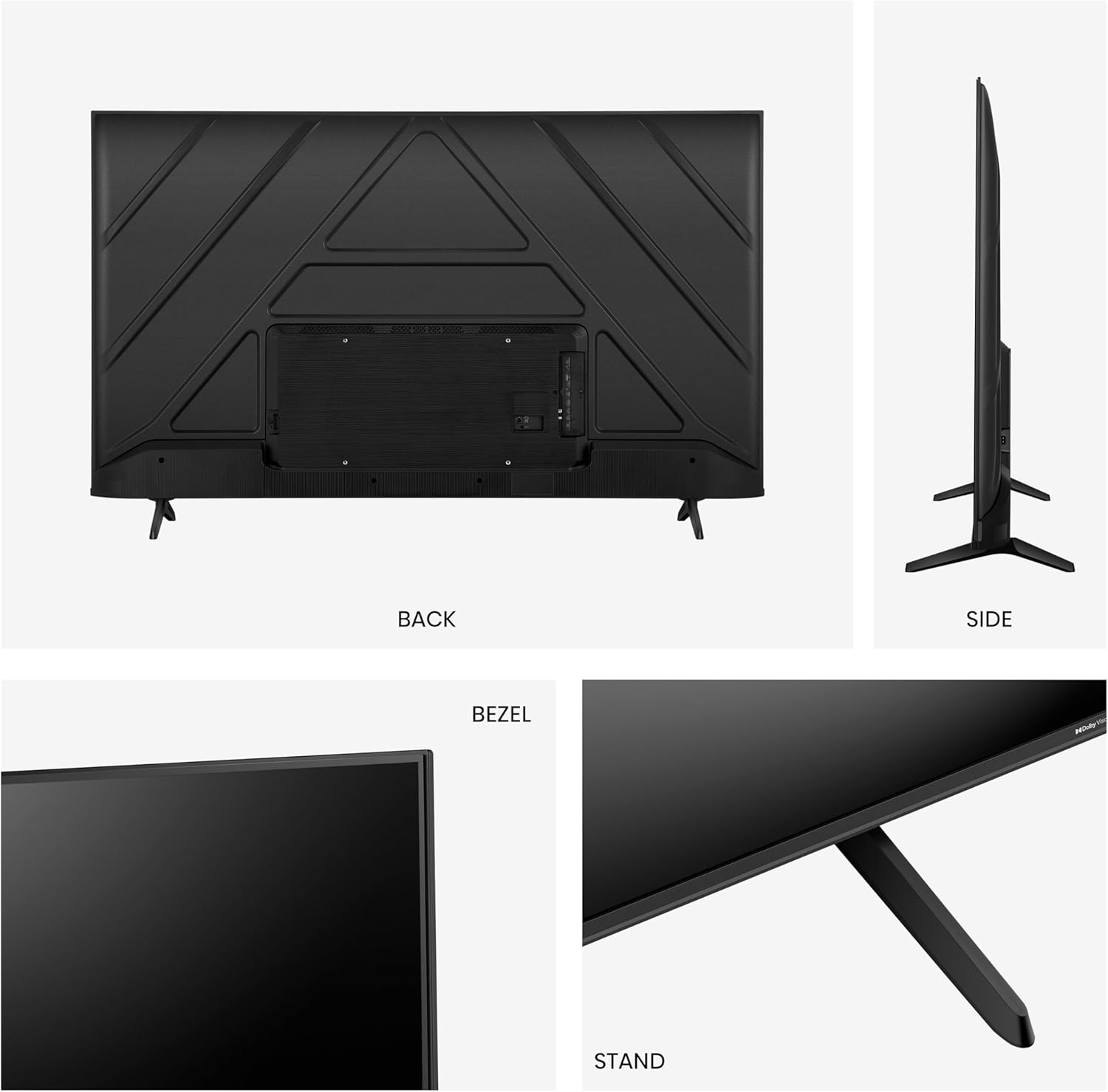
Image: A comparison table detailing specifications for Hisense E6N and E7N series TVs, including screen sizes, display technology (UHD 4K), refresh rate (60 Hz), color technology (Precision Colour), HDR support (Dolby Vision), gaming features (Game Mode Plus), voice assistants (Alexa Built-in/VIDAA VOICE), and connectivity (HDMI 2.1).
8. Garanzia e supporto
For warranty information, technical support, or service inquiries, please refer to the warranty card included with your product or visit the official Hisense website for your region. You can also find additional support resources and frequently asked questions online.