1. Introduzione
This manual provides comprehensive instructions for the Blackmagic Design Pyxis 6K Cinema Camera, L-Mount. It covers essential information regarding setup, operation, maintenance, and troubleshooting to ensure optimal performance and longevity of your camera. Please read this manual thoroughly before using the camera.
2. Informazioni sulla sicurezza
- Non esporre la fotocamera all'acqua o a umidità eccessiva.
- Avoid operating the camera in extreme temperatures.
- Use only Blackmagic Design approved accessories and power supplies.
- Non tentare di smontare o modificare la fotocamera. Per qualsiasi intervento di assistenza, rivolgersi a personale qualificato.
- Tenere la fotocamera lontana da forti campi magnetici.
3. Contenuto della confezione
Verificare che tutti gli articoli siano presenti nel pacco:
- Blackmagic Design Pyxis 6K Cinema Camera (L-Mount)
- Alimentazione elettrica
- Manuale dell'utente (questo documento)
- DaVinci Resolve Studio activation key
4. Fotocamera finitaview
The Blackmagic Design Pyxis 6K Cinema Camera features a 36x24mm full-frame 6K sensor, offering exceptional image quality and flexibility for cinematic content creation. It supports various recording formats including Blackmagic RAW and H.264 proxies, with resolutions up to 6048 x 4032.

Figura 4.1: Lato anteriore view of the Blackmagic Design Pyxis 6K Cinema Camera with an L-Mount lens attached. This image highlights the camera's robust body, the lens mount, and the integrated top handle.
Key features include a built-in 4-inch HDR 1500 nit LCD screen for clear monitoring, and support for open gate 3:2, full height 6:5 anamorphic, and Super 35 recording modes. The camera records full resolution up to 36 frames per second (fps) or 120 fps in windowed mode.

Figura 4.2: Posteriore view of the Blackmagic Design Pyxis 6K Cinema Camera, showcasing the 4-inch HDR LCD touchscreen display, control buttons, and the attached lithium-ion battery pack. The screen displays recording settings and menu options.
The camera utilizes CFexpress for flash memory storage and offers HDMI connectivity for external monitoring. Audio is supported in AAC, MP3, and PCM formats.
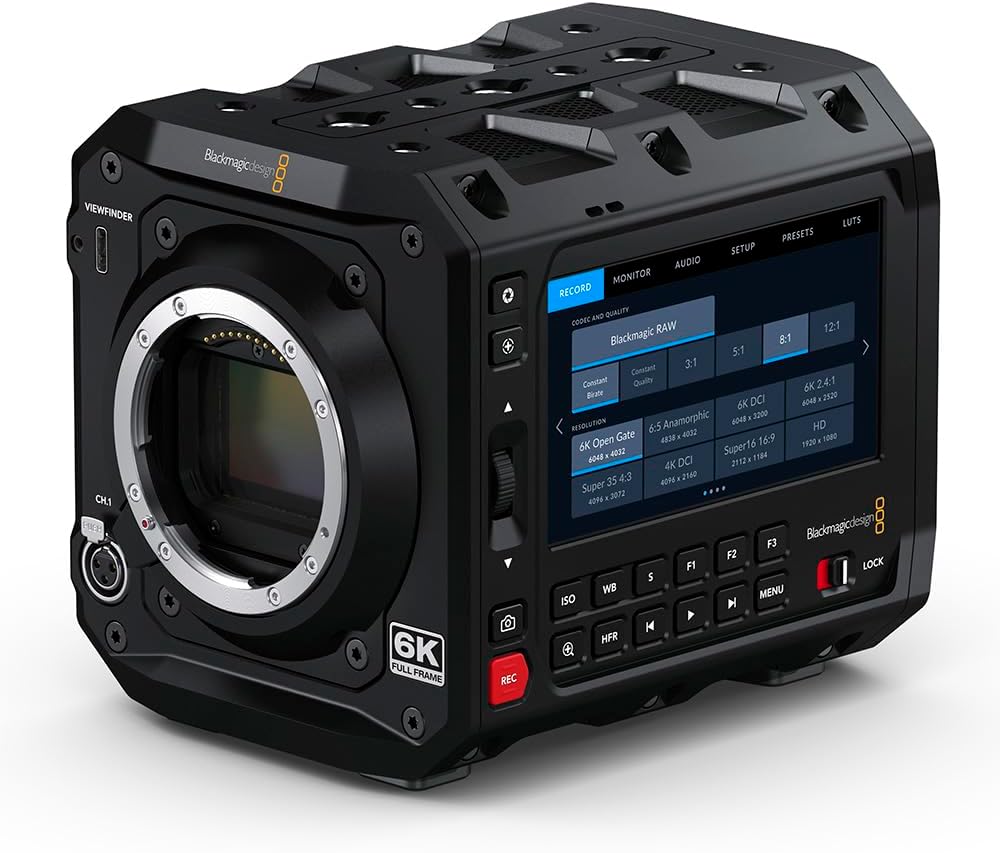
Figura 4.3: Fronte view of the Blackmagic Design Pyxis 6K Cinema Camera without a lens, clearly showing the L-Mount for lens attachment and the '6K FULL FRAME' designation. This view highlights the camera's robust construction and lens interface.
5. Impostazione
5.1. Installazione della batteria
- Assicurarsi che la fotocamera sia spenta.
- Individuare il vano batteria sul retro della fotocamera.
- Insert a compatible lithium-ion battery pack, ensuring it clicks securely into place.
5.2. Lens Attachment (L-Mount)
- Remove the body cap from the camera and the rear cap from your L-Mount lens.
- Align the white index mark on the lens with the white index mark on the camera's lens mount.
- Insert the lens into the mount and rotate it clockwise until it locks into position.
5.3. Media Card Insertion
- Locate the CFexpress card slot.
- Insert a CFexpress card with the label facing the correct direction until it clicks into place.
- Per rimuoverla, premere delicatamente la scheda per espellerla.
5.4. Accensione/Spegnimento
- Per accendere, far scorrere l'interruttore di alimentazione in posizione "ON".
- Per spegnere, portare l'interruttore di alimentazione in posizione "OFF".
5.5. Impostazioni iniziali
Upon first power-on, you may be prompted to set the language, date, and time. Follow the on-screen instructions using the touchscreen LCD.
6. Utilizzo della fotocamera
6.1. Navigazione nel menu
The 4-inch HDR LCD screen is a touchscreen interface. Tap icons and swipe to navigate through menus and adjust settings. Physical buttons are also available for quick access to common functions like ISO, White Balance, and Frame Rate.
6.2. registrazione
- Formati di registrazione: The camera supports Blackmagic RAW for maximum quality and H.264 proxies for efficient workflow. Select your desired format in the 'Record' menu.
- Risoluzione e frequenza dei fotogrammi: Adjust resolution (e.g., 6K Open Gate, 6K DCI, Super 35) and frame rate (up to 36 fps at full resolution, 120 fps windowed) via the 'Record' or 'Project' settings.
- Avvia/Interrompi registrazione: Press the dedicated 'REC' button on the camera body to start and stop recording.
6.3. Impostazioni audio
Access audio input levels, monitoring options, and format settings (AAC, MP3, PCM) through the 'Audio' menu. Ensure external microphones are properly connected to the camera's audio inputs.
6.4. Monitoraggio e connettività
Use the built-in LCD for on-camera monitoring. For external displays, connect an HDMI cable from the camera's HDMI output to your monitor. Adjust display settings in the 'Monitor' menu.
7. Manutenzione
7.1. Pulizia
- Per pulire il corpo della fotocamera, utilizzare un panno morbido e asciutto.
- Per lo schermo LCD, utilizzare una soluzione specifica per la pulizia dello schermo e un panno in microfibra.
- Keep the lens mount free of dust and debris. Use a blower brush for sensor cleaning if necessary, or consult a professional.
7.2. Conservazione
When not in use, store the camera in a cool, dry place, preferably in a padded camera bag or case to protect it from physical damage and environmental factors.
7.3. Aggiornamenti del firmware
Periodically check the Blackmagic Design website for firmware updates. Updates can improve performance, add features, and resolve issues. Follow the instructions provided with the firmware update carefully.
8. Risoluzione Dei Problemi
- La fotocamera non si accende: Ensure the battery is fully charged and correctly inserted, or the external power supply is connected.
- Nessuna immagine sul display LCD: Check lens attachment, ensure the lens cap is removed, and verify monitor settings.
- Problemi di registrazione: Confirm a compatible CFexpress card is inserted and has sufficient free space. Check recording format and resolution settings.
- Problemi audio: Verify microphone connection, audio input levels, and selected audio format.
- For persistent issues, perform a factory reset (refer to the 'Settings' menu) or contact Blackmagic Design support.
9. Specifiche
| Caratteristica | Specificazione |
|---|---|
| Dimensioni del prodotto | 5.91 x 4.72 x 4.33 pollici |
| Peso dell'articolo | 4.62 libbre |
| Numero modello articolo | CINECAMCPYXA60LFL |
| Tecnologia del sensore fotografico | CMOS |
| Risoluzione di acquisizione video | 6K (6048 x 4032), 1080p, 720p |
| Apertura massima | 2 Millimeters (Lens dependent) |
| Tipo di memoria flash | CFespresso |
| Formato di acquisizione video | Blackmagic RAW, CinemaDNG, ProRes, DNxHR |
| Formato audio supportato | AAC, MP3, PCM |
| Dimensioni dello schermo | 4 Inches (HDR 1500 nit LCD) |
| Tecnologia di connettività | Cavo HDMI |
| Colore | Nero |
| Produttore | Progettazione della magia nera |
10. Garanzia e supporto
10.1. Informazioni sulla garanzia
Blackmagic Design products typically come with a limited manufacturer's warranty. Please refer to the warranty card included with your product or visit the official Blackmagic Design websito per termini e condizioni di garanzia dettagliati specifici per la tua regione.
10.2. Supporto tecnico
For technical assistance, product registration, or to download the latest software and drivers, please visit the official Blackmagic Design support page. You can find comprehensive FAQs, knowledge base articles, and contact information for customer support.
Official Blackmagic Design Store: Blackmagic Design on Amazon


