Introduzione
This manual provides comprehensive instructions for the Douk Audio T7 7-Band Equalizer Balanced XLR/RCA Preamplifier. Please read this manual carefully before operating the device to ensure proper use and optimal performance.
Importanti istruzioni di sicurezza
- Leggere queste istruzioni.
- Conservare queste istruzioni.
- Prestate attenzione a tutti gli avvertimenti.
- Seguire tutte le istruzioni.
- Non utilizzare questo apparecchio vicino all'acqua.
- Pulire solo con un panno asciutto.
- Non ostruire le aperture di ventilazione. Installare secondo le istruzioni del produttore.
- Non installare vicino a fonti di calore come radiatori, bocchette di riscaldamento, stufe o altri apparecchi (inclusi amplificatori) che producono calore.
- Proteggere il cavo di alimentazione per evitare che venga calpestato o schiacciato, in particolare in corrispondenza delle spine, delle prese di corrente e del punto in cui esce dall'apparecchio.
- Utilizzare solo accessori/componenti specificati dal produttore.
- Scollegare l'apparecchio durante i temporali o quando non viene utilizzato per lunghi periodi di tempo.
- Affidare tutti gli interventi di assistenza a personale di assistenza qualificato. L'assistenza è richiesta quando l'apparecchio è stato danneggiato in qualsiasi modo, ad esempio se il cavo di alimentazione o la spina sono danneggiati, se è stato versato del liquido o sono caduti degli oggetti nell'apparecchio, se l'apparecchio è stato esposto a pioggia o umidità, se non funziona normalmente o se è caduto.
Contenuto della confezione

The image displays the Douk Audio T7 unit, a DC 12V power adapter, and a diagram showing the dimensions and weight of the unit and package.
Il pacchetto include:
- 1 x Douk Audio T7 7-Band Equalizer Preamppiù vivace
- 1 x alimentatore DC 12V
Caratteristiche del prodotto
- Equalizzatore a 7 bande: Independent frequency band control (64Hz/125Hz/250Hz/500Hz/2KHz/4KHz/8KHz) with a range of -6dB to +6dB. Allows precise adjustment of treble, midrange, and bass to compensate for speaker characteristics and room acoustics.
- XLR bilanciato Preamplificatore: Supports both XLR and RCA inputs and outputs. Delivers high-quality audio to amplifiers or active speakers with excellent channel separation, resolution, soundstage, and a clean background.
- Bypass Design & High Performance: Features a bypass mode that can be activated by turning off the power, allowing for the enjoyment of the original audio signal without equalization. The T7 boasts a Signal-to-Noise Ratio (SNR) exceeding 104dB, a frequency response range of 20Hz-20kHz, and a distortion level as low as 0.003%, ensuring accurate audio reproduction.
- Attractive and Robust Design: Housed in a black aluminum alloy chassis, providing effective shielding, a cool aesthetic, and durable construction. Ideal for audiophiles seeking high-fidelity sound.
- Caratteristiche utili: Operates without a volume control, outputting a predetermined level. Both XLR and RCA outputs function simultaneously.
Controlli e connessioni
Pannello frontale

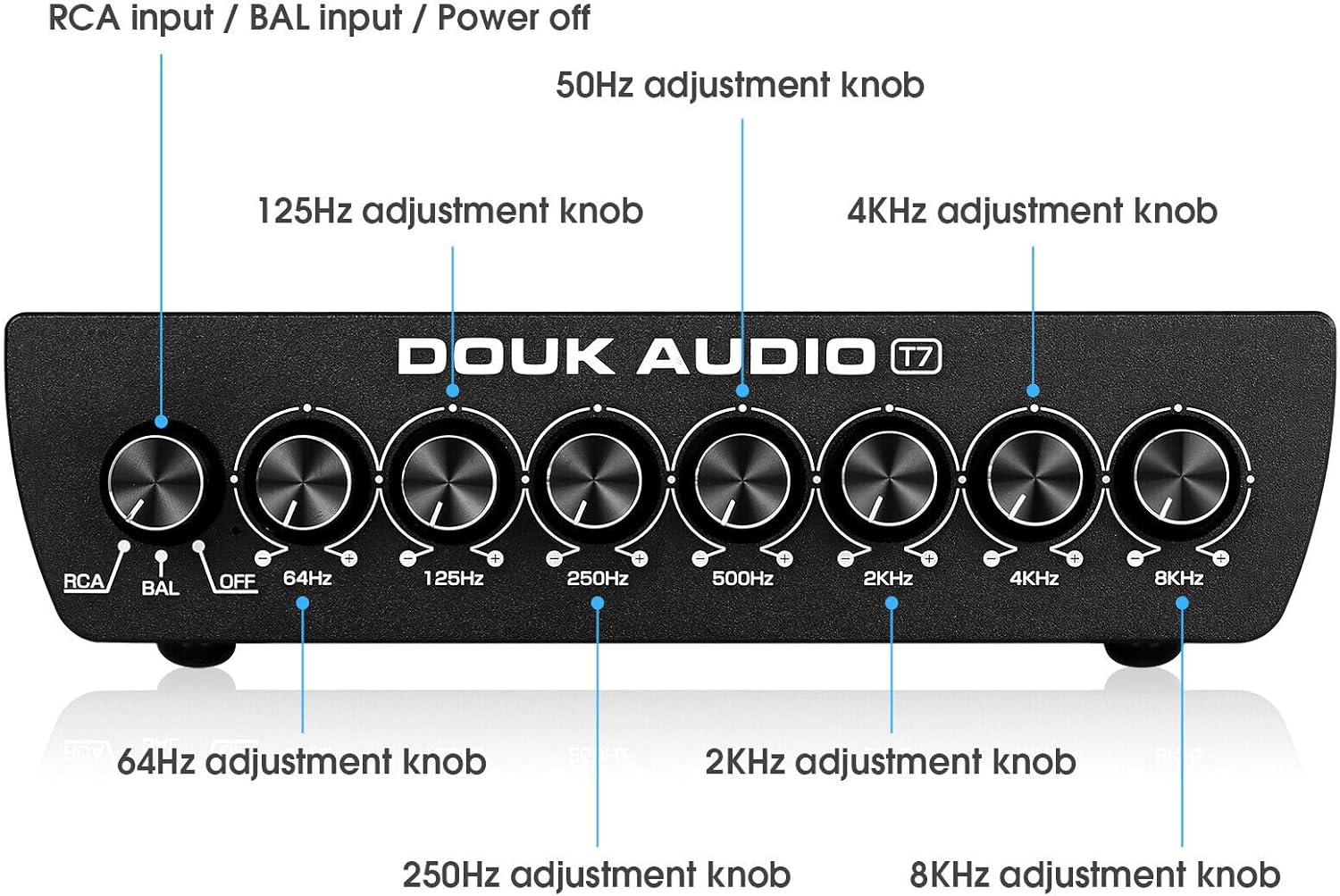
This image shows the front panel of the Douk Audio T7, highlighting the input selector knob (RCA/BAL/OFF) and the seven equalizer adjustment knobs for 64Hz, 125Hz, 250Hz, 500Hz, 2KHz, 4KHz, and 8KHz.
The front panel features the following controls:
- Input Selector Knob (RCA/BAL/OFF): Selects between RCA input, Balanced (XLR) input, or activates bypass mode (OFF).
- 64Hz Adjustment Knob: Adjusts the gain for the 64Hz frequency band.
- 125Hz Adjustment Knob: Adjusts the gain for the 125Hz frequency band.
- 250Hz Adjustment Knob: Adjusts the gain for the 250Hz frequency band.
- 500Hz Adjustment Knob: Adjusts the gain for the 500Hz frequency band.
- 2KHz Adjustment Knob: Adjusts the gain for the 2KHz frequency band.
- 4KHz Adjustment Knob: Adjusts the gain for the 4KHz frequency band.
- 8KHz Adjustment Knob: Adjusts the gain for the 8KHz frequency band.
Pannello posteriore
This image illustrates the rear panel connections of the Douk Audio T7, showing the Balanced XLR/RCA inputs, Balanced XLR/RCA outputs, and the DC 12V power input.
Il pannello posteriore fornisce le seguenti connessioni:
- Balanced XLR Input (L/R): For connecting balanced audio sources using XLR cables.
- Ingresso RCA (S/D): For connecting unbalanced audio sources using RCA cables.
- Balanced XLR Output (L/R): Per connettersi a amplifiers or active speakers using XLR cables.
- Uscita RCA (S/D): Per connettersi a amplifiers or active speakers using RCA cables.
- INGRESSO CC 12V: Ingresso di alimentazione per l'adattatore da 12 V CC incluso.
Guida all'installazione
1. Collegamento elettrico
Connect the included DC 12V power adapter to the "DC 12V IN" port on the rear panel of the T7. Plug the adapter into a suitable power outlet.
2. Connessione di ingresso audio
For RCA Input: Connect your audio source (e.g., CD player, DAC, phone, tablet PC, TV set-top box, laptop) to the "RCA Input" jacks on the rear panel using RCA cables.
For Balanced XLR Input: Connect your audio source to the "Balanced XLR Input" jacks on the rear panel using XLR cables.
3. Connessione di uscita audio
Connect the "RCA Output" jacks or "Balanced XLR Output" jacks on the rear panel of the T7 to your amplifier or active speakers using appropriate RCA or XLR cables. Both outputs can be used simultaneously.
4. Accensione iniziale
Ensure all connections are secure. Turn on your audio source and amplifier/active speakers. Then, power on the Douk Audio T7.
Istruzioni per l'uso
1. Selezione della modalità di input
Use the input selector knob on the front panel to choose your desired input: "RCA" for RCA sources, or "BAL" for Balanced XLR sources.
2. Adjusting Equalization
Once an input is selected, use the seven frequency adjustment knobs (64Hz, 125Hz, 250Hz, 500Hz, 2KHz, 4KHz, 8KHz) to fine-tune the audio frequencies. Rotate the knobs clockwise to boost the frequency band (+6dB) and counter-clockwise to cut the frequency band (-6dB).
Sperimenta diverse impostazioni per ottenere il suono che preferiscifile or to correct room acoustics and speaker response.
3. Modalità bypass
To listen to the original, unequlized audio signal, set the input selector knob to "OFF". This activates the bypass mode, allowing the audio signal to pass through the unit without any equalization.
4. Simultaneous Outputs
The T7 outputs audio simultaneously through both the RCA and Balanced XLR output ports. You can connect to multiple devices if needed.
Manutenzione
Pulizia
Wipe the unit with a soft, dry cloth. Do not use any liquid cleaners or solvents, as they may damage the finish or internal components.
Magazzinaggio
If the unit will not be used for an extended period, disconnect it from the power supply and store it in a cool, dry place.
Ventilazione
Ensure that the ventilation openings are not blocked to prevent overheating. Maintain adequate space around the unit for proper airflow.
Risoluzione dei problemi
Nessuna uscita audio
- Controlla la potenza: Ensure the power adapter is securely connected to the T7 and a working power outlet.
- Check Input Selection: Verify that the input selector knob on the front panel is set to the correct input (RCA or BAL), not "OFF" (bypass mode).
- Controllare le connessioni: Ensure all audio cables (input and output) are securely connected to both the T7 and your source/amplificatore/altoparlanti.
- Check Source/Amplificatore: Conferma che la tua sorgente audio è in riproduzione e il tuo amplifier/active speakers are powered on and functioning correctly.
Suono distorto
- Check Gain Levels: Ensure that the equalizer knobs are not set to extreme boost levels, which can cause clipping or distortion. Try reducing the gain on specific frequency bands.
- Controllare i cavi: Ispezionare i cavi audio per verificare che non siano danneggiati o che i collegamenti siano allentati.
- Qualità della fonte: Verify the quality of the audio source. Poor quality source material can result in distorted output.
Ronzio o rumore
- Ciclo di terra: A hum can sometimes indicate a ground loop. Try connecting all audio equipment to the same power strip or outlet. If the issue persists, a ground loop isolator may be necessary.
- Qualità del cavo: Use high-quality, shielded audio cables.
- Interferenza: Keep the unit away from other electronic devices that may cause interference.
Specifiche
| Modello: | T7 |
| Bande di frequenza: | 64 Hz, 125 Hz, 250 Hz, 500 Hz, 2 kHz, 4 kHz, 8 kHz |
| Gamma di guadagno: | -6dB to +6dB per band |
| Ingressi: | Balanced XLR (L/R), RCA (L/R) |
| Risultati: | Balanced XLR (L/R), RCA (L/R) |
| Rapporto segnale/rumore (SNR): | >104 dB |
| Risposta in frequenza: | 20 Hz - 20 kHz |
| Distorsione: | <0.003% |
| Alimentazione elettrica: | CC 12V |
| Dimensioni del prodotto (L x P x A): | 15.2 x 12.6 x 4.2 cm (5.98 x 4.96 x 1.65 pollici) |
| Peso netto: | 1.02 kg (2.25 libbre) |
| Produttore: | Audio di Douk |
| Paese di origine: | Cina |
Garanzia e supporto
Douk Audio products are designed for reliability and performance. For warranty information and technical support, please refer to the documentation included with your purchase or visit the official Douk Audio websito. Conservare la ricevuta d'acquisto come prova d'acquisto per eventuali reclami in garanzia.