1. Introduzione
This manual provides essential instructions for the safe and efficient use of your Trevi XR 8A44 DOUBLE Portable Speaker System. Please read this manual thoroughly before operating the device and retain it for future reference.
2. Prodotto finitoview
The Trevi XR 8A44 DOUBLE is a versatile portable speaker system designed for high-quality audio playback. It features two independent, separable speaker units that can function together as a stereo pair or individually. Each unit delivers 10W of power, totaling 20W when combined. The system supports Bluetooth 5.3, Micro SD card playback, and AUX-IN connectivity. It is also IPX5 water resistant, making it suitable for various environments.
2.1 Caratteristiche principali
- Separable wireless speaker design, forming two independent units.
- Total output power of 2 x 10W (20W combined).
- IPX5 water resistance for protection against water jets.
- Clear sound with 2 stereo speakers and 2 passive bass radiators.
- Volume, playback, and pause controls integrated.
- Wireless audio via Bluetooth v5.3.
- Two independent MP3 players for Micro SD card playback (one per unit).
- Two AUX-IN inputs for wired connections.
- Convenient carrying strap.
- Light disc illumination for visual effects.
- Indicatore LED per lo stato di carica della batteria.
- Rechargeable high-capacity lithium battery via TYPE-C port.
2.2 Contenuto della confezione
- Trevi XR 8A44 DOUBLE Speaker Units (x2)
- Cavo di ricarica (USB tipo C)
- Manuale dell'utente (questo documento)
- Certificato di garanzia
2.3 Diagramma e controlli del prodotto
Refer to the images below for an understanding of the speaker's physical components and controls.


3. Impostazione
3.1 Caricamento della batteria
Before first use, fully charge both speaker units. Use the provided USB Type-C charging cable and connect it to a compatible USB power adapter (not included).
- Locate the Type-C charging port on each speaker unit.
- Connect the Type-C end of the cable to the speaker and the USB-A end to a power source.
- L'indicatore LED mostrerà lo stato di carica. Solitamente si spegnerà o cambierà colore quando la carica sarà completa.
Nota: Per una durata ottimale della batteria, evitare di scaricarla completamente frequentemente.
3.2 Accensione/Spegnimento
To power on or off each speaker unit:
- Accensione: Press and hold the Power button (usually integrated with the Play/Pause button) for a few seconds until you hear an audible prompt or see the light disc illuminate.
- Spegni: Premere e tenere premuto nuovamente il pulsante di accensione per alcuni secondi, finché l'altoparlante non si spegne.
3.3 Separating and Connecting Speakers
The Trevi XR 8A44 DOUBLE consists of two units that can be magnetically connected or separated for different audio experiences.
- Separare: Gently pull the two speaker units apart. They are held together by magnets.
- Per connettere: Align the magnetic ends of the two speaker units and push them together until they snap into place.

4. Istruzioni per l'uso
4.1 Bluetooth Pairing (Single Speaker Mode)
To connect a single speaker unit to your Bluetooth-enabled device:
- Ensure the speaker is powered on and not connected to another device. It should enter pairing mode automatically (indicated by a flashing LED or audible prompt).
- Sul tuo dispositivo (smartphone, tablet, ecc.), attiva il Bluetooth e cerca i dispositivi disponibili.
- Select "Trevi XR 8A44 DOUBLE" from the list of found devices.
- Once connected, the speaker will provide an audible confirmation, and the LED indicator will stabilize.
4.2 True Wireless Stereo (TWS) Pairing (Two Speaker Mode)
To use both speaker units together for a stereo experience:
- Ensure both speaker units are powered on and not connected to any Bluetooth device.
- On one of the speakers (this will be the primary unit), double-press the Power/Play/Pause button. The speakers will attempt to pair with each other.
- Once successfully paired, you will hear an audible confirmation. One speaker will act as the left channel and the other as the right.
- Now, on your Bluetooth-enabled device, search for "Trevi XR 8A44 DOUBLE" and connect. Only one entry will appear for the combined system.
Nota: TWS pairing is typically automatic when speakers are separated and powered on, but manual initiation might be required if they don't connect automatically.
4.3 Riproduzione della scheda Micro SD
Each speaker unit has an independent Micro SD card slot for MP3 playback.
- Insert a Micro SD card (pre-loaded with MP3 audio files) into the designated slot on the speaker unit.
- The speaker should automatically switch to Micro SD playback mode.
- Use the Play/Pause and Volume (+/-) buttons to control playback.
Nota: If both speakers are in TWS mode, inserting a Micro SD card into one speaker will play audio only through that speaker, overriding the TWS Bluetooth connection for that unit. To use both speakers with Micro SD, each would need its own card and would play independently.
4.4 Connessione AUX-IN
For wired audio playback, use the AUX-IN port on each speaker unit.
- Collegare un'estremità di un cavo audio da 3.5 mm (non incluso) alla porta AUX-IN dell'altoparlante.
- Connect the other end to the audio output of your device (e.g., MP3 player, laptop).
- The speaker should automatically switch to AUX-IN mode.
- Controlla il volume sia dall'altoparlante che dal dispositivo collegato.
4.5 Controlli del volume e della riproduzione
The speaker units feature integrated controls:
- Riproduci/Pausa: Premere brevemente il pulsante Accensione/Riproduzione/Pausa.
- Aumenta volume: Premere brevemente il pulsante '+'.
- Volume basso: Premere brevemente il pulsante '-'.
- Traccia successiva: Premere a lungo il pulsante '+'.
- Traccia precedente: Premere a lungo il pulsante '-'.
4.6 Light Disc Illumination
The speaker units feature an illuminated light disc. The operation of the light disc may vary:
- Luci a levetta: A dedicated button (if present) or a long press of a specific control button (e.g., Play/Pause) might cycle through light modes or turn them on/off. Refer to the quick start guide included in your package for exact button functionality.
5. Manutenzione
5.1 Pulizia
- Pulisci l'esterno dell'altoparlante con un panno morbido eamp stoffa.
- Non utilizzare detergenti abrasivi, alcol o solventi chimici.
- Assicurarsi che tutte le porte siano asciutte prima di caricare o collegare i cavi.
5.2 Resistenza all'acqua (IPX5)
The Trevi XR 8A44 DOUBLE is rated IPX5 water resistant. This means it is protected against low-pressure water jets from any direction. It is non progettato per essere immerso in acqua.
- Do not submerge the speakers in water.
- Ensure the charging port cover (if present) is securely closed before exposure to water.
- Dry the speakers thoroughly after exposure to water before charging.

5.3 Cura della batteria
- Per preservarne la salute, caricare regolarmente la batteria, anche quando non la si utilizza.
- Conservare gli altoparlanti in un luogo fresco e asciutto, lontano dalla luce solare diretta e da temperature estreme.
- Do not attempt to replace the battery yourself. Contact qualified service personnel.
6. Risoluzione Dei Problemi
| Problema | Possibile causa | Soluzione |
|---|---|---|
| L'altoparlante non si accende. | La batteria è scarica. | Caricare completamente l'altoparlante utilizzando il cavo Type-C in dotazione. |
| Impossibile effettuare l'associazione tramite Bluetooth. | L'altoparlante non è in modalità di associazione; il Bluetooth del dispositivo è disattivato; l'altoparlante è connesso a un altro dispositivo. | Ensure speaker is in pairing mode (flashing LED). Turn off and on Bluetooth on your device. Disconnect from other devices. Try TWS pairing steps if using two speakers. |
| No sound from Micro SD card. | Scheda non inserita correttamente; non supportata file format; card is empty or corrupted. | Re-insert Micro SD card. Ensure files are in MP3 format. Check card content on a computer. |
| L'associazione TWS non riesce. | Gli altoparlanti sono troppo distanti; uno degli altoparlanti è già connesso a un dispositivo Bluetooth. | Assicurarsi che gli altoparlanti siano vicini tra loro. Scollegare entrambi gli altoparlanti da qualsiasi dispositivo Bluetooth prima di avviare l'associazione TWS. |
| Audio distortion or low volume. | Volume too low on speaker or source device; low battery; poor Bluetooth connection. | Increase volume on both speaker and source device. Charge the battery. Move source device closer to the speaker. |
7. Specifiche
| Nome modello: | Trevi XR 8A44 DOUBLE |
| Marca: | Trevi |
| Potenza di uscita: | 2 x 10W (totale 20W) |
| Connettività: | Bluetooth v5.3, Micro SD, AUX-IN (3.5mm) |
| Fonte di energia: | Rechargeable Lithium Battery (via Type-C USB) |
| Resistenza all'acqua: | IPX5 (protetto contro i getti d'acqua) |
| Modalità di uscita audio: | Stereo (when TWS paired) |
| Frequency Response (Lower Limit): | Frequenza 100 Hz |
| Metodo di controllo: | Pulsanti touch |
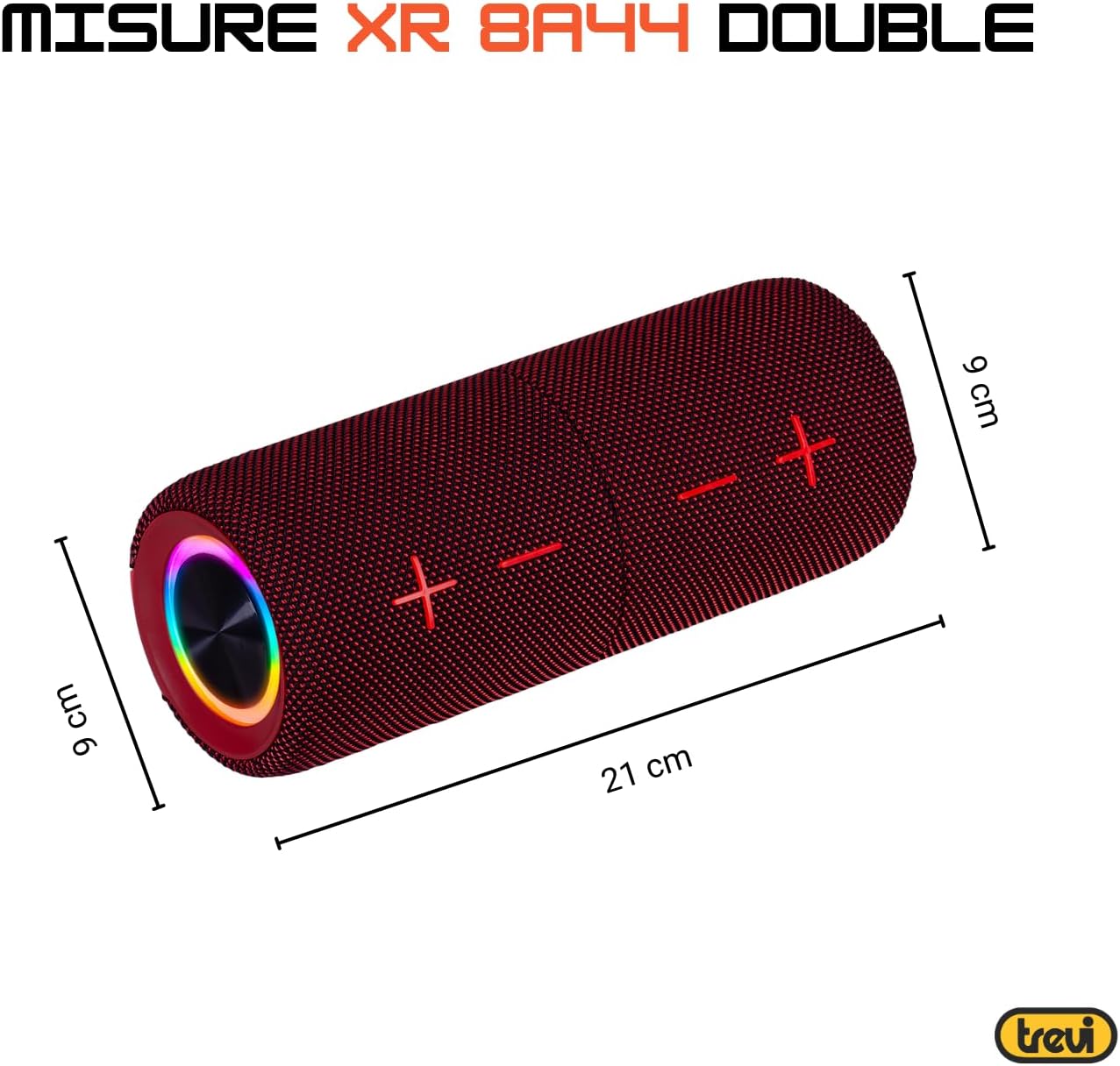
| Dimensioni (per unità): | Approx. 8D x 21W x 8H cm (based on image: 21cm length, 9cm diameter) |
| Peso (per unità): | Circa 200 grammi |
| Materiale: | Sintetico |
| Dispositivi compatibili: | Laptop, MP3 Player, Smartphone, Game Console, Tablet, TV |
| Componenti inclusi: | Speakers, Charging Cable, User Manual, Warranty Certificate |
8. Garanzia e supporto
8.1 Garanzia limitata
Your Trevi XR 8A44 DOUBLE Portable Speaker System comes with a limited warranty. Please refer to the included warranty certificate for specific terms, conditions, and duration of coverage. Keep your proof of purchase for warranty claims.
8.2 Assistenza clienti
If you encounter any issues not covered in the troubleshooting section or require further assistance, please contact Trevi customer support. Contact information can typically be found on the official Trevi website or on the warranty certificate.
- Supporto online: Visit the official Trevi websito per FAQ, registrazione del prodotto e dettagli di contatto dell'assistenza.
- E-mail/Telefono: Refer to your warranty documentation for direct contact methods.


