Introduzione
The Westcott FJ80 II Universal Touchscreen 80Ws Speedlight is a versatile and powerful flash unit designed for both on-camera and off-camera use. Featuring a soft round head for even light coverage, a large touchscreen for intuitive control, and multi-brand compatibility, it is an essential tool for photographers seeking reliable and high-performance lighting.
This manual provides detailed instructions for setting up, operating, and maintaining your FJ80 II Speedlight to ensure optimal performance and longevity.
Cosa c'è nella scatola
Upon unboxing your Westcott FJ80 II Speedlight, please verify that all the following components are included:
- (1) FJ80 II M Universal Speedlight
- (1) FJ80 II Lithium Polymer Battery
- (1) FJ80 II Battery Charger and Cord
- (1) FJ80 II AC Adapter
- (1) FJ80 II Shoe Stand
- (1) FJ80 II USB-C Cable
- (1) FJ80 II Travel Case
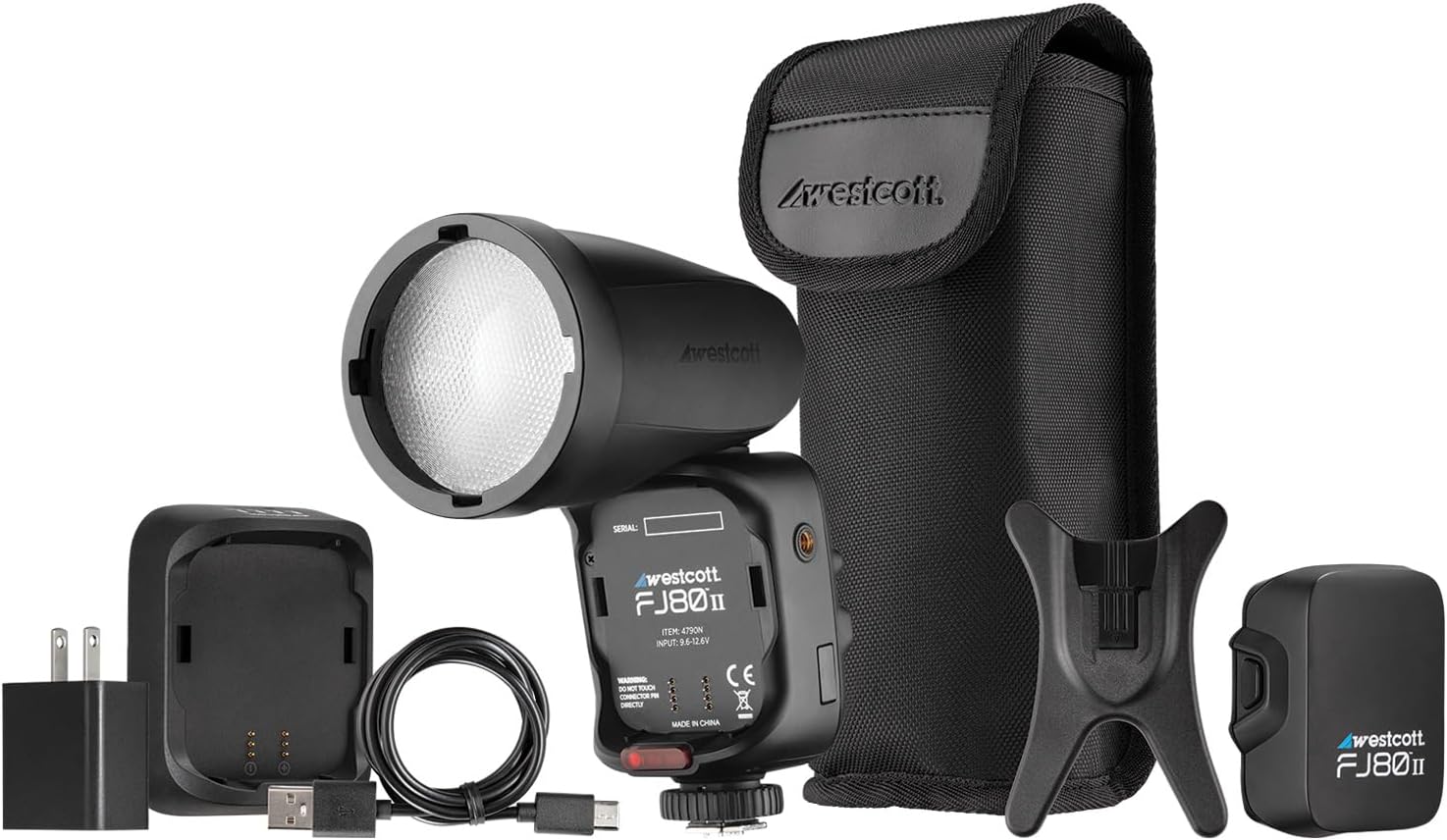
Figure 1: All components included in the Westcott FJ80 II package.
Impostare
Installazione e ricarica della batteria
- Insert the FJ80 II Lithium Polymer Battery into the battery compartment of the speedlight. Ensure it clicks securely into place.
- Connect the FJ80 II Battery Charger to the AC Adapter.
- Collegare l'adattatore CA a una presa a muro standard.
- Connect the battery to the charger. The charging indicator light will show the charging status.
- Allow the battery to fully charge before first use. A full charge provides 500+ full-power flashes.
Mounting the Speedlight
The FJ80 II can be mounted on-camera or used off-camera with the included shoe stand.
Montaggio sulla telecamera:
- Assicurati che la fotocamera sia spenta.
- Slide the FJ80 II's hot shoe mount into your camera's hot shoe.
- Secure the speedlight by tightening the locking mechanism on the hot shoe mount.

Figure 2: FJ80 II mounted on various camera brands, demonstrating multi-brand compatibility.
Off-Camera Use:
- Attach the FJ80 II to the included shoe stand.
- Place the shoe stand on a flat, stable surface or mount it onto a light stand with a compatible adapter (not included).
Operating the Speedlight
Accensione/spegnimento
Premere e tenere premuto il pulsante di accensione (Ⓢ) on the side of the speedlight to turn it on or off. The touchscreen will illuminate upon power-on.
Interfaccia touchscreen
The FJ80 II features a large 2.8-inch LCD color touchscreen for easy navigation and control of settings. Tap icons and values to adjust them.

Figura 3: dettagliata view of the FJ80 II's touchscreen and control buttons.
Modalità flash
The FJ80 II supports various flash modes for different photographic needs:
- Modalità manuale (M): Allows precise control over flash power output. Adjust power levels directly on the touchscreen.
- Modalità TTL (attraverso l'obiettivo): Automatically adjusts flash output based on camera metering for balanced exposure.
- Sincronizzazione ad alta velocità (HSS): Consente la sincronizzazione del flash con velocità di otturazione più elevate rispetto alla velocità di sincronizzazione nativa della fotocamera, utile per congelare l'azione o per sovrastare la luce ambientale.
- Sincronizzazione sulla tendina anteriore: Il flash si attiva all'inizio dell'esposizione.
- Sincronizzazione della tendina posteriore: Flash fires at the end of the exposure, creating a motion blur effect behind the subject.
Comunicazione senza fili
The FJ80 II features reliable wireless communication with a range of up to 328 feet (100 meters). This allows for flexible off-camera lighting setups. Refer to your camera's manual for specific wireless flash triggering instructions if using it as a master or slave unit.
Compatibilità
The Westcott FJ80 II is designed for multi-brand compatibility, supporting a wide range of camera systems. It is compatible with:
- Canone
- Nikon
- Sony (with adapter)
- Fuji
- Lumix (Panasonic)
- Olimpo
For dedicated Sony compatibility without an adapter, please refer to Westcott part #4796N.
Manutenzione
Proper maintenance ensures the longevity and optimal performance of your FJ80 II Speedlight.
- Pulizia: Use a soft, dry cloth to clean the exterior of the speedlight. For the touchscreen, use a microfiber cloth specifically designed for electronics. Avoid abrasive cleaners or solvents.
- Magazzinaggio: When not in use, store the speedlight in its travel case in a cool, dry place away from direct sunlight and extreme temperatures. Remove the battery if storing for extended periods.
- Cura della batteria: Recharge the battery regularly, even if not in frequent use, to maintain its health. Avoid fully depleting the battery before recharging.
- Prestazioni termiche: The FJ80 II features enhanced thermal performance to avoid overheating during prolonged use. However, continuous high-power flashes may still trigger thermal protection. Allow the unit to cool down if this occurs.
Risoluzione dei problemi
| Problema | Possibile causa | Soluzione |
|---|---|---|
| Speedlight does not power on. | La batteria è scarica o non è inserita correttamente. | Assicurarsi che la batteria sia completamente carica e installata correttamente. |
| Il flash non si attiva. | Incorrect camera settings, speedlight not securely mounted, or in sleep mode. | Check camera flash settings. Re-mount speedlight. Tap touchscreen or press a button to wake from sleep. |
| L'emissione del flash non è uniforme. | Battery low, or thermal protection activated. | Recharge battery. Allow speedlight to cool down if used continuously at high power. |
| Wireless communication issues. | Out of range, interference, or incorrect channel/group settings. | Ensure units are within 328 ft range. Change channels/groups to avoid interference. |
Specifiche
| Caratteristica | Dettaglio |
|---|---|
| Dimensioni del prodotto | 8.28 x 3.11 x 3.11 pollici |
| Peso dell'articolo | 2.55 libbre |
| Numero di modello | Multi-Brand |
| Batterie richieste | 2 AA batteries (for internal components, main power is Lithium Polymer) |
| Produttore | F.J. Westcott |
| Supporti compatibili | Canon, Nikon, Sony (with adapter), Fuji, Panasonic, Olympus |
| Battery Life (Flashes) | 500+ full-power flashes per charge |
| Riciclare il tempo | 0.05-1.5 secondi |
| wireless Range | 328 piedi (100 metri) |
| Temperatura del colore | 5500K (stable) |
Garanzia e supporto
Westcott provides a full 1-year pledge for this product. Additionally, lifetime support and US-based customer service are available. For any inquiries or assistance, please contact Westcott customer support directly.
For more information, visit the official Westcott websito o fare riferimento ai recapiti forniti sulla confezione del prodotto.


