1. Introduzione
This manual provides comprehensive instructions for the setup, operation, and maintenance of your iCON Pro Audio P1-M DAW Control Surface and D4T Display. The P1-M is designed to enhance your digital audio workstation workflow with tactile control, while the D4T display provides essential visual feedback. Please read this manual thoroughly before using the device to ensure proper functionality and to maximize your experience.
2. Informazioni sulla sicurezza
- Alimentazione elettrica: Utilizzare solo l'adattatore di alimentazione specificato. Assicurarsi che il volumetage soddisfa i requisiti del dispositivo.
- Acqua e umidità: Do not expose the unit to water, rain, or moisture. Avoid placing liquid containers near the device.
- Ventilazione: Assicurare un'adeguata ventilazione attorno all'unità. Non ostruire le aperture di ventilazione.
- Fonti di calore: Tenere l'unità lontana da fonti di calore quali termosifoni, bocchette di ventilazione, stufe o altri apparecchi che producono calore.
- Pulizia: Pulire solo con un panno asciutto. Non usare detergenti liquidi o spray.
- Manutenzione: Non tentare di riparare questo prodotto da soli. Affidare tutte le operazioni di manutenzione a personale di assistenza qualificato.
3. Contenuto della confezione
Verificare che tutti gli articoli siano presenti nel pacco:
- iCON Pro Audio P1-M Control Surface
- iCON Pro Audio D4T Display Unit
- Cavo USB
- Adattatore di alimentazione
- Guida rapida (se applicabile)
4. Prodotto finitoview
The iCON P1-M is a professional USB-MIDI control surface featuring 8 touch-sensitive motorized faders and a customizable touchscreen. It is bundled with the D4T display unit for enhanced visual feedback.

Figura 4.1: Davanti view of the iCON P1-M Control Surface with the D4T Display attached. This image shows the 8 motorized faders, rotary encoders, transport controls, and the integrated D4T display providing channel information.
4.1 componenti chiave
- Motorized Faders: Eight touch-sensitive motorized faders with 12-bit resolution for precise level control.
- Encoder rotativi: Eight dual-function rotary encoders for pan, send, and other parameters.
- D4T Display: An integrated display unit providing channel names, levels, and timecode information.
- Customizable Touchscreen: A 4-inch, 16-panel digital touchscreen for assigning and controlling up to 80 functions.
- Ruota jog: A smooth-action jog wheel for navigation and precise editing.
- Controlli di trasporto: Dedicated buttons for Play, Stop, Record, Fast Forward, and Rewind.
- DAW Select Buttons: Allows switching between up to three connected DAWs.
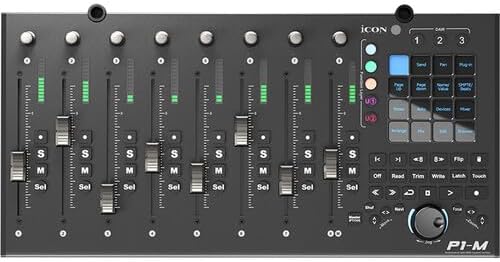
Figura 4.2: Top-down view of the iCON P1-M control surface, highlighting the layout of faders, rotary knobs, and the control panel with various function buttons and the jog wheel.

Figura 4.3: Avvicinamento view of the D4T display unit, showing individual channel level meters and names, along with a timecode display on the right.

Figura 4.4: Posteriore view of the iCON P1-M, displaying the power input, external control jacks, and USB-C ports for connection and firmware updates.
5. Impostazione
5.1 Connecting the P1-M and D4T
- Attach D4T: Securely attach the D4T display unit to the P1-M control surface using the provided connectors.
- Collegamento elettrico: Connect the power adapter to the P1-M's 12V DC input and then to a power outlet.
- Connessione USB: Connect the P1-M to your computer using the supplied USB cable. The P1-M is class-compliant and does not require specific drivers for basic functionality on Mac and Windows.
5.2 Integrazione DAW
The P1-M supports Universal Mackie Control and HUI protocols for seamless integration with various DAWs, including Pro Tools, Logic Pro, and Ableton Live. Refer to your DAW's documentation for specific setup instructions for external control surfaces.
- iMAPTM Software: Download and install the iMAPTM software from the iCON Pro Audio website. This software is used for customizing the touchscreen functions, configuring settings, and performing firmware updates.
- DAW Selection: Use the dedicated DAW select buttons on the P1-M to switch between up to three configured DAWs.
6. Istruzioni per l'uso
6.1 Fader and Encoder Control
- Fader: Move the motorized faders to adjust track levels. The faders are touch-sensitive, allowing for automation recording.
- Encoder rotativi: Turn the rotary encoders to control parameters suchs as pan, send levels, or plug-in parameters, depending on the selected mode. Pressing an encoder often toggles a function (e.g., mute, solo).
6.2 Funzioni del touchscreen

Figura 6.1: Illustration of various customizable functions available on the P1-M's touchscreen, including notes, track, send, pan, and plug-in controls.
The 4-inch touchscreen allows for dynamic control over various DAW functions. Use the iMAPTM software to customize the layout and assign up to 80 different functions via drag-and-drop. Tap the desired function on the screen to activate it.
6.3 Transport and Navigation

Figura 6.2: Close-up of the illuminated transport controls on the P1-M, including play, stop, record, fast forward, and rewind buttons.
- Ruota jog: Rotate the jog wheel to scrub through your project timeline or navigate within your DAW.
- Pulsante Zoom: The illuminated "Zoom" button, combined with the jog wheel and directional keys, allows for precise zooming and navigation within your DAW's interface.
- Pulsanti di trasporto: Use the dedicated buttons for standard transport functions (Play, Stop, Record, etc.).
7. Manutenzione
- Pulizia: Use a soft, dry, lint-free cloth to clean the surface of the unit. Do not use abrasive cleaners, solvents, or waxes.
- Protezione dalla polvere: When not in use, cover the unit to protect it from dust accumulation.
- Aggiornamenti del firmware: Controllare regolarmente iCON Pro Audio website for firmware updates. Updates can be performed via the USB-C connection and iMAPTM software.
8. Risoluzione Dei Problemi
- Nessun potere:
- Assicurarsi che l'adattatore di alimentazione sia collegato saldamente sia all'unità sia a una presa di corrente funzionante.
- Verify the power adapter is the correct one for the device.
- Non riconosciuto dal computer/DAW:
- Controlla la connessione del cavo USB. Prova una porta USB o un cavo diverso.
- Ensure the P1-M is powered on.
- Verify that your DAW's preferences are correctly configured to recognize the P1-M as a Mackie Control or HUI device.
- Riavvia il computer e la DAW.
- Check for the latest firmware and iMAPTM software updates.
- I fader non si muovono/non rispondono:
- Ensure the unit is powered and connected.
- Check DAW settings for fader automation and control surface assignments.
- Perform a factory reset if issues persist (refer to iMAPTM software documentation).
- D4T Display Not Working:
- Ensure the D4T is correctly attached to the P1-M.
- Verify the P1-M is powered on and communicating with the DAW.
9. Specifiche
| Numero di modello | IPA-P1MD4T-BUN |
| Peso dell'articolo | 4.4 libbre |
| Dimensioni del prodotto | 20.87 x 10.63 x 4.33 pollici |
| Colore | Nero |
| Tipo di connettore | USB |
| Interfaccia Hardware | USB |
| Software supportato | Ableton Live, Pro Tools, Logic Pro (via Mackie Control/HUI) |
| Tipo di materiale | Metallo |
| Quantità canale mixer | 8 |
| Piattaforma hardware | Per PC/Mac |
10. Garanzia e supporto
iCON Pro Audio products are designed for quality and reliability. For warranty information, please refer to the warranty card included with your product or visit the official iCON Pro Audio website. For technical support, product registration, or to download the latest drivers and iMAPTM software, please visit the iCON Pro Audio support page:


