Introduzione
Thank you for choosing the EBL 12-Bay Independent LCD Battery Charger. This manual provides essential information for the safe and efficient operation of your new charger. Please read it thoroughly before use and retain it for future reference.
Informazioni importanti sulla sicurezza
- Use only with Ni-MH and Ni-CD AA/AAA rechargeable batteries. Do not attempt to charge non-rechargeable batteries.
- Evitare di cortocircuitare i terminali della batteria.
- Non smontare o modificare il caricatore.
- Tenere il caricabatterie lontano da acqua, umidità e temperature elevate.
- Garantire un'adeguata ventilazione durante la ricarica per evitare il surriscaldamento.
- Scollegare il caricabatterie dalla fonte di alimentazione quando non è in uso o prima di pulirlo.
- Tenere fuori dalla portata dei bambini.
- If the charger or batteries show signs of damage, discontinue use immediately.
Contenuto della confezione
- 1 x EBL FY-1209 Smart Battery Charger
- 1 x Manuale utente
- 1 x cavo di tipo C
Prodotto finitoview
The EBL 12-Bay Smart Battery Charger is designed for efficient and safe charging of Ni-MH and Ni-CD AA/AAA rechargeable batteries. Key features include:
- Slot di ricarica indipendenti: Each of the 12 bays charges independently, allowing for flexible charging of 1 to 12 batteries simultaneously, regardless of their charge level.
- Funzione di scarico: A unique discharge function helps eliminate the memory effect of batteries, restoring their power and improving performance.
- Schermo LCD nitido: The large LCD screen provides real-time status updates for each battery during charging or discharging, including charge level and error indicators.
- Rilevamento intelligente: Automatically detects reverse polarity, damaged batteries, non-rechargeable batteries, and fully charged batteries, ensuring safe operation.
- Molteplici protezioni di sicurezza: Features over-heat, over-current, short-circuit, and non-rechargeable/defective battery detection for enhanced safety.
- Convenient Type-C Input: Compatible with various 5V/2A power sources like adapters, laptops, car chargers, and power banks for versatile charging.

This image shows the white EBL 12-bay battery charger with its prominent LCD display and 12 individual battery slots. The design is sleek and compact.

This image highlights the key components of the charger, including the Charge/Discharge Button, LCD Display, Type-C Input Port, AA/AAA Battery "+" and "-" terminals, and Cooling Holes. Each slot is numbered from 1 to 12.

This image displays the charger from a side angle, emphasizing its slim profile and portability, making it easy to store or carry.
Impostare
- Connetti alimentazione: Insert the provided Type-C cable into the charger's Type-C input port. Connect the other end of the cable to a 5V/2A USB power source (e.g., wall adapter, computer USB port, power bank). The LCD screen will briefly illuminate, indicating the charger is powered on.
- Preparare le batterie: Ensure your Ni-MH or Ni-CD AA/AAA rechargeable batteries are clean and free from damage.

This image illustrates the Type-C input port on the side of the charger, showing the cable being connected. It emphasizes the convenience of using various 5V/2A power sources.
Istruzioni per l'uso
1. Inserimento delle batterie
- Insert 1 to 12 AA or AAA Ni-MH/Ni-CD rechargeable batteries into the respective slots.
- Ensure the positive (+) and negative (-) ends of the batteries match the polarity markings in the charger slots.
- The charger supports both AA and AAA batteries in any slot. For AAA batteries, ensure they make proper contact with the smaller terminals.

This image demonstrates how to insert both AA and AAA batteries into the charger's 12 independent slots. It highlights the flexibility of charging different battery types simultaneously.
2. Comprensione del display LCD
- Upon inserting batteries, the LCD screen will display the real-time charging status for each individual slot.
- Battery icons will animate to indicate active charging.
- A full, static battery icon indicates the battery is fully charged.
- An "X" or "Wrong" icon indicates a non-rechargeable, damaged, or incorrectly inserted battery.
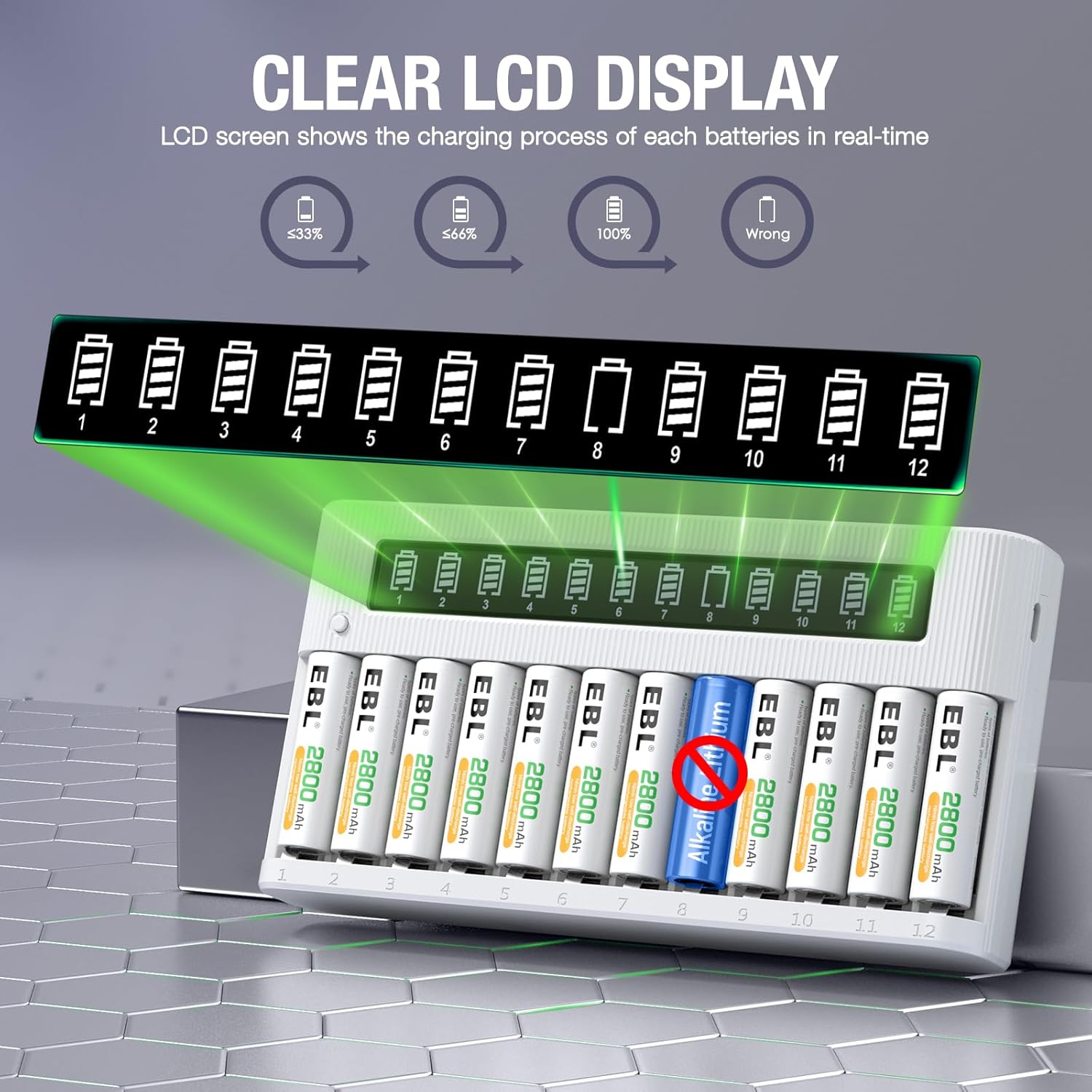
This image provides a close-up of the LCD screen, showing battery icons indicating different charge levels (e.g., <33%, <66%, 100%) and a "Wrong" indicator for a detected non-rechargeable battery.
3. Processo di ricarica
- The charger will automatically begin charging once batteries are correctly inserted and power is connected.
- Charging time varies depending on battery capacity and initial charge level.
- The charger uses advanced MCU control and -ΔV function for optimal charging.
4. Funzione di scarico
- To activate the discharge function, press and hold the "Charge/Discharge Button" (located on the left side of the LCD screen) for approximately 3 seconds.
- The charger will discharge the batteries to eliminate memory effect, then automatically switch to charging mode once the discharge process is complete.

This image shows the charger with batteries inserted and the "Charge/Discharge Button" highlighted. It visually explains how the discharge function helps maintain maximum battery capacity before charging.
5. Rilevamento intelligente
- The charger intelligently detects various battery conditions:
- Reverse Battery: If a battery is inserted with incorrect polarity, the LCD will show an error.
- Damaged/Non-Rechargeable Battery: The charger will identify and stop charging these types of batteries, displaying an error on the LCD.
- Batteria completamente carica: Charging automatically stops when batteries reach full capacity to prevent overcharging.

This image visually demonstrates the charger's smart detection features, showing how it identifies and indicates issues like reverse battery insertion, damaged/non-rechargeable batteries, and confirms fully charged batteries.
Manutenzione
- Pulire regolarmente i contatti del caricabatterie e della batteria con un panno asciutto e morbido.
- Conservare il caricabatterie in un luogo fresco e asciutto quando non in uso.
- Evitare di far cadere o di sottoporre il caricabatterie a forti urti.
Risoluzione dei problemi
| Problema | Possibile causa | Soluzione |
|---|---|---|
| Il caricabatterie non si accende. | Nessuna connessione di alimentazione o cavo difettoso. | Check Type-C cable connection and power source. Try a different cable or power adapter. |
| Battery not charging (LCD shows "Wrong" or no animation). | Incorrect battery type, damaged battery, reverse polarity, or poor contact. | Ensure battery is Ni-MH/Ni-CD. Check polarity. Clean battery contacts. Replace damaged batteries. |
| Batteries overheating. | Faulty battery or poor ventilation. | Remove the battery immediately. Ensure adequate ventilation around the charger. |
Specifiche
| Caratteristica | Dettaglio |
|---|---|
| Modello | AF-1209 |
| Tipi di batterie compatibili | Ni-MH, Ni-CD (AA, AAA) |
| Ingresso | 5V/2A (Tipo C) |
| Volume di uscitatage | 1.2V (CC) |
| Numero di slot | 12 slot indipendenti |
| Dimensioni del prodotto | 8.07 x 10.6 x 4.5 pollici |
| Peso dell'articolo | 10.2 once |
| Certificazioni di sicurezza | Certificazione UL, CE, RoHS |
Garanzia e supporto
EBL products come with a standard warranty. For detailed warranty information, technical support, or customer service inquiries, please refer to the official EBL website or contact their customer support directly. Please retain your purchase receipt for warranty claims.


