1. Introduzione
Thank you for choosing the EIGHTREE Outdoor Wi-Fi Smart Plug ET71. This smart plug is designed for outdoor use, featuring IP44 waterproofing, energy monitoring, and compatibility with popular smart home platforms like Alexa, SmartThings, and Google Home. This manual provides detailed instructions for safe installation, operation, and maintenance of your device.
2. Informazioni importanti sulla sicurezza
- Leggere attentamente tutte le istruzioni prima dell'uso.
- This device is rated IP44 for outdoor use, protecting against splashing water. Do not immerse in water.
- Ensure the power supply matches the device's specifications (230V, 16A, Max 3680W).
- Do not disassemble, repair, or modify the device. Contact support if issues arise.
- Tenere fuori dalla portata dei bambini.
- Only connect to a 2.4 GHz Wi-Fi network. 5.0 GHz Wi-Fi is not supported.
Nota importante: This smart plug may not include a ground pin, which could make it incompatible or unsafe for use in certain regions (e.g., France, Belgium) that require a specific type of grounded plug. Please verify compatibility with your local electrical outlets before use.
3. Prodotto finitoview
The EIGHTREE ET71 Smart Plug is a compact device designed to make your outdoor appliances smart. It features a power button, an indicator light, and a weather-resistant casing.
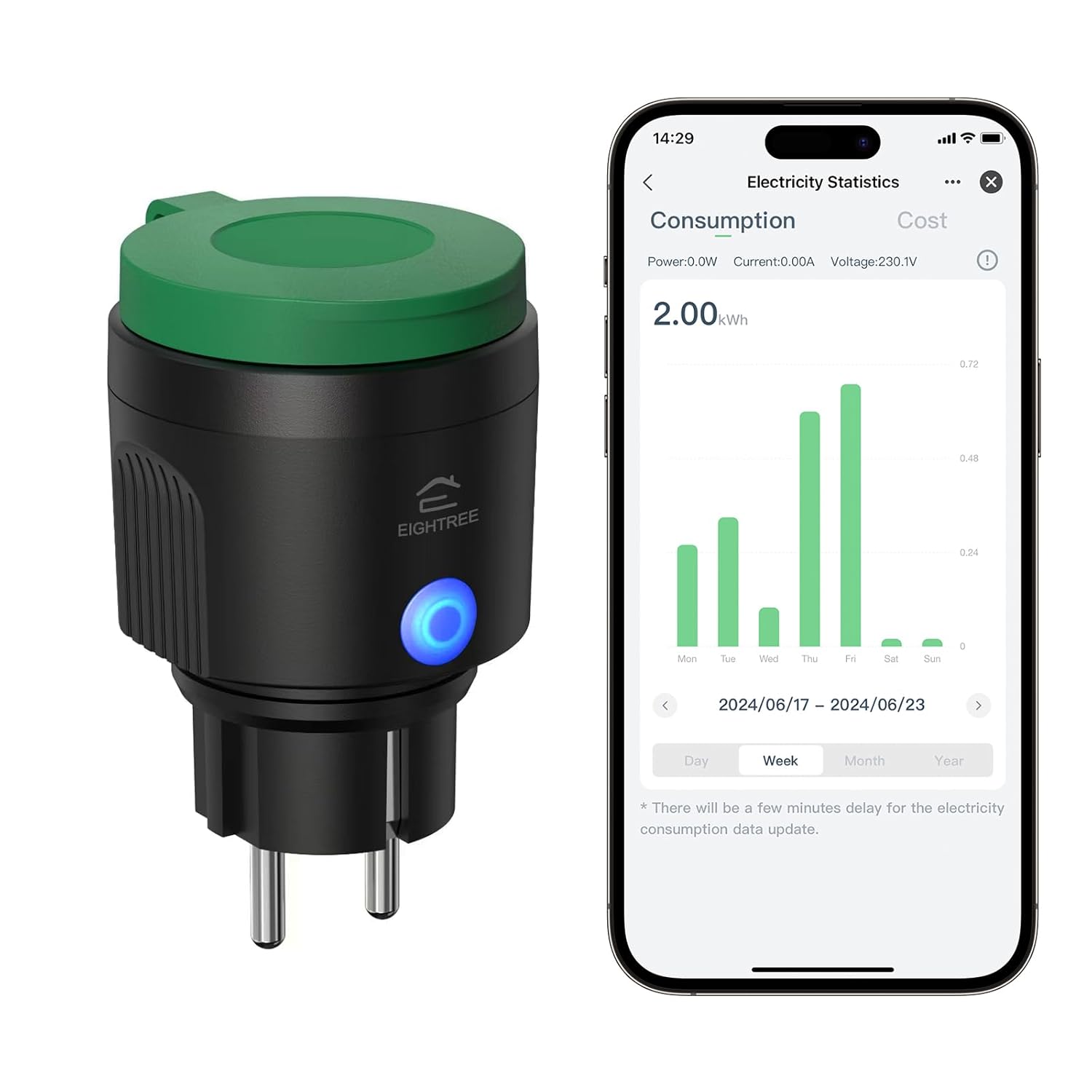
Immagine 3.1: EIGHTREE ET71 Outdoor Wi-Fi Smart Plug shown alongside its mobile application interface displaying electricity consumption statistics. The plug is black with a green cap and a blue LED indicator.
Caratteristiche principali:
- IP44 impermeabile: Designed for outdoor use, resistant to splashing water.
- Monitoraggio energetico: Track detailed power consumption of connected devices.
- Controllo vocale: Compatible with Alexa, SmartThings, and Google Home for hands-free operation.
- Telecomando: Manage your devices from anywhere using the mobile app.
- Timer e programmazione: Set custom schedules for automatic on/off operations.
- Connessione Wi-Fi: Connects to your home Wi-Fi network (2.4 GHz only).

Immagine 3.2: Visual representation of the EIGHTREE ET71 Smart Plug's versatile features, including App Control, Voice Control, Energy Monitoring, Group Control, Set Timers, WiFi Connection, and IP44 Waterproofing.
4. Specifiche
| Parametro | Valore |
|---|---|
| Numero di modello | ET71 |
| Volume nominaletage | 230 Volt |
| Corrente nominale | 16 A |
| Potenza di carico massima | 3680 L |
| Materiale | Plastica PC + ABS |
| Applicazione | Smart Life App |
| Sistemi supportati | Android e iOS |
| Banda di frequenza Wi-Fi | 2.4 GHz only (5.0 GHz not supported) |
| Grado di protezione IP | IP44 (impermeabile) |
| Dimensioni (L x P x A) | Dimensioni: 5.7 x 6.5 x 10 cm |
| Peso | 130 grammi |
| Modalità operativa | ACCESO SPENTO |
| Tipo di connettore | Collegare |

Immagine 4.1: The EIGHTREE ET71 Smart Plug installed in an outdoor socket, demonstrating its IP44 weatherproof design with water splashing on it, indicating reliable operation in various weather conditions.
5. Istruzioni per l'installazione
5.1. Scarica l'app Smart Life
- Scan the QR code (if provided on packaging) or search for "Smart Life" in the Apple App Store (for iOS) or Google Play Store (for Android).
- Scarica e installa l'app.
- Registra un account o accedi se ne hai già uno.
5.2. Connect the Smart Plug to Wi-Fi
- Plug the EIGHTREE ET71 Smart Plug into an outdoor electrical outlet. Ensure the outlet is protected from direct heavy rain and is within Wi-Fi range.
- Apri l'app Vita intelligente.
- Tocca l'icona "+" nell'angolo in alto a destra per aggiungere un dispositivo.
- Selezionare "Presa elettrica" o "Spina intelligente" dall'elenco dei dispositivi.
- Follow the on-screen instructions to put the smart plug into pairing mode (usually by pressing and holding the power button on the plug until the indicator light blinks rapidly).
- Inserisci il nome e la password della tua rete Wi-Fi a 2.4 GHz. Nota: le reti Wi-Fi a 5.0 GHz non sono supportate.
- Wait for the app to connect to the device. Once connected, you can rename the plug for easier control.
6. Istruzioni per l'uso
6.1. Controllo app
Once connected, you can control the smart plug directly from the Smart Life app:
- Acceso/Spento: Tocca l'icona di accensione accanto al nome del dispositivo per accenderlo o spegnerlo.
- Monitoraggio energetico: Access the device details to view real-time power consumption (Power: W, Current: A, Voltage: V) and historical electricity statistics (kWh) by day, week, or month.
- Electricity Cost Setting: Within the app, you can input your local electricity price to estimate your energy costs. Use a decimal point (e.g., "0.25") for fractional values.

Immagine 6.1: The Smart Life app interface showing the energy monitoring function of the EIGHTREE ET71 Smart Plug, displaying consumption data over time, useful for tracking household electricity usage.
6.2. Controllo vocale
The EIGHTREE ET71 Smart Plug is compatible with Amazon Alexa, Google Home, and SmartThings. To enable voice control:
- Link your Smart Life account to your preferred voice assistant app (Alexa, Google Home, or SmartThings).
- Scopri i dispositivi nell'app dell'assistente vocale.
- Una volta scoperto, puoi usare comandi vocali come:
- "Alexa, accendi [Nome dispositivo]."
- "Ehi Google, disattiva [Nome dispositivo]."
- "SmartThings, set [Device Name] to on."

Immagine 6.2: A user interacting with a voice assistant (Alexa) to control the EIGHTREE ET71 Smart Plug, demonstrating hands-free operation and compatibility with major smart home platforms.
6.3. Controllo remoto
Control your outdoor devices from anywhere with an internet connection. Simply open the Smart Life app on your smartphone or tablet to manage the smart plug's status.

Immagine 6.3: Two images depicting the remote control capability of the EIGHTREE ET71 Smart Plug. One shows a person using a smartphone outdoors, and the other shows a house with festive lights, implying remote management of outdoor lighting.
6.4. Funzioni timer e programmazione
Automate your devices by setting timers and schedules:
- Timer: Set a countdown timer for the plug to turn on or off after a specified duration.
- Programma: Create daily or weekly schedules for the plug to turn on or off at specific times. This can be used for garden lights, irrigation systems, or other outdoor appliances.
- Conto alla rovescia: Similar to a timer, but often used for temporary operations.

Immagine 6.4: The Smart Life app interface showing timer and scheduling options for the EIGHTREE ET71 Smart Plug, with examples like turning on a sprinkler at 5:00 PM and outdoor lights at 7:00 PM (sunrise turn on).
7. Manutenzione
- Pulizia: Scollegare la spina intelligente dalla presa di corrente prima di pulirla. Utilizzare un panno morbido e asciutto per pulire la superficie. Non utilizzare detergenti liquidi o materiali abrasivi.
- Magazzinaggio: If not in use for an extended period, store the smart plug in a cool, dry place away from direct sunlight and extreme temperatures.
- Ispezione: Periodically check the plug and cable for any signs of damage. Do not use if damaged.
8. Risoluzione Dei Problemi
- Problem: Device cannot connect to Wi-Fi.
- Soluzione:
- Assicurati che la tua rete Wi-Fi sia a 2.4 GHz. Le reti a 5.0 GHz non sono supportate.
- Verificare che il segnale Wi-Fi sia sufficientemente forte nel punto in cui si trova la presa.
- Assicurarsi che la spina sia in modalità di associazione (la spia luminosa lampeggia rapidamente).
- Verifica che la password del tuo Wi-Fi sia corretta.
- Riavvia il router Wi-Fi e riprova.
- Problem: Voice control is not working.
- Soluzione:
- Ensure your Smart Life account is correctly linked to Alexa, Google Home, or SmartThings.
- Prova a riscoprire i dispositivi nell'app dell'assistente vocale.
- Check the device name in the Smart Life app and use that exact name in your voice commands.
- Verifica che la tua connessione Internet sia stabile.
- Problem: Energy monitoring data is delayed or inaccurate.
- Soluzione:
- There might be a slight delay (a few minutes) for electricity consumption data to update in the app.
- Assicurarsi che la spina abbia una connessione Wi-Fi stabile.
- If the issue persists, try unplugging and replugging the smart plug.
- Problem: Plug is unresponsive.
- Soluzione:
- Check if the plug is receiving power.
- Scollegare il dispositivo, attendere 10 secondi e ricollegarlo.
- If the issue continues, you may need to reset the device and re-pair it with the app.
9. Garanzia e supporto
The EIGHTREE ET71 Smart Plug comes with a Garanzia di 24 mesi, which begins upon delivery of the package. This warranty covers mechanical and electrical failures resulting from regular use.
If you encounter any problems or require additional assistance, please contact EIGHTREE customer support directly. Contact information can typically be found on the product packaging or the official EIGHTREE websito.


