Introduzione
This manual provides instructions for the Interphone QUIKLOX Support, designed for seamless integration with BMW Navigator mounts. This accessory offers a secure and convenient solution for mounting your smartphone on your motorcycle, featuring integrated anti-vibration technology and dual USB charging ports.
The QUIKLOX mount is engineered to perfectly fit the pre-installed navigation mount on compatible BMW motorcycles. It is compatible with all QUIKLOX phone holders, ensuring a secure attachment for your device. The integrated anti-vibration system is designed to reduce vibrations from the motorcycle engine, protecting your smartphone during rides.
For charging, the mount includes one USB Type-A and one USB Type-C port, both with IP66 waterproof certification. These ports are powered directly by the motorcycle's pre-installation, eliminating the need for additional wiring. The design allows for both horizontal and vertical orientation of your device, enhancing usability and adaptability to your navigation needs.
1. Configurazione e installazione
Follow these steps to install your Interphone QUIKLOX Support onto your BMW motorcycle's navigator mount.
1.1 Attaching the QUIKLOX Support to the BMW Navigator Mount
- Ensure your BMW motorcycle has the pre-installed navigator mount.
- Align the Interphone QUIKLOX Support with the BMW navigator mount. The design allows for a precise fit.
- Gently push the QUIKLOX Support onto the BMW mount until it clicks securely into place.
- Verify that the mount is firmly attached and does not wobble. The adapter is designed to lock and unlock with your motorcycle key, providing an additional layer of security against theft when parked.
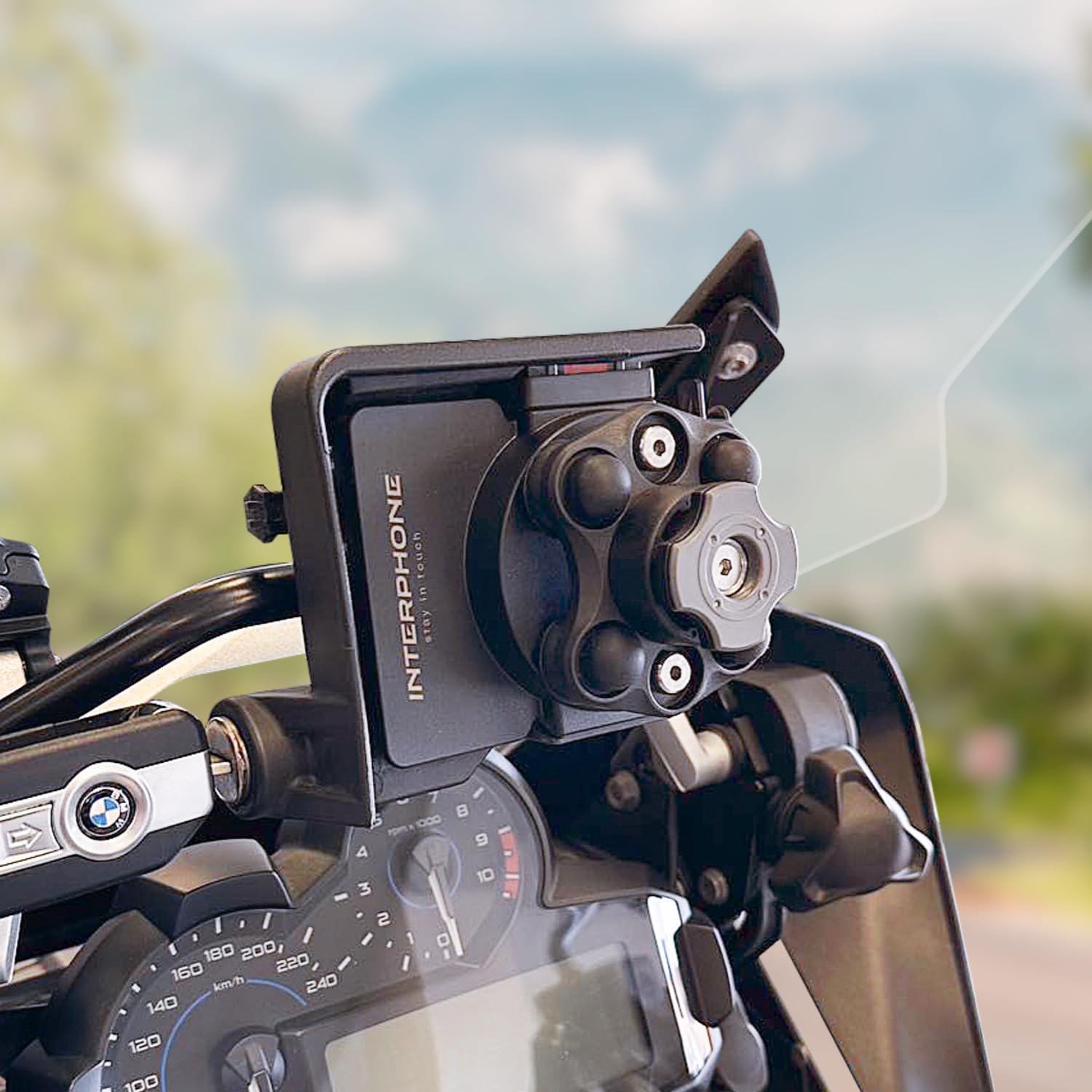
Image: The Interphone QUIKLOX Support securely installed on a BMW motorcycle's pre-existing navigator mount.
1.2 Attaching a QUIKLOX Phone Holder
- Ensure you have a compatible QUIKLOX phone holder (sold separately).
- Align your QUIKLOX phone holder with the QUIKLOX interface on the newly installed support.
- Twist the phone holder to lock it into position. The modular system allows for easy attachment and detachment.

Image: A smartphone securely mounted on the Interphone QUIKLOX Support, ready for navigation.
2. Istruzioni per l'uso
This section details the use of the Interphone QUIKLOX Support's features.
2.1 Utilizzo delle porte di ricarica USB
- The mount features one USB Type-A port and one USB Type-C port.
- These ports are powered automatically when the mount is correctly installed on the BMW navigator mount and the motorcycle's ignition is on.
- Connect your smartphone or other USB-powered devices using appropriate cables to either the USB-A or USB-C port for charging.
- The ports are IP66 waterproof certified, meaning they are protected against dust ingress and powerful water jets. Ensure the rubber covers are properly sealed when not in use to maintain waterproofing.

Immagine: Dettaglio view of the Interphone QUIKLOX Support, highlighting the integrated USB-A and USB-C charging ports.
2.2 Regolazione dell'orientamento del dispositivo
- The QUIKLOX system allows for easy rotation of your smartphone between horizontal (landscape) and vertical (portrait) orientations.
- Simply rotate your phone holder and device to the desired orientation. The secure locking mechanism will hold it in place.
2.3 Sistema antivibrante
- The integrated anti-vibration system is designed to absorb shocks and reduce vibrations transmitted from the motorcycle engine and road conditions.
- This system helps protect your smartphone's internal components, especially its camera, from potential damage caused by prolonged exposure to vibrations.
3. Manutenzione
Proper maintenance ensures the longevity and optimal performance of your Interphone QUIKLOX Support.
- Pulizia: Pulire regolarmente il supporto con un panno morbido eamp panno per rimuovere polvere e sporco. Evitare l'uso di prodotti chimici aggressivi o detergenti abrasivi.
- Ispezione: Periodically check all connections and the locking mechanism for any signs of wear or damage. Ensure the mount remains securely attached to the BMW navigator mount.
- USB Port Covers: Always ensure the rubber covers for the USB ports are properly sealed when not in use to maintain their IP66 waterproof rating.
- Anti-Vibration Components: Inspect the anti-vibration dampeners for any signs of degradation or cracking. While designed for durability, extreme conditions can affect them over time.
4. Risoluzione Dei Problemi
If you encounter issues with your Interphone QUIKLOX Support, refer to the following common problems and solutions.
| Problema | Possibile causa | Soluzione |
|---|---|---|
| USB ports are not charging. |
|
|
| Il telefono sembra allentato o vibra eccessivamente. |
|
|
| Mount cannot be removed from BMW cradle. |
|
|
5. Specifiche del prodotto
| Caratteristica | Dettaglio |
|---|---|
| Numero di modello | SMQUIKLOXBMWCRADLE |
| Marca | Citofono |
| Compatibilità | BMW Navigator Mounts, All QUIKLOX Phone Holders, Smartphones |
| Porte USB | 1x USB tipo A, 1x USB tipo C |
| Grado di impermeabilità | IP66 (Protected against dust and powerful water jets) |
| Caratteristiche speciali | Integrated Anti-Vibration System, Adjustable, Lightweight, Rotatable, Theft Protection (via motorcycle key) |
| Colore | Nero |
| Peso dell'articolo | 6.7 once (circa 190 grammi) |
| Dimensioni del pacco | 9.02 x 4.84 x 2.52 pollici |
| Contenuto | 1x Interphone QUIKLOX Support (phone holder not included) |
| Produttore | Cellular Line S.p.A |
6. Informazioni sulla garanzia
Specific warranty terms and conditions for the Interphone QUIKLOX Support are provided by the manufacturer, Cellularline S.p.A., or the authorized seller at the time of purchase.
Please retain your proof of purchase for warranty claims. For detailed information regarding warranty coverage, duration, and procedures, refer to the documentation included with your product or contact the seller directly.
7. Assistenza clienti
If you require further assistance, have questions not covered in this manual, or need to report an issue, please contact:
- Il tuo venditore: For purchase-related inquiries, returns, or initial troubleshooting.
- Interphone / Cellularline S.p.A.: Visit the official Interphone website or Cellularline S.p.A. websito per supporto prodotti, FAQ e informazioni di contatto.
When contacting support, please have your product model number (SMQUIKLOXBMWCRADLE) and proof of purchase readily available.